No audio in any browsers in Win7

lindar37

New member
Local time
10:03 AM
Messages
13
About a week ago, I lost audio in my browsers. Everything was fine then bam. I can play VLC, Cd,DVDs and don't have a problem, but I cannot hear anything online. I am not sure what happened. I did a lot of trouble shooting. I tried to update drivers, but it's going for the Windows one. I did malware and Virus scans, software updates, drivers, codecs and even a system restore, but the problem is still here. I am not sure what you need in order to try to help me. I have a Dell Inspiron Duel Core, run Win7 Home Premium, 64-bit. I've googled and looked here and still am not able to get it working. I did notice that it stopped after running iTunes. I uninstalled iTunes, but that didn't help either. Can anyone help me please?

thanks,
Linda
 

My Computer My Computer

At a glance

Windows 7 Home Premium, 64-bitPentium Duel Core4gb
Computer Manufacturer/Model Number
Dell Inspiron 560
OS
Windows 7 Home Premium, 64-bit
CPU
Pentium Duel Core
Memory
4gb
Hard Drives
500gb hd master
1.5tb slave
Hi Linda, welcome to the Seven Forums.

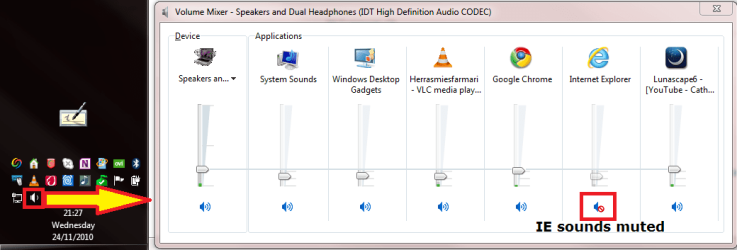
Have you checked the volume mixer's individual volume controls to each browser? Right click the loudspeaker icon on notification area and choose Open Volume Mixer to see the settings:

VolumeMixer.png

(I'm having taskbar vertical on the left, don't let it confuse you ;) )

Remember, an application or browser is only shown in the mixer if it's currently outputting sound or video. If you only have pages with no audio or video output open, the browser is not shown here.

Kari
 

My Computer My Computer

At a glance

Windows 10 Pro x64 EN-GB1.6 GHz Intel Core i7-720QM Processor6 GBATI Mobility Radeon HD 5850 Graphics
Computer type
Laptop
Computer Manufacturer/Model Number
HP ENVY 17-1150eg
OS
Windows 10 Pro x64 EN-GB
CPU
1.6 GHz Intel Core i7-720QM Processor
Memory
6 GB
Graphics Card(s)
ATI Mobility Radeon HD 5850 Graphics
Sound Card
Beats sound system with integrated subwoofer
Monitor(s) Displays
17" laptop display, 22" LED and 32" Full HD TV through HDMI
Screen Resolution
1600*900 (1), 1920*1080 (2&3)
Hard Drives
Internal: 2 x 500 GB SATA Hard Disk Drive 7200 rpm
External: 2TB for backups, 3TB USB3 network drive for media
Cooling
As Envy runs a bit warm, I have it on a Cooler Master pad
Keyboard
Logitech diNovo Media Desktop Laser (bluetooth)
Mouse
Logitech Performance Mouse MX
Internet Speed
50/10 Mbps VDSL
Antivirus
Windows Defender 4.3.9431.0
Browser
Maxthon 3.5.2., IE11
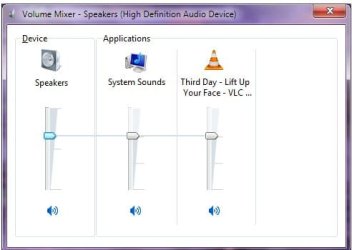
I have nothing muted. I'm attaching a SS of the mixer. I know it's not that easy...lol. I have Firefox and IE open when taking this SS.

Thanks for trying,
Linda
 

Attachments

  • Sound mixer.jpg
    Sound mixer.jpg
    17 KB · Views: 11

My Computer My Computer

At a glance

Windows 7 Home Premium, 64-bitPentium Duel Core4gb
Computer Manufacturer/Model Number
Dell Inspiron 560
OS
Windows 7 Home Premium, 64-bit
CPU
Pentium Duel Core
Memory
4gb
Hard Drives
500gb hd master
1.5tb slave
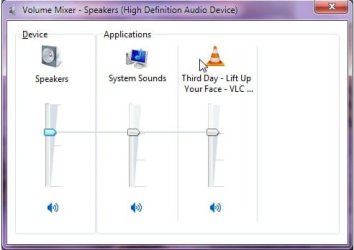
Could you please open some sites with audio on both FF and IE, for instance a Youtube video, and then take a new screenshot?
 

My Computer My Computer

At a glance

Windows 10 Pro x64 EN-GB1.6 GHz Intel Core i7-720QM Processor6 GBATI Mobility Radeon HD 5850 Graphics
Computer type
Laptop
Computer Manufacturer/Model Number
HP ENVY 17-1150eg
OS
Windows 10 Pro x64 EN-GB
CPU
1.6 GHz Intel Core i7-720QM Processor
Memory
6 GB
Graphics Card(s)
ATI Mobility Radeon HD 5850 Graphics
Sound Card
Beats sound system with integrated subwoofer
Monitor(s) Displays
17" laptop display, 22" LED and 32" Full HD TV through HDMI
Screen Resolution
1600*900 (1), 1920*1080 (2&3)
Hard Drives
Internal: 2 x 500 GB SATA Hard Disk Drive 7200 rpm
External: 2TB for backups, 3TB USB3 network drive for media
Cooling
As Envy runs a bit warm, I have it on a Cooler Master pad
Keyboard
Logitech diNovo Media Desktop Laser (bluetooth)
Mouse
Logitech Performance Mouse MX
Internet Speed
50/10 Mbps VDSL
Antivirus
Windows Defender 4.3.9431.0
Browser
Maxthon 3.5.2., IE11
Here ya go. I have Firefox playing a youtube video and IE on Phonezoo playing a ringtone. SS while both are playing. No sound at all.
 

Attachments

  • Sound mxr2.jpg
    Sound mxr2.jpg
    17.6 KB · Views: 11

My Computer My Computer

At a glance

Windows 7 Home Premium, 64-bitPentium Duel Core4gb
Computer Manufacturer/Model Number
Dell Inspiron 560
OS
Windows 7 Home Premium, 64-bit
CPU
Pentium Duel Core
Memory
4gb
Hard Drives
500gb hd master
1.5tb slave
Very strange. I'll ask some other geeks to join us, I'm clueless :rolleyes:
 

My Computer My Computer

At a glance

Windows 10 Pro x64 EN-GB1.6 GHz Intel Core i7-720QM Processor6 GBATI Mobility Radeon HD 5850 Graphics
Computer type
Laptop
Computer Manufacturer/Model Number
HP ENVY 17-1150eg
OS
Windows 10 Pro x64 EN-GB
CPU
1.6 GHz Intel Core i7-720QM Processor
Memory
6 GB
Graphics Card(s)
ATI Mobility Radeon HD 5850 Graphics
Sound Card
Beats sound system with integrated subwoofer
Monitor(s) Displays
17" laptop display, 22" LED and 32" Full HD TV through HDMI
Screen Resolution
1600*900 (1), 1920*1080 (2&3)
Hard Drives
Internal: 2 x 500 GB SATA Hard Disk Drive 7200 rpm
External: 2TB for backups, 3TB USB3 network drive for media
Cooling
As Envy runs a bit warm, I have it on a Cooler Master pad
Keyboard
Logitech diNovo Media Desktop Laser (bluetooth)
Mouse
Logitech Performance Mouse MX
Internet Speed
50/10 Mbps VDSL
Antivirus
Windows Defender 4.3.9431.0
Browser
Maxthon 3.5.2., IE11
I would try a System Restore first. It may not work but you won't lose anything but a little time trying.

Try to remember when it quit working. If say last Wednesday. Then pick a restore point from last Tuesday.
Tutorial for Sys Restore if you need it.
http://www.sevenforums.com/tutorials/700-system-restore.html

Let us know if it works and we will go from there.

Mike
 

My Computer My Computer

At a glance

Windows7 Pro 64bit SP-1; Windows XP Pro 32bitIntel Core i7-870 Lynnfield 2.93GHz LGA 1156 ...8GB@1400MHz Crucial Ballistix DDR3-1600 4x2GBASUS ENGTX460 DirectCU/2DI/1GD5 1GB 256-bit G...
Computer Manufacturer/Model Number
Hopalong/ Godzilla
OS
Windows7 Pro 64bit SP-1; Windows XP Pro 32bit
CPU
Intel Core i7-870 Lynnfield 2.93GHz LGA 1156 95W Quad-Core
Motherboard
ASUS P7P55D-E PRO
Memory
8GB@1400MHz Crucial Ballistix DDR3-1600 4x2GB
Graphics Card(s)
ASUS ENGTX460 DirectCU/2DI/1GD5 1GB 256-bit GDDR5
Sound Card
VIA Onboard
Monitor(s) Displays
Asus VS248H-P 24"; Samsung SyncMaster 941BW 19"ws
Screen Resolution
1920x1080; 1440x900
Hard Drives
Samsung 830 120GB SSD
Intel 320 120GB SSD
Western Digital Caviar Black WD7501AALS 750GB 7200 RPM SATA 3.0Gb/s
Western Digital Caviar Black WD6401AALS 640GB 7200 RPM SATA 3.0Gb/s
PSU
COOLER MASTER Silent Pro RS850-AMBAJ3-US 850W Modular
Case
COOLER MASTER HAF 932 RC-932-KKN5-GP Black
Cooling
Scythe "Mugen-2 Rev.B" (2 ScytheKaze-Jyuni PWM fans)
Keyboard
Logitech K-320
Mouse
Kensington
Antivirus
Avast Inernet Suite
Browser
IE 9 ; Chrome
Mike:

I did a system restore this am. The last time I am sure it worked was on 11/17, but that latest date I could restore to was on 11/19, so I did that date this am. I often create a system restore point daily, so I'm not sure why it doesn't go back farther.

I really have done everything I know to do or can find to do. This is just bizarre but is also very frustrating!

Thanks for your help!
Linda
 

My Computer My Computer

At a glance

Windows 7 Home Premium, 64-bitPentium Duel Core4gb
Computer Manufacturer/Model Number
Dell Inspiron 560
OS
Windows 7 Home Premium, 64-bit
CPU
Pentium Duel Core
Memory
4gb
Hard Drives
500gb hd master
1.5tb slave

Stolen from Brink's tutorial.
7. Select (click on) a listed restore point that you want to restore Windows 7 back to. (See screenshot below)
NOTE: Check the Show other restore points box to see any restore points (older) that may not be listed here
Put a check mark in the box in lower left corner if you didn't this morning. It will show a lot more dates and times.

http://www.sevenforums.com/tutorials/700-system-restore.html
 

My Computer My Computer

At a glance

Windows7 Pro 64bit SP-1; Windows XP Pro 32bitIntel Core i7-870 Lynnfield 2.93GHz LGA 1156 ...8GB@1400MHz Crucial Ballistix DDR3-1600 4x2GBASUS ENGTX460 DirectCU/2DI/1GD5 1GB 256-bit G...
Computer Manufacturer/Model Number
Hopalong/ Godzilla
OS
Windows7 Pro 64bit SP-1; Windows XP Pro 32bit
CPU
Intel Core i7-870 Lynnfield 2.93GHz LGA 1156 95W Quad-Core
Motherboard
ASUS P7P55D-E PRO
Memory
8GB@1400MHz Crucial Ballistix DDR3-1600 4x2GB
Graphics Card(s)
ASUS ENGTX460 DirectCU/2DI/1GD5 1GB 256-bit GDDR5
Sound Card
VIA Onboard
Monitor(s) Displays
Asus VS248H-P 24"; Samsung SyncMaster 941BW 19"ws
Screen Resolution
1920x1080; 1440x900
Hard Drives
Samsung 830 120GB SSD
Intel 320 120GB SSD
Western Digital Caviar Black WD7501AALS 750GB 7200 RPM SATA 3.0Gb/s
Western Digital Caviar Black WD6401AALS 640GB 7200 RPM SATA 3.0Gb/s
PSU
COOLER MASTER Silent Pro RS850-AMBAJ3-US 850W Modular
Case
COOLER MASTER HAF 932 RC-932-KKN5-GP Black
Cooling
Scythe "Mugen-2 Rev.B" (2 ScytheKaze-Jyuni PWM fans)
Keyboard
Logitech K-320
Mouse
Kensington
Antivirus
Avast Inernet Suite
Browser
IE 9 ; Chrome
Yes, I did that too. It still only went to 11/19. I can't do it now, because the only dates listed now are 11/23 & today, and I obviously had this problem then.
 

My Computer My Computer

At a glance

Windows 7 Home Premium, 64-bitPentium Duel Core4gb
Computer Manufacturer/Model Number
Dell Inspiron 560
OS
Windows 7 Home Premium, 64-bit
CPU
Pentium Duel Core
Memory
4gb
Hard Drives
500gb hd master
1.5tb slave
Uhg. iTunes. The attack of the blue meanies.

Most likely, hopefully, iTunes has commandeered all of your file associations. You can manually go through the list of associations and change them back to the desired programs, but it involves a lot of guesswork.

Hopefully a system restore to before iTunes was installed will work. In the future, when installing iTunes, RealPlayer, Quicktime, or any other "multimedia" application say NO to any window or checkbox that asks to change associations.

If you are not fortunate, you may need to go deeper. Take a look at these links, if you have not seen them already, and see if anything mentioned there will work for you:

No sound from web browser [Solved]
No Sound on internet [Solved]

The only caveat being that these are solutions for Vista. They should still apply to W7, but YMMV.
 

My Computer My Computer

At a glance

Windows 7 64 Bit Home Premium SP1i7-3820GSkill F3-14900CL9Q - 16GBEVGA GeForce GTX660 - Driver 352.86
Computer type
PC/Desktop
Computer Manufacturer/Model Number
Home Built - Jan 2013
OS
Windows 7 64 Bit Home Premium SP1
CPU
i7-3820
Motherboard
Asus P9X79-PRO - Bios 4608
Memory
GSkill F3-14900CL9Q - 16GB
Graphics Card(s)
EVGA GeForce GTX660 - Driver 352.86
Sound Card
On board Realtek ALC898
Monitor(s) Displays
Acer S271HL
Screen Resolution
1920 x 1080
Hard Drives
#1- Samsung 840 Pro Series
#2- Western Digital WD1002FAEX Sata3 Black
#3- Western Digital WD1002FAEX Sata3 Black
PSU
Corsair CMPSU-850TX-V2 - 850 watt (by Seasonic)
Case
Corsair Obsidian 550D
Cooling
Standard 3 120mm case fans, Cooler Master Hyper 212 EVO
Keyboard
MS KC-0405
Mouse
Intellimouse 5-button
Internet Speed
56 Mbits/Sec (on a good day)
Antivirus
Avast & Malwarebytes
Browser
Firefox
Other Info
Asus DVD - DRW-24B1ST 24X
Okay. People miss that a lot of times. I wanted to be sure.


TVeblen

No restore points old enough.
 

My Computer My Computer

At a glance

Windows7 Pro 64bit SP-1; Windows XP Pro 32bitIntel Core i7-870 Lynnfield 2.93GHz LGA 1156 ...8GB@1400MHz Crucial Ballistix DDR3-1600 4x2GBASUS ENGTX460 DirectCU/2DI/1GD5 1GB 256-bit G...
Computer Manufacturer/Model Number
Hopalong/ Godzilla
OS
Windows7 Pro 64bit SP-1; Windows XP Pro 32bit
CPU
Intel Core i7-870 Lynnfield 2.93GHz LGA 1156 95W Quad-Core
Motherboard
ASUS P7P55D-E PRO
Memory
8GB@1400MHz Crucial Ballistix DDR3-1600 4x2GB
Graphics Card(s)
ASUS ENGTX460 DirectCU/2DI/1GD5 1GB 256-bit GDDR5
Sound Card
VIA Onboard
Monitor(s) Displays
Asus VS248H-P 24"; Samsung SyncMaster 941BW 19"ws
Screen Resolution
1920x1080; 1440x900
Hard Drives
Samsung 830 120GB SSD
Intel 320 120GB SSD
Western Digital Caviar Black WD7501AALS 750GB 7200 RPM SATA 3.0Gb/s
Western Digital Caviar Black WD6401AALS 640GB 7200 RPM SATA 3.0Gb/s
PSU
COOLER MASTER Silent Pro RS850-AMBAJ3-US 850W Modular
Case
COOLER MASTER HAF 932 RC-932-KKN5-GP Black
Cooling
Scythe "Mugen-2 Rev.B" (2 ScytheKaze-Jyuni PWM fans)
Keyboard
Logitech K-320
Mouse
Kensington
Antivirus
Avast Inernet Suite
Browser
IE 9 ; Chrome
Uhg. iTunes. The attack of the blue meanies.

Most likely, hopefully, iTunes has commandeered all of your file associations. You can manually go through the list of associations and change them back to the desired programs, but it involves a lot of guesswork.

Hopefully a system restore to before iTunes was installed will work. In the future, when installing iTunes, RealPlayer, Quicktime, or any other "multimedia" application say NO to any window or checkbox that asks to change associations.

If you are not fortunate, you may need to go deeper. Take a look at these links, if you have not seen them already, and see if anything mentioned there will work for you:

No Sound on internet [Solved]

The only caveat being that these are solutions for Vista. They should still apply to W7, but YMMV.

This link is the one I want to try, however it says to paste it to notepad, save it as missing.reg and import. The problem is that a notepad doc is a txt fiile. Does anyone know how I can save it as a .reg file, so I can import it? No Sound on internet [Solved]
 

My Computer My Computer

At a glance

Windows 7 Home Premium, 64-bitPentium Duel Core4gb
Computer Manufacturer/Model Number
Dell Inspiron 560
OS
Windows 7 Home Premium, 64-bit
CPU
Pentium Duel Core
Memory
4gb
Hard Drives
500gb hd master
1.5tb slave
I'll find someone who does.

Hang in there for a couple.
Mike
 

My Computer My Computer

At a glance

Windows7 Pro 64bit SP-1; Windows XP Pro 32bitIntel Core i7-870 Lynnfield 2.93GHz LGA 1156 ...8GB@1400MHz Crucial Ballistix DDR3-1600 4x2GBASUS ENGTX460 DirectCU/2DI/1GD5 1GB 256-bit G...
Computer Manufacturer/Model Number
Hopalong/ Godzilla
OS
Windows7 Pro 64bit SP-1; Windows XP Pro 32bit
CPU
Intel Core i7-870 Lynnfield 2.93GHz LGA 1156 95W Quad-Core
Motherboard
ASUS P7P55D-E PRO
Memory
8GB@1400MHz Crucial Ballistix DDR3-1600 4x2GB
Graphics Card(s)
ASUS ENGTX460 DirectCU/2DI/1GD5 1GB 256-bit GDDR5
Sound Card
VIA Onboard
Monitor(s) Displays
Asus VS248H-P 24"; Samsung SyncMaster 941BW 19"ws
Screen Resolution
1920x1080; 1440x900
Hard Drives
Samsung 830 120GB SSD
Intel 320 120GB SSD
Western Digital Caviar Black WD7501AALS 750GB 7200 RPM SATA 3.0Gb/s
Western Digital Caviar Black WD6401AALS 640GB 7200 RPM SATA 3.0Gb/s
PSU
COOLER MASTER Silent Pro RS850-AMBAJ3-US 850W Modular
Case
COOLER MASTER HAF 932 RC-932-KKN5-GP Black
Cooling
Scythe "Mugen-2 Rev.B" (2 ScytheKaze-Jyuni PWM fans)
Keyboard
Logitech K-320
Mouse
Kensington
Antivirus
Avast Inernet Suite
Browser
IE 9 ; Chrome
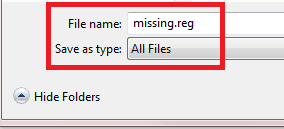
In Notepad's Save As dialog, choose Save As Type All Files. This way the txt-extension is left out and you can decide which extension to use.

Notepad_All_Files.png
 

My Computer My Computer

At a glance

Windows 10 Pro x64 EN-GB1.6 GHz Intel Core i7-720QM Processor6 GBATI Mobility Radeon HD 5850 Graphics
Computer type
Laptop
Computer Manufacturer/Model Number
HP ENVY 17-1150eg
OS
Windows 10 Pro x64 EN-GB
CPU
1.6 GHz Intel Core i7-720QM Processor
Memory
6 GB
Graphics Card(s)
ATI Mobility Radeon HD 5850 Graphics
Sound Card
Beats sound system with integrated subwoofer
Monitor(s) Displays
17" laptop display, 22" LED and 32" Full HD TV through HDMI
Screen Resolution
1600*900 (1), 1920*1080 (2&3)
Hard Drives
Internal: 2 x 500 GB SATA Hard Disk Drive 7200 rpm
External: 2TB for backups, 3TB USB3 network drive for media
Cooling
As Envy runs a bit warm, I have it on a Cooler Master pad
Keyboard
Logitech diNovo Media Desktop Laser (bluetooth)
Mouse
Logitech Performance Mouse MX
Internet Speed
50/10 Mbps VDSL
Antivirus
Windows Defender 4.3.9431.0
Browser
Maxthon 3.5.2., IE11
Tried it and it didn't work... grrr. I am not sure what to do now. That made perfect sense. I had trouble doing it, so a tech friend of mine used TeamViewer and did it. He ended up copying and pasting it into win/system32. Guess I'll keep looking....
 

My Computer My Computer

At a glance

Windows 7 Home Premium, 64-bitPentium Duel Core4gb
Computer Manufacturer/Model Number
Dell Inspiron 560
OS
Windows 7 Home Premium, 64-bit
CPU
Pentium Duel Core
Memory
4gb
Hard Drives
500gb hd master
1.5tb slave
Tried it and it didn't work... grrr. I am not sure what to do now. That made perfect sense. I had trouble doing it, so a tech friend of mine used TeamViewer and did it. He ended up copying and pasting it into win/system32. Guess I'll keep looking....

Hello,

I have saved it in a .reg file. Please try it and report back. It should work though.
 

Attachments

My Computer My Computer

At a glance

Win7 Home Premium x64Phenom II x4 955 3.2GHz
Computer Manufacturer/Model Number
Home built
OS
Win7 Home Premium x64
CPU
Phenom II x4 955 3.2GHz
Motherboard
Gigabyte
Good news bad news. The file worked perfectly and was applied, however, the problem still exists. I checked the mixer and still no browsers show, only the speaker (device) and the system sounds (application). This is very frustrating! Thanks so much for the file though, I'm glad to see it could work.
 

My Computer My Computer

At a glance

Windows 7 Home Premium, 64-bitPentium Duel Core4gb
Computer Manufacturer/Model Number
Dell Inspiron 560
OS
Windows 7 Home Premium, 64-bit
CPU
Pentium Duel Core
Memory
4gb
Hard Drives
500gb hd master
1.5tb slave

Attachments

  • Fixit audio 1.jpg
    Fixit audio 1.jpg
    51 KB · Views: 52
  • Fixit #2 audio.jpg
    Fixit #2 audio.jpg
    51.6 KB · Views: 49

My Computer My Computer

At a glance

Windows 7 Home Premium, 64-bitPentium Duel Core4gb
Computer Manufacturer/Model Number
Dell Inspiron 560
OS
Windows 7 Home Premium, 64-bit
CPU
Pentium Duel Core
Memory
4gb
Hard Drives
500gb hd master
1.5tb slave
Ok, I've been doing some research on my own. I'm not very savvy but here goes:

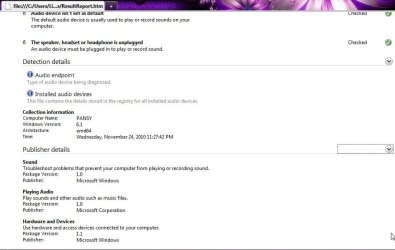
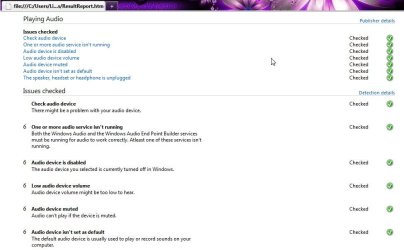
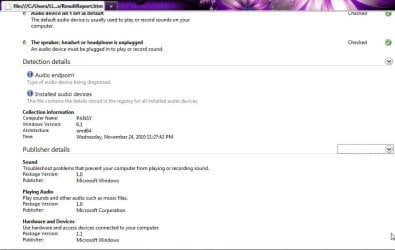
1) I went to MS Fixit and ran the program (Microsoft Fix it Solution Center: troubleshooting software issues) and got the following error report:
See jpgs

2) I looked up the errors and found "Wiindows Audio Endpoint Builder aren't running." I edited the registry per a forum suggestion: Windows Audio Endpoint Builder error

I had a similar issue where all of a sudden my audio stopped working and the Windows Audio service wouldn't run. Couldn't find anythinig on google about how to fix it but after a few hours with a microsoft support representative he fixed it.

Try going into regedit, HKEY_LOCAL_MACHINE/SYSTEM/CurrentControlSet/Services/Audiosrv
and in the DependOnService remove all entries except RpcSs and then restart your computer
Seems a little bit like a cheat to me heheh but it fixed my sound so it's worth a shot if you can't get yours to work.. if it doesn't fix your problem just add the other 2 dependencies back in or something.. might not be a bad idea to back up your registry before you make any changes.. can't hurt

I checked to see if everything was ok and no audio device is showing as installed, but the Device Manager showed one installed, so i thought I'd see if the driver was need. According to specs, I needed the Realtek updated one, so I installed it. I now have an operating Sound Manager, BUT it's not seeing the device plugged in.

I click on the sound icon and playback and it shows no audio devices. How to I get that to show up? I have unplugged and replugged, rebooted,... you name it. I think i've come really far and so close to the finish. Does anyone know how to show me the rest please? I'm really hoping that something here makes some kind of sense.
 

Attachments

  • Fixit audio 1.jpg
    Fixit audio 1.jpg
    51 KB · Views: 11
  • Fixit #2 audio.jpg
    Fixit #2 audio.jpg
    51.6 KB · Views: 10

My Computer My Computer

At a glance

Windows 7 Home Premium, 64-bitPentium Duel Core4gb
Computer Manufacturer/Model Number
Dell Inspiron 560
OS
Windows 7 Home Premium, 64-bit
CPU
Pentium Duel Core
Memory
4gb
Hard Drives
500gb hd master
1.5tb slave
Back
Top