Solved No audio input device problems

stevedore

New member
Local time
4:13 PM
Messages
6
I recently purchased a new pc laptop, but I had a problem, I tried to set up my new headset but I got the "no audio input device found" I spent about two hours searching what the problem could be, I needed to update my driver, after I updated my driver to realtex I got the "you just plugged in a device to your audio jack" and It still isn't working. it works only for the speaker part of my headset, not the audio part, any Ideas?:(
 

My Computer

Computer type
Laptop
OS
8X64
Please fill in the "My System Specs" so we know what hardware you have. It helps us to try and help you.

Also what headset/mic are you using? If its one designed for an iPhone/iPod, it is a "trrs" type plug and that is incompatible with PC's and needs an adapter.
 

My Computer

Computer type
PC/Desktop
Computer Manufacturer/Model Number
My Own Build
OS
Windows 10 64 bit
CPU
Intel i7 6700K
Motherboard
ASUS ROG Maximus VIII Hero
Memory
16GB Corsair Dominator
Graphics Card(s)
Intel CPU Graphics
Sound Card
RealTek
Monitor(s) Displays
27" Dell S2719dgf
Screen Resolution
2560X1440
Hard Drives
1 TB Samsung 850 EVO SSD for Win 10 Pro
500GB Samsung 850 EVO SSD for Win 10 Insider
2 TB drive for backup
PSU
EVGA Supernova 750G2
Case
BeQuiet Silent Base 600
Cooling
Deepcool Captain 120EX
Keyboard
Microsoft Wireless 2000
Mouse
Microsoft wireless
Internet Speed
100 MB/sec (Cable)
Antivirus
Microsoft Defender and Malwarebytes
Browser
Edge/Firefox
Other Info
Cakewalk (Sonar) by BandLab and Studio One 4.1 Pro recording studio software. MOTU 896Mk3 Hybrid recording interface, Frontier Tranzport wireless control unit, Behringer X-Touch Control Surface.
Five USB connected optical drives for CD Audio production using Nero BurningROM
Its taking a really long time for me to put each spec in the "my specs" category so ill put my specs here (might be a lot)

specs:
------------------
System Information
------------------
Time of this report: 3/6/2014, 19:57:19
Machine name: STEVENSCOMPUTER
Operating System: Windows 8 64-bit (6.2, Build 9200) (9200.win8_gdr.130531-1504)
Language: English (Regional Setting: English)
System Manufacturer: ASUSTeK COMPUTER INC.
System Model: X551CAP
BIOS: X551CAP.203
Processor: Intel(R) Celeron(R) CPU 1007U @ 1.50GHz (2 CPUs), ~1.5GHz
Memory: 4096MB RAM
Available OS Memory: 3982MB RAM
Page File: 2812MB used, 3153MB available
Windows Dir: C:\Windows
DirectX Version: DirectX 11
DX Setup Parameters: Not found
User DPI Setting: Using System DPI
System DPI Setting: 96 DPI (100 percent)
DWM DPI Scaling: Disabled

Display Devices
---------------
Card name: Intel(R) HD Graphics
Manufacturer: Intel Corporation
Chip type: Intel(R) HD Graphics Family
DAC type: Internal
Device Type: Full Device

Sound Devices
-------------
Description: Speakers (Realtek High Definition Audio)
Default Sound Playback: Yes
Default Voice Playback: Yes
Hardware ID: HDAUDIO\FUNC_01&VEN_10EC&DEV_0270&SUBSYS_1043145D&REV_1001


----------------------------------------------
I took off most of the stuff I don't think was needed
 
Last edited:

My Computer

Computer type
Laptop
OS
8X64
and the headset is SADES SA-708 gaming headset
 

My Computer

Computer type
Laptop
OS
8X64
That headset, from what I find, has a microphone volume control. If the speaker part of the headset is working, but the mic is not that is one place to start.

Looking at that PC on the ASUS site, there are two RealTek drivers and according to the site, if you have Windows 7 you should use the older listed driver.

Another issue, since you installed the RealTek driver, I assume it originally had the generic Windows installed basic function HD Audio Codec drivers. If these were not uninstalled they can cause conflicts and devices to not work.

Several possibilities.

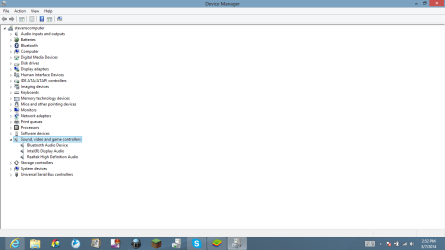
Please post Screen shot of the Device Manager, Sound Video and Game Controller section.

http://www.sevenforums.com/tutorials/9733-screenshots-files-upload-post-seven-forums.html
 

My Computer

Computer type
PC/Desktop
Computer Manufacturer/Model Number
My Own Build
OS
Windows 10 64 bit
CPU
Intel i7 6700K
Motherboard
ASUS ROG Maximus VIII Hero
Memory
16GB Corsair Dominator
Graphics Card(s)
Intel CPU Graphics
Sound Card
RealTek
Monitor(s) Displays
27" Dell S2719dgf
Screen Resolution
2560X1440
Hard Drives
1 TB Samsung 850 EVO SSD for Win 10 Pro
500GB Samsung 850 EVO SSD for Win 10 Insider
2 TB drive for backup
PSU
EVGA Supernova 750G2
Case
BeQuiet Silent Base 600
Cooling
Deepcool Captain 120EX
Keyboard
Microsoft Wireless 2000
Mouse
Microsoft wireless
Internet Speed
100 MB/sec (Cable)
Antivirus
Microsoft Defender and Malwarebytes
Browser
Edge/Firefox
Other Info
Cakewalk (Sonar) by BandLab and Studio One 4.1 Pro recording studio software. MOTU 896Mk3 Hybrid recording interface, Frontier Tranzport wireless control unit, Behringer X-Touch Control Surface.
Five USB connected optical drives for CD Audio production using Nero BurningROM
yet again I wasn't sure how to do screenshots and move it to here, so I attached the file here
 

Attachments

  • Screenshot (2).png
    Screenshot (2).png
    29.5 KB · Views: 4

My Computer

Computer type
Laptop
OS
8X64
Whatever the Bluetooth device is, it may be causing the problem? Disable that (temporarily) and see if it makes a difference.

You can disable it in the Device Manager, RIGHT click on the entry and then LEFT click Disable.
 

My Computer

Computer type
PC/Desktop
Computer Manufacturer/Model Number
My Own Build
OS
Windows 10 64 bit
CPU
Intel i7 6700K
Motherboard
ASUS ROG Maximus VIII Hero
Memory
16GB Corsair Dominator
Graphics Card(s)
Intel CPU Graphics
Sound Card
RealTek
Monitor(s) Displays
27" Dell S2719dgf
Screen Resolution
2560X1440
Hard Drives
1 TB Samsung 850 EVO SSD for Win 10 Pro
500GB Samsung 850 EVO SSD for Win 10 Insider
2 TB drive for backup
PSU
EVGA Supernova 750G2
Case
BeQuiet Silent Base 600
Cooling
Deepcool Captain 120EX
Keyboard
Microsoft Wireless 2000
Mouse
Microsoft wireless
Internet Speed
100 MB/sec (Cable)
Antivirus
Microsoft Defender and Malwarebytes
Browser
Edge/Firefox
Other Info
Cakewalk (Sonar) by BandLab and Studio One 4.1 Pro recording studio software. MOTU 896Mk3 Hybrid recording interface, Frontier Tranzport wireless control unit, Behringer X-Touch Control Surface.
Five USB connected optical drives for CD Audio production using Nero BurningROM
I still got nothing, and also, I noticed when it says "you just plugged a device into the audio jack" it only comes up when I have the headset piece plugged in before I turn on the computer
 

My Computer

Computer type
Laptop
OS
8X64
Looking back at the original post. You stated a new PC and you had to update the driver to Realtek. That suggests an initial setup problem, and in that case the PC vendor support should have been contacted. Whether it is just a "bad load" and the PC needs reinstalled or if there is a hardware problem.

On a new PC, unless the initial manufacturer install was bad, you should not have to install drivers to get something to work.

If you want, on your own, if ASUS has a procedure to reinstall the PC back to the original factory setup that may be a good step. I would suspect that is the first thing that ASUS will tell you to do (typical vendor support "fix").
 

My Computer

Computer type
PC/Desktop
Computer Manufacturer/Model Number
My Own Build
OS
Windows 10 64 bit
CPU
Intel i7 6700K
Motherboard
ASUS ROG Maximus VIII Hero
Memory
16GB Corsair Dominator
Graphics Card(s)
Intel CPU Graphics
Sound Card
RealTek
Monitor(s) Displays
27" Dell S2719dgf
Screen Resolution
2560X1440
Hard Drives
1 TB Samsung 850 EVO SSD for Win 10 Pro
500GB Samsung 850 EVO SSD for Win 10 Insider
2 TB drive for backup
PSU
EVGA Supernova 750G2
Case
BeQuiet Silent Base 600
Cooling
Deepcool Captain 120EX
Keyboard
Microsoft Wireless 2000
Mouse
Microsoft wireless
Internet Speed
100 MB/sec (Cable)
Antivirus
Microsoft Defender and Malwarebytes
Browser
Edge/Firefox
Other Info
Cakewalk (Sonar) by BandLab and Studio One 4.1 Pro recording studio software. MOTU 896Mk3 Hybrid recording interface, Frontier Tranzport wireless control unit, Behringer X-Touch Control Surface.
Five USB connected optical drives for CD Audio production using Nero BurningROM
Back
Top