
No audio on Merriam Webster site

Andy Green

New member
Local time
11:13 AM
Messages
8
Greetings all

The people at Merriam Webster dictionary create one of the websites I like. Mostly I like to go there and play the spelling game. I go to the spelling game page, click on the word "Start," and a voice pronounces a word and gives the definition. Then, I key in what I think is the correct spelling, and afterward find out if I'm right.

However, a few days ago, on and ONLY on the Merriam Webster site, the sound stopped working. Everything else with the game works fine but the audio is silent.

Also, if it means anything, there are some streaming videos on the Merriam Webster site with sound, and at first (by default) the sound is muted. There's some kind of audio / video player on the screen and the default audio value is muted. This makes the video silent at first, but when I click on the speaker icon in the onscreen player and un-mute the audio, I can hear the pronunciation of the word. The spelling game doesn't have a speaker icon because there's no video associated with it (audio only).

I'd like to get the sound on the Merriam Webster site working again. Help!
 
Last edited:

My Computer My Computer

At a glance

Windows 7 home premiumPentium250 GB
Computer type
Laptop
Computer Manufacturer/Model Number
HP
OS
Windows 7 home premium
CPU
Pentium
Memory
250 GB
Sound Card
Apowersoft_AudioDevice Conexant Pebble High Definition Smart
Monitor(s) Displays
LCD laptop screen
Screen Resolution
1366 x 768
Hard Drives
250 GB
PSU
AC and battery
Cooling
Standard fan
Keyboard
Standard laptop
Mouse
Touchpad
Internet Speed
DSL
Browser
Prefer Firefox but also have Internet Explorer
My Computer My Computer

At a glance

W7 Pro SP1 64biti78GBIntel HD Graphics
Computer type
Laptop
Computer Manufacturer/Model Number
Employer provided Dell Latitude
OS
W7 Pro SP1 64bit
CPU
i7
Memory
8GB
Graphics Card(s)
Intel HD Graphics
Hard Drives
crappy SSD
Antivirus
Employer mandated Symantec Endpoint Protection
Browser
Pale Moon 64bit, IE11 64bit & Chrome 64bit
Browser and screenshot

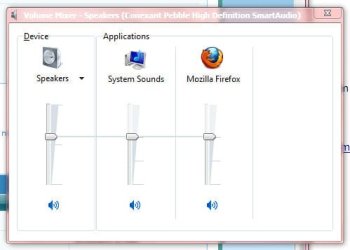
I prefer Firefox, but I've tried it with Internet Explorer and it doesn't work IE either. Screenshot attached.
 

Attachments

  • Volume mixer.jpg
    Volume mixer.jpg
    17.2 KB · Views: 5

My Computer My Computer

At a glance

Windows 7 home premiumPentium250 GB
Computer type
Laptop
Computer Manufacturer/Model Number
HP
OS
Windows 7 home premium
CPU
Pentium
Memory
250 GB
Sound Card
Apowersoft_AudioDevice Conexant Pebble High Definition Smart
Monitor(s) Displays
LCD laptop screen
Screen Resolution
1366 x 768
Hard Drives
250 GB
PSU
AC and battery
Cooling
Standard fan
Keyboard
Standard laptop
Mouse
Touchpad
Internet Speed
DSL
Browser
Prefer Firefox but also have Internet Explorer

My Computer My Computer

At a glance

W7 Pro SP1 64biti78GBIntel HD Graphics
Computer type
Laptop
Computer Manufacturer/Model Number
Employer provided Dell Latitude
OS
W7 Pro SP1 64bit
CPU
i7
Memory
8GB
Graphics Card(s)
Intel HD Graphics
Hard Drives
crappy SSD
Antivirus
Employer mandated Symantec Endpoint Protection
Browser
Pale Moon 64bit, IE11 64bit & Chrome 64bit
I've updated my specs as much as I know. Internet explorer is version 9 but I rarely use IE. I mostly use Firefox. I downloaded IE version 10 but it caused problems with Windows Live Mail so I went back to version 9.

On the browser test page, the Windows media player test worked good with IE, and worked at a low level with Firefox. With Firefox, the video was strongly pixilated and the audio and general play were jittery but it still worked a little bit.

The Merriam Webster site doesn't work with either IE or Firefox.
 

My Computer My Computer

At a glance

Windows 7 home premiumPentium250 GB
Computer type
Laptop
Computer Manufacturer/Model Number
HP
OS
Windows 7 home premium
CPU
Pentium
Memory
250 GB
Sound Card
Apowersoft_AudioDevice Conexant Pebble High Definition Smart
Monitor(s) Displays
LCD laptop screen
Screen Resolution
1366 x 768
Hard Drives
250 GB
PSU
AC and battery
Cooling
Standard fan
Keyboard
Standard laptop
Mouse
Touchpad
Internet Speed
DSL
Browser
Prefer Firefox but also have Internet Explorer
Thanks for the specs. The test website is mainly for IE. The volume I needed to hear the test website is about the same that I needed to hear the MW Spell It game... so it is not that MW changed/lowered the volume (if that is even possible). The test page plays a video and the MW page plays an audio file... so the test is not perfect.

Have you tried resetting IE?
 

My Computer My Computer

At a glance

W7 Pro SP1 64biti78GBIntel HD Graphics
Computer type
Laptop
Computer Manufacturer/Model Number
Employer provided Dell Latitude
OS
W7 Pro SP1 64bit
CPU
i7
Memory
8GB
Graphics Card(s)
Intel HD Graphics
Hard Drives
crappy SSD
Antivirus
Employer mandated Symantec Endpoint Protection
Browser
Pale Moon 64bit, IE11 64bit & Chrome 64bit
It's working with IE

Success with IE. I reset IE to the default values and that fixed the trouble with IE. However, I reset Firefox to the default values (at least I think I did), but it's still broken with Firefox. Would you help with Firefox?
 

My Computer My Computer

At a glance

Windows 7 home premiumPentium250 GB
Computer type
Laptop
Computer Manufacturer/Model Number
HP
OS
Windows 7 home premium
CPU
Pentium
Memory
250 GB
Sound Card
Apowersoft_AudioDevice Conexant Pebble High Definition Smart
Monitor(s) Displays
LCD laptop screen
Screen Resolution
1366 x 768
Hard Drives
250 GB
PSU
AC and battery
Cooling
Standard fan
Keyboard
Standard laptop
Mouse
Touchpad
Internet Speed
DSL
Browser
Prefer Firefox but also have Internet Explorer
I don't much about Firefox plug-ins, add-ons and extensions.
Maybe apply any updates to the plug-ins.
 

My Computer My Computer

At a glance

W7 Pro SP1 64biti78GBIntel HD Graphics
Computer type
Laptop
Computer Manufacturer/Model Number
Employer provided Dell Latitude
OS
W7 Pro SP1 64bit
CPU
i7
Memory
8GB
Graphics Card(s)
Intel HD Graphics
Hard Drives
crappy SSD
Antivirus
Employer mandated Symantec Endpoint Protection
Browser
Pale Moon 64bit, IE11 64bit & Chrome 64bit
Back
Top