No Audio Output Device is Installed

cruxone

New member
Member
VIP
Local time
5:02 AM
Messages
109
I used my computer two days ago in the morning to watch a video on Windows Media Player, and all was normal. Three hours later (after a flight), I turned it on and there is no audio.

-Speaker icon next to clock has a red X
-Hovering over it displays "No audio output device is installed"
-Clicking on it runs a troubleshoot, the result of which is "Audio Device is disabled...not fixed"
-It provides no additional options.
-I am unable to go back to a restore point. I tried and it failed twice, now there are no additional restore points.
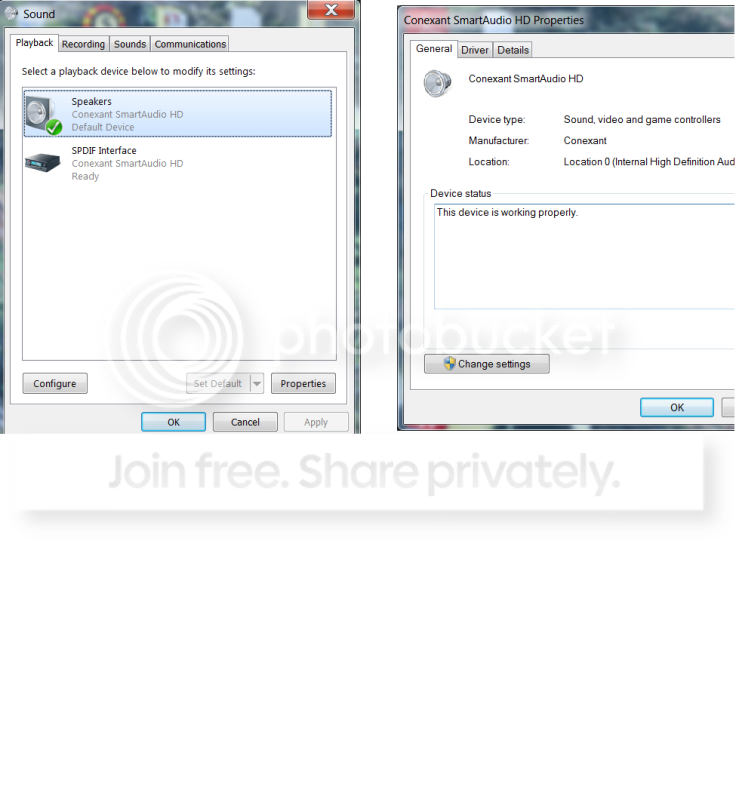
-right-clicking the X and selecting playback devices reveals this:
Speakers: Conexant Smart Audio HD; Default Device (there is a green check if that means anything)
SPDIF Interface: Conexant SmartAudio HD; Ready
-when I right-click on these, the "configure" and "test" don't do anything
-I already right-clicked the blank area below these two and checked "show disabled devices" and "show disconnected devices" (neither affect this list)
-I am not finding any definitive fixes for this problem online
-I have tried going into "Services" and restarting my "windows audio" and "windows audio endpoint builder" services

Specs: Toshiba Qosmio X505, Windows 7 Home Premium, 64 bit

Please help. I am stuck in Thailand and would really like to skype my friends and family :)

edit: it looks like my streaming video is really choppy as well (youtube, etc), but AVI files play smoothly (the video only, obv no audio)
 
Last edited:

My Computer

Computer Manufacturer/Model Number
Toshiba Qosmio X505
OS
Windows 7 Home Premium 64 bit
CPU
Intel Core i7 Q 740 @ 1.73 GHz
Sound Card
Conexant SmartAudio HD
The green check should mean that the device is still working correctly.
By this I mean that the driver for the device is functioning as expected.

Therefore, it must be a setting within the audio software for your machine,
in this case being the Conexant Smart Audio, which also says that it is ready.

Check the driver for the device anyway by right clicking the speaker properties
button in the sound window and under the general tab->controller information click properties again. Then click on the levels tab in the speaker properties box and check that the audio output level is 100 and there is no red mark near the small blue speaker as there is with microphone and line in as shown in the image I have provided.

Last of all click on the advanced tab in speaker properties and if yours is similar to this image then uncheck the boxes under exclusive mode and then click on restore defaults. I have a very similar model to your machine and by clicking this button it will restore the sample rate and bit depth to be used when running in shared mode. Mine says 24bit 48000Hz (studio quality).

Sometimes these changes can occur due to the use of a particular program or programs being used at the same time or in conjunction with each other. Maybe
it has just happened by accident (went to sleep on plane and head hit keyboard!!!)

Hope this helps- let us know how you go

Cheers :)
Edit: Make sure in speakers properties box that under the general tab the device usage
is set at "Use this Device (enable)"

View attachment 185937 View attachment 185939
 
Last edited:

My Computer

OS
Windows 7 Home Premium 64 Bit OS
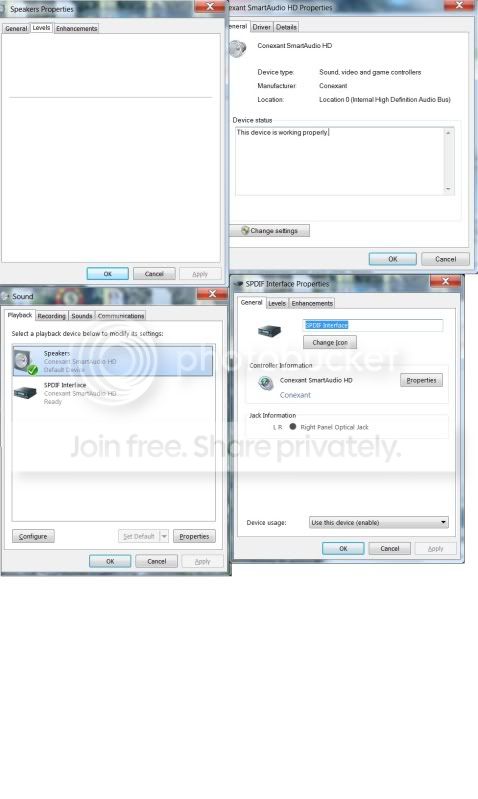
I will try to attach what my boxes look like that correspond with the ones you attached.

SoundPics.jpg

As you can see, I don't have an advanced tab, and my levels tab leads to a blank box (one horizontal gray line). I am ready to explode! Do you have any further advice?
 

My Computer

Computer Manufacturer/Model Number
Toshiba Qosmio X505
OS
Windows 7 Home Premium 64 bit
CPU
Intel Core i7 Q 740 @ 1.73 GHz
Sound Card
Conexant SmartAudio HD
Were you using headphones on the flight?
If so, have you tried plugging the pair of headphones back in to see if you get a jack detection prompt?
Sometimes plugging a device in the headphone jack or output jack (desktop) re-enables audio.
 

My Computer

Computer type
PC/Desktop
Computer Manufacturer/Model Number
Custom Build
OS
Windows 7 Home Premium 64 bit
CPU
Intel Core i7-4790
Motherboard
GA-Z87X-D3H
Memory
G.SKILL 8GB (2 x 4GB) DDR3 F3-10666CL9D-8GBNT
Graphics Card(s)
AMD Radeon R7 250
Sound Card
Realtek ALC892
Monitor(s) Displays
Samsung UN32EH5000, Dell 1703FPT
Screen Resolution
1920 x 1080, 1280 x 1024
Hard Drives
WD5003AZEX
WD10EZEX
Samsung HD103SJ
Samsung 128 GB 840 PRO
PSU
SeaSonic M12II SS-500GM
Case
Fractal Design Define R4
Cooling
Zalman CNPS9900ALED
Keyboard
Logitech K800
Mouse
Logitech M705
Internet Speed
16 Mbps
Antivirus
Avast
Browser
Firefox
Other Info
Bose Companion 2 Multimedia Speakers
I was using headphones when last it worked. Nothing happens when I plugt them in now, though I am fairly certain no prompt occurred whenever i used them in the past.
 

My Computer

Computer Manufacturer/Model Number
Toshiba Qosmio X505
OS
Windows 7 Home Premium 64 bit
CPU
Intel Core i7 Q 740 @ 1.73 GHz
Sound Card
Conexant SmartAudio HD
I would go to the Toshiba site, download and re-install your audio drivers.
 

My Computer

Computer type
PC/Desktop
Computer Manufacturer/Model Number
Custom Build
OS
Windows 7 Home Premium 64 bit
CPU
Intel Core i7-4790
Motherboard
GA-Z87X-D3H
Memory
G.SKILL 8GB (2 x 4GB) DDR3 F3-10666CL9D-8GBNT
Graphics Card(s)
AMD Radeon R7 250
Sound Card
Realtek ALC892
Monitor(s) Displays
Samsung UN32EH5000, Dell 1703FPT
Screen Resolution
1920 x 1080, 1280 x 1024
Hard Drives
WD5003AZEX
WD10EZEX
Samsung HD103SJ
Samsung 128 GB 840 PRO
PSU
SeaSonic M12II SS-500GM
Case
Fractal Design Define R4
Cooling
Zalman CNPS9900ALED
Keyboard
Logitech K800
Mouse
Logitech M705
Internet Speed
16 Mbps
Antivirus
Avast
Browser
Firefox
Other Info
Bose Companion 2 Multimedia Speakers
I would go to the Toshiba site, download and re-install your audio drivers.

Would you mind elaborating on this process a bit? I don't want to mess anything up.
 

My Computer

Computer Manufacturer/Model Number
Toshiba Qosmio X505
OS
Windows 7 Home Premium 64 bit
CPU
Intel Core i7 Q 740 @ 1.73 GHz
Sound Card
Conexant SmartAudio HD
Ok, uninstalled and reinstalled and it did not work
 

My Computer

Computer Manufacturer/Model Number
Toshiba Qosmio X505
OS
Windows 7 Home Premium 64 bit
CPU
Intel Core i7 Q 740 @ 1.73 GHz
Sound Card
Conexant SmartAudio HD
The headphones are actually now on the list of playback devices, but I cannot get any sound to come from them.
 

My Computer

Computer Manufacturer/Model Number
Toshiba Qosmio X505
OS
Windows 7 Home Premium 64 bit
CPU
Intel Core i7 Q 740 @ 1.73 GHz
Sound Card
Conexant SmartAudio HD
One thing I didnt mention earlier is that, when hitting my volume control buttons next to the keyboard, the standard beeps occur as would if I were adjusting the volume, though they stay at the same volume.
 

My Computer

Computer Manufacturer/Model Number
Toshiba Qosmio X505
OS
Windows 7 Home Premium 64 bit
CPU
Intel Core i7 Q 740 @ 1.73 GHz
Sound Card
Conexant SmartAudio HD
so when you click (volume+) 10 times it beep at the same volume each time, and (volume-) has the same behavior?
 

My Computer

Computer Manufacturer/Model Number
Custom self build - Desktop
OS
MS Windows 7 Home Premium SP1 64-bit (Family Pack Lic.) Upgrade
CPU
AMD Phenom II X6: Black Ed 1090T - AM3 / 3.2GHz / 8MB
Motherboard
Biostar TA790XE3
Memory
2 dual ch sets OCZ DDR3 PC3-10666 Platinum 1333MHz 8GB total
Graphics Card(s)
Onboard
Sound Card
Onboard 5.1 channel HD
Monitor(s) Displays
SyncMaster "Legal-sized" LCD (rotatable)
Screen Resolution
unknown (8.5"x15")? pixels are not known
Hard Drives
HDD1: WD RE3 Enterprize [p/n: WD500ABYS-NDW]
________SATA-II (3Gb/s) 500GB/7200rpm/16MB

HDD2: Deskstar 7K1000.C [p/n: HDS721010CLA332]
________SATA-II (3Gb/s) 1TB/7200rpm/32MB
PSU
Antec 900W mATX 20+4 w/6-8SATA;2MLX;4x6(+2)PCIe[p/n HCG-900]
Case
Mid 10-bay tower - free space design interior & well vented
Cooling
CPU HS cooler, 14.5" Case-sysfan1, dual sysfan2, exhaust
Keyboard
Blue Star Ergonomic - ps/2
Mouse
LED coorded w/v. roller wheel - ps/2
Internet Speed
GbLAN 10/100/1000 & WLAN - on T1 (Peer Network)
Other Info
Harmon-Karden speakers (L,R @ sub)

APC (Lead/Acid Batt backup UPC+Surge protector+etc)

Sony DVD SATA(300) - RW DVD/CD SATA-II(300)

My Computer

Computer Manufacturer/Model Number
Toshiba Qosmio X505
OS
Windows 7 Home Premium 64 bit
CPU
Intel Core i7 Q 740 @ 1.73 GHz
Sound Card
Conexant SmartAudio HD
it's supposed to beep at the current volume so you can stop when it's at a favorable level, but your system sounds like it is not doing this at all. Instead the beep is probably being produced as an indication of an error occurring. The error has to do with your sound devices/drivers not working correctly either because of something wrong with the driver files, a conflict with something, or your sound not being setup correctly.


Edit: Give me a few minutes to review the thred...
 

My Computer

Computer Manufacturer/Model Number
Custom self build - Desktop
OS
MS Windows 7 Home Premium SP1 64-bit (Family Pack Lic.) Upgrade
CPU
AMD Phenom II X6: Black Ed 1090T - AM3 / 3.2GHz / 8MB
Motherboard
Biostar TA790XE3
Memory
2 dual ch sets OCZ DDR3 PC3-10666 Platinum 1333MHz 8GB total
Graphics Card(s)
Onboard
Sound Card
Onboard 5.1 channel HD
Monitor(s) Displays
SyncMaster "Legal-sized" LCD (rotatable)
Screen Resolution
unknown (8.5"x15")? pixels are not known
Hard Drives
HDD1: WD RE3 Enterprize [p/n: WD500ABYS-NDW]
________SATA-II (3Gb/s) 500GB/7200rpm/16MB

HDD2: Deskstar 7K1000.C [p/n: HDS721010CLA332]
________SATA-II (3Gb/s) 1TB/7200rpm/32MB
PSU
Antec 900W mATX 20+4 w/6-8SATA;2MLX;4x6(+2)PCIe[p/n HCG-900]
Case
Mid 10-bay tower - free space design interior & well vented
Cooling
CPU HS cooler, 14.5" Case-sysfan1, dual sysfan2, exhaust
Keyboard
Blue Star Ergonomic - ps/2
Mouse
LED coorded w/v. roller wheel - ps/2
Internet Speed
GbLAN 10/100/1000 & WLAN - on T1 (Peer Network)
Other Info
Harmon-Karden speakers (L,R @ sub)

APC (Lead/Acid Batt backup UPC+Surge protector+etc)

Sony DVD SATA(300) - RW DVD/CD SATA-II(300)
can you please repost a similar screen capture as you did before and provide the current state of the audio jacks (what's plugged in if anything at the time - headphones, nothing, etc)

It looks like your original drivers were problematic as there were no volume scrollbars.


Mike
 

My Computer

Computer Manufacturer/Model Number
Custom self build - Desktop
OS
MS Windows 7 Home Premium SP1 64-bit (Family Pack Lic.) Upgrade
CPU
AMD Phenom II X6: Black Ed 1090T - AM3 / 3.2GHz / 8MB
Motherboard
Biostar TA790XE3
Memory
2 dual ch sets OCZ DDR3 PC3-10666 Platinum 1333MHz 8GB total
Graphics Card(s)
Onboard
Sound Card
Onboard 5.1 channel HD
Monitor(s) Displays
SyncMaster "Legal-sized" LCD (rotatable)
Screen Resolution
unknown (8.5"x15")? pixels are not known
Hard Drives
HDD1: WD RE3 Enterprize [p/n: WD500ABYS-NDW]
________SATA-II (3Gb/s) 500GB/7200rpm/16MB

HDD2: Deskstar 7K1000.C [p/n: HDS721010CLA332]
________SATA-II (3Gb/s) 1TB/7200rpm/32MB
PSU
Antec 900W mATX 20+4 w/6-8SATA;2MLX;4x6(+2)PCIe[p/n HCG-900]
Case
Mid 10-bay tower - free space design interior & well vented
Cooling
CPU HS cooler, 14.5" Case-sysfan1, dual sysfan2, exhaust
Keyboard
Blue Star Ergonomic - ps/2
Mouse
LED coorded w/v. roller wheel - ps/2
Internet Speed
GbLAN 10/100/1000 & WLAN - on T1 (Peer Network)
Other Info
Harmon-Karden speakers (L,R @ sub)

APC (Lead/Acid Batt backup UPC+Surge protector+etc)

Sony DVD SATA(300) - RW DVD/CD SATA-II(300)
Do you have the sound muted possibly.
 

My Computer

Computer Manufacturer/Model Number
Dell XPS 730
OS
Windows 7 Home Premium 64 bit
CPU
Intel Core 2 quad Extreme Q9770 @ 3.2 GHz
Memory
4x2 GB Muskin 1600 MHz ram
Graphics Card(s)
NVidia GTX 250
Sound Card
Soundblaster X-Fi Fatality Champion
Monitor(s) Displays
2 Dell 2007WFP Ultrascans
Screen Resolution
3360 x 1050
Hard Drives
WD Black 1TB sata, 2-WD Black 500 sata, 2-Seagate 500 Go external
PSU
1000 Watt
Cooling
air
Keyboard
MS Natrual Keyboard Pro
Mouse
Logitech Wireless Trackball
Internet Speed
DSL Elite
Well if you haven't fixed it using any of the stuff mentioned,
then maybe it would be a good idea to uninstall and reinstall
drivers.

If you would like to try this can you be a little more specific of the model
of your Qosmio please - if you look on the bottom of the machine find
the sticker related to your model- it should read something like the following:
X505-Q8100X or X505-Q8104X or X505-Q862 etc....

This can help us to locate the correct drivers for your machine and the specific
hardware running on your laptop so you can at least try this option.

If you would like to try this yourself, simply un-install the drivers related to
your audio devices through Control Panel -> Device Manager and then
search for your model at the Toshiba support site here: Toshiba Support - Homepage

Good luck
 

My Computer

OS
Windows 7 Home Premium 64 Bit OS
Well if you haven't fixed it using any of the stuff mentioned,
then maybe it would be a good idea to uninstall and reinstall
drivers.

If you would like to try this can you be a little more specific of the model
of your Qosmio please - if you look on the bottom of the machine find
the sticker related to your model- it should read something like the following:
X505-Q8100X or X505-Q8104X or X505-Q862 etc....

This can help us to locate the correct drivers for your machine and the specific
hardware running on your laptop so you can at least try this option.

If you would like to try this yourself, simply un-install the drivers related to
your audio devices through Control Panel -> Device Manager and then
search for your model at the Toshiba support site here: Toshiba Support - Homepage

Good luck

OP did that already -- review posts 6, (7), 8.
 

My Computer

Computer Manufacturer/Model Number
Custom self build - Desktop
OS
MS Windows 7 Home Premium SP1 64-bit (Family Pack Lic.) Upgrade
CPU
AMD Phenom II X6: Black Ed 1090T - AM3 / 3.2GHz / 8MB
Motherboard
Biostar TA790XE3
Memory
2 dual ch sets OCZ DDR3 PC3-10666 Platinum 1333MHz 8GB total
Graphics Card(s)
Onboard
Sound Card
Onboard 5.1 channel HD
Monitor(s) Displays
SyncMaster "Legal-sized" LCD (rotatable)
Screen Resolution
unknown (8.5"x15")? pixels are not known
Hard Drives
HDD1: WD RE3 Enterprize [p/n: WD500ABYS-NDW]
________SATA-II (3Gb/s) 500GB/7200rpm/16MB

HDD2: Deskstar 7K1000.C [p/n: HDS721010CLA332]
________SATA-II (3Gb/s) 1TB/7200rpm/32MB
PSU
Antec 900W mATX 20+4 w/6-8SATA;2MLX;4x6(+2)PCIe[p/n HCG-900]
Case
Mid 10-bay tower - free space design interior & well vented
Cooling
CPU HS cooler, 14.5" Case-sysfan1, dual sysfan2, exhaust
Keyboard
Blue Star Ergonomic - ps/2
Mouse
LED coorded w/v. roller wheel - ps/2
Internet Speed
GbLAN 10/100/1000 & WLAN - on T1 (Peer Network)
Other Info
Harmon-Karden speakers (L,R @ sub)

APC (Lead/Acid Batt backup UPC+Surge protector+etc)

Sony DVD SATA(300) - RW DVD/CD SATA-II(300)
I would appreciate any updates on the situation and the previously requested screens from post #14 when you do return to continue solving your problem.

Thanks in advance,
Mike
 

My Computer

Computer Manufacturer/Model Number
Custom self build - Desktop
OS
MS Windows 7 Home Premium SP1 64-bit (Family Pack Lic.) Upgrade
CPU
AMD Phenom II X6: Black Ed 1090T - AM3 / 3.2GHz / 8MB
Motherboard
Biostar TA790XE3
Memory
2 dual ch sets OCZ DDR3 PC3-10666 Platinum 1333MHz 8GB total
Graphics Card(s)
Onboard
Sound Card
Onboard 5.1 channel HD
Monitor(s) Displays
SyncMaster "Legal-sized" LCD (rotatable)
Screen Resolution
unknown (8.5"x15")? pixels are not known
Hard Drives
HDD1: WD RE3 Enterprize [p/n: WD500ABYS-NDW]
________SATA-II (3Gb/s) 500GB/7200rpm/16MB

HDD2: Deskstar 7K1000.C [p/n: HDS721010CLA332]
________SATA-II (3Gb/s) 1TB/7200rpm/32MB
PSU
Antec 900W mATX 20+4 w/6-8SATA;2MLX;4x6(+2)PCIe[p/n HCG-900]
Case
Mid 10-bay tower - free space design interior & well vented
Cooling
CPU HS cooler, 14.5" Case-sysfan1, dual sysfan2, exhaust
Keyboard
Blue Star Ergonomic - ps/2
Mouse
LED coorded w/v. roller wheel - ps/2
Internet Speed
GbLAN 10/100/1000 & WLAN - on T1 (Peer Network)
Other Info
Harmon-Karden speakers (L,R @ sub)

APC (Lead/Acid Batt backup UPC+Surge protector+etc)

Sony DVD SATA(300) - RW DVD/CD SATA-II(300)
Apologies for the second hand try for a fix.

Yep - I shoulda reviewed the thread before flappin me jaws!
And yep again- I'd also like to see some feedback and what the solution
is to this. Could help me in future, ya just never know.
 

My Computer

OS
Windows 7 Home Premium 64 Bit OS
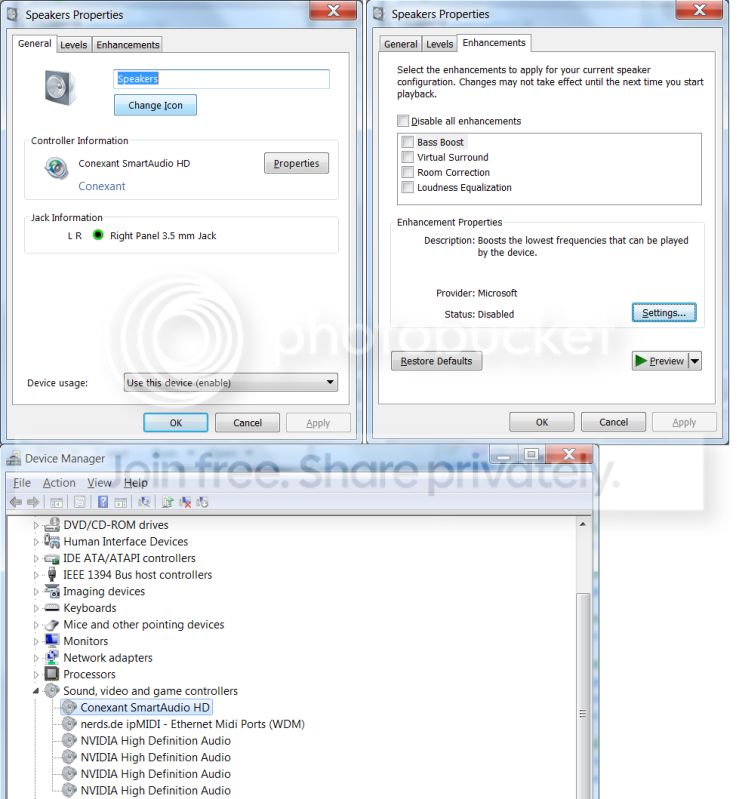
Couple things: The green circle is new, but the headphones no longer appear on the list of playback devices. FWIW the green circle is there regardless of whether or not my headphones are plugged in. (They are atm).

When I click the SmartAudio icon in control>hardwareandsoftware, it briefly flashes on the screen and then disappears. Not sure if that has anything to do with it. Before trying to reinstall my drivers, it wouldn't open at all and jsut give a box that said it couldnt be opened.
soundpics-1.png

Soundpics2.png


Not sure what if any issue there is under "enhancements" where it says disabled, but I am unable to enable anything there afaik.

Toshiba Qosmio X505-Q890 with Windows 7 Home premium 64 Bit.
 

My Computer

Computer Manufacturer/Model Number
Toshiba Qosmio X505
OS
Windows 7 Home Premium 64 bit
CPU
Intel Core i7 Q 740 @ 1.73 GHz
Sound Card
Conexant SmartAudio HD
Back
Top