Solved No Audio Output Device is Installed

Zhall

New member
Local time
2:11 AM
Messages
19
I believe this is an issue regarding an update.

I had this issue before and did a system restore to back before I had installed a certain program, and the issue went away.

Now however, I do not have a restore point that will go far enough back.


I started up my computer today and I was hit with the "No Audio Output Device is Installed" message, showing a red x circle by my speaker icon.

When I click on it it detects problems then attempts to install the driver needed.

Every time it attempts to do this it fails.

The driver is the "High Definition Audio Device"

Upon entering device manager everything related to sound has a yellow caution triangle next to it stating that...

Code:
Windows cannot start this hardware device because its configuration information (in the registry) is incomplete or damaged. (Code 19)

I have tried the following
  • Uninstalling everything on the "Sound, video and game controllers" list, and attempting to reinstall
  • Installing the realtek audio drivers from their site
  • Removing my sound card and attempting to use onboard sound

The sound card I'm using is an old sound blaster live card, I don't think I even need it, but for some reason I still use it. (perhaps that will become apparent)

Thanks
 

My Computer

OS
Windows 7
Try control panel(large icons) and going into your sound, and manage or view sound devices. If there is nothing in your output(playback), then thats a problem. If there is, then select your speakers/headset/anything you use that generates audo that is connected to your computer that. If all else fails, try a new soundcard
 

My Computer

Computer type
PC/Desktop
Computer Manufacturer/Model Number
Acer
OS
Windows 7 Home Premium
CPU
Intel(R) Core(TM) i3-2370M CPU @ 2.40GHz 2.40GHz
Motherboard
Laptop
Memory
4.00(3.85 GB usable)
Graphics Card(s)
Laptop
Hard Drives
Laptop
Antivirus
None (Because they all had annoying ads and did nothing)
Did you even read my post?
 

My Computer

OS
Windows 7
Could you fill out your system specs, please? It makes it easier to help if we know what kind of computer we're dealing with.

Thanks.
 

My Computer

Computer type
PC/Desktop
Computer Manufacturer/Model Number
Mellon Labs (custom build)
OS
Win 7 Pro x64/Win 10 Pro x64 dual boot
CPU
AMD FX 8350 Vishera @ 4200
Motherboard
ASUS M5A97 R2.0
Memory
16 GB Mushkin Blackline DDR3-2400 @ 1866 (9-10-10-10-31)
Graphics Card(s)
XFX Radeon R9 280 Double D Black Edition
Sound Card
Realtek HD Audio on MB. Sounds great.
Monitor(s) Displays
Acer 24", Acer 22"
Screen Resolution
3840 x 1080
Hard Drives
1 x Mushkin Chronos 120 GB SSD (Win 10)
1 x Samsung 850 EVO 250 GB SSD (Win 7)
1 x WD 1TB SATA Blue
1 x WD 1TB SATA Green
PSU
Corsair TX-750
Case
CoolerMaster HAF 912+
Cooling
Coolermaster Seidon 240M Liquid AIO. 6 case fans
Keyboard
Logitech G710+
Mouse
Logitech G500s
Internet Speed
Much better since I got fiber, but still way overpriced.
Antivirus
MSE, Malware Bytes for scanning
Browser
Firefox
Other Info
Corsair VOID USB headphones.

A Mellon Labs X-1 - LCD Smartie driven system status display.

Brought to you by the letter E
Abit Ax78 motherboard
AMD Phenom 9850 2.5GHZ
Windows 7 Home Premium
Sound Blaster X-Fi
Radeon HD 6970
 

My Computer

OS
Windows 7
Sometimes Radeon cards will disable other audio sources in favor of the HDMI port on the video card, but I don't know that that would cause a driver issue or driver failure.

You say that this happened after you installed a certain program in your OP. What happens if you uninstall that program? Maybe the program and your audio driver aren't compatible.
 

My Computer

Computer type
PC/Desktop
Computer Manufacturer/Model Number
Mellon Labs (custom build)
OS
Win 7 Pro x64/Win 10 Pro x64 dual boot
CPU
AMD FX 8350 Vishera @ 4200
Motherboard
ASUS M5A97 R2.0
Memory
16 GB Mushkin Blackline DDR3-2400 @ 1866 (9-10-10-10-31)
Graphics Card(s)
XFX Radeon R9 280 Double D Black Edition
Sound Card
Realtek HD Audio on MB. Sounds great.
Monitor(s) Displays
Acer 24", Acer 22"
Screen Resolution
3840 x 1080
Hard Drives
1 x Mushkin Chronos 120 GB SSD (Win 10)
1 x Samsung 850 EVO 250 GB SSD (Win 7)
1 x WD 1TB SATA Blue
1 x WD 1TB SATA Green
PSU
Corsair TX-750
Case
CoolerMaster HAF 912+
Cooling
Coolermaster Seidon 240M Liquid AIO. 6 case fans
Keyboard
Logitech G710+
Mouse
Logitech G500s
Internet Speed
Much better since I got fiber, but still way overpriced.
Antivirus
MSE, Malware Bytes for scanning
Browser
Firefox
Other Info
Corsair VOID USB headphones.

A Mellon Labs X-1 - LCD Smartie driven system status display.

Brought to you by the letter E
This has happened twice now, last time uninstalling that program helped.

This time it happened randomly, with no program to blame.

I believe I know what you mean about the video card, but incase I don't, what are the specifics on that?

Supposedly the sound drivers come with catalyst 14.4, but every time I install it there's no sound drivers?

When I go to the sound control panel it is literally empty. (typically 4-5 output and 3 input devices listed)
 

My Computer

OS
Windows 7
I just tried booting into linux (puppy slacko) and trying to play some audio, no luck there.

I believe I have yet another soundcard laying around, perhaps I will try it
 

My Computer

OS
Windows 7
try downloading the IDT universal sound driver, its sounds like sound driver conflict between the onboard sound devices and and your plugin devices.
 

My Computer

Computer type
Laptop
Computer Manufacturer/Model Number
hp
OS
windows 7 professional 32 bit
CPU
intel
Memory
2Gigs
I believe I know what you mean about the video card, but incase I don't, what are the specifics on that?

Supposedly the sound drivers come with catalyst 14.4, but every time I install it there's no sound drivers?

When I go to the sound control panel it is literally empty. (typically 4-5 output and 3 input devices listed)
I've heard of it happening where the system suddenly gets it in it's head to use the graphics card's HDMI sound output to the exclusion of all else in the system, and it can be very difficult to get it set back to normal. I haven't had it happen personally, so I can't give you specifics, sorry.

What does show up in the sound control panel?

I just tried booting into linux (puppy slacko) and trying to play some audio, no luck there.

I believe I have yet another soundcard laying around, perhaps I will try it
If Linux won't play audio either, you might be looking at a hardware fault.
 

My Computer

Computer type
PC/Desktop
Computer Manufacturer/Model Number
Mellon Labs (custom build)
OS
Win 7 Pro x64/Win 10 Pro x64 dual boot
CPU
AMD FX 8350 Vishera @ 4200
Motherboard
ASUS M5A97 R2.0
Memory
16 GB Mushkin Blackline DDR3-2400 @ 1866 (9-10-10-10-31)
Graphics Card(s)
XFX Radeon R9 280 Double D Black Edition
Sound Card
Realtek HD Audio on MB. Sounds great.
Monitor(s) Displays
Acer 24", Acer 22"
Screen Resolution
3840 x 1080
Hard Drives
1 x Mushkin Chronos 120 GB SSD (Win 10)
1 x Samsung 850 EVO 250 GB SSD (Win 7)
1 x WD 1TB SATA Blue
1 x WD 1TB SATA Green
PSU
Corsair TX-750
Case
CoolerMaster HAF 912+
Cooling
Coolermaster Seidon 240M Liquid AIO. 6 case fans
Keyboard
Logitech G710+
Mouse
Logitech G500s
Internet Speed
Much better since I got fiber, but still way overpriced.
Antivirus
MSE, Malware Bytes for scanning
Browser
Firefox
Other Info
Corsair VOID USB headphones.

A Mellon Labs X-1 - LCD Smartie driven system status display.

Brought to you by the letter E
Unfortunately I get the "The hardware detected is not supported by this IDT software package." message.
 

My Computer

OS
Windows 7
sound.png


I tried using another sound card, but it's from 1999, so I highly doubt it will work.

There is another card I can use, so I think I may try it.
 

My Computer

OS
Windows 7
Wow. It should at least show your motherboard audio device. Something is seriously wrong. I'm hoping that one of the other members with more experience in this sort of thing will see this and chime in. I'm at a loss.
 

My Computer

Computer type
PC/Desktop
Computer Manufacturer/Model Number
Mellon Labs (custom build)
OS
Win 7 Pro x64/Win 10 Pro x64 dual boot
CPU
AMD FX 8350 Vishera @ 4200
Motherboard
ASUS M5A97 R2.0
Memory
16 GB Mushkin Blackline DDR3-2400 @ 1866 (9-10-10-10-31)
Graphics Card(s)
XFX Radeon R9 280 Double D Black Edition
Sound Card
Realtek HD Audio on MB. Sounds great.
Monitor(s) Displays
Acer 24", Acer 22"
Screen Resolution
3840 x 1080
Hard Drives
1 x Mushkin Chronos 120 GB SSD (Win 10)
1 x Samsung 850 EVO 250 GB SSD (Win 7)
1 x WD 1TB SATA Blue
1 x WD 1TB SATA Green
PSU
Corsair TX-750
Case
CoolerMaster HAF 912+
Cooling
Coolermaster Seidon 240M Liquid AIO. 6 case fans
Keyboard
Logitech G710+
Mouse
Logitech G500s
Internet Speed
Much better since I got fiber, but still way overpriced.
Antivirus
MSE, Malware Bytes for scanning
Browser
Firefox
Other Info
Corsair VOID USB headphones.

A Mellon Labs X-1 - LCD Smartie driven system status display.

Brought to you by the letter E
List any Problem devices
  • Make sure devices are connected and powered on
  • Click Start->Run, enter: msinfo32. Click the + sign next to Components to expand it
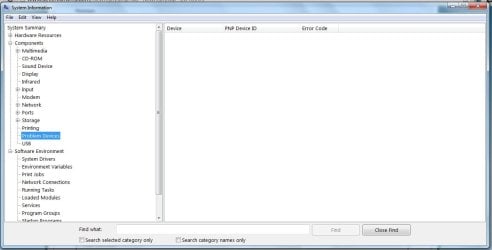
  • Click Problem Devices. Anything appear?
  • If yes, click on it, Ctrl-A to select all, Ctrl-C to copy it, Ctrl-V to paste into next post
  • On the other hand, if no devices are listed, tell me so
Generate and attach a DirectX report
  • Click Start->Run, enter dxdiag and click OK
    ===> If you’re running 32 bit Windows, dxdiag will launch on its own
    ===> If you’re running 64 bit Windows, after dxdiag launches, you’ll see a 64-bit DxDiag button. Click it to launch the 64-bit version of dxdiag
  • Notice progress in lower left window corner
  • When done, click Save Information button and save as a text file to your Desktop
  • Upload and attach the file to your next post
 

My Computer

Computer type
PC/Desktop
Computer Manufacturer/Model Number
Dell Optiplex 360 and Optiplex 755
OS
Desk 1: Win 7 Pro x32; Desk 2: Windows 10 x64
Hard Drives
500GB Crucial SSD in both Desktops
Other Info
Buffalo 6TB NAS, Raid 1
Two Audio Devices are listed as problem devices.
AMD High Definition Audio Device HDAUDIO\FUNC_01&VEN_1002&DEV_AA01&SUBSYS_00AA0100&REV_1002\5&F40C6FE&2&0001 Failure using the VxD loader.
SB X-Fi Xtreme Audio PCI\VEN_1102&DEV_0007&SUBSYS_10121102&REV_00\4&35E69562&0&20A4 Failure using the VxD loader.

The DXdiag is attached.

Thanks
 

Attachments

My Computer

OS
Windows 7
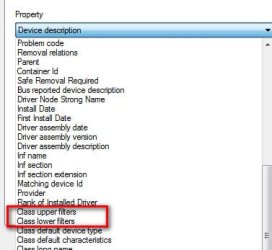
In Device Manager, right click on either of those two audio devices->Properties->Details. Scroll through the pull down menu and look if there is a Class upper filters and/or a Class lower filters listed. If so, select and copy/paste the values to your next post
 

Attachments

  • Filters.jpg
    Filters.jpg
    18.7 KB · Views: 12

My Computer

Computer type
PC/Desktop
Computer Manufacturer/Model Number
Dell Optiplex 360 and Optiplex 755
OS
Desk 1: Win 7 Pro x32; Desk 2: Windows 10 x64
Hard Drives
500GB Crucial SSD in both Desktops
Other Info
Buffalo 6TB NAS, Raid 1
Class Upper Filters - Voxaldriver

I uninstalled the Voxal voice modifier and it fixed my sound!

I'd venture to guess that the drivers for voxal conflicted with the regular sound drivers.

I'll keep this in mind if it happens again.

I didn't think my sound card went out, I'm glad I didn't order one yet.

Thanks!
 

My Computer

OS
Windows 7
You're most welcome!

Glad I was able to help :)

/* EDIT */
p.s. Sometimes that can also be a sign that a 3rd party audio driver (voxal in your case) installation is corrupt or perhaps the driver is out of date. Uninstalling, reinstalling (and checking if there's a new version as well) may help in some cases.

In other cases the drivers conflict and don't work together. In that case, there's no choice but leave it uninstalled.
 

My Computer

Computer type
PC/Desktop
Computer Manufacturer/Model Number
Dell Optiplex 360 and Optiplex 755
OS
Desk 1: Win 7 Pro x32; Desk 2: Windows 10 x64
Hard Drives
500GB Crucial SSD in both Desktops
Other Info
Buffalo 6TB NAS, Raid 1
List any Problem devices
  • Make sure devices are connected and powered on
  • Click Start->Run, enter: msinfo32. Click the + sign next to Components to expand it
  • Click Problem Devices. Anything appear?
  • If yes, click on it, Ctrl-A to select all, Ctrl-C to copy it, Ctrl-V to paste into next post
  • On the other hand, if no devices are listed, tell me so
Generate and attach a DirectX report
  • Click Start->Run, enter dxdiag and click OK
    ===> If you’re running 32 bit Windows, dxdiag will launch on its own
    ===> If you’re running 64 bit Windows, after dxdiag launches, you’ll see a 64-bit DxDiag button. Click it to launch the 64-bit version of dxdiag
  • Notice progress in lower left window corner
  • When done, click Save Information button and save as a text file to your Desktop
  • Upload and attach the file to your next post


Hello Sir,

I am so glad I found a thread that fits my PC problem "no audio output device is installed". I follow the steps above, In my case I found no Problem devices in the system information. I attached a screenshot and a dxdiag report.

Hoping that you still have time reading my post. Thanks in advance
 

Attachments

My Computer

Computer type
PC/Desktop
OS
Windows 7 32 bit
Back
Top