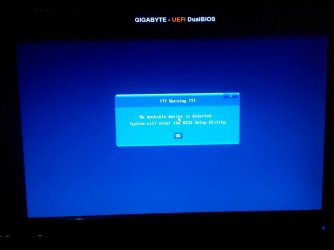
No bootable device detected on first startup, second will be fine.

mocyn

New member
Local time
4:42 PM
Messages
28
I have a problem with my pc setup.

Mind you i tried everything i read on every forum available before posting this.


My problem started when I was playing Skyrim on a CRT Monitor. Why? because our 32inch LED TV is now being used for watching so I am stuck with a 17inch CRT Monitor from my previous rig. While playing, it just turn off for no apparent reason. When I tried to turn it on. It says no bootable device detected. Then says something like proceeding to bios settings. After that, everytime I power up my pc for the first time. It says the same thing again, "no bootable device detected system will enter the bios setup utility".

Here are the solutions I tried:

Reseat sata cable
Reseat connector from MOBO to PSU
Reseat connector from PSU to HDD
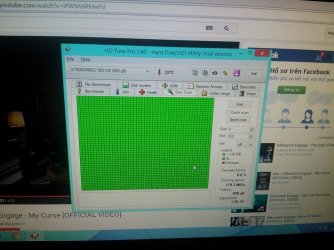
Tried testing HDD on HDTUNE but says still healthy
Pulled out CMOS battery and put it back
Switch ram to another slot
Switch sata cable to another slot on the motherboard
Change bios settings like Boot selection
Change bios settings to default
Updated the bios to latest version

And I've forget the others because this problem is bugging me for the last 6 months I think? I already bought a 18.5in Asus LCD Monitor but the problem still persists.

What seems to bother me is after the first boot-up it says no bootable device. What i had to do is push the power button to shut it down and push it again. And viola its now working. Just like that. The first bootup is the only problem. Someone please help me. I dont know what to do. It bugs me everytime afraid that my PC will just wont work one day.

If it helps this is my rig.
Amd A8 6600k 3.9GHz
Gigabyte F2A78M-HD2
Kingston Fury 1866 4GBx1
Seagate 500GB 7200rpm
700 watts PSU
And the integrated GPU which is Radeon HD 8530.

Right now I am using a Generic PSU. One that you can buy anywhere from 8-10dollars. It says here that its 700watts but no certification. I have this theory that it cant supply the whole system unit so the hdd cant be detected. The problem no bootable device detected started when I transferred to a different house so I guess the electricity there is not that stable i think? Do you think if I buy a Corsair VS450 that'll solve my problem?
 

My Computer My Computer

Computer type
PC/Desktop
OS
Windows 7 Ultimate x64 Dual Boot with Windows 8.1 x64
CPU
Amd A8 6600k
Motherboard
Gigabyte F2A78M-HD2
Memory
Kingston Fury 1866 4GBx1
Graphics Card(s)
Integrated GPU Radeon HD 8530.
Hard Drives
Seagate 500GB 7200rpm
I had something like that happen just before my hard drive failed. I got half a dozen or so restarts (was able to back up my data) and then the drive went bad on the seventh restart.

How long has this been going on (how many starts have you done since the problem first appeared)?

I suggest you make a Repair disk - if you don't have one already. http://www.sevenforums.com/tutorials/2083-system-repair-disc-create.html
 

My Computer My Computer

OS
Windows 7 Home Premium
CPU
i3 2100T
Motherboard
ASRock H67M-ITX
This has been going for the past six months. HDtune says my HDD is healthy. Only on the first boot though. Thanks for the reply man
 

My Computer My Computer

Computer type
PC/Desktop
OS
Windows 7 Ultimate x64 Dual Boot with Windows 8.1 x64
CPU
Amd A8 6600k
Motherboard
Gigabyte F2A78M-HD2
Memory
Kingston Fury 1866 4GBx1
Graphics Card(s)
Integrated GPU Radeon HD 8530.
Hard Drives
Seagate 500GB 7200rpm
You already said you have removed CMOS battery, but that may not have been enough (depends on how long etc). There is a proper way of resetting CMOS (check your motherboard manual), please do so. You will know it was successful if your date/time is reset.

Maybe it has something to do with your HDD not coming alive at first power up and need to spin up some before actually start working?

Seeing you have an UEFI BIOS, try disabling Fast Boot in BIOS if it is not already.
 

My Computer My Computer

Computer type
PC/Desktop
Computer Manufacturer/Model Number
Custom Build
OS
Windows 7 Ultimate x64 SP1
CPU
AMD Phenom 2 1090T
Motherboard
Gigabyte GA-890FXA-UD5
Memory
2x8GB Kingston HyperX Fury Black 1600Mhz Unganged
Graphics Card(s)
MSI GTX 970 Gaming 4G
Sound Card
Realtek On-Board HD 7.1 Audio / Logitech G35
Monitor(s) Displays
3xAcer GD245HQ
Screen Resolution
1920x1080
Hard Drives
Samsung 850 Pro 512GB SSD - OS /
WD Caviar Black SATA 3 - 1 TBx2 - Dynamic RAID 0 /
WD Caviar Green SATA 2 - 640GBx2 - Dynamic RAID 0 /
WD Caviar Green SATA 2 - 640GB - Internal Backup /
Seagate Barracude SATA 3 - 3TB - External Backup/ Sync
PSU
HighPower 1000W
Case
Cooler Master HAF 932
Cooling
Noctua NH-D14
Keyboard
Logitech G19
Mouse
Logitech G500
Internet Speed
100/4 Mbit Cable (100GB quota)
Antivirus
ZoneAlarm Extreme Security / MBAM Pro / MBAE Free / SAS Free
Browser
IE 11 - Firefox - Chrome
Other Info
Logitech F710/ G27/ G940/ Z5500 // TrackIR 5 // Nvidia 3D Surround Vision
ya. i've done the proper way afaik. Shut down the pc. Pull out power plug. Hold power button for up to 20 seconds. and then pull cmos battery and pray to the Gods (haha). Put it back again and power on. It reset the date thats why I keep on resetting the date on windows but still keeps going back on 2010 every time i boot up. Also disable Fast Boot since I have no use for it.

For your theory i think thats it. Does that mean power outage or too little power travel to the HDD on the first startup so it doesnt spin outright? thanks btw
 

My Computer My Computer

Computer type
PC/Desktop
OS
Windows 7 Ultimate x64 Dual Boot with Windows 8.1 x64
CPU
Amd A8 6600k
Motherboard
Gigabyte F2A78M-HD2
Memory
Kingston Fury 1866 4GBx1
Graphics Card(s)
Integrated GPU Radeon HD 8530.
Hard Drives
Seagate 500GB 7200rpm
It reset the date thats why I keep on resetting the date on windows but still keeps going back on 2010 every time i boot up

Does the time reset at every boot? That means your CMOS battery is dead, replace it.

With a working battery you only set your time once after a CMOS reset.
 

My Computer My Computer

Computer type
PC/Desktop
Computer Manufacturer/Model Number
Custom Build
OS
Windows 7 Ultimate x64 SP1
CPU
AMD Phenom 2 1090T
Motherboard
Gigabyte GA-890FXA-UD5
Memory
2x8GB Kingston HyperX Fury Black 1600Mhz Unganged
Graphics Card(s)
MSI GTX 970 Gaming 4G
Sound Card
Realtek On-Board HD 7.1 Audio / Logitech G35
Monitor(s) Displays
3xAcer GD245HQ
Screen Resolution
1920x1080
Hard Drives
Samsung 850 Pro 512GB SSD - OS /
WD Caviar Black SATA 3 - 1 TBx2 - Dynamic RAID 0 /
WD Caviar Green SATA 2 - 640GBx2 - Dynamic RAID 0 /
WD Caviar Green SATA 2 - 640GB - Internal Backup /
Seagate Barracude SATA 3 - 3TB - External Backup/ Sync
PSU
HighPower 1000W
Case
Cooler Master HAF 932
Cooling
Noctua NH-D14
Keyboard
Logitech G19
Mouse
Logitech G500
Internet Speed
100/4 Mbit Cable (100GB quota)
Antivirus
ZoneAlarm Extreme Security / MBAM Pro / MBAE Free / SAS Free
Browser
IE 11 - Firefox - Chrome
Other Info
Logitech F710/ G27/ G940/ Z5500 // TrackIR 5 // Nvidia 3D Surround Vision
nope. FIxed it months ago. My sole problem would be the No bootable device detected
 

My Computer My Computer

Computer type
PC/Desktop
OS
Windows 7 Ultimate x64 Dual Boot with Windows 8.1 x64
CPU
Amd A8 6600k
Motherboard
Gigabyte F2A78M-HD2
Memory
Kingston Fury 1866 4GBx1
Graphics Card(s)
Integrated GPU Radeon HD 8530.
Hard Drives
Seagate 500GB 7200rpm
Did you try going into BIOS first thing before booting to Windows? Does HDD show up if so?

You can also try the one-time Boot Menu (should be some other F-key or DEL or something, should show during POST) and see if HDD will show.

Try the above without trying to boot into Windows (start pressing F-key for BIOS as soon as you start PC). I hope I could be clear what I am asking.

There is also 1 thing that comes to my mind (but not sure if relevant during boot):
- download CrystalDiskInfo and run it (CrystalDiskInfo - Software - Crystal Dew World)
- the top menu - Function - Advanced feature - AAM/APM Control - select the HDD (if there are 2 or more)
- push the slider to the right (max performance) for both AAM and APM (if enabled)

See if this will make a difference.

---------------

To test if it is an electric outlet issue, the easiest would be to move your PC to a friend's house and test it. Then try with another power supply (you are better off in the long run with a proper power supply anyway).
 

My Computer My Computer

Computer type
PC/Desktop
Computer Manufacturer/Model Number
Custom Build
OS
Windows 7 Ultimate x64 SP1
CPU
AMD Phenom 2 1090T
Motherboard
Gigabyte GA-890FXA-UD5
Memory
2x8GB Kingston HyperX Fury Black 1600Mhz Unganged
Graphics Card(s)
MSI GTX 970 Gaming 4G
Sound Card
Realtek On-Board HD 7.1 Audio / Logitech G35
Monitor(s) Displays
3xAcer GD245HQ
Screen Resolution
1920x1080
Hard Drives
Samsung 850 Pro 512GB SSD - OS /
WD Caviar Black SATA 3 - 1 TBx2 - Dynamic RAID 0 /
WD Caviar Green SATA 2 - 640GBx2 - Dynamic RAID 0 /
WD Caviar Green SATA 2 - 640GB - Internal Backup /
Seagate Barracude SATA 3 - 3TB - External Backup/ Sync
PSU
HighPower 1000W
Case
Cooler Master HAF 932
Cooling
Noctua NH-D14
Keyboard
Logitech G19
Mouse
Logitech G500
Internet Speed
100/4 Mbit Cable (100GB quota)
Antivirus
ZoneAlarm Extreme Security / MBAM Pro / MBAE Free / SAS Free
Browser
IE 11 - Firefox - Chrome
Other Info
Logitech F710/ G27/ G940/ Z5500 // TrackIR 5 // Nvidia 3D Surround Vision
I replied on the wrong thread hahahha. will check on it later when i get home.
 

My Computer My Computer

Computer type
PC/Desktop
OS
Windows 7 Ultimate x64 Dual Boot with Windows 8.1 x64
CPU
Amd A8 6600k
Motherboard
Gigabyte F2A78M-HD2
Memory
Kingston Fury 1866 4GBx1
Graphics Card(s)
Integrated GPU Radeon HD 8530.
Hard Drives
Seagate 500GB 7200rpm
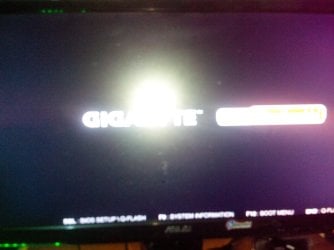
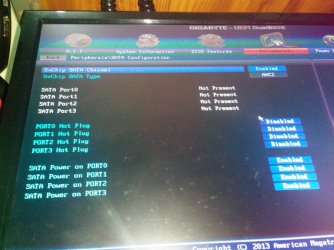
I included attachments because I went to different forums already. Nobody could find a solution as of now. On the first bootup it automatically goes to bios immediately. After the Gigabyte Logo it says No bootable device detected. Then you can see there's no HDD detected. Thats the pictures.
 

Attachments

  • 11725021_1102414646453042_1325566783_o.jpg
    11725021_1102414646453042_1325566783_o.jpg
    309.3 KB · Views: 0
  • 11743659_1102414589786381_828037389_o.jpg
    11743659_1102414589786381_828037389_o.jpg
    69.3 KB · Views: 0
  • 11741912_1102463876448119_1333598094_n.jpg
    11741912_1102463876448119_1333598094_n.jpg
    90.8 KB · Views: 0

My Computer My Computer

Computer type
PC/Desktop
OS
Windows 7 Ultimate x64 Dual Boot with Windows 8.1 x64
CPU
Amd A8 6600k
Motherboard
Gigabyte F2A78M-HD2
Memory
Kingston Fury 1866 4GBx1
Graphics Card(s)
Integrated GPU Radeon HD 8530.
Hard Drives
Seagate 500GB 7200rpm
After trying the CrystalDiskInfo;
I would also check in BIOS - BIOS features - "Boot Mode Selection" and "Storage Boot Option Control".
 

My Computer My Computer

Computer type
PC/Desktop
Computer Manufacturer/Model Number
Custom Build
OS
Windows 7 Ultimate x64 SP1
CPU
AMD Phenom 2 1090T
Motherboard
Gigabyte GA-890FXA-UD5
Memory
2x8GB Kingston HyperX Fury Black 1600Mhz Unganged
Graphics Card(s)
MSI GTX 970 Gaming 4G
Sound Card
Realtek On-Board HD 7.1 Audio / Logitech G35
Monitor(s) Displays
3xAcer GD245HQ
Screen Resolution
1920x1080
Hard Drives
Samsung 850 Pro 512GB SSD - OS /
WD Caviar Black SATA 3 - 1 TBx2 - Dynamic RAID 0 /
WD Caviar Green SATA 2 - 640GBx2 - Dynamic RAID 0 /
WD Caviar Green SATA 2 - 640GB - Internal Backup /
Seagate Barracude SATA 3 - 3TB - External Backup/ Sync
PSU
HighPower 1000W
Case
Cooler Master HAF 932
Cooling
Noctua NH-D14
Keyboard
Logitech G19
Mouse
Logitech G500
Internet Speed
100/4 Mbit Cable (100GB quota)
Antivirus
ZoneAlarm Extreme Security / MBAM Pro / MBAE Free / SAS Free
Browser
IE 11 - Firefox - Chrome
Other Info
Logitech F710/ G27/ G940/ Z5500 // TrackIR 5 // Nvidia 3D Surround Vision
sorry. im using win 8 as my main os
 

My Computer My Computer

Computer type
PC/Desktop
OS
Windows 7 Ultimate x64 Dual Boot with Windows 8.1 x64
CPU
Amd A8 6600k
Motherboard
Gigabyte F2A78M-HD2
Memory
Kingston Fury 1866 4GBx1
Graphics Card(s)
Integrated GPU Radeon HD 8530.
Hard Drives
Seagate 500GB 7200rpm
Good reason to be sorry. ;)

Sorry but I had to ask. Is the solution on Windows 8.1 and Windows 7 different even if the problem lies within the bios? thankyou for your response
 

My Computer My Computer

Computer type
PC/Desktop
OS
Windows 7 Ultimate x64 Dual Boot with Windows 8.1 x64
CPU
Amd A8 6600k
Motherboard
Gigabyte F2A78M-HD2
Memory
Kingston Fury 1866 4GBx1
Graphics Card(s)
Integrated GPU Radeon HD 8530.
Hard Drives
Seagate 500GB 7200rpm
Depends on the problem. If you want to post the requested screenshot we might be able to spot the problem as happens in about half of cases.
 
Depends on the problem. If you want to post the requested screenshot we might be able to spot the problem as happens in about half of cases.

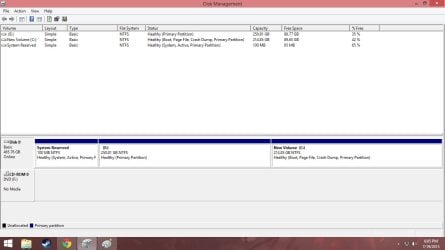
here you. sorry was busy these past few days. I gave 2 screenshot. hope this would help. oh btw, the disk labeled local disk E would be the partition for win7. and the new volume c: would be the one for win 8.1. cant access win7 right now. forgot the password hahahahahahaha
 

Attachments

  • error.jpg
    error.jpg
    59.4 KB · Views: 4
  • error2.jpg
    error2.jpg
    60.3 KB · Views: 2

My Computer My Computer

Computer type
PC/Desktop
OS
Windows 7 Ultimate x64 Dual Boot with Windows 8.1 x64
CPU
Amd A8 6600k
Motherboard
Gigabyte F2A78M-HD2
Memory
Kingston Fury 1866 4GBx1
Graphics Card(s)
Integrated GPU Radeon HD 8530.
Hard Drives
Seagate 500GB 7200rpm

My Computer My Computer

Computer type
PC/Desktop
Computer Manufacturer/Model Number
Custom Build
OS
Windows 7 Ultimate x64 SP1
CPU
AMD Phenom 2 1090T
Motherboard
Gigabyte GA-890FXA-UD5
Memory
2x8GB Kingston HyperX Fury Black 1600Mhz Unganged
Graphics Card(s)
MSI GTX 970 Gaming 4G
Sound Card
Realtek On-Board HD 7.1 Audio / Logitech G35
Monitor(s) Displays
3xAcer GD245HQ
Screen Resolution
1920x1080
Hard Drives
Samsung 850 Pro 512GB SSD - OS /
WD Caviar Black SATA 3 - 1 TBx2 - Dynamic RAID 0 /
WD Caviar Green SATA 2 - 640GBx2 - Dynamic RAID 0 /
WD Caviar Green SATA 2 - 640GB - Internal Backup /
Seagate Barracude SATA 3 - 3TB - External Backup/ Sync
PSU
HighPower 1000W
Case
Cooler Master HAF 932
Cooling
Noctua NH-D14
Keyboard
Logitech G19
Mouse
Logitech G500
Internet Speed
100/4 Mbit Cable (100GB quota)
Antivirus
ZoneAlarm Extreme Security / MBAM Pro / MBAE Free / SAS Free
Browser
IE 11 - Firefox - Chrome
Other Info
Logitech F710/ G27/ G940/ Z5500 // TrackIR 5 // Nvidia 3D Surround Vision
For the forgotten password - http://www.sevenforums.com/tutorials/238737-user-account-reset-password-windows-7-a.html

I wonder if you need to be trying startup repair from a win 8 repair disk or equivalent. I will wait for Greg to comment.

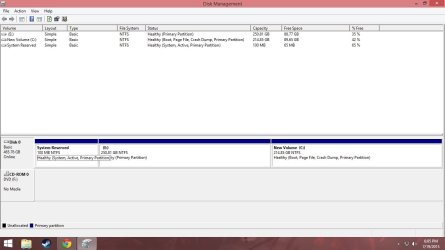
I remembered the password a while ago. I logged in before i go out to work. Maybe its better if I troubleshoot using win7 right? i know this is far away from the repair disk thingy. But if it helps, this is a screenshot of what we are using to asses a hard drive if its fit to be sold as secondhand good. Its called HDtune btw. It says its 100% healthy. Thanks for your help
 

Attachments

  • asdadada.JPG
    asdadada.JPG
    97.7 KB · Views: 1
Last edited:

My Computer My Computer

Computer type
PC/Desktop
OS
Windows 7 Ultimate x64 Dual Boot with Windows 8.1 x64
CPU
Amd A8 6600k
Motherboard
Gigabyte F2A78M-HD2
Memory
Kingston Fury 1866 4GBx1
Graphics Card(s)
Integrated GPU Radeon HD 8530.
Hard Drives
Seagate 500GB 7200rpm
Hmm, I am not convinced to call this a hardware fault or an OS misconfiguration to be honest.

Did you check AAM/APM of the HDD yet (post #8)?

Then I would try in order:
- use another power connector from the PSU (a different cable coming out) but not the same plug on the PSU. I hope this one is clear.
- Then I would find any SATA harddisk (maybe you have one laying around or ask friends) and remove your current one/s and see if it is recognized by BIOS, even install Win7 on it just to test
- if the issue continue with the other HDD too, either BIOS at fault or just somehow misconfigured. Does your BIOS have an option to delay start or similar?
 

My Computer My Computer

Computer type
PC/Desktop
Computer Manufacturer/Model Number
Custom Build
OS
Windows 7 Ultimate x64 SP1
CPU
AMD Phenom 2 1090T
Motherboard
Gigabyte GA-890FXA-UD5
Memory
2x8GB Kingston HyperX Fury Black 1600Mhz Unganged
Graphics Card(s)
MSI GTX 970 Gaming 4G
Sound Card
Realtek On-Board HD 7.1 Audio / Logitech G35
Monitor(s) Displays
3xAcer GD245HQ
Screen Resolution
1920x1080
Hard Drives
Samsung 850 Pro 512GB SSD - OS /
WD Caviar Black SATA 3 - 1 TBx2 - Dynamic RAID 0 /
WD Caviar Green SATA 2 - 640GBx2 - Dynamic RAID 0 /
WD Caviar Green SATA 2 - 640GB - Internal Backup /
Seagate Barracude SATA 3 - 3TB - External Backup/ Sync
PSU
HighPower 1000W
Case
Cooler Master HAF 932
Cooling
Noctua NH-D14
Keyboard
Logitech G19
Mouse
Logitech G500
Internet Speed
100/4 Mbit Cable (100GB quota)
Antivirus
ZoneAlarm Extreme Security / MBAM Pro / MBAE Free / SAS Free
Browser
IE 11 - Firefox - Chrome
Other Info
Logitech F710/ G27/ G940/ Z5500 // TrackIR 5 // Nvidia 3D Surround Vision
Back
Top