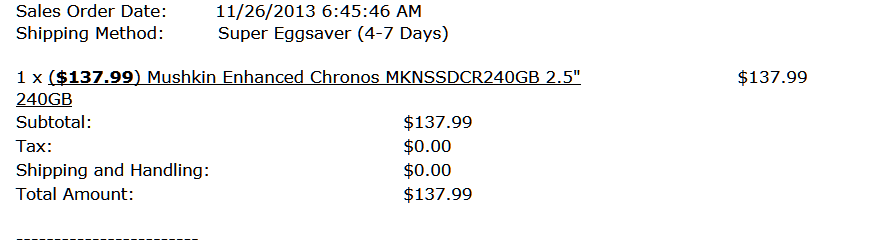
I have a PowerSpec computer purchased from MicroCenter two years ago. It's been a wonderful machine until about a week ago. It came from the factory with a 64gb SSD drive, which was becoming too small for my needs. We purchased a 256gb Crucial SSD several months ago and finally got around to cloning it with Macrium Reflect and installing it in place of the 64gb sometime around 11/20/13. (We also have two 2tb drives with a raid setup, factory settings that haven't been changed since we purchased. It's the option to have a total of 4tb's of storage rather than having the drives mirror each other. Sorry for the beginner descriptions)
Everything worked great for a few weeks after replacing the 64gb with 256gb Crucial. Computer was running fast and smooth, no sign of any issues. Then one day last week, I came home from errands to find only the Windows wallpaper on the monitor. I tried control-alt-delete and things got really weird. Instead of having task manager, etc. appear, I got a message that I didn't catch, but I thought it said something about security and accounts. I wouldn't want to put any money on it, though, because I'm just not sure. Then a crash and upon trying to reboot, there was a message saying there was no bootable drive. The SSD wasn't recognized.
We tried several times to get the machine to recognize the drive but no success. Tried using the Windows install disk but it couldn't install on the SSD because it didn't exist. We put the original 64gb drive back in and the computer seemed to function normally. We went out and purchased a Samsung 250gb SSD and tried installing that, fully expecting that the issue was isolated to the Crucial SSD. But we were surprised to see that the Samsung didn't work either!
The next morning, we took the machine to a repair shop nearby. We've used them before but this time there was a new tech there, and we quickly realized he's not very knowledgeable. Very disappointing to have him say that there are "extra microsoft files" running in the background that are unnecessary and are probably clogging things up, overworking the computer, etc. Plus, he uninstalled my antivirus (Avast) but didn't tell us he was going to do that. When we called later to say we didn't like being left without protection, that he should have at least let us know, he just said he doesn't like Avast and steers people away from it. And that the computer was fine now and we shouldn't have any problems, and also he didn't experience the problem in his shop (the SSD drive not recognized). He also installed a new 750W Corsair power supply for us, which was just something we wanted to do, separate from the "repair."
We started the computer when we got it home and it seemed okay. I reinstalled Avast, shut down the machine for the night. Started it the next morning and within fifteen minutes or so, same crash except this time I was actually sitting at the desk to see it happen rather than being out and coming home to just the wallpaper. The first thing that happened was everything was frozen except the cursor. Then the cursor froze, too. I tried control-alt-delete and got the blue screen that's usually behind the task manager and other options, only it said "preparing security options". Then the machine tried to reboot on its own, but the message about no bootable device was the result.
So... we took the machine to Microcenter the next day. They had it for two days. The technician said he updated the firmware on the Crucial drive, that since we'd purchased it quite a while ago and waited to install it, the firmware was outdated. Said the machine runs "sweet" and that we wouldn't have the problem again.
Got it home just a couple of hours ago, had it on for maybe fifteen minutes, and it crashed. No bootable device again! Except this time after a couple of tries and unplugging it once, it booted and I'm now looking at the windows desktop and doing a scan for malware using Malwarebytes. I used Avast's uninstall utility to completely remove Avast first, mostly just so I can rule it out even though I don't think it's the problem. We have it on several other computers, all using the same version and same updates, and there's no issue. The computer I'm on right now that sits next to the problematic machine has Avast on it. (I'm not adverse to using another antivirus if Avast is ever a problem, just haven't had a reason to switch)
I came here because I'm frustrated that we've had the machine in for repairs twice with two different people, two different companies, and we have yet to be told what's causing this problem. I'm confused because the new 256gb drive worked fine for a few weeks before the crash and burn. Also, the 64gb drive seems to work fine. And the Crucial drive won't screw up in front of repairmen, which is driving me crazy.
I've come to these forums so many times in the past and found answers to questions I had. And it occurred to me tonight that maybe someone here can at least tell me what to say to the techs at Microcenter when we take it back again. Possibly something I can ask them to check that they're not checking on their own. I don't think they did anything with the BIOS or motherboard because, as I was told, the guy who goes more in depth with hardware (I think that's what was said) isn't in till Thursday. But I got the feeling if I could just direct someone to check something specific, they could before then. I shouldn't have to do that, but this is just really frustrating that no one's isolating this problem.
I'd appreciate any advice or information that might help. Thanks so much.
Everything worked great for a few weeks after replacing the 64gb with 256gb Crucial. Computer was running fast and smooth, no sign of any issues. Then one day last week, I came home from errands to find only the Windows wallpaper on the monitor. I tried control-alt-delete and things got really weird. Instead of having task manager, etc. appear, I got a message that I didn't catch, but I thought it said something about security and accounts. I wouldn't want to put any money on it, though, because I'm just not sure. Then a crash and upon trying to reboot, there was a message saying there was no bootable drive. The SSD wasn't recognized.
We tried several times to get the machine to recognize the drive but no success. Tried using the Windows install disk but it couldn't install on the SSD because it didn't exist. We put the original 64gb drive back in and the computer seemed to function normally. We went out and purchased a Samsung 250gb SSD and tried installing that, fully expecting that the issue was isolated to the Crucial SSD. But we were surprised to see that the Samsung didn't work either!
The next morning, we took the machine to a repair shop nearby. We've used them before but this time there was a new tech there, and we quickly realized he's not very knowledgeable. Very disappointing to have him say that there are "extra microsoft files" running in the background that are unnecessary and are probably clogging things up, overworking the computer, etc. Plus, he uninstalled my antivirus (Avast) but didn't tell us he was going to do that. When we called later to say we didn't like being left without protection, that he should have at least let us know, he just said he doesn't like Avast and steers people away from it. And that the computer was fine now and we shouldn't have any problems, and also he didn't experience the problem in his shop (the SSD drive not recognized). He also installed a new 750W Corsair power supply for us, which was just something we wanted to do, separate from the "repair."
We started the computer when we got it home and it seemed okay. I reinstalled Avast, shut down the machine for the night. Started it the next morning and within fifteen minutes or so, same crash except this time I was actually sitting at the desk to see it happen rather than being out and coming home to just the wallpaper. The first thing that happened was everything was frozen except the cursor. Then the cursor froze, too. I tried control-alt-delete and got the blue screen that's usually behind the task manager and other options, only it said "preparing security options". Then the machine tried to reboot on its own, but the message about no bootable device was the result.
So... we took the machine to Microcenter the next day. They had it for two days. The technician said he updated the firmware on the Crucial drive, that since we'd purchased it quite a while ago and waited to install it, the firmware was outdated. Said the machine runs "sweet" and that we wouldn't have the problem again.
Got it home just a couple of hours ago, had it on for maybe fifteen minutes, and it crashed. No bootable device again! Except this time after a couple of tries and unplugging it once, it booted and I'm now looking at the windows desktop and doing a scan for malware using Malwarebytes. I used Avast's uninstall utility to completely remove Avast first, mostly just so I can rule it out even though I don't think it's the problem. We have it on several other computers, all using the same version and same updates, and there's no issue. The computer I'm on right now that sits next to the problematic machine has Avast on it. (I'm not adverse to using another antivirus if Avast is ever a problem, just haven't had a reason to switch)
I came here because I'm frustrated that we've had the machine in for repairs twice with two different people, two different companies, and we have yet to be told what's causing this problem. I'm confused because the new 256gb drive worked fine for a few weeks before the crash and burn. Also, the 64gb drive seems to work fine. And the Crucial drive won't screw up in front of repairmen, which is driving me crazy.
I've come to these forums so many times in the past and found answers to questions I had. And it occurred to me tonight that maybe someone here can at least tell me what to say to the techs at Microcenter when we take it back again. Possibly something I can ask them to check that they're not checking on their own. I don't think they did anything with the BIOS or motherboard because, as I was told, the guy who goes more in depth with hardware (I think that's what was said) isn't in till Thursday. But I got the feeling if I could just direct someone to check something specific, they could before then. I shouldn't have to do that, but this is just really frustrating that no one's isolating this problem.
I'd appreciate any advice or information that might help. Thanks so much.
My Computer
- Computer type
- PC/Desktop
- OS
- Windows 7 Home Premium

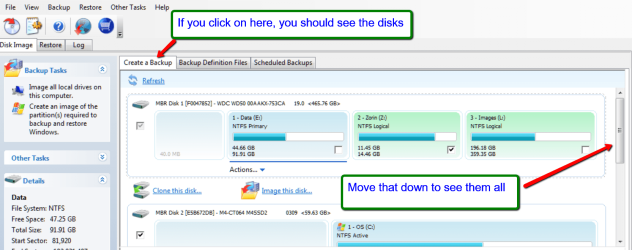
 The crazy thing right now is I have to wait for it to crash again before I can follow your instructions. I have the CD ready to go and the computer is still being scanned by Malwarebytes. I started the scan not long after the machine finally booted following that last crash I referred to, and Malwarebytes indicates the time elapsed so far is 1 hour and 30 minutes. Unfortunately, I have no doubt it'll crash at some point.