
Solved No Bootmgr

lucidoobe

New member
Local time
3:17 PM
Messages
31
Location
NSW
After installing an auxiliary hard drive and re-starting the PC, the "no bootmgr" error came up. I pulled the side off the case and saw that the main drive power cable had come off. I isolated the aux drive, replaced the power cable on the main drive, and re-started. Same message persists despite numerous fix/massages. have done chkdsk, defrag, bootrec, etc. System image restore still restarts with same result.

The last one, which makes sense to me is using cmd prompt from DVD installation disk -

Select drive of source = D:\
D:\copy bootmgr c:\
y/n/all = y
"access denied"

What is the solution to access here? I assume I am already administrator status, as was not prompted for username and pw?
 

My Computer

Computer type
PC/Desktop
Computer Manufacturer/Model Number
custom
OS
Windows 7 Pro
CPU
i3
Motherboard
gigabyte
Memory
6GB
Graphics Card(s)
n/a
Sound Card
generic
Monitor(s) Displays
TV LCD
Screen Resolution
1080
Hard Drives
320GB, 80GB
Antivirus
Norton 360
Browser
various
Other Info
TV and audio, plus internet broadcasts.
Welcome to Seven Forums lucidoobe.
Check the boot drive priority in your BIOS making sure the w7 drive is set before the auxiliary drive.
 

My Computer

Computer type
PC/Desktop
Computer Manufacturer/Model Number
Home Built Desktop By DataTech
OS
Windows 7 Ultimate X64 SP1
CPU
Intel i5-2550K, Differing ~4.4-4.8GHz No built in GPU
Motherboard
ASUS P8Z68-V PRO/GEN3
Memory
16GB G.Skill Sniper 1866MHz @ 2133MHz 2x8GB
Graphics Card(s)
ASUS GTX650TIB-DC2OC-2GD5, (650TI Boost)
Sound Card
Onboard Realtek 5-1
Monitor(s) Displays
Samsung P2570HD
Screen Resolution
1920x1080
Hard Drives
Samsung 840 Pro 256GB SSD for OS, 500GB Seagate Constellation (Enterprise drive) for Data
PSU
Corsair HX650W
Case
Inwin Dragon Rider
Cooling
Hyper 212 EVO w/two Noctua fans, push-pull, @1300 RPM
Keyboard
E-Z Eyes, bright yellow keys with large characters
Mouse
steelseries SENSEI Laser Pro Gaming
Internet Speed
48-51Mbs Mbs down, 11 Mbs up Xfinity Cable
Antivirus
Norton Internet Security 2013
Browser
IE 10, Opera, Pale Moon if needed
Other Info
4 case fans, LG BluRay-RE, ASUS DVD-RW, Mr. Fusion power supply, 1.21 gigawatts.
No bootmgr

The aux drive is not accessible, as I removed the sata data cable to make sure of that. It is possible that when the pwr cable fell away from the C drive on first startup, the system looked at the aux drive? In any case, there appears to be no bootmgr that is able to be copied from the C drive any more?
 

My Computer

Computer type
PC/Desktop
Computer Manufacturer/Model Number
custom
OS
Windows 7 Pro
CPU
i3
Motherboard
gigabyte
Memory
6GB
Graphics Card(s)
n/a
Sound Card
generic
Monitor(s) Displays
TV LCD
Screen Resolution
1080
Hard Drives
320GB, 80GB
Antivirus
Norton 360
Browser
various
Other Info
TV and audio, plus internet broadcasts.

My Computer

Computer type
PC/Desktop
Computer Manufacturer/Model Number
Home Built Desktop By DataTech
OS
Windows 7 Ultimate X64 SP1
CPU
Intel i5-2550K, Differing ~4.4-4.8GHz No built in GPU
Motherboard
ASUS P8Z68-V PRO/GEN3
Memory
16GB G.Skill Sniper 1866MHz @ 2133MHz 2x8GB
Graphics Card(s)
ASUS GTX650TIB-DC2OC-2GD5, (650TI Boost)
Sound Card
Onboard Realtek 5-1
Monitor(s) Displays
Samsung P2570HD
Screen Resolution
1920x1080
Hard Drives
Samsung 840 Pro 256GB SSD for OS, 500GB Seagate Constellation (Enterprise drive) for Data
PSU
Corsair HX650W
Case
Inwin Dragon Rider
Cooling
Hyper 212 EVO w/two Noctua fans, push-pull, @1300 RPM
Keyboard
E-Z Eyes, bright yellow keys with large characters
Mouse
steelseries SENSEI Laser Pro Gaming
Internet Speed
48-51Mbs Mbs down, 11 Mbs up Xfinity Cable
Antivirus
Norton Internet Security 2013
Browser
IE 10, Opera, Pale Moon if needed
Other Info
4 case fans, LG BluRay-RE, ASUS DVD-RW, Mr. Fusion power supply, 1.21 gigawatts.
Get the AOMEI Pro for free and make a CD or stick. Load from that and have a look what thedisk situation is - especially which partition is the active partition.

Aomei Partition Assistant Pro Edition 5.5 Giveaway

You can also try to run startup/repair 3 times hoping to fix the bootmgr.
 

My Computer

Computer Manufacturer/Model Number
HP, Dell, Gateway, Toshiba - 4 laptops and 2 desktops
OS
Vista, Windows7, Mint Mate, Zorin, Windows 8
CPU
from 1.6GHz Duo to i7
Monitor(s) Displays
2x HP w2207
Hard Drives
5x HDD, 7x SSD, 12x Externals
Keyboard
with trackball - no mices
Mouse
Trackball mice
Internet Speed
DSL 6000
I always set boot order to DVD/main drive. This way I can load up programs from repair disk, Hiren, system DVD, etc.
Startup repair has been activated several times.

I will have a look at AOMEI.

Thanx for replies.
 

My Computer

Computer type
PC/Desktop
Computer Manufacturer/Model Number
custom
OS
Windows 7 Pro
CPU
i3
Motherboard
gigabyte
Memory
6GB
Graphics Card(s)
n/a
Sound Card
generic
Monitor(s) Displays
TV LCD
Screen Resolution
1080
Hard Drives
320GB, 80GB
Antivirus
Norton 360
Browser
various
Other Info
TV and audio, plus internet broadcasts.
No bootmgr

Hi WHS,

I have downloaded AOMEI and made an ISO which I burned to a bootable CD. I have run it on the TV PC and surface scan is totally clean. I am currently 45 % through scanning for lost partitions and have found:

0 - NTFS - 3.01MB - Logical
1 - NTFS - 3.01MB - Logical
2 - NTFS - 3.01MB - Logical
3 - NTFS - 3.01MB - Logical

I have done some "create MBR" (this and Hiren?) so looks like they are accumulating? What are your suggestions? :confused:
 

My Computer

Computer type
PC/Desktop
Computer Manufacturer/Model Number
custom
OS
Windows 7 Pro
CPU
i3
Motherboard
gigabyte
Memory
6GB
Graphics Card(s)
n/a
Sound Card
generic
Monitor(s) Displays
TV LCD
Screen Resolution
1080
Hard Drives
320GB, 80GB
Antivirus
Norton 360
Browser
various
Other Info
TV and audio, plus internet broadcasts.
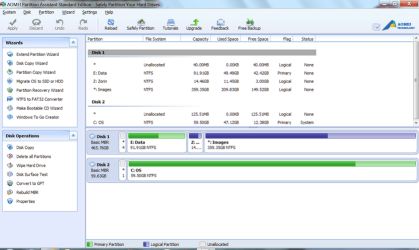
Can you take a (readable) picture with the camera of what partitions AOMEI shows and post it here. That may help us to see what the situation on the disk is. Something like this:
 

Attachments

  • 2014-01-16_0919.png
    2014-01-16_0919.png
    53.8 KB · Views: 4

My Computer

Computer Manufacturer/Model Number
HP, Dell, Gateway, Toshiba - 4 laptops and 2 desktops
OS
Vista, Windows7, Mint Mate, Zorin, Windows 8
CPU
from 1.6GHz Duo to i7
Monitor(s) Displays
2x HP w2207
Hard Drives
5x HDD, 7x SSD, 12x Externals
Keyboard
with trackball - no mices
Mouse
Trackball mice
Internet Speed
DSL 6000
OK, I will get my old Kodak out and do this, Stand by.
 

My Computer

Computer type
PC/Desktop
Computer Manufacturer/Model Number
custom
OS
Windows 7 Pro
CPU
i3
Motherboard
gigabyte
Memory
6GB
Graphics Card(s)
n/a
Sound Card
generic
Monitor(s) Displays
TV LCD
Screen Resolution
1080
Hard Drives
320GB, 80GB
Antivirus
Norton 360
Browser
various
Other Info
TV and audio, plus internet broadcasts.
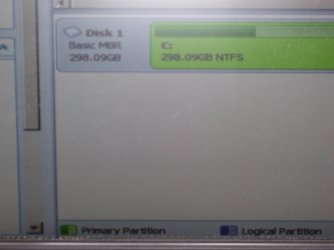
TV screen img

This is not the best, but as you can see, there is just one partition visible. This would be of the system image restore, the last action I took, which will not boot up?

Why are the boot sections not visible?
 

Attachments

  • MCE 003.jpg
    MCE 003.jpg
    261.5 KB · Views: 2

My Computer

Computer type
PC/Desktop
Computer Manufacturer/Model Number
custom
OS
Windows 7 Pro
CPU
i3
Motherboard
gigabyte
Memory
6GB
Graphics Card(s)
n/a
Sound Card
generic
Monitor(s) Displays
TV LCD
Screen Resolution
1080
Hard Drives
320GB, 80GB
Antivirus
Norton 360
Browser
various
Other Info
TV and audio, plus internet broadcasts.
For the C partition to boot itself it must be marked System Active, but we cannot see that because the most important information is not in the picture..

In some Partition Managers the System and Boot flags are used interchangeably, but one must still appear for the partition to be bootable. In DIsk Mgmt boot only means the partition currently booted.

Unplug all other HD's, confirm the Win7 is Partition Marked Active and then run Startup Repair - Run 3 Separate Times. This will repair or rewrite the System boot files so Win7 can boot.

Report back any error messages and exactly what happens.
 
Extras.

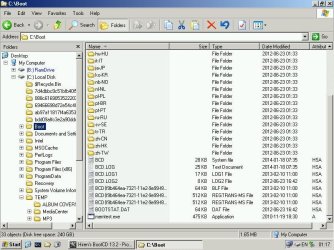
OK, I booted up with a hiren disk into MiniXP and did some screen shots, which I will attach.
 

Attachments

  • cboot.jpg
    cboot.jpg
    91.6 KB · Views: 0
  • cboot2.jpg
    cboot2.jpg
    83.4 KB · Views: 0
  • cprograms.jpg
    cprograms.jpg
    94.2 KB · Views: 0
  • minixp.jpg
    minixp.jpg
    30.8 KB · Views: 0

My Computer

Computer type
PC/Desktop
Computer Manufacturer/Model Number
custom
OS
Windows 7 Pro
CPU
i3
Motherboard
gigabyte
Memory
6GB
Graphics Card(s)
n/a
Sound Card
generic
Monitor(s) Displays
TV LCD
Screen Resolution
1080
Hard Drives
320GB, 80GB
Antivirus
Norton 360
Browser
various
Other Info
TV and audio, plus internet broadcasts.
OK gregrocker, I'll check that out now.
cheers,
 

My Computer

Computer type
PC/Desktop
Computer Manufacturer/Model Number
custom
OS
Windows 7 Pro
CPU
i3
Motherboard
gigabyte
Memory
6GB
Graphics Card(s)
n/a
Sound Card
generic
Monitor(s) Displays
TV LCD
Screen Resolution
1080
Hard Drives
320GB, 80GB
Antivirus
Norton 360
Browser
various
Other Info
TV and audio, plus internet broadcasts.
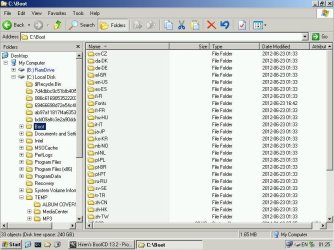
Hmm, that does not tell me anything. I needed the text section above to see which partition is the active partition - in AOMEI they call it the System Partition. Like this:
 

Attachments

  • 2014-01-17_1058.png
    2014-01-17_1058.png
    7.9 KB · Views: 0

My Computer

Computer Manufacturer/Model Number
HP, Dell, Gateway, Toshiba - 4 laptops and 2 desktops
OS
Vista, Windows7, Mint Mate, Zorin, Windows 8
CPU
from 1.6GHz Duo to i7
Monitor(s) Displays
2x HP w2207
Hard Drives
5x HDD, 7x SSD, 12x Externals
Keyboard
with trackball - no mices
Mouse
Trackball mice
Internet Speed
DSL 6000
Hi WHS,

I have run AOMEI disk again and indeed, it is showing me [SYSTEM]. I can take another photo if you like to verify that? I have a query over mounting? This is what it says :

\Device\HarddiskVolume1
Mount point: \\?Volume{de3d05c7-80f9-11e3-82ca-806e6f6e6963}\

I guess the"?" before volume caught my eye? :eek:


Hmm, that does not tell me anything. I needed the text section above to see which partition is the active partition - in AOMEI they call it the System Partition. Like this:
 

My Computer

Computer type
PC/Desktop
Computer Manufacturer/Model Number
custom
OS
Windows 7 Pro
CPU
i3
Motherboard
gigabyte
Memory
6GB
Graphics Card(s)
n/a
Sound Card
generic
Monitor(s) Displays
TV LCD
Screen Resolution
1080
Hard Drives
320GB, 80GB
Antivirus
Norton 360
Browser
various
Other Info
TV and audio, plus internet broadcasts.
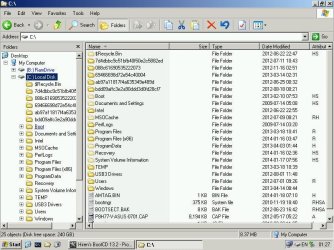
Which partition shows as "System" ??
 

My Computer

Computer Manufacturer/Model Number
HP, Dell, Gateway, Toshiba - 4 laptops and 2 desktops
OS
Vista, Windows7, Mint Mate, Zorin, Windows 8
CPU
from 1.6GHz Duo to i7
Monitor(s) Displays
2x HP w2207
Hard Drives
5x HDD, 7x SSD, 12x Externals
Keyboard
with trackball - no mices
Mouse
Trackball mice
Internet Speed
DSL 6000
We've never used Aoemei here so I don't know why it was advised since we've helped tens of thousands of others with similar problems using Partition Wizard which has no history of failing on critical partitioning operations when using the boot CD - while all others except DIsk Mgmt do.

What's important is that all other disks are unplugged, C is Partition Marked Active,
and then run Startup Repair - Run 3 Separate Times so if you'll do that then it almost always suffices.
 
Active

WHS - There is only one partition visible, C:\ and it is, as you highlighted in red, [SYSTEM].

Gregrocker - OK, I will get Partition Wizard and do system repair 3 times, as you suggest. I have done it multiple times already on other boot ups.
 

My Computer

Computer type
PC/Desktop
Computer Manufacturer/Model Number
custom
OS
Windows 7 Pro
CPU
i3
Motherboard
gigabyte
Memory
6GB
Graphics Card(s)
n/a
Sound Card
generic
Monitor(s) Displays
TV LCD
Screen Resolution
1080
Hard Drives
320GB, 80GB
Antivirus
Norton 360
Browser
various
Other Info
TV and audio, plus internet broadcasts.
Greg, I recommend AOMEI now since it has more function than Partition Wizard. Else it is very similar to PW. Have to go with the times.

OP, do the 3 time system repair as Greg recommended. That should fix the problem since C is marked as 'System"
 

My Computer

Computer Manufacturer/Model Number
HP, Dell, Gateway, Toshiba - 4 laptops and 2 desktops
OS
Vista, Windows7, Mint Mate, Zorin, Windows 8
CPU
from 1.6GHz Duo to i7
Monitor(s) Displays
2x HP w2207
Hard Drives
5x HDD, 7x SSD, 12x Externals
Keyboard
with trackball - no mices
Mouse
Trackball mice
Internet Speed
DSL 6000
System means holding the System boot files and Boot means presently booted in Disk Mgmt, but means opposite in most Partition Managers. So it gets confusing if they all have a different one.

What functions does Aoemi offer that PW doesn't?

I've heard of it, think Si mentioned it.
 
Back
Top
