Solved No Bootmgr

pwhe811.iso

OK, I have burnt a bootable disk for this, and run it up.
It sees C:\ as [system] and [active].

I got adventurous and activated a MBR repair, which it executed as successful.

I then restarted, which went back to the generic (not pwhe8) startup repair. I did this 3 times as you suggested, but no joy on generic reboot?

Am I missing a startup repair within pwhe8?

persevering......
 

My Computer My Computer

Computer type
PC/Desktop
Computer Manufacturer/Model Number
custom
OS
Windows 7 Pro
CPU
i3
Motherboard
gigabyte
Memory
6GB
Graphics Card(s)
n/a
Sound Card
generic
Monitor(s) Displays
TV LCD
Screen Resolution
1080
Hard Drives
320GB, 80GB
Antivirus
Norton 360
Browser
various
Other Info
TV and audio, plus internet broadcasts.
Greg, The one function I really like is partition alignment - more and more important with SSDs.
 

My Computer My Computer

Computer Manufacturer/Model Number
HP, Dell, Gateway, Toshiba - 4 laptops and 2 desktops
OS
Vista, Windows7, Mint Mate, Zorin, Windows 8
CPU
from 1.6GHz Duo to i7
Monitor(s) Displays
2x HP w2207
Hard Drives
5x HDD, 7x SSD, 12x Externals
Keyboard
with trackball - no mices
Mouse
Trackball mice
Internet Speed
DSL 6000
If you'll click the link for Startup Repair - Run 3 Separate Times you'll see it's run from the Win7 DVD or flash stick installer, or System Repair Disk and not Partition Wizard.

PW is really only to see the exact config, to mark Active and other operations, but neither partition manager was needed here since in the links are ways to do all tasks from the Win7 media. I only brought up Aoemi so if someone tries its Resize function and it ruins the OS, they were warned.
 
Yes.

OK, that's what I thought. So I remove pwhe8 disk and replace Win7 repair disk and do another 3 times system repair, warm boot only?
 

My Computer My Computer

Computer type
PC/Desktop
Computer Manufacturer/Model Number
custom
OS
Windows 7 Pro
CPU
i3
Motherboard
gigabyte
Memory
6GB
Graphics Card(s)
n/a
Sound Card
generic
Monitor(s) Displays
TV LCD
Screen Resolution
1080
Hard Drives
320GB, 80GB
Antivirus
Norton 360
Browser
various
Other Info
TV and audio, plus internet broadcasts.
Reboot in between each Startup Repair.

Make sure you have Win7 partition marked Active and no other drives plugged in.
 
Extra material.

Hi Gregrocker,

Nope, nothing got resolved with the triple system repair.

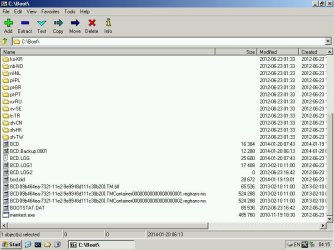
I am attaching some extra material that may be useful? :(

MS Windows [Version 6.1.7600]
X:\Windows\System32\bcdedit /v

Windows Boot Manager
--------------------------
Identifier <9dea862c-5cdd-4e70-acc1-f32b344d4785>
Device Partition -C:
Path \bootmgr
Description Windows Boot Manager
local en-US
Default <5467dcc1-813c-11e3-8h9d-d0fd8ddac404>
Displayorder <5467dcc1-813c-11e3-8h9d-d0fd8ddac404>
Timeout 30

Windows Boot Loader
------------------------
Identifier <5467dcc1-813c-11e3-8h9d-d0fd866ac404>
Device Partition-C:
Path Windows\System32\Winload.exe
Description Windows 7 Professional
Locale en-US
OSDevice Partition-C:
System Root \Windows

X:\Windows\System32\
 

Attachments

  • bcd-files.jpg
    bcd-files.jpg
    72.1 KB · Views: 0
  • c-files.jpg
    c-files.jpg
    93.4 KB · Views: 0

My Computer My Computer

Computer type
PC/Desktop
Computer Manufacturer/Model Number
custom
OS
Windows 7 Pro
CPU
i3
Motherboard
gigabyte
Memory
6GB
Graphics Card(s)
n/a
Sound Card
generic
Monitor(s) Displays
TV LCD
Screen Resolution
1080
Hard Drives
320GB, 80GB
Antivirus
Norton 360
Browser
various
Other Info
TV and audio, plus internet broadcasts.
Still no joy here?

I have done:
[1] cmd chkdsk /f
[2] disk sector scan
[3] bootrec.exe /fixboot
/fixmbr
/rebuildbcd
copy mbr from repair disk and saved to C: (minus attributes)
So many "system repairs" I have lost count.
Still, the colours coming together to "starting windows" stops, freezes, and the box restarts - fail.

Root Cause found:

Unspecified changes to system configuration might have caused the problem.

Repair Action: System files integrity check & repair.
Result = failed.
Error Code = 0 x 490
Time taken = 648855ms

My BIOS seems OK and is IDE, not AHCI. I have removed the USB3 external drive connection.

What will I lose if I put in my system disk for Win7 and do install. Then select "repair current windows installation"? :eek:
 

My Computer My Computer

Computer type
PC/Desktop
Computer Manufacturer/Model Number
custom
OS
Windows 7 Pro
CPU
i3
Motherboard
gigabyte
Memory
6GB
Graphics Card(s)
n/a
Sound Card
generic
Monitor(s) Displays
TV LCD
Screen Resolution
1080
Hard Drives
320GB, 80GB
Antivirus
Norton 360
Browser
various
Other Info
TV and audio, plus internet broadcasts.
Xtra

I cannot do a registry check unless the Win7 is actually running - tried ccleaner on mini XP, but it will not address the C: drive, only mini XP.
 

My Computer My Computer

Computer type
PC/Desktop
Computer Manufacturer/Model Number
custom
OS
Windows 7 Pro
CPU
i3
Motherboard
gigabyte
Memory
6GB
Graphics Card(s)
n/a
Sound Card
generic
Monitor(s) Displays
TV LCD
Screen Resolution
1080
Hard Drives
320GB, 80GB
Antivirus
Norton 360
Browser
various
Other Info
TV and audio, plus internet broadcasts.
Everything that can be done to start Win7 is sequenced in Troubleshooting Windows 7 Failure to Start.

If it's infected it may not repair, so run the bootable AV scan first to see, then if infected run it again and reconfirm with another.

It seems it ran SFC and found corrupted System files. But it may not repair them until that is run 3 separate times as well: SFC /SCANNOW Run in Command Prompt at Boot.

You said you had run countless repairs but wanted to know if you could repair from your Win7 disk. Well your repairs may not even work if they are not run from the disk since System files can be corrupted in the repair utility too.

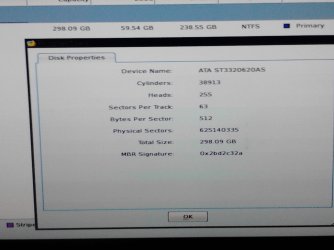
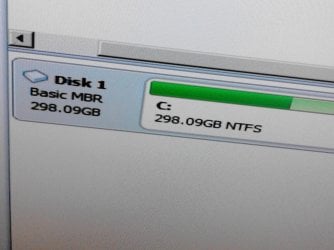
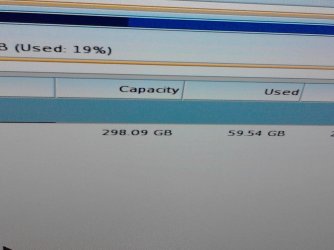
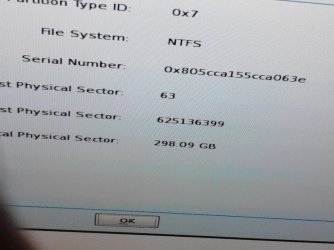
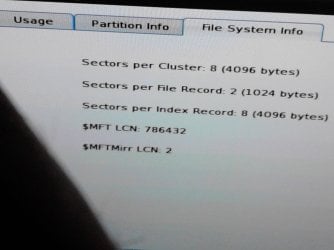
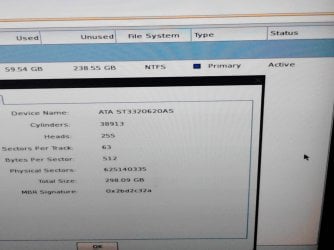
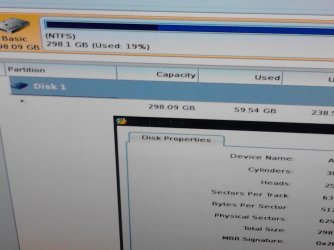
Boot free Partition Wizard bootable CD (burned to CD with Windows Image Burner) which can perform some of the steps in the tutorial, post back a screenshot of the full disk map and listings so we see everything.
 
OK, that'll keep me busy. Thanx for the links.
 

My Computer My Computer

Computer type
PC/Desktop
Computer Manufacturer/Model Number
custom
OS
Windows 7 Pro
CPU
i3
Motherboard
gigabyte
Memory
6GB
Graphics Card(s)
n/a
Sound Card
generic
Monitor(s) Displays
TV LCD
Screen Resolution
1080
Hard Drives
320GB, 80GB
Antivirus
Norton 360
Browser
various
Other Info
TV and audio, plus internet broadcasts.
I don't have a way of doing a screen shot of results of scannow as there is no image program on the system disk Win7 that booted. The best I can try is my smart phone??? Scannow is running as I write.
 

My Computer My Computer

Computer type
PC/Desktop
Computer Manufacturer/Model Number
custom
OS
Windows 7 Pro
CPU
i3
Motherboard
gigabyte
Memory
6GB
Graphics Card(s)
n/a
Sound Card
generic
Monitor(s) Displays
TV LCD
Screen Resolution
1080
Hard Drives
320GB, 80GB
Antivirus
Norton 360
Browser
various
Other Info
TV and audio, plus internet broadcasts.
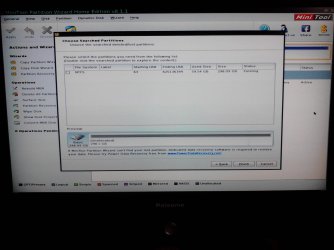
You were only asked for a Partition Wizard screenshot since we can often immediately see a problem with the disk listings and drive map.

Use your phone camera to take a snap, upload the file(s) using paper clip in reply box.

This time we need to see the whole thing, especially the listings for each disk.
 
First result

gregrocker, I did run scannow 3 times, and am familiar with its result, the same for my attempt to find out why my Win8 laptop wouldn't allow "store" to open for my upgrade to Win8.1.

Just wrote it down:

Windows Resource Protection found corrupt files but was unable to fix some of them.
Results are included in the CBS.Log (windir\logs\CBS\CBS.log)
eg. to c:\windows\Logs\CBS\CBS.log

I'll run up mini XP again tomorrow and go search for them. Pity I haven't got screenshot capability.
 

My Computer My Computer

Computer type
PC/Desktop
Computer Manufacturer/Model Number
custom
OS
Windows 7 Pro
CPU
i3
Motherboard
gigabyte
Memory
6GB
Graphics Card(s)
n/a
Sound Card
generic
Monitor(s) Displays
TV LCD
Screen Resolution
1080
Hard Drives
320GB, 80GB
Antivirus
Norton 360
Browser
various
Other Info
TV and audio, plus internet broadcasts.
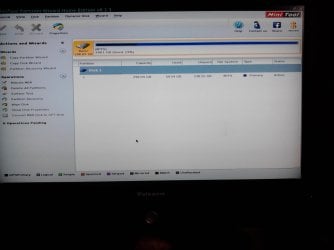
Screenshots.

I am not familiar with paperclip sorry?
Attaching what I took today in the attach files section.
 

Attachments

  • IMG_20140206_165029.jpg
    IMG_20140206_165029.jpg
    194.9 KB · Views: 0
  • IMG_20140206_165110.jpg
    IMG_20140206_165110.jpg
    154.2 KB · Views: 0
  • IMG_20140206_170837.jpg
    IMG_20140206_170837.jpg
    121.8 KB · Views: 0
  • IMG_20140206_170801.jpg
    IMG_20140206_170801.jpg
    126.6 KB · Views: 0
  • IMG_20140206_165636.jpg
    IMG_20140206_165636.jpg
    148.2 KB · Views: 0
  • IMG_20140206_165619.jpg
    IMG_20140206_165619.jpg
    154.1 KB · Views: 0
  • IMG_20140206_165519.jpg
    IMG_20140206_165519.jpg
    138.5 KB · Views: 0
  • IMG_20140206_171503.jpg
    IMG_20140206_171503.jpg
    210.6 KB · Views: 0
  • IMG_20140206_170949.jpg
    IMG_20140206_170949.jpg
    268.9 KB · Views: 0
  • IMG_20140206_170914.jpg
    IMG_20140206_170914.jpg
    176.7 KB · Views: 0
  • IMG_20140206_170854.jpg
    IMG_20140206_170854.jpg
    186.6 KB · Views: 0
  • IMG_20140206_171541.jpg
    IMG_20140206_171541.jpg
    345.2 KB · Views: 0
  • IMG_20140206_171548.jpg
    IMG_20140206_171548.jpg
    202.9 KB · Views: 0
  • IMG_20140206_171737.jpg
    IMG_20140206_171737.jpg
    303.8 KB · Views: 0
  • IMG_20140206_171820.jpg
    IMG_20140206_171820.jpg
    182 KB · Views: 0

My Computer My Computer

Computer type
PC/Desktop
Computer Manufacturer/Model Number
custom
OS
Windows 7 Pro
CPU
i3
Motherboard
gigabyte
Memory
6GB
Graphics Card(s)
n/a
Sound Card
generic
Monitor(s) Displays
TV LCD
Screen Resolution
1080
Hard Drives
320GB, 80GB
Antivirus
Norton 360
Browser
various
Other Info
TV and audio, plus internet broadcasts.
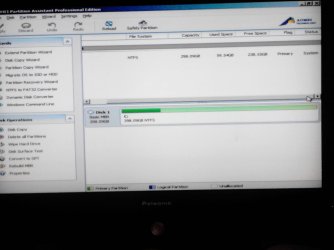
My Computer My Computer

Computer type
PC/Desktop
Computer Manufacturer/Model Number
Home Built Desktop By DataTech
OS
Windows 7 Ultimate X64 SP1
CPU
Intel i5-2550K, Differing ~4.4-4.8GHz No built in GPU
Motherboard
ASUS P8Z68-V PRO/GEN3
Memory
16GB G.Skill Sniper 1866MHz @ 2133MHz 2x8GB
Graphics Card(s)
ASUS GTX650TIB-DC2OC-2GD5, (650TI Boost)
Sound Card
Onboard Realtek 5-1
Monitor(s) Displays
Samsung P2570HD
Screen Resolution
1920x1080
Hard Drives
Samsung 840 Pro 256GB SSD for OS, 500GB Seagate Constellation (Enterprise drive) for Data
PSU
Corsair HX650W
Case
Inwin Dragon Rider
Cooling
Hyper 212 EVO w/two Noctua fans, push-pull, @1300 RPM
Keyboard
E-Z Eyes, bright yellow keys with large characters
Mouse
steelseries SENSEI Laser Pro Gaming
Internet Speed
48-51Mbs Mbs down, 11 Mbs up Xfinity Cable
Antivirus
Norton Internet Security 2013
Browser
IE 10, Opera, Pale Moon if needed
Other Info
4 case fans, LG BluRay-RE, ASUS DVD-RW, Mr. Fusion power supply, 1.21 gigawatts.
Yes.

Thanks, I am aware of that, but have no bootable windows 7 to do this. There are corrupt files that no fix has been able to repair at this time.
 

My Computer My Computer

Computer type
PC/Desktop
Computer Manufacturer/Model Number
custom
OS
Windows 7 Pro
CPU
i3
Motherboard
gigabyte
Memory
6GB
Graphics Card(s)
n/a
Sound Card
generic
Monitor(s) Displays
TV LCD
Screen Resolution
1080
Hard Drives
320GB, 80GB
Antivirus
Norton 360
Browser
various
Other Info
TV and audio, plus internet broadcasts.
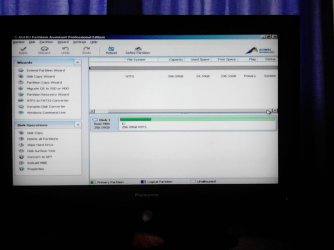
You mentioned you didn't know about the paper clip, so...:)
 

My Computer My Computer

Computer type
PC/Desktop
Computer Manufacturer/Model Number
Home Built Desktop By DataTech
OS
Windows 7 Ultimate X64 SP1
CPU
Intel i5-2550K, Differing ~4.4-4.8GHz No built in GPU
Motherboard
ASUS P8Z68-V PRO/GEN3
Memory
16GB G.Skill Sniper 1866MHz @ 2133MHz 2x8GB
Graphics Card(s)
ASUS GTX650TIB-DC2OC-2GD5, (650TI Boost)
Sound Card
Onboard Realtek 5-1
Monitor(s) Displays
Samsung P2570HD
Screen Resolution
1920x1080
Hard Drives
Samsung 840 Pro 256GB SSD for OS, 500GB Seagate Constellation (Enterprise drive) for Data
PSU
Corsair HX650W
Case
Inwin Dragon Rider
Cooling
Hyper 212 EVO w/two Noctua fans, push-pull, @1300 RPM
Keyboard
E-Z Eyes, bright yellow keys with large characters
Mouse
steelseries SENSEI Laser Pro Gaming
Internet Speed
48-51Mbs Mbs down, 11 Mbs up Xfinity Cable
Antivirus
Norton Internet Security 2013
Browser
IE 10, Opera, Pale Moon if needed
Other Info
4 case fans, LG BluRay-RE, ASUS DVD-RW, Mr. Fusion power supply, 1.21 gigawatts.
Logs.

Hi Gregrocker,
I went and retrieved the CBS.Logs off the C: drive and copied them on a stick.
I am attaching the files in case they are useful? They are the sfc /scannow results.

Uh Oh, the .cab files are invalid for uploading? Is there an alternative to send to you?
 

My Computer My Computer

Computer type
PC/Desktop
Computer Manufacturer/Model Number
custom
OS
Windows 7 Pro
CPU
i3
Motherboard
gigabyte
Memory
6GB
Graphics Card(s)
n/a
Sound Card
generic
Monitor(s) Displays
TV LCD
Screen Resolution
1080
Hard Drives
320GB, 80GB
Antivirus
Norton 360
Browser
various
Other Info
TV and audio, plus internet broadcasts.
non-image files (txt)?

Attempting to upload 1 x .txt files from CBS.Logs.

Nope, the server doesn't like it? Let me know if there is a .ZIP file alternative upload?
 

My Computer My Computer

Computer type
PC/Desktop
Computer Manufacturer/Model Number
custom
OS
Windows 7 Pro
CPU
i3
Motherboard
gigabyte
Memory
6GB
Graphics Card(s)
n/a
Sound Card
generic
Monitor(s) Displays
TV LCD
Screen Resolution
1080
Hard Drives
320GB, 80GB
Antivirus
Norton 360
Browser
various
Other Info
TV and audio, plus internet broadcasts.
Back
Top