
W7 Home Premium 64 pre-installed and functioning perfectly well on a quad-core Intel laptop for many years. The OS has been kept current and is at SP1+.
I recently got tired of my old standby browser and would very much like my new choice to be the default. The problem is that I can find no way to wrest control from IE11-x64 now that I have uninstalled the old browser.
Despite several re-installs of the new one and IE claiming that it is not the default either, it maintains its iron grip. The new browser functions perfectly well, but any attempt to use its interface to set it as the default (for my ancient email client, etc.) results in nothing except more of IE11. I have changed every web-based/html/xml reference that I can find in Control Panel -> Programs -> Default Programs -> Set Associations to no avail.
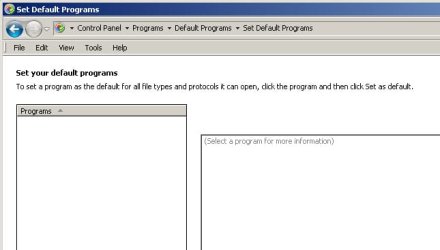
The thing I do not understand is that, even though all of the relevant file types are displayed and modifiable via the aforementioned interface, Control Panel -> Programs -> Default Programs -> Set Default Programs shows no programs available. None, nada, zero, zilch. A screen shot of the nothingness is attached.
Is there a registry setting hiding somewhere or anyone in the Seven-verse who has a solution or even a guess? I've read every tutorial I can find and one or the other of the previous should work, but ... no. I have used CCleaner to clean the registry, all caches, cookies, etc. and still Windows has no knowledge of any possible default programs of any kind. Anyway, I would be eternally grateful for any hints or info whatsoever. Thanks!
I recently got tired of my old standby browser and would very much like my new choice to be the default. The problem is that I can find no way to wrest control from IE11-x64 now that I have uninstalled the old browser.
Despite several re-installs of the new one and IE claiming that it is not the default either, it maintains its iron grip. The new browser functions perfectly well, but any attempt to use its interface to set it as the default (for my ancient email client, etc.) results in nothing except more of IE11. I have changed every web-based/html/xml reference that I can find in Control Panel -> Programs -> Default Programs -> Set Associations to no avail.
The thing I do not understand is that, even though all of the relevant file types are displayed and modifiable via the aforementioned interface, Control Panel -> Programs -> Default Programs -> Set Default Programs shows no programs available. None, nada, zero, zilch. A screen shot of the nothingness is attached.
Is there a registry setting hiding somewhere or anyone in the Seven-verse who has a solution or even a guess? I've read every tutorial I can find and one or the other of the previous should work, but ... no. I have used CCleaner to clean the registry, all caches, cookies, etc. and still Windows has no knowledge of any possible default programs of any kind. Anyway, I would be eternally grateful for any hints or info whatsoever. Thanks!
Attachments
My Computer
- Computer type
- Laptop
- Computer Manufacturer/Model Number
- Dell
- OS
- Windows 7 Home Premium x64
- CPU
- Intel Core i7 Q 720
- Motherboard
- Dell
- Memory
- 8 GB


