no internet connection - device drivers (Code 28)

maurits

New member
Local time
3:51 AM
Messages
1
Hello,

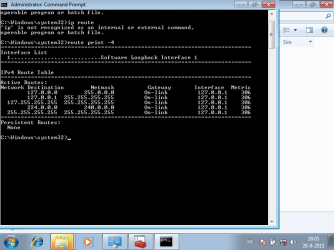
I got a used asus X54C laptop from ebay. I replaced a faulty hard disk, downloaded OS7 , reinstalled and activated with the key provided on the back of the machine.

The problem is the laptop has no internet connection. However, my desktop computer has no problems. Both machines are connected through a LAN switch to the same DSL router (Experia V8). I would like to be able to connect the asus to the internet through WLAN.

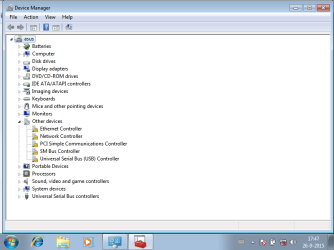
I tried to run Systeminfo.exe. But the asus is missing .NET Framework 4. The file dotNetFx40_Full_setup seems to need an internet connection as well. I'm at this all afternoon with no progress at all. How can I figure out whether I have all hardware I need in the first place? I need this laptop+internet for study.

Thanks for any help, maurits
 

Attachments
  • printout-device-manager.png
    printout-device-manager.png
    20.7 KB · Views: 0
  • printout-ipconfig.png
    printout-ipconfig.png
    25.2 KB · Views: 0
  • printout-routeprint.png
    printout-routeprint.png
    16.6 KB · Views: 0

My Computer My Computer

Computer type
Laptop
Computer Manufacturer/Model Number
asus x54c (build 2012)
OS
windows 7 home sp1 - version 6.1.7601
CPU
ACPIx64 - Intel Celeron B820 1.70GHz
Memory
4GB
Hard Drives
WDC WD3200BEKT-60PVMTO ATA
Antivirus
no
Browser
IE8
my first guess is your install did not have any drivers for the ASUS network hardware
 

My Computer My Computer

Computer type
PC/Desktop
Computer Manufacturer/Model Number
custom build
OS
Microsoft Windows 7 Ultimate 64-bit 7601 Multiprocessor Free Service Pack 1
CPU
AMD FX(tm)-6100 Six-Core Processor
Motherboard
ASUSTeK Computer INC. M5A78L-M LX PLUS
Memory
4.00 GB
Graphics Card(s)
AMD Radeon HD 6450
Sound Card
(1) AMD High Definition Audio Device (2) Realtek High Defi
Monitor(s) Displays
Toshiba 47ZV650U 47" LCD 240Hz
Screen Resolution
1920 x 1080 x 32 bits (4294967296 colors) @ 60 Hz
Hard Drives
(1) HDT722516DLA380 ATA Device (2) Hitachi HDS721025CLA382 ATA Device (3) ST4000VN000-1H4168 ATA Device (4) Generic STORAGE DEVICE USB Device (5) Generic STORAGE DEVICE USB Device (6) Generic STORAGE DEVICE USB Device (7) Generic STORAGE
PSU
Corsair CX430M
Case
WMI (Waste Management Incorporated)
Cooling
Yes, it's very cool.
Keyboard
Bluetooth KB & Mousepad
Internet Speed
Fios 15/5 and it sucks when Verizon is throttling it down
Antivirus
Avast, MSE and Malwarebytes
Browser
Firefox v.41.0.2 and IE 11
Other Info
2 years old and so far this rig still kicks butt

My Computer My Computer

Computer type
PC/Desktop
Computer Manufacturer/Model Number
custom build
OS
Microsoft Windows 7 Ultimate 64-bit 7601 Multiprocessor Free Service Pack 1
CPU
AMD FX(tm)-6100 Six-Core Processor
Motherboard
ASUSTeK Computer INC. M5A78L-M LX PLUS
Memory
4.00 GB
Graphics Card(s)
AMD Radeon HD 6450
Sound Card
(1) AMD High Definition Audio Device (2) Realtek High Defi
Monitor(s) Displays
Toshiba 47ZV650U 47" LCD 240Hz
Screen Resolution
1920 x 1080 x 32 bits (4294967296 colors) @ 60 Hz
Hard Drives
(1) HDT722516DLA380 ATA Device (2) Hitachi HDS721025CLA382 ATA Device (3) ST4000VN000-1H4168 ATA Device (4) Generic STORAGE DEVICE USB Device (5) Generic STORAGE DEVICE USB Device (6) Generic STORAGE DEVICE USB Device (7) Generic STORAGE
PSU
Corsair CX430M
Case
WMI (Waste Management Incorporated)
Cooling
Yes, it's very cool.
Keyboard
Bluetooth KB & Mousepad
Internet Speed
Fios 15/5 and it sucks when Verizon is throttling it down
Antivirus
Avast, MSE and Malwarebytes
Browser
Firefox v.41.0.2 and IE 11
Other Info
2 years old and so far this rig still kicks butt
You need drivers, rather than fooling around and searching for what you need check out 3DP Net From their webpage: 3DP Net detects ethernet card automatically. and provides the newest or the most suitable driver. It supports off-line installation. Simply 3DP Net is intergrated driver installer. :: 3DP Chip :: 3DP Software (3DP Chip / Net / Bench) Current version is 3DP Net 15.05 it's a 107 Mb download, no adware and no BS. Oh and it's free too. I use on my Win7PE SE System Management bootable flash drive for situations like yours
 

My Computer My Computer

Computer type
PC/Desktop
Computer Manufacturer/Model Number
Corsair
OS
Window 7 x32
CPU
G3258
Motherboard
ASRock Z97 Anniversary
Memory
8 GB
Ewe, that smells!!!!!
 

My Computer My Computer

Computer type
PC/Desktop
Computer Manufacturer/Model Number
custom build
OS
Microsoft Windows 7 Ultimate 64-bit 7601 Multiprocessor Free Service Pack 1
CPU
AMD FX(tm)-6100 Six-Core Processor
Motherboard
ASUSTeK Computer INC. M5A78L-M LX PLUS
Memory
4.00 GB
Graphics Card(s)
AMD Radeon HD 6450
Sound Card
(1) AMD High Definition Audio Device (2) Realtek High Defi
Monitor(s) Displays
Toshiba 47ZV650U 47" LCD 240Hz
Screen Resolution
1920 x 1080 x 32 bits (4294967296 colors) @ 60 Hz
Hard Drives
(1) HDT722516DLA380 ATA Device (2) Hitachi HDS721025CLA382 ATA Device (3) ST4000VN000-1H4168 ATA Device (4) Generic STORAGE DEVICE USB Device (5) Generic STORAGE DEVICE USB Device (6) Generic STORAGE DEVICE USB Device (7) Generic STORAGE
PSU
Corsair CX430M
Case
WMI (Waste Management Incorporated)
Cooling
Yes, it's very cool.
Keyboard
Bluetooth KB & Mousepad
Internet Speed
Fios 15/5 and it sucks when Verizon is throttling it down
Antivirus
Avast, MSE and Malwarebytes
Browser
Firefox v.41.0.2 and IE 11
Other Info
2 years old and so far this rig still kicks butt
Drivers

Just go to the asus websites tap in your model No X54c downloads drivers, windows version W7 32/64 It will list all of the drivers you need.
Drop them All to a spare usb, then on your lappy,

Go to the "unknown device" update drivers >>LET ME PICk<< choose> search my comp,Search Drive X, where X is your usb.

Roy

Note at the same time your downloading on your other comp,
get an AV, get the stand alone installer for IE11, or which ever browser you want,
and dont forget youre gonna get 200+ MS updates when you get on line.
 

My Computer My Computer

Computer type
PC/Desktop
Computer Manufacturer/Model Number
medionl/Aspire 6930G/acer x55a
OS
W7 home premium 32bit/W7HP 64bit/w10 tp insider ring
CPU
E5300 dual core
Motherboard
medion MS7366
Memory
3gb
Graphics Card(s)
Nvidia Geforce 7100 Nforce 630i
Monitor(s) Displays
avixc
Internet Speed
n (isp resticted to 72)
Antivirus
mse/pands
Browser
palemoon
Other Info
Belkin Fd7050 n USB using Railink RT2870 drivers, more upto date
Cyclops I had a free moment so I thought I would responded to your rather unprofessional comment. The advice I gave was spot on. A simple, effective solution. I recover, repair and maintain over 100 machines a month. Disparate brands, makes and models. I built a copy of Winbuilder Win7PE SE and use it as my recovery environment, a basic requirement is internet access I can't load a Gig's worth of network drivers into memory to cover every machine in work on, the boot wim would be unmanageable and take forever to load. With 3DP Net I click and the correct driver is installed and bam !! I got internet access. Really before you post a VERY small minded response I recommend you download and at least examine the product your criticizing. He bought a machine off eBay, he wants it to work, today, no internet access? please mister provide me with a solution, fix it for me. He's not a professional like me, I do this everyday Cyclops. One click solution. From me. Ewe, that smells!!!!!
 

My Computer My Computer

Computer type
PC/Desktop
Computer Manufacturer/Model Number
Corsair
OS
Window 7 x32
CPU
G3258
Motherboard
ASRock Z97 Anniversary
Memory
8 GB
You need drivers, rather than fooling around and searching for what you need check out 3DP Net From their webpage: 3DP Net detects ethernet card automatically. and provides the newest or the most suitable driver. It supports off-line installation. Simply 3DP Net is intergrated driver installer. :: 3DP Chip :: 3DP Software (3DP Chip / Net / Bench) Current version is 3DP Net 15.05 it's a 107 Mb download, no adware and no BS. Oh and it's free too. I use on my Win7PE SE System Management bootable flash drive for situations like yours

Hmmm...this comes in very handy and conveniently for me, but I don't always have the ethernet wiring. Is there an integrated driver installer with offline install support for the most commonly used wireless network adapters?
 

My Computer My Computer

Computer type
Laptop
Computer Manufacturer/Model Number
Acer Aspire E1-532
OS
Microsoft Windows 7 Home Premium 64-bit 7601 Multiprocessor Free Service Pack 1
CPU
Intel(R) Celeron(R) 2957U @ 1.40GHz
Motherboard
Acer EA50_HW
Memory
8.00 GB
Graphics Card(s)
Intel(R) HD Graphics
Sound Card
High Definition Audio Device
Screen Resolution
1366 x 768 x 32 bits (4294967296 colors) @ 59 Hz
Hard Drives
TOSHIBA MQ01ABD100 ATA Device
Hmmm...this comes in very handy and conveniently for me, but I don't always have the ethernet wiring. Is there an integrated driver installer with offline install support for the most commonly used wireless network adapters?

Drivers always are hardware-specific. You need a particular driver for each different hardware piece (and a different one for each OS/version too). Bundling a number of disimilar drivers is certainly possible, but not a good idea. For instance, it would easily become outdated as new hardware appears and as hardware vendors provide drivers updates. And you would always have to carry the whole thing, knowing that only one of those will ever be of any use. Not to mention the difficulty in choosing what to install.

To concretely answer, I'm not aware of any of such package. I would also run away from it if I knew of any one. But they can for sure exist.

Not all drivers need to come though a network connection however. Before reformating, make sure to put all needed drivers in a pendrive, together with the Windows installer, and you won't have any problem, even if you have no network at all at first.
 

My Computer My Computer

Computer type
Laptop
Computer Manufacturer/Model Number
Toshiba Sattelite A665-S6092
OS
Windows 7 Ultimate x64
CPU
Intel Core i7-740QM
Memory
8 GB DDR3
Graphics Card(s)
NVIDIA GeForce 330GT
Screen Resolution
1366x768
Hard Drives
Samsung 840 SSD 500GB
1TB USB3 external HD
Cooling
Coolermaster Notepal U3 notebook cooling pad
Internet Speed
3mbps ASDL
Antivirus
ClamWin 0.98.7
Browser
Opera 12.17 x86 (main), Firefox 38 (sec), IE11 (last resort)
Back
Top