NO ISP Shortcut

DrWho

Banned
VIP
Local time
5:30 PM
Messages
154
Location
Central Florida, USA
In XP, I could easily create a shortcut to my internet connection.
Not so in Win-7. There is nothing I can click on, to make a shortcut.

Does anyone know of another way to do this?

The Doctor :cool:
 

My Computer

Computer Manufacturer/Model Number
Home Made
OS
Windows XP-Pro-SP3, Windows 7
CPU
AMD, 2X, Dual Core 5200+
Motherboard
MSI K9N Platinum
Memory
6 gig DDR2, Super Talent
Graphics Card(s)
Winfast
Sound Card
On Board AC97
Monitor(s) Displays
19" Envision LCD
Screen Resolution
1024x768
Hard Drives
3x , Maxtor/Seagate SATA2 (160, 160, 200gig)
PSU
Antec Earthwatts 650
Case
Pac Man Mid-Tower
Cooling
11 fans
Keyboard
Generic
Mouse
MS digital
Internet Speed
5 Meg Cable

My Computer

Computer type
PC/Desktop
Computer Manufacturer/Model Number
Airbot 2.0
OS
Windows 7 Ultimate x64 SP1
CPU
Core i7 920 (D0) @ 4Ghz, *26c idle *65c full load on air
Motherboard
Asus P6X58D Premium - Sata 6Gb/s - USB 3.0
Memory
12GB DDR3 Corsair Dominator -CMD12GX3M6A1600C8 at 1600MHz
Graphics Card(s)
Zotac Geforce GTX 770
Sound Card
ASUS Xonar D2X
Monitor(s) Displays
1 LG 24" Flatron W2453V-PF 1 Samsung 24" P2450H both 2ms RT
Screen Resolution
1920x1080@60hz
Hard Drives
1 Samsung 250GB 840 Evo SSD
1 OCZ Vertex2 180GB SSD
1 TB Samsung Spinpoint F1 7200RPM 32MB cache
2 500GB WD Caviar Blacks 7200RPM 32MB cache (WD5001AALS)

Pioneer DVD Burner DVR-S18M
PSU
Corsair HX1000W
Case
Cooler Master HAF 932
Cooling
Case Fans *3 230mm, *1 140mm/CPU - *Tuniq Tower 120 Extreme
Keyboard
Logitech Wireless MK700
Mouse
Logitech Wireless MK700
Internet Speed
DL 15 Mbps UL 0.98 Mbps
Antivirus
None
Browser
Firefox Nightly
Other Info
Processor-7.7 *RAM- 7.9 *Graphics-7.9 *Gaming Graphics- 7.9 *SSD- 7.8 W.E.I final score= 7.7
*Phone- LG Nexus 5
Well, close but no Cigar!
It's not a shortcut to the Network Connections Folder that I want.
I have just one connection, and I'd like to make a shortcut to that (one) connection, like I could in XP.
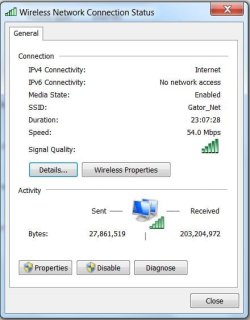
With that shortcut on my desktop, I can open the connections window to that one connection and see how it's doing and disable it if I want to.
When it's disabled, just clicking on the shortcut, ENABLES it again, without ever opening a window at all.

I can go into the connections folder in control panel and do the same, but that's slow and clunky.

There are so many quick and easy things that I did in XP that I can no longer do in Win-7 that I'm beginning to get used to it. I won't loose any sleep over it anyway. And I won't be running Windows 7 as my primary OS anytime soon.

I just wanna say that I thank the guys on this forum for helping me to get Windows Mail up and running on Win-7, 64bit. I have it tweaked and tuned so it looks and acts pretty much like Outlook Express 6, which is what I was after.
I also have my entire address book from XP transferred to Win-7 'Contacts'.
I had to save it as a CSV file in XP for it to be importable into Contacts in Win-7.

I've already had several of my customers buy new PC's with Win-7 installed
(a few of those are 64 bit) and of course they want to use an email program that's familiar to them....
something that looks and works like Outlook Express.
I get lots of "attaboys" when I pull the rabbit out of my hat and make Windows Mail work for them and then save their Address Book to Win-7 as well. And it's all thanks to information I've read on this forum.

I'm in XP-Pro right now, but when I get back into Win-7, I'll try to make that shortcut to the connections folder.

Thanks again,
The Doctor :cool:
 

My Computer

Computer Manufacturer/Model Number
Home Made
OS
Windows XP-Pro-SP3, Windows 7
CPU
AMD, 2X, Dual Core 5200+
Motherboard
MSI K9N Platinum
Memory
6 gig DDR2, Super Talent
Graphics Card(s)
Winfast
Sound Card
On Board AC97
Monitor(s) Displays
19" Envision LCD
Screen Resolution
1024x768
Hard Drives
3x , Maxtor/Seagate SATA2 (160, 160, 200gig)
PSU
Antec Earthwatts 650
Case
Pac Man Mid-Tower
Cooling
11 fans
Keyboard
Generic
Mouse
MS digital
Internet Speed
5 Meg Cable
Couldn't you right-click the connection (list from the Network connections) and create shortcut? This will put it on your desktop for you.
 

My Computer

Computer Manufacturer/Model Number
Lenovo ThinkPad T60
OS
Windows 7 Ultimate 64Bit
CPU
GenuineIntel Intel(R) Core(TM) DuoCore T2400 @ 1.83GHz
Motherboard
Intel(R) 82801G (ICH7 Family)
Memory
2.00 GB
Graphics Card(s)
Mobile Intel(R) 945 Express Chipset
Sound Card
SoundMAX Integrated Digital HD Audio
Monitor(s) Displays
ThinkPad Display
Screen Resolution
1400x1050
Hard Drives
100Gb SATA
Keyboard
Standard Keyboard
Mouse
HID-compliant Mouse
Internet Speed
Cable Broadband - 54Mbps
Other Info
Intel(R) PRO/1000 PL Network Connection
11a/b/g Wireless LAN Mini PCI Express Adapter
Couldn't you right-click the connection (list from the Network connections) and create shortcut? This will put it on your desktop for you.

DrWho, is this what you are wanting to create a shortcut to? I had this in my taskbar with XP. I could not right click on it and create a shortcut.
 

Attachments

  • Network.JPG
    Network.JPG
    36.1 KB · Views: 44

My Computer

Computer Manufacturer/Model Number
Home built
OS
Windows 7 Ultimate 32 bit
CPU
Intel(R) Pentium(R) 4 CPU 3.00GHz
Motherboard
ASUS P4P800-VM Motherboard Chipset: Intel 865G + ICH5
Memory
2.50 GB RAM
Graphics Card(s)
NVIDIA GeForce 7600 GS
Sound Card
SoundMax Integrated Digital Audio (Chip)
Monitor(s) Displays
ViewSonic VX 1962 wm
Screen Resolution
1680 X 1050
Hard Drives
Seagate Barracuda 7200.10 80 GB
ST380215A ATA Device 18.6 GB
Western Digital "My Book" external hard drive 750 GB
Cooling
Fan based
Keyboard
Microsoft Comfort Curve Keyboard 2000 v10 USB
Mouse
Logitec optic USB
Internet Speed
3.01 Mb/s download 0.64 Mb/s upload
In Network and Sharing center, left side click Change adapter settings. There is a listing in there, right click your required connection, and create shortcut. A message will say do yiuwant to create a shortcut in your desktop instead, just click yes.
 

My Computer

Computer Manufacturer/Model Number
Lenovo ThinkPad T60
OS
Windows 7 Ultimate 64Bit
CPU
GenuineIntel Intel(R) Core(TM) DuoCore T2400 @ 1.83GHz
Motherboard
Intel(R) 82801G (ICH7 Family)
Memory
2.00 GB
Graphics Card(s)
Mobile Intel(R) 945 Express Chipset
Sound Card
SoundMAX Integrated Digital HD Audio
Monitor(s) Displays
ThinkPad Display
Screen Resolution
1400x1050
Hard Drives
100Gb SATA
Keyboard
Standard Keyboard
Mouse
HID-compliant Mouse
Internet Speed
Cable Broadband - 54Mbps
Other Info
Intel(R) PRO/1000 PL Network Connection
11a/b/g Wireless LAN Mini PCI Express Adapter
Well, I finally got the job done.
From the tutorial mentioned earlier, I made the desktop shortcut to the Connections folder where my two possible connections were shown. I then right clicked on the one I want and clicked on "Create Shortcut".
That worked! I now have my connection shortcut on my desktop, right where I wanted it.
When I click the desktop shortcut, I get the connection windows shown by CarlTR6.
It works to allow me to disable and then re-enable my Internet Connection, just like it did in Windows XP.

I want to thank yous guys once again...... for helping me make Windows 7 more friendly and helpful.

* How would a person, who has NO Knowledge of internet help forums, ever cope with this stuff? Ergo, most of the hatred for Vista.

MS changed things in Vista and Win-7 that just should have never been changed.
And just think..... some programmer at MS actually got paid good money for making Windows less friendly. Go figure!

Thanks again!
The Doctor :cool:
 

My Computer

Computer Manufacturer/Model Number
Home Made
OS
Windows XP-Pro-SP3, Windows 7
CPU
AMD, 2X, Dual Core 5200+
Motherboard
MSI K9N Platinum
Memory
6 gig DDR2, Super Talent
Graphics Card(s)
Winfast
Sound Card
On Board AC97
Monitor(s) Displays
19" Envision LCD
Screen Resolution
1024x768
Hard Drives
3x , Maxtor/Seagate SATA2 (160, 160, 200gig)
PSU
Antec Earthwatts 650
Case
Pac Man Mid-Tower
Cooling
11 fans
Keyboard
Generic
Mouse
MS digital
Internet Speed
5 Meg Cable
In Network and Sharing center, left side click Change adapter settings. There is a listing in there, right click your required connection, and create shortcut. A message will say do yiuwant to create a shortcut in your desktop instead, just click yes.

Thanks much, aem; it worked like a charm
 

My Computer

Computer Manufacturer/Model Number
Home built
OS
Windows 7 Ultimate 32 bit
CPU
Intel(R) Pentium(R) 4 CPU 3.00GHz
Motherboard
ASUS P4P800-VM Motherboard Chipset: Intel 865G + ICH5
Memory
2.50 GB RAM
Graphics Card(s)
NVIDIA GeForce 7600 GS
Sound Card
SoundMax Integrated Digital Audio (Chip)
Monitor(s) Displays
ViewSonic VX 1962 wm
Screen Resolution
1680 X 1050
Hard Drives
Seagate Barracuda 7200.10 80 GB
ST380215A ATA Device 18.6 GB
Western Digital "My Book" external hard drive 750 GB
Cooling
Fan based
Keyboard
Microsoft Comfort Curve Keyboard 2000 v10 USB
Mouse
Logitec optic USB
Internet Speed
3.01 Mb/s download 0.64 Mb/s upload
Back
Top