Well, close but no Cigar!
It's not a shortcut to the Network Connections Folder that I want.
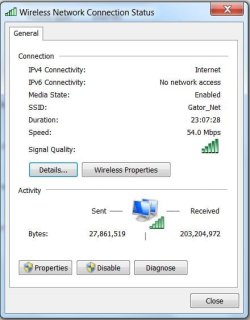
I have just one connection, and I'd like to make a shortcut to that (one) connection, like I could in XP.
With that shortcut on my desktop, I can open the connections window to that one connection and see how it's doing and disable it if I want to.
When it's disabled, just clicking on the shortcut, ENABLES it again, without ever opening a window at all.
I can go into the connections folder in control panel and do the same, but that's slow and clunky.
There are so many quick and easy things that I did in XP that I can no longer do in Win-7 that I'm beginning to get used to it. I won't loose any sleep over it anyway. And I won't be running Windows 7 as my primary OS anytime soon.
I just wanna say that I thank the guys on this forum for helping me to get Windows Mail up and running on Win-7, 64bit. I have it tweaked and tuned so it looks and acts pretty much like Outlook Express 6, which is what I was after.
I also have my entire address book from XP transferred to Win-7 'Contacts'.
I had to save it as a CSV file in XP for it to be importable into Contacts in Win-7.
I've already had several of my customers buy new PC's with Win-7 installed
(a few of those are 64 bit) and of course they want to use an email program that's familiar to them....
something that looks and works like Outlook Express.
I get lots of "attaboys" when I pull the rabbit out of my hat and make Windows Mail work for them and then save their Address Book to Win-7 as well. And it's all thanks to information I've read on this forum.
I'm in XP-Pro right now, but when I get back into Win-7, I'll try to make that shortcut to the connections folder.
Thanks again,
The Doctor