No Local Network Access

kqmaverick

New member
Local time
7:19 PM
Messages
8
I havent been able to get Network access working, The internet work fine. In the Network Status window it lists my access type as Internet and not Local and Internet like i think it should. Any ideas?
 

Attachments

  • Network.jpg
    Network.jpg
    59.2 KB · Views: 542

My Computer

Computer Manufacturer/Model Number
Alienware m17x
OS
Windows 7 x64 Home Premium
CPU
Intel Core2 Extreme Quad QX9300
Memory
4GB DDR3 at 1333MHz
Graphics Card(s)
Dual 280M GTX in SLI
Sound Card
Creative X-Fi Xtreme Notebook
Screen Resolution
1920x1200
Hard Drives
2 x 500GB 7200 RPM HDD Raid 0
Just checked mine and it's the same, showing internet but not local?

I have to access my NAS by mapping network drive. Do you have network discovery turned on? It' sunder the change advance sharing settings on the left of the panel in your screen shot.
 

My Computer

OS
Win7 7600 x64
Memory
8gig
Graphics Card(s)
Nvidia
Monitor(s) Displays
dual wide screen 22inch each
Hard Drives
2x 500gig
LAN

I havent been able to get Network access working, The internet work fine. In the Network Status window it lists my access type as Internet and not Local and Internet like i think it should. Any ideas?

In win 7 you need to set up either a homegroup as your snip says you are ready to do, or set up a work style "workgroup" I like the workgroup concept more cause I am an old time networker, but its up to you. You need to go into network and sharing (right click the network icon in toolbar) choose homegroup options, and set up a homegroup if you want the homegroup type of lcal networking. Once you have set up networking you need to decide what you want to share.

Win 7 is a bit different than previous versions but you will get the hang of it.

I have subscribed to this thread so every time you post to it I will get an email and come back to check it out.

Hope this helps and points you in the right direction

Ken
 
Last edited:

My Computer

Computer Manufacturer/Model Number
HP Pavillion dv-7 1005 Tx
OS
Win 8 Release candidate 8400
CPU
[email protected]
Memory
4 gigs
Graphics Card(s)
Nvidia 9600M
Sound Card
HD built-in
Monitor(s) Displays
17" Wxga
Screen Resolution
1440x900
Cooling
none
Internet Speed
45Mb down 5Mb up
I verified Network Discovery is still on and i am currently setup to use a Workgroup. I forgot to mention that i have network access VIA IP address it does not work VIA NETBIOS.
 

My Computer

Computer Manufacturer/Model Number
Alienware m17x
OS
Windows 7 x64 Home Premium
CPU
Intel Core2 Extreme Quad QX9300
Memory
4GB DDR3 at 1333MHz
Graphics Card(s)
Dual 280M GTX in SLI
Sound Card
Creative X-Fi Xtreme Notebook
Screen Resolution
1920x1200
Hard Drives
2 x 500GB 7200 RPM HDD Raid 0
no lan

I verified Network Discovery is still on and i am currently setup to use a Workgroup. I forgot to mention that i have network access VIA IP address it does not work VIA NETBIOS.

hi and welcome again

are you saying that IP works but netbios doesn't? So if ip works can you ping your router? (type cmd in search, then type ping whatever your router's ip is (something like 192.168.1.1)). If ip is working then netbios has to be working they are dependant.

Im confused what can you do on your local area network?

Ken
 

My Computer

Computer Manufacturer/Model Number
HP Pavillion dv-7 1005 Tx
OS
Win 8 Release candidate 8400
CPU
[email protected]
Memory
4 gigs
Graphics Card(s)
Nvidia 9600M
Sound Card
HD built-in
Monitor(s) Displays
17" Wxga
Screen Resolution
1440x900
Cooling
none
Internet Speed
45Mb down 5Mb up
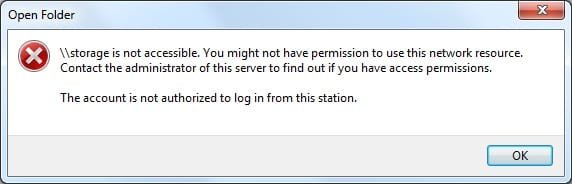
I have a Network Storage device. I normally access it by its share name \\storage but on my Windows 7 system i can only access via its static ip address \\192.168.1.3 . the other issue im having is with my playstation 3, which can act as a media player for files located on network devices. My windows 7 machine does not show up on it as a device sharing media (media sharing is turned on). I also have a Windows Vista machine my windows Vista machine and Windows 7 machine cannot see eachother.
 

My Computer

Computer Manufacturer/Model Number
Alienware m17x
OS
Windows 7 x64 Home Premium
CPU
Intel Core2 Extreme Quad QX9300
Memory
4GB DDR3 at 1333MHz
Graphics Card(s)
Dual 280M GTX in SLI
Sound Card
Creative X-Fi Xtreme Notebook
Screen Resolution
1920x1200
Hard Drives
2 x 500GB 7200 RPM HDD Raid 0
Meh NBT is archaic, it's unfortunate we still rely on it.

Force the OS to use NBT or NetBIOS by going to Network and Sharing Center -> Change adapter settings -> Right-click Wireless Network Connection -> Click Properties -> Select Internet Protocol Version 4 -> Click Properties -> Click the Advanced button on the General tab -> Select the WINS tab -> Select Enable NetBIOS over TCP/IP.

I would also force QoS to ensure NBT is used. When you are in the Properties window for the Wireless Network Connection, hit the configure button -> select the Advanced tab -> Select the QoS property -> Select Enabled -> click OK. Your connection will have to be re-established. When it is connected again, you should be golden.
 

My Computer

Computer type
PC/Desktop
OS
7229
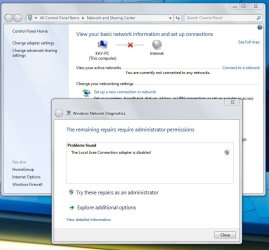
to me it happens that when I turn on my PC that it doesn't have internet connection and I need to disable the netowrk (deleting it) and create a new one. then i can choose the " troubleshhot" and it automatically fixes it. but before I disable and re-create the network " troubleshoot" wont' help.

I'm hard-connected to a Netgear router. Teh outer is fine and my 2 wireless laptops login automatically without problems. It worked well auotmatically logging in with my desktop for a while in " W7 RC 7100 64" but all of sudden it makes such problems after booting up. I'm not sure if I did something to it.

anyone the same problem? Well, actually anyone with a solution? ;)

Edit: it shows " LAN adapter disabled" as error. Really weird since it can fix itself after I destroy the network.
 
Last edited:

My Computer

Computer Manufacturer/Model Number
homemade
OS
W7 Pro 64
CPU
Intel i3 3220 @ 3.3 GHz
Motherboard
ASRock H77M
Memory
2x8GB DDR 3 1600 Kingston
Graphics Card(s)
onboard
Sound Card
onboard
Monitor(s) Displays
two 21" LCD
Hard Drives
128 GB Samsung 830
PSU
OCZ400MXSP
Cooling
Stock
Internet Speed
DSL
I still get this error:
 

Attachments

  • error.jpg
    error.jpg
    13.7 KB · Views: 117

My Computer

Computer Manufacturer/Model Number
Alienware m17x
OS
Windows 7 x64 Home Premium
CPU
Intel Core2 Extreme Quad QX9300
Memory
4GB DDR3 at 1333MHz
Graphics Card(s)
Dual 280M GTX in SLI
Sound Card
Creative X-Fi Xtreme Notebook
Screen Resolution
1920x1200
Hard Drives
2 x 500GB 7200 RPM HDD Raid 0
I'm having this exact problem as well. I have a Dlink DNS-323 attached to my network which just today became inaccessible using the network name \\DNS\ (yeah, I know, not a great choice, but it worked), and is now only accessible via IP. If I try the netbios name, I get the same errors everyone else does.

Of note: I just installed several updates today, and right after installing them, the problem appeared. Those updates were:

Security Update for Microsoft Office Publisher 2007 (KB969693)
Cumulative Security Update for ActiveX Killbits for Windows 7 Release Candidate for x64-based Systems (KB973346)
Windows Live Essentials
Update for Microsoft Office Outlook 2007 Junk Email Filter (KB971933)
Office Live add-in 1.4

Any help would be appreciated.

 

My Computer

OS
Windows 7
One more quick detail - adding an entry to the LMHosts file does NOT fix the issue.
 

My Computer

OS
Windows 7
I attached my screen when it doesn't connect, and once it is " repaired"
. Even when i restart the PC it doesn't connect to the internet automatically. It did at first, but I must have screwed something up, or soem isntallation or update screwed it up.
 

Attachments

  • LAN disabled.JPG
    LAN disabled.JPG
    69.3 KB · Views: 86
  • LAN fixed.JPG
    LAN fixed.JPG
    58 KB · Views: 82

My Computer

Computer Manufacturer/Model Number
homemade
OS
W7 Pro 64
CPU
Intel i3 3220 @ 3.3 GHz
Motherboard
ASRock H77M
Memory
2x8GB DDR 3 1600 Kingston
Graphics Card(s)
onboard
Sound Card
onboard
Monitor(s) Displays
two 21" LCD
Hard Drives
128 GB Samsung 830
PSU
OCZ400MXSP
Cooling
Stock
Internet Speed
DSL
I read from googleing that the problem of not automatically connecting to internet at startup mighthave been caused by a windows update. that was a thread about win XP and an SP3 problem. Possible something similar happened with W7 at an update?

I have enabled (automatic) all services that somehow sounded like noetworking, incl. " IP Helper" . no improvement. :cry:
 

My Computer

Computer Manufacturer/Model Number
homemade
OS
W7 Pro 64
CPU
Intel i3 3220 @ 3.3 GHz
Motherboard
ASRock H77M
Memory
2x8GB DDR 3 1600 Kingston
Graphics Card(s)
onboard
Sound Card
onboard
Monitor(s) Displays
two 21" LCD
Hard Drives
128 GB Samsung 830
PSU
OCZ400MXSP
Cooling
Stock
Internet Speed
DSL
no lan

I still get this error:

I hate to say it but sometimes you have to give in and bite the bullet. did you have this problem since you installed win 7?

might be time to re-install (with the most recent build)

ken
 

My Computer

Computer Manufacturer/Model Number
HP Pavillion dv-7 1005 Tx
OS
Win 8 Release candidate 8400
CPU
[email protected]
Memory
4 gigs
Graphics Card(s)
Nvidia 9600M
Sound Card
HD built-in
Monitor(s) Displays
17" Wxga
Screen Resolution
1440x900
Cooling
none
Internet Speed
45Mb down 5Mb up
No when i first installed it i was working fine, then one day nothing. I'm sure something changed but i cant figure out for the life of me what it was.
 

My Computer

Computer Manufacturer/Model Number
Alienware m17x
OS
Windows 7 x64 Home Premium
CPU
Intel Core2 Extreme Quad QX9300
Memory
4GB DDR3 at 1333MHz
Graphics Card(s)
Dual 280M GTX in SLI
Sound Card
Creative X-Fi Xtreme Notebook
Screen Resolution
1920x1200
Hard Drives
2 x 500GB 7200 RPM HDD Raid 0
Back
Top