Solved No network acesss, ipv4 and ipv6 not connected

After I reenabled the auto ip, my ipconfig reverted back to same values of the ipconfig I first posted in the first page. I tried disabling and enabling the nics but nothing happened. I also tried uninstalling and reinstalling them, but again, there was still no connection.
do your network uses any domain or some other things? who configures your router? is your DHCP service from router?
I don't really understand the first question. My friend configured my router. I don't know how to answer the last question either. Where do I find that out?

There looks to be a tunnel adaptor problem to me although I can't see the rest of your ipconfig.

Try running the file below first, save file then unzip and click on it and let it run.
 

Attachments

My Computer My Computer

At a glance

Windows 7 Ult, Windows 8.1 Pro,Q9650-4.275GHz, E8600 4.5GHz, E6750-3.8GHzG.Skill PC2 9600 1200Mhz 5 5 5 15 2TGTX480
Computer type
PC/Desktop
Computer Manufacturer/Model Number
Home built
OS
Windows 7 Ult, Windows 8.1 Pro,
CPU
Q9650-4.275GHz, E8600 4.5GHz, E6750-3.8GHz
Motherboard
Evga 780i FTW
Memory
G.Skill PC2 9600 1200Mhz 5 5 5 15 2T
Graphics Card(s)
GTX480
Sound Card
Asus Xonar D2
Monitor(s) Displays
HannsG
Screen Resolution
1680X1050
Hard Drives
GSkill Phoenix Pro 120GB SSD
PSU
ThermalTake Toughpower 1000Watt modular
Case
ThermalTake XaserV
Cooling
Xigmatek S1283
Keyboard
Logitech G15
Mouse
Logitech G9
Internet Speed
T1
@vaidas3 There is only one pc on my network. My router only has two ethernet ports. One connects to the modem, and the other connects to the computer I choose to use. (So I'm switching back and forth with my desktop and laptop) My router is also a voip, so I have phone line connected too.

I tried doing the manual config, and inputted values for the last digit of the ip address, but there was no response to the changes. When I do an Ip config, it doesn't list the term "Ip Address" like my desktop does. The only term similar to that is IPv4 ip address? I also have one network available in my home.

Here is my ping from my desktop:

Code:
Pinging 192.168.254.4 with 32 bytes of data:

Reply from 192.168.254.4: bytes=32 time<1ms TTL=128

Ping statistics for 192.168.254.4:
    Packets: Sent = 4, Received = 4, Lost = 0 (0% loss),
Approximate round trip times in milli-seconds:
    Minimum = 0ms, Maximum = 0ms, Average = 0ms


C:\Documents and Settings\charm>ping 192.168.254.1

Pinging 192.168.254.1 with 32 bytes of data:

Reply from 192.168.254.1: bytes=32 time<1ms TTL=250

Ping statistics for 192.168.254.1:
    Packets: Sent = 4, Received = 4, Lost = 0 (0% loss),
Approximate round trip times in milli-seconds:
    Minimum = 0ms, Maximum = 0ms, Average = 0ms

C:\Documents and Settings\charm>ping 208.67.222.222

Pinging 208.67.222.222 with 32 bytes of data:

Reply from 208.67.222.222: bytes=32 time=48ms TTL=50
Reply from 208.67.222.222: bytes=32 time=46ms TTL=50
Reply from 208.67.222.222: bytes=32 time=48ms TTL=50
Reply from 208.67.222.222: bytes=32 time=46ms TTL=50

Ping statistics for 208.67.222.222:
    Packets: Sent = 4, Received = 4, Lost = 0 (0% loss),
Approximate round trip times in milli-seconds:
    Minimum = 46ms, Maximum = 48ms, Average = 47ms

C:\Documents and Settings\charm>ping 8.8.8.8

Pinging 8.8.8.8 with 32 bytes of data:

Reply from 8.8.8.8: bytes=32 time=40ms TTL=45
Reply from 8.8.8.8: bytes=32 time=57ms TTL=45
Reply from 8.8.8.8: bytes=32 time=41ms TTL=45

Ping statistics for 8.8.8.8:
    Packets: Sent = 4, Received = 4, Lost = 0 (0% loss),
Approximate round trip times in milli-seconds:
    Minimum = 40ms, Maximum = 57ms, Average = 44ms

C:\Documents and Settings\charm>ping yahoo.com

Pinging yahoo.com [98.139.183.24] with 32 bytes of data:

Reply from 98.139.183.24: bytes=32 time=127ms TTL=48
Reply from 98.139.183.24: bytes=32 time=147ms TTL=48
Reply from 98.139.183.24: bytes=32 time=147ms TTL=47
Reply from 98.139.183.24: bytes=32 time=191ms TTL=47

Ping statistics for 98.139.183.24:
    Packets: Sent = 4, Received = 4, Lost = 0 (0% loss),
Approximate round trip times in milli-seconds:
    Minimum = 127ms, Maximum = 191ms, Average = 153ms
And here's my ping for laptop. I'm not sure if I did this one right.
Code:
C:\Users\charm>ping 192.168.254.5

Pinging 192.168.254.5 with 32 bytes of data:
Reply from 192.168.254.5: bytes=32 time<1ms TTL=128

Ping statistics for 192.168.254.5:
    Packets: Sent = 4, Received = 4, Lost = 0 (0% loss),
Approximate round trip times in milli-seconds:
    Minimum = 0ms, Maximum = 0ms, Average = 0ms

C:\Users\charm>ping 192.168.254.1

Pinging 192.168.254.1 with 32 bytes of data:
Reply from 192.168.254.5: Destination host unreachable.

Ping statistics for 192.168.254.1:
    Packets: Sent = 4, Received = 4, Lost = 0 (0% loss),

C:\Users\charm>ping 208.67.220.220

Pinging 208.67.220.220 with 32 bytes of data:
Reply from 192.168.254.5: Destination host unreachable.

Ping statistics for 208.67.220.220:
    Packets: Sent = 4, Received = 4, Lost = 0 (0% loss),

C:\Users\charm>ping 8.8.8.8

Pinging 8.8.8.8 with 32 bytes of data:
Reply from 192.168.254.5: Destination host unreachable.

Ping statistics for 8.8.8.8:
    Packets: Sent = 4, Received = 4, Lost = 0 (0% loss),


C:\Users\charm>ping yahoo.com
Ping request could not find host yahoo.com. Please check the name and try again.
@chev65 I tried another ip config but it doesn't list anything beyond the tunnel adapters. I ran the program you attached but when I'm prompted to 'press any key' the window disappears. This repeated after I tried to run it a couple more times. The strange thing is that my Windows 7 is a 64 bit, but when I click on ia64, the program tells me its intended for a different machine type. But with the i386, I don't get the message at all? Either way, the window disappears. Or was the program designed to be that way?
 

My Computer My Computer

At a glance

Windows 7AMd A4-3300M APU 1.90 GHz
Computer Manufacturer/Model Number
HP/ Hp Pavillion g4 Notebook
OS
Windows 7
CPU
AMd A4-3300M APU 1.90 GHz
Go to Control Panel -> All Control Panel Items -> Network and Sharing Center and click on "Change Adapter Settings". Right click on "Local Area Connection" and select properties. Post a screenshot of that window so we can see what adapters are present.

When you say "I also have one network available in my home", are you just saying that you only have one network?
 

My Computer My Computer

At a glance

Windows 7 Ultimate x64
OS
Windows 7 Ultimate x64
I'm not quite sure. I'm guessing one because I have one modem. Please explain, because I don't really know.

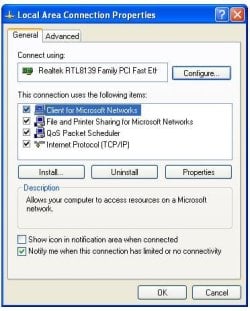
And here's a pic of the adapters.
 

Attachments

  • screenshot.jpg
    screenshot.jpg
    34.2 KB · Views: 42

My Computer My Computer

At a glance

Windows 7AMd A4-3300M APU 1.90 GHz
Computer Manufacturer/Model Number
HP/ Hp Pavillion g4 Notebook
OS
Windows 7
CPU
AMd A4-3300M APU 1.90 GHz
Is the "Reliable Multicast Protocol" checked in your other machine?

And yes, one modem typically means one ISP (internet service provider). There are exceptions, though. Basically just wondering why you had stated it, that's all. It's good though, the more info you provide, the easier to help.
 

My Computer My Computer

At a glance

Windows 7 Ultimate x64
OS
Windows 7 Ultimate x64
Oh I see. Vaidas3 was asking me if I had any other available networks I could connect to. I don't have Reliable Multicast Protocol in my desktop. Just in case the information is needed that machine's os is windows xp.

Desktop adapters:
 

Attachments

  • desktop.JPG
    desktop.JPG
    33.2 KB · Views: 39

My Computer My Computer

At a glance

Windows 7AMd A4-3300M APU 1.90 GHz
Computer Manufacturer/Model Number
HP/ Hp Pavillion g4 Notebook
OS
Windows 7
CPU
AMd A4-3300M APU 1.90 GHz
Okay, select it and then click uninstall, then okay. Then reboot and see what you've got.

(You can always install it again later, if needed).
 

My Computer My Computer

At a glance

Windows 7 Ultimate x64
OS
Windows 7 Ultimate x64
Still no luck. Just in case I need the Reliable Multicast Protocol later, how do I reinstall it?
 

My Computer My Computer

At a glance

Windows 7AMd A4-3300M APU 1.90 GHz
Computer Manufacturer/Model Number
HP/ Hp Pavillion g4 Notebook
OS
Windows 7
CPU
AMd A4-3300M APU 1.90 GHz
Still no luck. Just in case I need the Reliable Multicast Protocol later, how do I reinstall it?

Go ahead and do it now:

In the same dialog window, click install, in the window that appears, click protocol and then add, another window opens where you can select it to reinstall it.

Let me know when you're done.
 

My Computer My Computer

At a glance

Windows 7 Ultimate x64
OS
Windows 7 Ultimate x64
Okay. I reinstalled the protocol.
 

My Computer My Computer

At a glance

Windows 7AMd A4-3300M APU 1.90 GHz
Computer Manufacturer/Model Number
HP/ Hp Pavillion g4 Notebook
OS
Windows 7
CPU
AMd A4-3300M APU 1.90 GHz
Yes. But I don't think the program worked because when it prompted me to press any key, the window just disappeared.
 

My Computer My Computer

At a glance

Windows 7AMd A4-3300M APU 1.90 GHz
Computer Manufacturer/Model Number
HP/ Hp Pavillion g4 Notebook
OS
Windows 7
CPU
AMd A4-3300M APU 1.90 GHz
Is the router also wireless?
 

My Computer My Computer

At a glance

Windows 7 Ultimate x64
OS
Windows 7 Ultimate x64
No. It's not wireless.
 

My Computer My Computer

At a glance

Windows 7AMd A4-3300M APU 1.90 GHz
Computer Manufacturer/Model Number
HP/ Hp Pavillion g4 Notebook
OS
Windows 7
CPU
AMd A4-3300M APU 1.90 GHz
Okay. The reason I asked is because I thought maybe there was some damage done when the wire was "pulled" from the laptop. Thought you might try connecting by wireless...

I would try running the appropriate file in the zip posted by chev65 again, maybe do it with everything minimized so that no other windows can get in the way in case it pops up another window. I also don't know if UAC will pop up (where the screen darkens and a window appears to ask you whether to allow or not), so pay attention to that.

Then do the flush.bat file over again, and after reboot, do an ipconfig/all again and post.
 

My Computer My Computer

At a glance

Windows 7 Ultimate x64
OS
Windows 7 Ultimate x64
Okay. So 4 UACs popped up and I believe it deleted something. I then did the flush and I got this text before it rebooted.

Code:
C:\Windows\system32>pushd\windows\system32\drivers\etc

C:\Windows\System32\drivers\etc>attrib -h -s -r hosts

C:\Windows\System32\drivers\etc>echo 127.0.0.1 localhost 1>HOSTS

C:\Windows\System32\drivers\etc>attrib +r +h +s hosts

C:\Windows\System32\drivers\etc>popd

C:\Windows\System32>ipconfig /release

Windows IP Configuration

An error occurred while releasing interface Local Area Connection : An address h
as not yet been associated with the network endpoint.

No operation can be performed on Wireless Network Connection while it has its me
dia disconnected.

C:\Windows\System32>ipconfig /renew

Windows IP Configuration

and here's my new ipconfig

Host Name . . . . . . . . . . . . : charm-HP
Primary Dns Suffix . . . . . . . :
Node Type . . . . . . . . . . . . : Hybrid
IP Routing Enabled. . . . . . . . : No
WINS Proxy Enabled. . . . . . . . : No

Ethernet adapter Local Area Connection:

Connection-specific DNS Suffix . :
Description . . . . . . . . . . . : Realtek PCIe FE Family Controller
Physical Address. . . . . . . . . : 44-1E-A1-D4-6A-CF
DHCP Enabled. . . . . . . . . . . : Yes
Autoconfiguration Enabled . . . . : Yes
Link-local IPv6 Address . . . . . : fe80::1da2:12c9:d529:c235%14(Preferred)
Autoconfiguration IPv4 Address. . : 169.254.194.53(Preferred)
Subnet Mask . . . . . . . . . . . : 255.255.0.0
Default Gateway . . . . . . . . . :
DHCPv6 IAID . . . . . . . . . . . : 189013665
DHCPv6 Client DUID. . . . . . . . : 00-01-00-01-15-B2-FA-17-44-1E-A1-D4-6A-CF

DNS Servers . . . . . . . . . . . : fec0:0:0:ffff::1%1
fec0:0:0:ffff::2%1
fec0:0:0:ffff::3%1
NetBIOS over Tcpip. . . . . . . . : Enabled

Wireless LAN adapter Wireless Network Connection:

Media State . . . . . . . . . . . : Media disconnected
Connection-specific DNS Suffix . :
Description . . . . . . . . . . . : Realtek RTL8188CE 802.11b/g/n WiFi Adapte
r
Physical Address. . . . . . . . . : AC-81-12-AD-85-C5
DHCP Enabled. . . . . . . . . . . : Yes
Autoconfiguration Enabled . . . . : Yes

Tunnel adapter isatap.{9D0A9DDA-25C2-462C-B6AD-09A0E9BDC5C4}:

Media State . . . . . . . . . . . : Media disconnected
Connection-specific DNS Suffix . :
Description . . . . . . . . . . . : Microsoft ISATAP Adapter
Physical Address. . . . . . . . . : 00-00-00-00-00-00-00-E0
DHCP Enabled. . . . . . . . . . . : No
Autoconfiguration Enabled . . . . : Yes

Tunnel adapter Local Area Connection* 11:

Media State . . . . . . . . . . . : Media disconnected
Connection-specific DNS Suffix . :
Description . . . . . . . . . . . : Microsoft 6to4 Adapter
Physical Address. . . . . . . . . : 00-00-00-00-00-00-00-E0
DHCP Enabled. . . . . . . . . . . : No
Autoconfiguration Enabled . . . . : Yes

Tunnel adapter Teredo Tunneling Pseudo-Interface:

Media State . . . . . . . . . . . : Media disconnected
Connection-specific DNS Suffix . :
Description . . . . . . . . . . . : Teredo Tunneling Pseudo-Interface
Physical Address. . . . . . . . . : 00-00-00-00-00-00-00-E0
DHCP Enabled. . . . . . . . . . . : No
Autoconfiguration Enabled . . . . : Yes

Tunnel adapter isatap.{2B0AF32E-368F-4CE3-845D-F7FEC4427044}:

Media State . . . . . . . . . . . : Media disconnected
Connection-specific DNS Suffix . :
Description . . . . . . . . . . . : Microsoft ISATAP Adapter #3
Physical Address. . . . . . . . . : 00-00-00-00-00-00-00-E0
DHCP Enabled. . . . . . . . . . . : No
Autoconfiguration Enabled . . . . : Yes

I'm going to try with the wireless network the next time I go to the library or some cafe. I think I can connect through a wireless network because when I turn on the wi-fi button, it's able to detect my neighbor's network.
 

My Computer My Computer

At a glance

Windows 7AMd A4-3300M APU 1.90 GHz
Computer Manufacturer/Model Number
HP/ Hp Pavillion g4 Notebook
OS
Windows 7
CPU
AMd A4-3300M APU 1.90 GHz
You could try uninstalling the IPv6 TCP/IP protocol from the network adapter. I see you still have IPv6 addresses listed in ipconfig as well as the tunnel adapters.

There are other ways to get rid of those tunnel adapters.
 

My Computer My Computer

At a glance

Windows 7 Ultimate x64
OS
Windows 7 Ultimate x64
C:\Users\charm>ping 192.168.254.5

Pinging 192.168.254.5 with 32 bytes of data:
Reply from 192.168.254.5: bytes=32 time<1ms TTL=128

Ping statistics for 192.168.254.5:
Packets: Sent = 4, Received = 4, Lost = 0 (0% loss),
Approximate round trip times in milli-seconds:
Minimum = 0ms, Maximum = 0ms, Average = 0ms

at least you can ping local host that is good thing at least tcp/ip protocol seems to be working

but it seems all other locations can not be pinged
lets go bit deeper
in cmd type arp -a and paste results

so as far as i understand your network uses only one pc at a time
and looks like this

Internet<-->modem<->router<->pc
cable between router and pc is changed depending which pc is used
by the way why is dns suffix used (that is why i asked does your network has a domain)
Connection-specific DNS Suffix . : socal.rr.com

can you for testing purposes eliminate router and make your netwok
Internet<-->modem<->pc
 

My Computer My Computer

At a glance

Windows 7 pro 64bit. (SP1)Intel core I5 24008GB DDR3 KingstonGigabyte GF GTX650OC
Computer type
PC/Desktop
Computer Manufacturer/Model Number
Self Built PC
OS
Windows 7 pro 64bit. (SP1)
CPU
Intel core I5 2400
Motherboard
Gigabyte H61
Memory
8GB DDR3 Kingston
Graphics Card(s)
Gigabyte GF GTX650OC
Sound Card
Realtek HD audio
Monitor(s) Displays
LCD 20"
Screen Resolution
1600x900
Hard Drives
INTEL SSD 320 80GB +Seagate 7200.12 1TBx3
PSU
Coolermaster RX450W
Case
Coolermaster atx case
Cooling
stock cooler
Keyboard
logitech
Mouse
logitech
Internet Speed
FTTD 100mbps
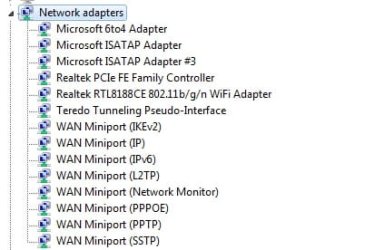
@sibbil I can only uncheck IPv6 TCP/IP in local area connection properties. The uninstall option is greyed out and unclickable. I just finished watching a video about tunnel adapters and the guy said to look at the hidden devices underneath the network adapters. He then said to disable the 6to4adaptor and teredo tunneling pseudo interface? I've attached an image of my adapters. What is your take on it?

@vaidas3 Here are the results I got after I typed the arp -a


Interface: 169.254.194.53 --- 0xe
Internet Address Physical Address Type
169.254.255.255 ff-ff-ff-ff-ff-ff static
224.0.0.22 01-00-5e-00-00-16 static
224.0.0.251 01-00-5e-00-00-fb static
224.0.0.252 01-00-5e-00-00-fc static
239.255.255.250 01-00-5e-7f-ff-fa static
255.255.255.255 ff-ff-ff-ff-ff-ff static
And I did a quick google search and my network does have a domain name. I would like to try the Internet<-->modem<->pc but I have voip and my family doesn't want to disconnect the phone.
 

Attachments

  • adapters.jpg
    adapters.jpg
    19.6 KB · Views: 27

My Computer My Computer

At a glance

Windows 7AMd A4-3300M APU 1.90 GHz
Computer Manufacturer/Model Number
HP/ Hp Pavillion g4 Notebook
OS
Windows 7
CPU
AMd A4-3300M APU 1.90 GHz
Go to
Control Panel>Network and Internet>Network and Sharing Center and on the left side click change adapter settings how many adapters do you see?
form there try to disable and enable ethernet adapter


you did restart the router yes? restart usually takes about a minute in that time your ip phone was down isnt it?

it would be enough to test just for a minute connection without router and reconnect it back.

if you use only one pc at a time then try to do same configuration as it is on working pc. including dns suffix do it manually. you can find all the setings in tcp/ipv4 properities advanced settings.
 

My Computer My Computer

At a glance

Windows 7 pro 64bit. (SP1)Intel core I5 24008GB DDR3 KingstonGigabyte GF GTX650OC
Computer type
PC/Desktop
Computer Manufacturer/Model Number
Self Built PC
OS
Windows 7 pro 64bit. (SP1)
CPU
Intel core I5 2400
Motherboard
Gigabyte H61
Memory
8GB DDR3 Kingston
Graphics Card(s)
Gigabyte GF GTX650OC
Sound Card
Realtek HD audio
Monitor(s) Displays
LCD 20"
Screen Resolution
1600x900
Hard Drives
INTEL SSD 320 80GB +Seagate 7200.12 1TBx3
PSU
Coolermaster RX450W
Case
Coolermaster atx case
Cooling
stock cooler
Keyboard
logitech
Mouse
logitech
Internet Speed
FTTD 100mbps
Back
Top