Solved No Operating System Asus Motherboard P8P67

keithwjones

New member
Local time
10:53 PM
Messages
4
Location
Somerset, UK
Helping a friend who has an auto update of drivers. After which no operating system found.

Win 7 64 bit, Asus Motherboard P8P67, made by Novatech.

I believe that the SATA drivers are the problem. I have repair disk and original driver disk.

When I run repair disk, no operating system is shown. I go to install drivers but I do not know which file to install.

I can see when first booted Marvell 88SE91xx comes up. When I mentioned this I was told that on the update the computer stalled on a Marvell update.

I can not see the drive in the bios and it appears to be connected correctly. When I look for drivers I appear to be able to access the drive as well as the driver disk.

Please can anyone tell me what file I load in when it asks in install drivers.

Keith
 

My Computer My Computer

At a glance

Windows 7 Home Premium SP1 32bitPentium Dual Core E6500 2.93GHz3GB
Computer type
PC/Desktop
Computer Manufacturer/Model Number
Dell Vostro 230
OS
Windows 7 Home Premium SP1 32bit
CPU
Pentium Dual Core E6500 2.93GHz
Memory
3GB
Antivirus
BT Net Protect Plus by Mcafee
Browser
Chrome
Hello and welcome Keith mate some things that bother me are that your friend is using an aftermarket driver update software?? - as a general rule always update drivers from the board manufacturer's site P8P67 | Motherboards | ASUS Global
the disk that comes with the board is invariably out of date by the time one buys it so don't use it unless you really have to.

One way of installing drivers is to download them to a USB on a different machine and then install from the stick to the machine

Personally I would get rid of it and that McAfee security a load of rubbish as far as a lot of members here will agree with if you want something else look here for free stuff Free Windows Desktop Software Security List | Gizmo's Freeware look under Real time and stay clear of AVG McAfee Trend and Comodo (good but a terrible nagger)

MSE is always a good bet to have too.

If you can boot into safe mode I would be inclined to run these too
SFC /SCANNOW Command - System File Checker
Disk Check < if necessary include the /f and /r in the command line as per Option2
Run these in safe mode and the sfc often best run for two to three runs – you can leave out the /r switch in ckdsk if you feel it not necessary
NB SFC best run for about three scans
 

My Computer My Computer

At a glance

Desk1 7 Home Prem / Desk2 10 Pro / Main lap A...Desk1 i5 3750K / Laptop i7 GTX 860M / Desk2 i...Desk1 8GB (1866) / Desk2 16GB (1333) / Laptop...Desk 1& 2NVidia GTX 650 & Laptops on board Intel
Computer type
PC/Desktop
Computer Manufacturer/Model Number
Own build (new) Desk1 / Asus ROG Win 7 / Desk2 1st build
OS
Desk1 7 Home Prem / Desk2 10 Pro / Main lap Asus ROG 10 Pro 2 laptop Toshiba 7 Pro Asus P2520 7 & 10
CPU
Desk1 i5 3750K / Laptop i7 GTX 860M / Desk2 i5 2500
Motherboard
Desk1 Asus P877-V / Desk2 Gigabyte H67 UD3H / Laptop ?
Memory
Desk1 8GB (1866) / Desk2 16GB (1333) / Laptop 8Gb DDR3
Graphics Card(s)
Desk 1& 2NVidia GTX 650 & Laptops on board Intel
Sound Card
Desk 1 & 2 -XONAR DG Realtek High Def audio Laptop
Monitor(s) Displays
Desk 1 Benq HD 2450 / Desk2 Philips 24" / Laptop 17.5"
Screen Resolution
1920x1080 D1 & D2 & Laptop 1
Hard Drives
Desk1 Samsung 120GB 830 SSD
Asus ROG 256GB 850 Pro SSD
Desk2 Samsung 840 256 SSD
Toshiba 120GB EVO
PSU
Desk 1 Corsair HX 1050/ Laptop ? / Desk 2 Corsair HX 650
Case
Desk 1 Cooler HAF XM ? Toshiba laptop / Desk2 Coolermaster
Cooling
Fans on all Desk1 -2 Desk2 - all Coolermasters 5 Laptop ?
Keyboard
Desk 1 MS Sidewinder X6 Desk 2 MS Sidewinder X 4
Mouse
Desk 1&2 - Gigabyte MS 900 gamer - laptop - Logitec wireless
Internet Speed
ADSL2+
Other Info
One other Desktop (tester) and spare Toshba laptop both with SSD's
Running Kaspersky 2016 ISS on all machines config'd identically
Logitec audio stereo systems on each machine (x3)
Canon MG5250MFC
Router/modem TP-Link running WPA2SK
Thanks for input - I agree ref update.

I have downloaded a Marvell update from Asus. Using repair disk.

But I am not sure which file I should be uploading. In disk/Floppy 64 there are various files .inf .sys .dll .cat and .oem. Is it one of those files?

Keith
 

My Computer My Computer

At a glance

Windows 7 Home Premium SP1 32bitPentium Dual Core E6500 2.93GHz3GB
Computer type
PC/Desktop
Computer Manufacturer/Model Number
Dell Vostro 230
OS
Windows 7 Home Premium SP1 32bit
CPU
Pentium Dual Core E6500 2.93GHz
Memory
3GB
Antivirus
BT Net Protect Plus by Mcafee
Browser
Chrome
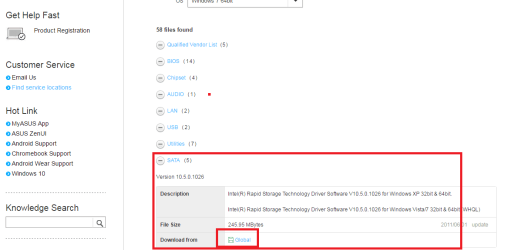
Keith if you want the SATA drivers you need to download it from that link I sent you see pic and if I where you I would also update the chipset one too the latest drivers are at the top of the listings if they do no good then you can always go back a version but never usually necessary.

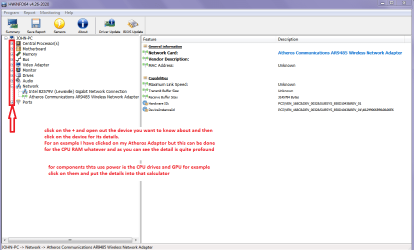
To find what components you are using see my little ditty and use PART B: to find details of them see pic also
Using HW Info
PART A:
You can test the volts on the PSU with HW Info HWiNFO, HWiNFO32/64 - Download < download the right bit version and close the right hand window select Sensors and scroll down to the power section where you will see what the volts are doing see my pic. In my pic the section (Nuvoton) with VBATT as a dead give away you are in the section for the rail voltages. There are other section titles and one that pops up often is ITE (sometimes the usual one for Gigabyte boards)
Now the voltage on the different rails have to be within 5% =+/- of what is required or the machine will not work properly if at all.
Limits +/-
12v = 11.4 – 12.6v
5v = 4.74 – 5.25v
3.3v = 3.135 – 3.465v
The Power good signal voltage at pin 8 on the 24 pin plug (grey cable) should be the same as the 5v rail reading/s
See this for the rail voltage info
PSUs 101: A Detailed Look Into Power Supplies (Section 2.)
The original right hand window shows the machine running and is handy for that but for looking at the components in some detail close it and use the main left hand side panel
FOR OTHER COMPONENTS
PART B:
Open each small square with + in it on the section the components are in and then click on the individual component/s (it will highlight in blue) - in the right hand side will appear all sorts of details including brands speeds and other essential info that particular device. See pic for example of the sort of detail you can access it just requires opening the device/s to get the brand and details on the right hand panel.

Edit I meant to add that Marvel is usually linked to a drive controller rather than a driver but I stand to be corrected.
 

Attachments

  • GLOBAL.PNG
    GLOBAL.PNG
    22.7 KB · Views: 3
  • HW INFO DEVICES.PNG
    HW INFO DEVICES.PNG
    32.3 KB · Views: 5

My Computer My Computer

At a glance

Desk1 7 Home Prem / Desk2 10 Pro / Main lap A...Desk1 i5 3750K / Laptop i7 GTX 860M / Desk2 i...Desk1 8GB (1866) / Desk2 16GB (1333) / Laptop...Desk 1& 2NVidia GTX 650 & Laptops on board Intel
Computer type
PC/Desktop
Computer Manufacturer/Model Number
Own build (new) Desk1 / Asus ROG Win 7 / Desk2 1st build
OS
Desk1 7 Home Prem / Desk2 10 Pro / Main lap Asus ROG 10 Pro 2 laptop Toshiba 7 Pro Asus P2520 7 & 10
CPU
Desk1 i5 3750K / Laptop i7 GTX 860M / Desk2 i5 2500
Motherboard
Desk1 Asus P877-V / Desk2 Gigabyte H67 UD3H / Laptop ?
Memory
Desk1 8GB (1866) / Desk2 16GB (1333) / Laptop 8Gb DDR3
Graphics Card(s)
Desk 1& 2NVidia GTX 650 & Laptops on board Intel
Sound Card
Desk 1 & 2 -XONAR DG Realtek High Def audio Laptop
Monitor(s) Displays
Desk 1 Benq HD 2450 / Desk2 Philips 24" / Laptop 17.5"
Screen Resolution
1920x1080 D1 & D2 & Laptop 1
Hard Drives
Desk1 Samsung 120GB 830 SSD
Asus ROG 256GB 850 Pro SSD
Desk2 Samsung 840 256 SSD
Toshiba 120GB EVO
PSU
Desk 1 Corsair HX 1050/ Laptop ? / Desk 2 Corsair HX 650
Case
Desk 1 Cooler HAF XM ? Toshiba laptop / Desk2 Coolermaster
Cooling
Fans on all Desk1 -2 Desk2 - all Coolermasters 5 Laptop ?
Keyboard
Desk 1 MS Sidewinder X6 Desk 2 MS Sidewinder X 4
Mouse
Desk 1&2 - Gigabyte MS 900 gamer - laptop - Logitec wireless
Internet Speed
ADSL2+
Other Info
One other Desktop (tester) and spare Toshba laptop both with SSD's
Running Kaspersky 2016 ISS on all machines config'd identically
Logitec audio stereo systems on each machine (x3)
Canon MG5250MFC
Router/modem TP-Link running WPA2SK
Thanks for help given.

I have solved the problem as follows:

Enter bios use DEL
Advanced Mode
Advanced
SATA
Mode set to AHCI
Changed to RAID Mode
Problem solved.

Keith
 

My Computer My Computer

At a glance

Windows 7 Home Premium SP1 32bitPentium Dual Core E6500 2.93GHz3GB
Computer type
PC/Desktop
Computer Manufacturer/Model Number
Dell Vostro 230
OS
Windows 7 Home Premium SP1 32bit
CPU
Pentium Dual Core E6500 2.93GHz
Memory
3GB
Antivirus
BT Net Protect Plus by Mcafee
Browser
Chrome
Ok Keith glad it is solved but it was the lack od specs mate that was needed if we knew tyou were running such a set up then it would have been easier.

so please do this for future posts
System Info - See Your System Specs
 

My Computer My Computer

At a glance

Desk1 7 Home Prem / Desk2 10 Pro / Main lap A...Desk1 i5 3750K / Laptop i7 GTX 860M / Desk2 i...Desk1 8GB (1866) / Desk2 16GB (1333) / Laptop...Desk 1& 2NVidia GTX 650 & Laptops on board Intel
Computer type
PC/Desktop
Computer Manufacturer/Model Number
Own build (new) Desk1 / Asus ROG Win 7 / Desk2 1st build
OS
Desk1 7 Home Prem / Desk2 10 Pro / Main lap Asus ROG 10 Pro 2 laptop Toshiba 7 Pro Asus P2520 7 & 10
CPU
Desk1 i5 3750K / Laptop i7 GTX 860M / Desk2 i5 2500
Motherboard
Desk1 Asus P877-V / Desk2 Gigabyte H67 UD3H / Laptop ?
Memory
Desk1 8GB (1866) / Desk2 16GB (1333) / Laptop 8Gb DDR3
Graphics Card(s)
Desk 1& 2NVidia GTX 650 & Laptops on board Intel
Sound Card
Desk 1 & 2 -XONAR DG Realtek High Def audio Laptop
Monitor(s) Displays
Desk 1 Benq HD 2450 / Desk2 Philips 24" / Laptop 17.5"
Screen Resolution
1920x1080 D1 & D2 & Laptop 1
Hard Drives
Desk1 Samsung 120GB 830 SSD
Asus ROG 256GB 850 Pro SSD
Desk2 Samsung 840 256 SSD
Toshiba 120GB EVO
PSU
Desk 1 Corsair HX 1050/ Laptop ? / Desk 2 Corsair HX 650
Case
Desk 1 Cooler HAF XM ? Toshiba laptop / Desk2 Coolermaster
Cooling
Fans on all Desk1 -2 Desk2 - all Coolermasters 5 Laptop ?
Keyboard
Desk 1 MS Sidewinder X6 Desk 2 MS Sidewinder X 4
Mouse
Desk 1&2 - Gigabyte MS 900 gamer - laptop - Logitec wireless
Internet Speed
ADSL2+
Other Info
One other Desktop (tester) and spare Toshba laptop both with SSD's
Running Kaspersky 2016 ISS on all machines config'd identically
Logitec audio stereo systems on each machine (x3)
Canon MG5250MFC
Router/modem TP-Link running WPA2SK
Back
Top