
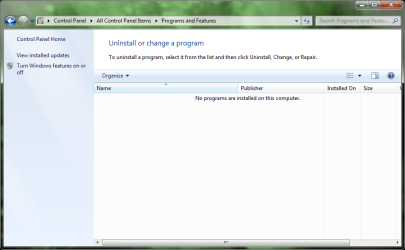
"No programs are installed on this computer" error

fire cat

Banned
Local time
3:19 AM
Messages
8
Hey everybody!
I'm new to the windows 7 forums.
So here is my problem: when i go to the Add/Remove Programs list, instead of seeing the list of installed programs it displays "No programs are installed on this computer". I tried rebooting the computer but that did do anything. Haven't turned on the computer since sunday 21.
I have attached a screenshot.
I am running Windows 7 Home Premium on the Samsung N310. I haven't had any problems befor this.
What can I do to solve this? Please help!

Thanks
Fire Cat
 

Attachments
  • No installed programs.png
    No installed programs.png
    40 KB · Views: 107

My Computer

OS
Windows 7 Home , Windows Vista Home, Windows XP Home, Windows XP Pro, Windows Mobile, Ubuntu Studio
Try using a third-party program such as Revo Uninstaller to see those programs.

BTW I see you're new. Welcome to SevenForums!
 

My Computer

Computer Manufacturer/Model Number
Custom
OS
Windows 7 Professional x64
CPU
Intel i7 2600K OC'd @ 4620 MHz
Motherboard
Asus P8Z68-V Pro
Memory
16GB GSkill Sniper 2133 Mhz (4x4GB)
Graphics Card(s)
EVGA GeForce GTX 480 SuperClocked+
Sound Card
Realtek High Definition Audio
Monitor(s) Displays
2x Acer S273HLbmii 27"
Screen Resolution
2 x 1920x1080
Hard Drives
64GB Crucial M4 SSD

Storage: Hitachi 1TB 5400RPM, Samsung 1.5TB 5400RPM
PSU
Corsair HW Series 750w (modular)
Case
Cooler Master HAF 932 Advanced Blue Edition
Cooling
CM Hyper 212+ CPU cooler, 3x 230mm + 1x 140mm case fans
Keyboard
Logitech MK320 (wireless)
Mouse
Logitech MK320 (wireless)
Internet Speed
30 Mb/s : 2 Mb/s
Not quite what I was looking for...

Thanks a lot Jonathan_King :D, I looked around the website and it software looks nice and has nice feature, but... I am trying to repair the error, not use something to replace it :(. Especially, I want to avoid installing big programs on my W7 computer, because as I said:
Fire Cat said:
I am running Windows 7 Home Premium on the Samsung N310
And if you look at it, you will see that the N310 isn't the biggest of computers, and I am allready using a lot of heavy softwares on it, eg: Virtual PC... :huh:
 

My Computer

OS
Windows 7 Home , Windows Vista Home, Windows XP Home, Windows XP Pro, Windows Mobile, Ubuntu Studio
Well please install Revo anyway. If it has the same problem, we know we have a bigger issue.
 

My Computer

Computer Manufacturer/Model Number
Custom
OS
Windows 7 Professional x64
CPU
Intel i7 2600K OC'd @ 4620 MHz
Motherboard
Asus P8Z68-V Pro
Memory
16GB GSkill Sniper 2133 Mhz (4x4GB)
Graphics Card(s)
EVGA GeForce GTX 480 SuperClocked+
Sound Card
Realtek High Definition Audio
Monitor(s) Displays
2x Acer S273HLbmii 27"
Screen Resolution
2 x 1920x1080
Hard Drives
64GB Crucial M4 SSD

Storage: Hitachi 1TB 5400RPM, Samsung 1.5TB 5400RPM
PSU
Corsair HW Series 750w (modular)
Case
Cooler Master HAF 932 Advanced Blue Edition
Cooling
CM Hyper 212+ CPU cooler, 3x 230mm + 1x 140mm case fans
Keyboard
Logitech MK320 (wireless)
Mouse
Logitech MK320 (wireless)
Internet Speed
30 Mb/s : 2 Mb/s
I did as you said, Jonathan_King, but some of the programs are not displayed, eg: adobe flash and shockwave, teamviewer and most importantly Office 2010 Beta.

*Edit*: Now the windows list of installed programs displays the Revo uninstaller.
 

My Computer

OS
Windows 7 Home , Windows Vista Home, Windows XP Home, Windows XP Pro, Windows Mobile, Ubuntu Studio
Looks like somehow Programs and Features lost the list of installed programs. Seems obvious, I guess.

You can try a System Restore to a point before the troubles.

If that doesn't work, I'm 90% sure a Repair Install will.
 

My Computer

Computer Manufacturer/Model Number
Custom
OS
Windows 7 Professional x64
CPU
Intel i7 2600K OC'd @ 4620 MHz
Motherboard
Asus P8Z68-V Pro
Memory
16GB GSkill Sniper 2133 Mhz (4x4GB)
Graphics Card(s)
EVGA GeForce GTX 480 SuperClocked+
Sound Card
Realtek High Definition Audio
Monitor(s) Displays
2x Acer S273HLbmii 27"
Screen Resolution
2 x 1920x1080
Hard Drives
64GB Crucial M4 SSD

Storage: Hitachi 1TB 5400RPM, Samsung 1.5TB 5400RPM
PSU
Corsair HW Series 750w (modular)
Case
Cooler Master HAF 932 Advanced Blue Edition
Cooling
CM Hyper 212+ CPU cooler, 3x 230mm + 1x 140mm case fans
Keyboard
Logitech MK320 (wireless)
Mouse
Logitech MK320 (wireless)
Internet Speed
30 Mb/s : 2 Mb/s
System restore worked fine! Thanks a lot!
I just created an additionnal restore point and backup in case it ever happens again!
I have a feeling Hypercam 2 is to blame...it is known to damage system files. Very happy to know it wasn't a virus!

Thanks a lot again,
Fire Cat
 

My Computer

OS
Windows 7 Home , Windows Vista Home, Windows XP Home, Windows XP Pro, Windows Mobile, Ubuntu Studio
No problem. Let's just hope it doesn't happen again!
 

My Computer

Computer Manufacturer/Model Number
Custom
OS
Windows 7 Professional x64
CPU
Intel i7 2600K OC'd @ 4620 MHz
Motherboard
Asus P8Z68-V Pro
Memory
16GB GSkill Sniper 2133 Mhz (4x4GB)
Graphics Card(s)
EVGA GeForce GTX 480 SuperClocked+
Sound Card
Realtek High Definition Audio
Monitor(s) Displays
2x Acer S273HLbmii 27"
Screen Resolution
2 x 1920x1080
Hard Drives
64GB Crucial M4 SSD

Storage: Hitachi 1TB 5400RPM, Samsung 1.5TB 5400RPM
PSU
Corsair HW Series 750w (modular)
Case
Cooler Master HAF 932 Advanced Blue Edition
Cooling
CM Hyper 212+ CPU cooler, 3x 230mm + 1x 140mm case fans
Keyboard
Logitech MK320 (wireless)
Mouse
Logitech MK320 (wireless)
Internet Speed
30 Mb/s : 2 Mb/s
Firecat,

I have the same problem you had before, but when I use the System Restore it says that it can't work because there is an antivirus running. I disabled all the options of the Norton Internet Security and the Windows Firewall, and it's still saying that, I tried a lots of times, but it doesn't work, What you did to run the System Restore?
I know it was 4 weeks ago, but if you remember what you did, pleas help me.

PD: Sorry about my english, it's not my first language and I am still learning.
 

My Computer

Computer Manufacturer/Model Number
TOSHIBA/
OS
windows 7
Firecat,

I have the same problem you had before, but when I use the System Restore it says that it can't work because there is an antivirus running. I disabled all the options of the Norton Internet Security and the Windows Firewall, and it's still saying that, I tried a lots of times, but it doesn't work, What you did to run the System Restore?
I know it was 4 weeks ago, but if you remember what you did, pleas help me.

PD: Sorry about my english, it's not my first language and I am still learning.
Welcome punkshot!

Try uninstalling Norton completely using the Norton Removal Tool.
 

My Computer

Computer Manufacturer/Model Number
Custom
OS
Windows 7 Professional x64
CPU
Intel i7 2600K OC'd @ 4620 MHz
Motherboard
Asus P8Z68-V Pro
Memory
16GB GSkill Sniper 2133 Mhz (4x4GB)
Graphics Card(s)
EVGA GeForce GTX 480 SuperClocked+
Sound Card
Realtek High Definition Audio
Monitor(s) Displays
2x Acer S273HLbmii 27"
Screen Resolution
2 x 1920x1080
Hard Drives
64GB Crucial M4 SSD

Storage: Hitachi 1TB 5400RPM, Samsung 1.5TB 5400RPM
PSU
Corsair HW Series 750w (modular)
Case
Cooler Master HAF 932 Advanced Blue Edition
Cooling
CM Hyper 212+ CPU cooler, 3x 230mm + 1x 140mm case fans
Keyboard
Logitech MK320 (wireless)
Mouse
Logitech MK320 (wireless)
Internet Speed
30 Mb/s : 2 Mb/s
Thanks Jonathan_King, I'll try tomorrow
 

My Computer

Computer Manufacturer/Model Number
TOSHIBA/
OS
windows 7
The system restore worked, but the problem's still there
 

My Computer

Computer Manufacturer/Model Number
TOSHIBA/
OS
windows 7
Back
Top