Solved No "Share With" Choice on Win7 Homegroup Menu

chriswchrisw

New member
Local time
3:06 AM
Messages
23
Desktop A hardwired to Netgear router, laptop B has wireless connection to router. Both Win7/64, Home Premium. I can get computer A (where the homegroup was established) to read and write (ie, permanently change) folders/files on computer B, but B can only read (not write) to A. I was supposed to get a "Share with" option when I rt-clk A's libraries to let B read/write on A, but I don't get that option (but I did get it on B during setup that allowed A to write on B!). I must have a setting wrong someplace that won't allow me the "share with" option on A. Any ideas?

I just found this from M$. "If you don't see the Share with menu, you might be trying to share an item on a network or other unsupported location. The Share with menu also won't appear when you select files outside your personal folder. " What does this mean? How does it explain why I can do what I want in one "direction"?, but not the other? What can I do to fix this? Thnx
 

My Computer My Computer

At a glance

Win 7 Home Prem 64
OS
Win 7 Home Prem 64

My Computer My Computer

At a glance

Windows 7 x64Intel i7 2600kG.skill Ripjaw 16gigs @ 1866Nvidia gtx580 (evga)
Computer Manufacturer/Model Number
Insane hobo technologies. ;-)
OS
Windows 7 x64
CPU
Intel i7 2600k
Motherboard
Asrock z68 extreme 4 gen 3
Memory
G.skill Ripjaw 16gigs @ 1866
Graphics Card(s)
Nvidia gtx580 (evga)
Sound Card
Integrated HD audio + hdmi
Monitor(s) Displays
24" ASUS widescreen + 42" insignia
Screen Resolution
1080p (1920x1080)
Hard Drives
128 Samsung 830
256 Samsung 840
3 x 1tb storage drive (various)
1 western digital 1tb (eSATA)
1 Seagate 1tb (eSATA)
PSU
1 kilowatt SLI/Crossfire rated Silverstone modular
Case
NZXT Phantom + additional 220 fan
Cooling
Zalmann
Keyboard
Microsoft wireless 3000 (v2)
Mouse
MS - wireless 5000 (bluetrack)
Internet Speed
depends on if you ask me or my provider.
Other Info
The above information is provided as is, and the author assumes no responsibility for issues it may cause with your sanity or fanboyism.
Magus....I believe everything is enabled, the only thing I can't do is write/change a file on A from B. I can start writing on A's file, but when I go to save the changes, "access is denied".
 
Last edited:

My Computer My Computer

At a glance

Win 7 Home Prem 64
OS
Win 7 Home Prem 64
Desktop A hardwired to Netgear router, laptop B has wireless connection to router. Both Win7/64, Home Premium. I can get computer A (where the homegroup was established) to read and write (ie, permanently change) folders/files on computer B, but B can only read (not write) to A. I was supposed to get a "Share with" option when I rt-clk A's libraries to let B read/write on A, but I don't get that option (but I did get it on B during setup that allowed A to write on B!). I must have a setting wrong someplace that won't allow me the "share with" option on A. Any ideas?

I just found this from M$. "If you don't see the Share with menu, you might be trying to share an item on a network or other unsupported location. The Share with menu also won't appear when you select files outside your personal folder. " What does this mean? How does it explain why I can do what I want in one "direction"?, but not the other? What can I do to fix this? Thnx

You should first go through this Homegroup troubleshooting guide and make sure that everything is set up like the guide shows, the details make a difference here. :)

http://helpdeskgeek.com/windows-7/windows-7-cannot-connect-to-homegroup/

If everything appears to be set up correctly and you are still having problems you should http://www.sevenforums.com/tutorials/43980-homegroup-leave.html the Homegroup on both machines then create a new Homegroup. Leave both machines turned on for this. After you create the new Homegroup you should be able to http://www.sevenforums.com/tutorials/43972-homegroup-add-computer-join.html that Homegroup using the new Homegroup password.
 

My Computer My Computer

At a glance

Windows 7 Ult, Windows 8.1 Pro,Q9650-4.275GHz, E8600 4.5GHz, E6750-3.8GHzG.Skill PC2 9600 1200Mhz 5 5 5 15 2TGTX480
Computer type
PC/Desktop
Computer Manufacturer/Model Number
Home built
OS
Windows 7 Ult, Windows 8.1 Pro,
CPU
Q9650-4.275GHz, E8600 4.5GHz, E6750-3.8GHz
Motherboard
Evga 780i FTW
Memory
G.Skill PC2 9600 1200Mhz 5 5 5 15 2T
Graphics Card(s)
GTX480
Sound Card
Asus Xonar D2
Monitor(s) Displays
HannsG
Screen Resolution
1680X1050
Hard Drives
GSkill Phoenix Pro 120GB SSD
PSU
ThermalTake Toughpower 1000Watt modular
Case
ThermalTake XaserV
Cooling
Xigmatek S1283
Keyboard
Logitech G15
Mouse
Logitech G9
Internet Speed
T1
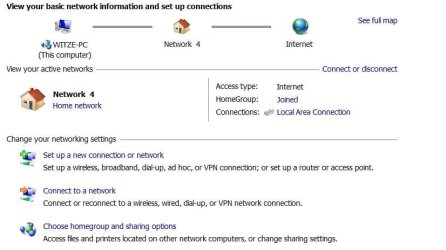
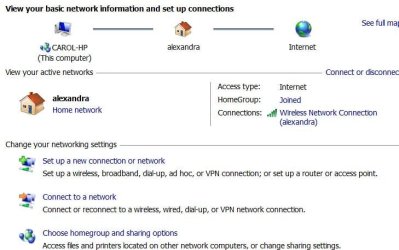
Chev....everything seems set up correctly as per your link. The left pic is what I see on A, the right is B (alexandra is the wireless link between B and the router). Look OK to you?

If this is still unresolved in the next day or two, I'll tear down the Homegroup and rebuild, as you suggest. Will keep you informed, thnx.
 

Attachments

  • Desktop A.jpg
    Desktop A.jpg
    38.7 KB · Views: 6
  • Laptop B.jpg
    Laptop B.jpg
    41.2 KB · Views: 7

My Computer My Computer

At a glance

Win 7 Home Prem 64
OS
Win 7 Home Prem 64
Chev....everything seems set up correctly as per your link. The left pic is what I see on A, the right is B (alexandra is the wireless link between B and the router). Look OK to you?

If this is still unresolved in the next day or two, I'll tear down the Homegroup and rebuild, as you suggest. Will keep you informed, thnx.

I just found this from M$. "If you don't see the Share with menu, you might be trying to share an item on a network or other unsupported location. The Share with menu also won't appear when you select files outside your personal folder. " What does this mean? How does it explain why I can do what I want in one "direction"?, but not the other? What can I do to fix this? Thnx

What that means is that the available files to share with the Homegroup need to be User files such as "My video's" My Documents, etc. Although you can also add other User files from Network drive locations by right clicking on say "My Pictures" then going to properties then click the "Add" button and browse to User files in other network locations at which point you can add them to the Library.
 

My Computer My Computer

At a glance

Windows 7 Ult, Windows 8.1 Pro,Q9650-4.275GHz, E8600 4.5GHz, E6750-3.8GHzG.Skill PC2 9600 1200Mhz 5 5 5 15 2TGTX480
Computer type
PC/Desktop
Computer Manufacturer/Model Number
Home built
OS
Windows 7 Ult, Windows 8.1 Pro,
CPU
Q9650-4.275GHz, E8600 4.5GHz, E6750-3.8GHz
Motherboard
Evga 780i FTW
Memory
G.Skill PC2 9600 1200Mhz 5 5 5 15 2T
Graphics Card(s)
GTX480
Sound Card
Asus Xonar D2
Monitor(s) Displays
HannsG
Screen Resolution
1680X1050
Hard Drives
GSkill Phoenix Pro 120GB SSD
PSU
ThermalTake Toughpower 1000Watt modular
Case
ThermalTake XaserV
Cooling
Xigmatek S1283
Keyboard
Logitech G15
Mouse
Logitech G9
Internet Speed
T1
Chev...I think I'm set up OK on that. The problem must then be that "access is denied" message I posted earlier. I can access the file and change it, I just can't save it. And it works in the A to B direction, just not B to A. AAARGH!
 

My Computer My Computer

At a glance

Win 7 Home Prem 64
OS
Win 7 Home Prem 64
Chev...I think I'm set up OK on that. The problem must then be that "access is denied" message I posted earlier. I can access the file and change it, I just can't save it. And it works in the A to B direction, just not B to A. AAARGH!

Check the permissions of the shared folder to make sure it's set to Homegroup read/write, by default it's only set to the "read" setting.

If you have any A/V software or third party firewalls installed it can also cause these types of problems. :)
 

My Computer My Computer

At a glance

Windows 7 Ult, Windows 8.1 Pro,Q9650-4.275GHz, E8600 4.5GHz, E6750-3.8GHzG.Skill PC2 9600 1200Mhz 5 5 5 15 2TGTX480
Computer type
PC/Desktop
Computer Manufacturer/Model Number
Home built
OS
Windows 7 Ult, Windows 8.1 Pro,
CPU
Q9650-4.275GHz, E8600 4.5GHz, E6750-3.8GHz
Motherboard
Evga 780i FTW
Memory
G.Skill PC2 9600 1200Mhz 5 5 5 15 2T
Graphics Card(s)
GTX480
Sound Card
Asus Xonar D2
Monitor(s) Displays
HannsG
Screen Resolution
1680X1050
Hard Drives
GSkill Phoenix Pro 120GB SSD
PSU
ThermalTake Toughpower 1000Watt modular
Case
ThermalTake XaserV
Cooling
Xigmatek S1283
Keyboard
Logitech G15
Mouse
Logitech G9
Internet Speed
T1
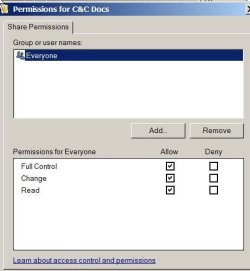
I've turned off firewalls, no effect. All folders in each library have been set to look like the attachment....is "everyone" incorrect?

Because I keep getting asked for permission to do something on A from B, could it be a "user account" problem?
 

Attachments

  • ScreenShot001.jpg
    ScreenShot001.jpg
    19.2 KB · Views: 6
Last edited:

My Computer My Computer

At a glance

Win 7 Home Prem 64
OS
Win 7 Home Prem 64
Last edited:

My Computer My Computer

At a glance

Windows 7 Ult, Windows 8.1 Pro,Q9650-4.275GHz, E8600 4.5GHz, E6750-3.8GHzG.Skill PC2 9600 1200Mhz 5 5 5 15 2TGTX480
Computer type
PC/Desktop
Computer Manufacturer/Model Number
Home built
OS
Windows 7 Ult, Windows 8.1 Pro,
CPU
Q9650-4.275GHz, E8600 4.5GHz, E6750-3.8GHz
Motherboard
Evga 780i FTW
Memory
G.Skill PC2 9600 1200Mhz 5 5 5 15 2T
Graphics Card(s)
GTX480
Sound Card
Asus Xonar D2
Monitor(s) Displays
HannsG
Screen Resolution
1680X1050
Hard Drives
GSkill Phoenix Pro 120GB SSD
PSU
ThermalTake Toughpower 1000Watt modular
Case
ThermalTake XaserV
Cooling
Xigmatek S1283
Keyboard
Logitech G15
Mouse
Logitech G9
Internet Speed
T1
Back
Top