No sound after a fresh Install

Reislet

New member
Local time
4:47 PM
Messages
6
Hey guys, I've just wasted too many hours trying to figure this out by my self. So any input is well appreciated.

The problem is the following, I don't have sound, at least I can't hear it, the volume is jumping up and down but it doesn't go into my headphones.

The specs are the following: (btw brand new pc)
Win7 Enterpise / p8h61-m Le / i5 2500 lga1155/ 4gb ram / nvidia geforce gtx 550 ti.

What I've done:
- Checked that the jacks are in the right places and they are plugged in perfectly.
- The drivers are up to date and downloaded from realtek site.
- Tried all the bios settings
- Nothing is muted

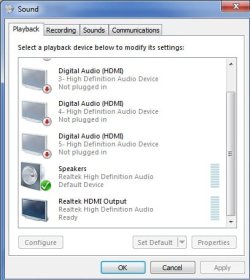
If i hit playback this is what I see, and I don't have any speakers only headphones.

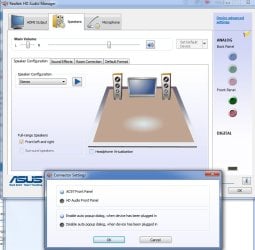
If I go to the realtek hd audio manager this is what i see, and only the front panel is active even though i've removed the pins from the mother board.

When I was updating my audio manager between the uninstall and the install in the playback tab I actually found headphones, though they were soundless. But when the install finished they were gone.

So if anybody has some ideas why i can get sound please help me out. Thanks :)

EDIT: is that sound manager that necessary isn't there any alternative?
 

Attachments
  • playback.jpg
    playback.jpg
    29.1 KB · Views: 14
  • realtekhdaudiomanager.jpg
    realtekhdaudiomanager.jpg
    59.4 KB · Views: 20

My Computer My Computer

OS
Windows 7 Ultimate x64
Disable all the playback devices except the one you are actually using.
...should probably be okay to keep realtek hdmi on since it's the same device.
All those generic digital audio devices need to be disabled though
just select one click properties then use the drop down to set it to disabled.
Currently they are only 'not plugged in'
My best experience is to not even use the realtek panel for audio...
 

My Computer My Computer

Computer Manufacturer/Model Number
Insane hobo technologies. ;-)
OS
Windows 7 x64
CPU
Intel i7 2600k
Motherboard
Asrock z68 extreme 4 gen 3
Memory
G.skill Ripjaw 16gigs @ 1866
Graphics Card(s)
Nvidia gtx580 (evga)
Sound Card
Integrated HD audio + hdmi
Monitor(s) Displays
24" ASUS widescreen + 42" insignia
Screen Resolution
1080p (1920x1080)
Hard Drives
128 Samsung 830
256 Samsung 840
3 x 1tb storage drive (various)
1 western digital 1tb (eSATA)
1 Seagate 1tb (eSATA)
PSU
1 kilowatt SLI/Crossfire rated Silverstone modular
Case
NZXT Phantom + additional 220 fan
Cooling
Zalmann
Keyboard
Microsoft wireless 3000 (v2)
Mouse
MS - wireless 5000 (bluetrack)
Internet Speed
depends on if you ask me or my provider.
Other Info
The above information is provided as is, and the author assumes no responsibility for issues it may cause with your sanity or fanboyism.
Thanks for the advice, the thing is that the device which I actually want to use, it's not present, and no idea why. Can you please elaborate on this: "realtek panel for audio"

I can live with the driver and with out the controller? (hmm this came out nice)
 

My Computer My Computer

OS
Windows 7 Ultimate x64

My Computer My Computer

Computer Manufacturer/Model Number
Insane hobo technologies. ;-)
OS
Windows 7 x64
CPU
Intel i7 2600k
Motherboard
Asrock z68 extreme 4 gen 3
Memory
G.skill Ripjaw 16gigs @ 1866
Graphics Card(s)
Nvidia gtx580 (evga)
Sound Card
Integrated HD audio + hdmi
Monitor(s) Displays
24" ASUS widescreen + 42" insignia
Screen Resolution
1080p (1920x1080)
Hard Drives
128 Samsung 830
256 Samsung 840
3 x 1tb storage drive (various)
1 western digital 1tb (eSATA)
1 Seagate 1tb (eSATA)
PSU
1 kilowatt SLI/Crossfire rated Silverstone modular
Case
NZXT Phantom + additional 220 fan
Cooling
Zalmann
Keyboard
Microsoft wireless 3000 (v2)
Mouse
MS - wireless 5000 (bluetrack)
Internet Speed
depends on if you ask me or my provider.
Other Info
The above information is provided as is, and the author assumes no responsibility for issues it may cause with your sanity or fanboyism.
That's correct the driver is downloaded from there.
Checked the device manager, there are no conflicts. In the audio section there are 4 hd audio drivers and the realtek one.
 

My Computer My Computer

OS
Windows 7 Ultimate x64
...yeah where are those other 4 coming from though, that's what I'm not getting...
 

My Computer My Computer

Computer Manufacturer/Model Number
Insane hobo technologies. ;-)
OS
Windows 7 x64
CPU
Intel i7 2600k
Motherboard
Asrock z68 extreme 4 gen 3
Memory
G.skill Ripjaw 16gigs @ 1866
Graphics Card(s)
Nvidia gtx580 (evga)
Sound Card
Integrated HD audio + hdmi
Monitor(s) Displays
24" ASUS widescreen + 42" insignia
Screen Resolution
1080p (1920x1080)
Hard Drives
128 Samsung 830
256 Samsung 840
3 x 1tb storage drive (various)
1 western digital 1tb (eSATA)
1 Seagate 1tb (eSATA)
PSU
1 kilowatt SLI/Crossfire rated Silverstone modular
Case
NZXT Phantom + additional 220 fan
Cooling
Zalmann
Keyboard
Microsoft wireless 3000 (v2)
Mouse
MS - wireless 5000 (bluetrack)
Internet Speed
depends on if you ask me or my provider.
Other Info
The above information is provided as is, and the author assumes no responsibility for issues it may cause with your sanity or fanboyism.
No idea, that's what win detects each and every time. Even though i disable the onboard from bios win still detects these 4. Might be from the nvidia card?
 

My Computer My Computer

OS
Windows 7 Ultimate x64
If you delete them do they reappear?
 

My Computer My Computer

Computer Manufacturer/Model Number
Insane hobo technologies. ;-)
OS
Windows 7 x64
CPU
Intel i7 2600k
Motherboard
Asrock z68 extreme 4 gen 3
Memory
G.skill Ripjaw 16gigs @ 1866
Graphics Card(s)
Nvidia gtx580 (evga)
Sound Card
Integrated HD audio + hdmi
Monitor(s) Displays
24" ASUS widescreen + 42" insignia
Screen Resolution
1080p (1920x1080)
Hard Drives
128 Samsung 830
256 Samsung 840
3 x 1tb storage drive (various)
1 western digital 1tb (eSATA)
1 Seagate 1tb (eSATA)
PSU
1 kilowatt SLI/Crossfire rated Silverstone modular
Case
NZXT Phantom + additional 220 fan
Cooling
Zalmann
Keyboard
Microsoft wireless 3000 (v2)
Mouse
MS - wireless 5000 (bluetrack)
Internet Speed
depends on if you ask me or my provider.
Other Info
The above information is provided as is, and the author assumes no responsibility for issues it may cause with your sanity or fanboyism.
I've uninstalled them from the device manager, did a restart and the first thing what win7 did is reinstalled them as new devices.

Btw what did you mean by this? "My best experience is to not even use the realtek panel for audio..."
 

My Computer My Computer

OS
Windows 7 Ultimate x64
The panel with all the envoirment features and stuff. It's part of the realtek pack, and in my personal experience their effects are horrible anyway.
If you have anything better than 5 dollar check out line bargin speakers on your computer you're best never turning those features on.
 

My Computer My Computer

Computer Manufacturer/Model Number
Insane hobo technologies. ;-)
OS
Windows 7 x64
CPU
Intel i7 2600k
Motherboard
Asrock z68 extreme 4 gen 3
Memory
G.skill Ripjaw 16gigs @ 1866
Graphics Card(s)
Nvidia gtx580 (evga)
Sound Card
Integrated HD audio + hdmi
Monitor(s) Displays
24" ASUS widescreen + 42" insignia
Screen Resolution
1080p (1920x1080)
Hard Drives
128 Samsung 830
256 Samsung 840
3 x 1tb storage drive (various)
1 western digital 1tb (eSATA)
1 Seagate 1tb (eSATA)
PSU
1 kilowatt SLI/Crossfire rated Silverstone modular
Case
NZXT Phantom + additional 220 fan
Cooling
Zalmann
Keyboard
Microsoft wireless 3000 (v2)
Mouse
MS - wireless 5000 (bluetrack)
Internet Speed
depends on if you ask me or my provider.
Other Info
The above information is provided as is, and the author assumes no responsibility for issues it may cause with your sanity or fanboyism.
Back
Top