No sound after windows 7 !

win7en

New member
Local time
6:59 AM
Messages
60
Hello,

I installed windows 7 on my HP dv1000 laptop. Windows works flawlessly but there is NO SOUND!
I tried to install the Microsoft UAA Bus Driver for High Definition Audio but I have an error message:"HPQNT.dll.failed"
What is going wrong ? How to fix this error to install UAA?
Please somebody has any idea, solution ?
I installed all imaginable driver (realtek...etc) but no sound!

Thanks for help
 

My Computer My Computer

OS
windows
Hello,

I installed windows 7 on my HP dv1000 laptop. Windows works flawlessly but there is NO SOUND!
I tried to install the Microsoft UAA Bus Driver for High Definition Audio but I have an error message:"HPQNT.dll.failed"
What is going wrong ? How to fix this error to install UAA?
Please somebody has any idea, solution ?
I installed all imaginable driver (realtek...etc) but no sound!

Thanks for help

Hello !!

You might wanna check this thread Win 7 and HP Pavilion dv1000 Notebook PC help. - HP Support Forum

- Captain
 

My Computer My Computer

Computer Manufacturer/Model Number
Samsung NP550P5C-S02IN
OS
Windows 7 Ultimate - 64-bit | Windows 8 Pro - 64-bit
CPU
Intel® Core™ i7 Processor 3,610QM (2.30Hz, 6MB L3 Cach
Memory
8 GB
Graphics Card(s)
NVIDIA® GeForce® GT 650M 2GB Graphics, Optimus™ techno
Sound Card
SoundAlive™ JBL 3 Speakers (With sub-Woofer)
Monitor(s) Displays
39.62cm (15.6) SuperBright 300nit HD+ LED Display
Screen Resolution
1,600 x 900, Anti-Reflective
Hard Drives
1TB S-ATA II Hard Drive (5,400RPM)
Thank you for your answer.
Actually, I have already installed this driver, with many others from HP website, but this didn't resolve the problem!
I have to try the Microsoft UAA high definition driver but I can't installed it, as there is an error message about the HPQNT.dll!
I think if I can fix this DLL issue, the problem might be solved! Microsoft UAA audio driver should resolve my problem but I can't installed it because of the DLL error!
 

My Computer My Computer

OS
windows
right-click on computer
manage
services
restart Windows Audio Service

see if that helps.;)
 

My Computer My Computer

Computer type
PC/Desktop
Computer Manufacturer/Model Number
Black Shadow IV
OS
Win7 x64
CPU
i5-3570K
Motherboard
Asrock Z77 Extreme4
Memory
2x4GB Rip Jaws 8-9-9-24
Graphics Card(s)
Asus R9 280X
Sound Card
X-Fi Extreme Music
Monitor(s) Displays
Dell U2412M
Screen Resolution
1920x1200
Hard Drives
Samsung Evo 250GB /
OCZ Vertex 4 128GB
PSU
Seasonic 660XP2
Case
Fractal Design R4
Cooling
Noctua NH-U12S
Hello,

I installed windows 7 on my HP dv1000 laptop. Windows works flawlessly but there is NO SOUND!
I tried to install the Microsoft UAA Bus Driver for High Definition Audio but I have an error message:"HPQNT.dll.failed"
What is going wrong ? How to fix this error to install UAA?
Please somebody has any idea, solution ?
I installed all imaginable driver (realtek...etc) but no sound!

Thanks for help

According to HP the only drivers for your computer are the XP ones. There is nothing newer and your model is not supported under win 7. You may be able to use the XP driver if you install it in compatibility mode.
(right click the insaller>properties>compatibility>XP)


Let us know if you need help

Ken
 

My Computer My Computer

Computer Manufacturer/Model Number
HP Pavillion dv-7 1005 Tx
OS
Win 8 Release candidate 8400
CPU
[email protected]
Memory
4 gigs
Graphics Card(s)
Nvidia 9600M
Sound Card
HD built-in
Monitor(s) Displays
17" Wxga
Screen Resolution
1440x900
Cooling
none
Internet Speed
45Mb down 5Mb up
Thank you for answers. Unfortunately, non of the proposed solutions worked !
I would like to install Microsoft UAA Bus but I can't !
I'm fed-up with HP !
 

My Computer My Computer

OS
windows
Did you check the link I posted of the thread on Microsoft technet, especially the post of Ivo87 in that thread?
 

My Computer My Computer

OS
7
I don't know if this works but worth to try

HERE
 

My Computer My Computer

OS
window's 7
CPU
core 2 quad
Motherboard
gigabyte
Memory
2gb corsair
Graphics Card(s)
ati hd4850
Monitor(s) Displays
lg
Screen Resolution
1600 X 900
Case
power logic
Other Info
none of the spec above is accurate
Sound has come back now! Thank you very much for your answer!
I don't know which solution solvedit but it works now and I can hear sounds on my laptop but....but there is still another problem: recording is not working!
I cant record any voice!
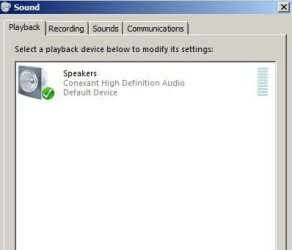
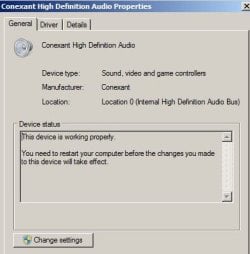
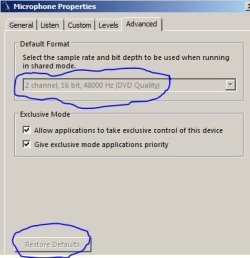
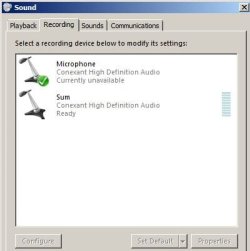
Recording device (built-in micro) is not working at all! I can hear sounds but can't record any sound! Others can't hear me neither! Although, driver is working correctly as figured out in the following screenshots:
Is there any abnormality with these devices ? I disabled, enabled, installed/unistalled all of these devices/drivers without success!

On the 4th screen shot (last one) I don't know why "Restore default" button and scrolling list are disabled, and Microphone is "Currently unavaliable"
?!
Really, fed-up with HP and windows 7 !
 

Attachments

  • 1.JPG
    1.JPG
    18.4 KB · Views: 21
  • 3.JPG
    3.JPG
    26 KB · Views: 5
  • 4.JPG
    4.JPG
    27.1 KB · Views: 7
  • 2.JPG
    2.JPG
    23 KB · Views: 5
Last edited:

My Computer My Computer

OS
windows
Maybe the microphone called Sum is your build in microphone because that
one has a level meter next to it.
Can't you click that one and adjust the properties?
 

My Computer My Computer

OS
7
sum maybe your microphone,however i'm confused that your microphone mark green but unavailable
 

My Computer My Computer

OS
window's 7
CPU
core 2 quad
Motherboard
gigabyte
Memory
2gb corsair
Graphics Card(s)
ati hd4850
Monitor(s) Displays
lg
Screen Resolution
1600 X 900
Case
power logic
Other Info
none of the spec above is accurate
Back
Top