Solved No sound in windows 7, onboard soundcard.

killbox

New member
Local time
12:24 AM
Messages
18
Hi guys, I'm experiencing trouble with the sound. At the moment I cant get any sound out of my computer. I use the onboard soundcard VIA® VT1828S 8. I think there might be some driver related issues?

What I've done:

- Installed a fresh install of windows on different harddrive to make sure the soundcard is working, and it was.

- Have installed/uinstalled newest sound driver.

Can anyone plase help me out?

Edit.

There might be a conflict with graphic card? ATI Radeon 5770


It says its disabled, but I haven't disabled it.
 

My Computer My Computer

At a glance

Windows 7 enterprise 64biti5 -750 socket 1156corsair xms 1600mhz 8gbAti radeon 5770 powercolor
OS
Windows 7 enterprise 64bit
CPU
i5 -750 socket 1156
Motherboard
Asus p55d pro
Memory
corsair xms 1600mhz 8gb
Graphics Card(s)
Ati radeon 5770 powercolor
Sound Card
onboard VIA VT1828S
Monitor(s) Displays
BenQ 24"
Screen Resolution
1920x1080
Hard Drives
many.... + SSD (Crucial C300)
PSU
Seasonic 750 watt MD12
Case
Corsair Obisidian 800D
Cooling
Noctua NH-D14
Keyboard
Logitech K510
Mouse
Microsoft Touch Mouse
Internet Speed
40/40 mbit fibre optics.
First, use this instead of your own picture link: http://www.sevenforums.com/tutorials/9733-screenshots-files-upload-post-seven-forums.html

Second, look up your motherboard manufacturer for all the drivers you need to download. Then go into windows update and download all that stuff like you need to. Then go to AMD's website and download its drivers.

You are saying you don't have a sound card, and your onboard sound isn't working at all, yes?

Dumb questions next, I know, but I still need to ask. You haven't been messing with settings, muting anything, or are missing speakers?

it is very interesting that it works on a brand new install on the same system. hmmm. do you have headphones plugged in? I'm sorry, but I can't guess as to what could be the problem. I'm nearly stumped. Could possibly be a bad onboard card. you bought your motherboard brand new? how recently? how long has the problem been occuring?
 

My Computer My Computer

At a glance

Microsoft Windows 8.1 Pro 64-bitIntel(R) Core(TM) i3-4130 CPU @ 3.40GHz8.00 GBNone
Computer type
PC/Desktop
Computer Manufacturer/Model Number
Custom Asus Build
OS
Microsoft Windows 8.1 Pro 64-bit
CPU
Intel(R) Core(TM) i3-4130 CPU @ 3.40GHz
Motherboard
B85M-E
Memory
8.00 GB
Graphics Card(s)
None
Sound Card
Realtek High Definition Audio
Monitor(s) Displays
Asus 23.6" Monitor
Screen Resolution
1920 x 1080 x 32 bits (4294967296 colors) @ 60 Hz
Hard Drives
INTEL SSDSC2BW180A4
Samsung SSD 840 PRO Series
PSU
Seasonic S12II-380Bronze
Case
Lian Li
Cooling
Fan, Passive
Keyboard
Logitech K120
Mouse
Microsoft Touch Mouse
Internet Speed
4ms Ping, 19.0 Mbps Download, 19.0 Mbps Upload
Antivirus
Eset Endpoint
Browser
Internet Explorer, Chrome
Are you using headphones or speakers? If you are using either, it could be one of them that isn't working. If you have any spare headphones or speakers, plug them in and see if they work. Sometimes it isn't anything wrong with the sound card, but the external device it's connected to.
 

My Computer My Computer

At a glance

Windows 7 Ultimate x64/Windows 8 Consumer Pre...Intel Pentium Dual Core E6700 3.2GHzStrontium 8192MB DDR3 1333Mhzmsi GeForce N560GTX-M2D1GD5 1GB
Computer Manufacturer/Model Number
Custom Build
OS
Windows 7 Ultimate x64/Windows 8 Consumer Preview x64/Ubuntu 11.04
CPU
Intel Pentium Dual Core E6700 3.2GHz
Motherboard
ASUS P5G41T-M LX
Memory
Strontium 8192MB DDR3 1333Mhz
Graphics Card(s)
msi GeForce N560GTX-M2D1GD5 1GB
Sound Card
Realtek HD Audio
Monitor(s) Displays
CHIMEI CMV 221D 22"
Screen Resolution
1680x1050
Hard Drives
Seagate Barracuda LP Green 3.5'' 2TB Internal HDD 5900RPM + WD Elements Desktop 1TB External HDD 7200RPM
PSU
SHAW Viper-1500w Gaming PSU
Case
Black eMaxx ATX Mini Tower Case
Keyboard
Microsoft Wireless Keyboard 1000
Mouse
Microsoft Wireless Optical Mouse 2000
Internet Speed
100GB @ 4.76Mbps
I'm very sure that the onboard soundcard is working properly. As i mentioned I installed a fresh windows 7 on a different harddrive just to make sure. I plugged speakers, headphones, and headphones via dac (toslink), and that worked great.

My motherboard is a Asus P55D PRO using a VIA® VT1828S sound module.

I'm pretty sure that there must be a driver jam or something.

I've tried to delete driver from device manager, then install a new driver from Asus website and ViA website.

The problem occurred last week. I've used a usb dac for a long time, and I recently purchased a new dac where I have to use spdif/toslink instead of usb. I plugged it in, but the dac weren't detected so I installed the driver.

I've also tried to uinstall graphic card drivers (Radeon 5770) and installed a fresh one.
 

My Computer My Computer

At a glance

Windows 7 enterprise 64biti5 -750 socket 1156corsair xms 1600mhz 8gbAti radeon 5770 powercolor
OS
Windows 7 enterprise 64bit
CPU
i5 -750 socket 1156
Motherboard
Asus p55d pro
Memory
corsair xms 1600mhz 8gb
Graphics Card(s)
Ati radeon 5770 powercolor
Sound Card
onboard VIA VT1828S
Monitor(s) Displays
BenQ 24"
Screen Resolution
1920x1080
Hard Drives
many.... + SSD (Crucial C300)
PSU
Seasonic 750 watt MD12
Case
Corsair Obisidian 800D
Cooling
Noctua NH-D14
Keyboard
Logitech K510
Mouse
Microsoft Touch Mouse
Internet Speed
40/40 mbit fibre optics.
why do you think it is the graphics card's fault then?
 

My Computer My Computer

At a glance

Microsoft Windows 8.1 Pro 64-bitIntel(R) Core(TM) i3-4130 CPU @ 3.40GHz8.00 GBNone
Computer type
PC/Desktop
Computer Manufacturer/Model Number
Custom Asus Build
OS
Microsoft Windows 8.1 Pro 64-bit
CPU
Intel(R) Core(TM) i3-4130 CPU @ 3.40GHz
Motherboard
B85M-E
Memory
8.00 GB
Graphics Card(s)
None
Sound Card
Realtek High Definition Audio
Monitor(s) Displays
Asus 23.6" Monitor
Screen Resolution
1920 x 1080 x 32 bits (4294967296 colors) @ 60 Hz
Hard Drives
INTEL SSDSC2BW180A4
Samsung SSD 840 PRO Series
PSU
Seasonic S12II-380Bronze
Case
Lian Li
Cooling
Fan, Passive
Keyboard
Logitech K120
Mouse
Microsoft Touch Mouse
Internet Speed
4ms Ping, 19.0 Mbps Download, 19.0 Mbps Upload
Antivirus
Eset Endpoint
Browser
Internet Explorer, Chrome
Just trying to eliminate every option. That didn't help though. I tried to reinstall the drivers.

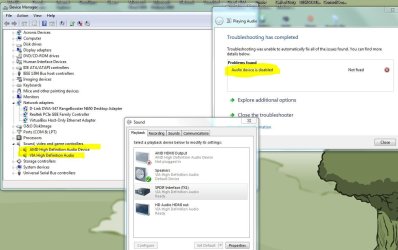
The troubleshooting says the audio device is disabled, but I haven't disabled it. It's not listed as disabled in device manager. But what is the audio device? is the the sound card or the speakers?
 

My Computer My Computer

At a glance

Windows 7 enterprise 64biti5 -750 socket 1156corsair xms 1600mhz 8gbAti radeon 5770 powercolor
OS
Windows 7 enterprise 64bit
CPU
i5 -750 socket 1156
Motherboard
Asus p55d pro
Memory
corsair xms 1600mhz 8gb
Graphics Card(s)
Ati radeon 5770 powercolor
Sound Card
onboard VIA VT1828S
Monitor(s) Displays
BenQ 24"
Screen Resolution
1920x1080
Hard Drives
many.... + SSD (Crucial C300)
PSU
Seasonic 750 watt MD12
Case
Corsair Obisidian 800D
Cooling
Noctua NH-D14
Keyboard
Logitech K510
Mouse
Microsoft Touch Mouse
Internet Speed
40/40 mbit fibre optics.
go to device manager and look at the audio and sound and speaker stuff listed there. Let me know if there are any exclaimation marks. also, there you can try uninstalling them (windows should redetect them and reinstall them, and if it doesn't, restart). then reinstall its drivers (only the audio this time). You don't have a sound card in your computer that it is detecting? no auxillary cables plugged in or headphones, etc?

You've looked through windows audio AND your device's audio settings again and again for anything to reenable the speakers? make sure all settings are listed correctly according to your setup. If nothing else works, I suggest look it up through google, and perhaps wait for another reply, because i've expended my knowledge on the issue.

ALSO, there is a chance you could have the wrong item enabled in your windows audio control. Try enabling all other audio devices (the ones in your picture at the top) and then disabling all but one (with sound plauying the whole time). Then enable another one and disable the one you had enabled.
In other words you are seeing if they all work together (the sound may be distorted or it may not work at all), and you are testing each one individually to see if it works by itself. Let me know how this goes.
 

My Computer My Computer

At a glance

Microsoft Windows 8.1 Pro 64-bitIntel(R) Core(TM) i3-4130 CPU @ 3.40GHz8.00 GBNone
Computer type
PC/Desktop
Computer Manufacturer/Model Number
Custom Asus Build
OS
Microsoft Windows 8.1 Pro 64-bit
CPU
Intel(R) Core(TM) i3-4130 CPU @ 3.40GHz
Motherboard
B85M-E
Memory
8.00 GB
Graphics Card(s)
None
Sound Card
Realtek High Definition Audio
Monitor(s) Displays
Asus 23.6" Monitor
Screen Resolution
1920 x 1080 x 32 bits (4294967296 colors) @ 60 Hz
Hard Drives
INTEL SSDSC2BW180A4
Samsung SSD 840 PRO Series
PSU
Seasonic S12II-380Bronze
Case
Lian Li
Cooling
Fan, Passive
Keyboard
Logitech K120
Mouse
Microsoft Touch Mouse
Internet Speed
4ms Ping, 19.0 Mbps Download, 19.0 Mbps Upload
Antivirus
Eset Endpoint
Browser
Internet Explorer, Chrome
go to device manager and look at the audio and sound and speaker stuff listed there. Let me know if there are any exclaimation marks. also, there you can try uninstalling them (windows should redetect them and reinstall them, and if it doesn't, restart). then reinstall its drivers (only the audio this time). You don't have a sound card in your computer that it is detecting? no auxillary cables plugged in or headphones, etc?

You've looked through windows audio AND your device's audio settings again and again for anything to reenable the speakers? make sure all settings are listed correctly according to your setup. If nothing else works, I suggest look it up through google, and perhaps wait for another reply, because i've expended my knowledge on the issue.

ALSO, there is a chance you could have the wrong item enabled in your windows audio control. Try enabling all other audio devices (the ones in your picture at the top) and then disabling all but one (with sound plauying the whole time). Then enable another one and disable the one you had enabled.
In other words you are seeing if they all work together (the sound may be distorted or it may not work at all), and you are testing each one individually to see if it works by itself. Let me know how this goes.
Ok, this is how the device manager looks like:

223.JPG

I've tried several times to reinstall it from device manager without success. I don't have any other sound cards connected. I have to devices connected at the moment, one dac (spdif/toslink) and one headphone (regular jack).


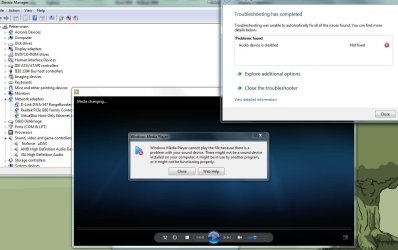
I have no clue what to do now. I really don't want to format the disk and install a new windows. Trying to play a song:

333.JPG

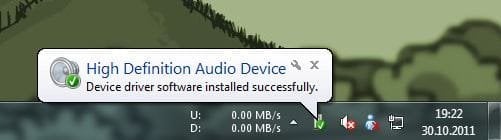
This happens when I choose to uinstall the VIA soundcard in device manager (after restart):

444.JPG
 

My Computer My Computer

At a glance

Windows 7 enterprise 64biti5 -750 socket 1156corsair xms 1600mhz 8gbAti radeon 5770 powercolor
OS
Windows 7 enterprise 64bit
CPU
i5 -750 socket 1156
Motherboard
Asus p55d pro
Memory
corsair xms 1600mhz 8gb
Graphics Card(s)
Ati radeon 5770 powercolor
Sound Card
onboard VIA VT1828S
Monitor(s) Displays
BenQ 24"
Screen Resolution
1920x1080
Hard Drives
many.... + SSD (Crucial C300)
PSU
Seasonic 750 watt MD12
Case
Corsair Obisidian 800D
Cooling
Noctua NH-D14
Keyboard
Logitech K510
Mouse
Microsoft Touch Mouse
Internet Speed
40/40 mbit fibre optics.
I'm very close to giving up. Just format and install a fresh window. That will take me hours of hours to get everything back, but at least it will work...
 

My Computer My Computer

At a glance

Windows 7 enterprise 64biti5 -750 socket 1156corsair xms 1600mhz 8gbAti radeon 5770 powercolor
OS
Windows 7 enterprise 64bit
CPU
i5 -750 socket 1156
Motherboard
Asus p55d pro
Memory
corsair xms 1600mhz 8gb
Graphics Card(s)
Ati radeon 5770 powercolor
Sound Card
onboard VIA VT1828S
Monitor(s) Displays
BenQ 24"
Screen Resolution
1920x1080
Hard Drives
many.... + SSD (Crucial C300)
PSU
Seasonic 750 watt MD12
Case
Corsair Obisidian 800D
Cooling
Noctua NH-D14
Keyboard
Logitech K510
Mouse
Microsoft Touch Mouse
Internet Speed
40/40 mbit fibre optics.
why don't you try removing the dac and see if your headphones work straight from the computer.
I looked up some stuff for you:

Here is worth a try: Audio Device is Disabled - Microsoft Answers
Here is a similar problem: "Audio Device is Disabled"...um, not - Page 2

Run an sfc /scannow in CMD prompt

Try this: Hardware devices are not working or are not detected in Windows

It has been said that you can disable or enable the on board sound in the bios, and you can also change it. If you have changed it (like from hd to ac97) while the operating system is on your computer, try changing it back. if it doesn't work, you will need to repair install or reinstall (assuming this is indeed the issue).
 

My Computer My Computer

At a glance

Microsoft Windows 8.1 Pro 64-bitIntel(R) Core(TM) i3-4130 CPU @ 3.40GHz8.00 GBNone
Computer type
PC/Desktop
Computer Manufacturer/Model Number
Custom Asus Build
OS
Microsoft Windows 8.1 Pro 64-bit
CPU
Intel(R) Core(TM) i3-4130 CPU @ 3.40GHz
Motherboard
B85M-E
Memory
8.00 GB
Graphics Card(s)
None
Sound Card
Realtek High Definition Audio
Monitor(s) Displays
Asus 23.6" Monitor
Screen Resolution
1920 x 1080 x 32 bits (4294967296 colors) @ 60 Hz
Hard Drives
INTEL SSDSC2BW180A4
Samsung SSD 840 PRO Series
PSU
Seasonic S12II-380Bronze
Case
Lian Li
Cooling
Fan, Passive
Keyboard
Logitech K120
Mouse
Microsoft Touch Mouse
Internet Speed
4ms Ping, 19.0 Mbps Download, 19.0 Mbps Upload
Antivirus
Eset Endpoint
Browser
Internet Explorer, Chrome

My Computer My Computer

At a glance

Microsoft Windows 8.1 Pro 64-bitIntel(R) Core(TM) i3-4130 CPU @ 3.40GHz8.00 GBNone
Computer type
PC/Desktop
Computer Manufacturer/Model Number
Custom Asus Build
OS
Microsoft Windows 8.1 Pro 64-bit
CPU
Intel(R) Core(TM) i3-4130 CPU @ 3.40GHz
Motherboard
B85M-E
Memory
8.00 GB
Graphics Card(s)
None
Sound Card
Realtek High Definition Audio
Monitor(s) Displays
Asus 23.6" Monitor
Screen Resolution
1920 x 1080 x 32 bits (4294967296 colors) @ 60 Hz
Hard Drives
INTEL SSDSC2BW180A4
Samsung SSD 840 PRO Series
PSU
Seasonic S12II-380Bronze
Case
Lian Li
Cooling
Fan, Passive
Keyboard
Logitech K120
Mouse
Microsoft Touch Mouse
Internet Speed
4ms Ping, 19.0 Mbps Download, 19.0 Mbps Upload
Antivirus
Eset Endpoint
Browser
Internet Explorer, Chrome

My Computer My Computer

At a glance

Microsoft Windows 8.1 Pro 64-bitIntel(R) Core(TM) i3-4130 CPU @ 3.40GHz8.00 GBNone
Computer type
PC/Desktop
Computer Manufacturer/Model Number
Custom Asus Build
OS
Microsoft Windows 8.1 Pro 64-bit
CPU
Intel(R) Core(TM) i3-4130 CPU @ 3.40GHz
Motherboard
B85M-E
Memory
8.00 GB
Graphics Card(s)
None
Sound Card
Realtek High Definition Audio
Monitor(s) Displays
Asus 23.6" Monitor
Screen Resolution
1920 x 1080 x 32 bits (4294967296 colors) @ 60 Hz
Hard Drives
INTEL SSDSC2BW180A4
Samsung SSD 840 PRO Series
PSU
Seasonic S12II-380Bronze
Case
Lian Li
Cooling
Fan, Passive
Keyboard
Logitech K120
Mouse
Microsoft Touch Mouse
Internet Speed
4ms Ping, 19.0 Mbps Download, 19.0 Mbps Upload
Antivirus
Eset Endpoint
Browser
Internet Explorer, Chrome
Last edited:

My Computer My Computer

At a glance

Windows 7 Ultimate x64/Windows 8 Consumer Pre...Intel Pentium Dual Core E6700 3.2GHzStrontium 8192MB DDR3 1333Mhzmsi GeForce N560GTX-M2D1GD5 1GB
Computer Manufacturer/Model Number
Custom Build
OS
Windows 7 Ultimate x64/Windows 8 Consumer Preview x64/Ubuntu 11.04
CPU
Intel Pentium Dual Core E6700 3.2GHz
Motherboard
ASUS P5G41T-M LX
Memory
Strontium 8192MB DDR3 1333Mhz
Graphics Card(s)
msi GeForce N560GTX-M2D1GD5 1GB
Sound Card
Realtek HD Audio
Monitor(s) Displays
CHIMEI CMV 221D 22"
Screen Resolution
1680x1050
Hard Drives
Seagate Barracuda LP Green 3.5'' 2TB Internal HDD 5900RPM + WD Elements Desktop 1TB External HDD 7200RPM
PSU
SHAW Viper-1500w Gaming PSU
Case
Black eMaxx ATX Mini Tower Case
Keyboard
Microsoft Wireless Keyboard 1000
Mouse
Microsoft Wireless Optical Mouse 2000
Internet Speed
100GB @ 4.76Mbps
I gave up guys. I've just installed a fresh windows 7 on my SSD. I have a complete image of the drive as it where though. The audio is working perfectly now, I haven't installed any VIA drivers, and I don't dare to install it either. From now on I will invest in Acronis true image. I will juse the Try&Decide option, so I can always turn things back if something goes wrong.

I did as you guys advised me to. Unplug all devices, enable/disable in bios. Change front panel setting (from AC97 to HD) etc.

I really appreciate all the help guys! :)
 

My Computer My Computer

At a glance

Windows 7 enterprise 64biti5 -750 socket 1156corsair xms 1600mhz 8gbAti radeon 5770 powercolor
OS
Windows 7 enterprise 64bit
CPU
i5 -750 socket 1156
Motherboard
Asus p55d pro
Memory
corsair xms 1600mhz 8gb
Graphics Card(s)
Ati radeon 5770 powercolor
Sound Card
onboard VIA VT1828S
Monitor(s) Displays
BenQ 24"
Screen Resolution
1920x1080
Hard Drives
many.... + SSD (Crucial C300)
PSU
Seasonic 750 watt MD12
Case
Corsair Obisidian 800D
Cooling
Noctua NH-D14
Keyboard
Logitech K510
Mouse
Microsoft Touch Mouse
Internet Speed
40/40 mbit fibre optics.
sorry it didn't work out for you o.0
 

My Computer My Computer

At a glance

Microsoft Windows 8.1 Pro 64-bitIntel(R) Core(TM) i3-4130 CPU @ 3.40GHz8.00 GBNone
Computer type
PC/Desktop
Computer Manufacturer/Model Number
Custom Asus Build
OS
Microsoft Windows 8.1 Pro 64-bit
CPU
Intel(R) Core(TM) i3-4130 CPU @ 3.40GHz
Motherboard
B85M-E
Memory
8.00 GB
Graphics Card(s)
None
Sound Card
Realtek High Definition Audio
Monitor(s) Displays
Asus 23.6" Monitor
Screen Resolution
1920 x 1080 x 32 bits (4294967296 colors) @ 60 Hz
Hard Drives
INTEL SSDSC2BW180A4
Samsung SSD 840 PRO Series
PSU
Seasonic S12II-380Bronze
Case
Lian Li
Cooling
Fan, Passive
Keyboard
Logitech K120
Mouse
Microsoft Touch Mouse
Internet Speed
4ms Ping, 19.0 Mbps Download, 19.0 Mbps Upload
Antivirus
Eset Endpoint
Browser
Internet Explorer, Chrome
Or wait a second. How much space does the repair solution take? I might try it out. My only concern is that I only have a 64gb SSD, so there might not be enough space.


Edit.

You must have at least 8.87 GB of free space, more if you have a larger installation, on the hard drive/partition Windows 7 is installed on to do a repair install.
 

My Computer My Computer

At a glance

Windows 7 enterprise 64biti5 -750 socket 1156corsair xms 1600mhz 8gbAti radeon 5770 powercolor
OS
Windows 7 enterprise 64bit
CPU
i5 -750 socket 1156
Motherboard
Asus p55d pro
Memory
corsair xms 1600mhz 8gb
Graphics Card(s)
Ati radeon 5770 powercolor
Sound Card
onboard VIA VT1828S
Monitor(s) Displays
BenQ 24"
Screen Resolution
1920x1080
Hard Drives
many.... + SSD (Crucial C300)
PSU
Seasonic 750 watt MD12
Case
Corsair Obisidian 800D
Cooling
Noctua NH-D14
Keyboard
Logitech K510
Mouse
Microsoft Touch Mouse
Internet Speed
40/40 mbit fibre optics.
thats awesome u got it working, but sux it took so much work. that was a very odd problem.
 

My Computer My Computer

At a glance

Windows 7 Professional x64AMD Phenom II X4 980 Black Edition @ 4.1Ghz8GB Crucial DDR2 PC5300Asus Radeon HD 5450
Computer Manufacturer/Model Number
Custom Box
OS
Windows 7 Professional x64
CPU
AMD Phenom II X4 980 Black Edition @ 4.1Ghz
Motherboard
ECS Elite Group IC780M-A V2.0
Memory
8GB Crucial DDR2 PC5300
Graphics Card(s)
Asus Radeon HD 5450
Sound Card
On Board
Monitor(s) Displays
Dual Monitor Setup
Hard Drives
60GB OCZ Vertex 3 SSD,
320GB, 250GB, & Dual 160GB HDD's
PSU
Cooler Master eXtreme Power Plus 500w
Case
Cooler Master Elite 310
Cooling
Dual 120mm Cooler Master Case Fans
Keyboard
Logitech...
Mouse
Microsoft Mouse 4000
Internet Speed
Super Fast
It works if I stick to the fresh windows install, but not my old system. Right now I'm trying to do a Repair Install install of windows 7. Hopefully this will fix my problem. Currently I'm struggling to get that done. "your current windows is more recent than the version your trying to upgrade to".

Any suggestions?

Edit.


Got the repair install to work. Fingers crossed. Hope my audio issue get solved :)
 
Last edited:

My Computer My Computer

At a glance

Windows 7 enterprise 64biti5 -750 socket 1156corsair xms 1600mhz 8gbAti radeon 5770 powercolor
OS
Windows 7 enterprise 64bit
CPU
i5 -750 socket 1156
Motherboard
Asus p55d pro
Memory
corsair xms 1600mhz 8gb
Graphics Card(s)
Ati radeon 5770 powercolor
Sound Card
onboard VIA VT1828S
Monitor(s) Displays
BenQ 24"
Screen Resolution
1920x1080
Hard Drives
many.... + SSD (Crucial C300)
PSU
Seasonic 750 watt MD12
Case
Corsair Obisidian 800D
Cooling
Noctua NH-D14
Keyboard
Logitech K510
Mouse
Microsoft Touch Mouse
Internet Speed
40/40 mbit fibre optics.
I'm sorry we couldn't help more but I'm glad you solved your problem.
 

My Computer My Computer

At a glance

Windows 7 Ultimate x64/Windows 8 Consumer Pre...Intel Pentium Dual Core E6700 3.2GHzStrontium 8192MB DDR3 1333Mhzmsi GeForce N560GTX-M2D1GD5 1GB
Computer Manufacturer/Model Number
Custom Build
OS
Windows 7 Ultimate x64/Windows 8 Consumer Preview x64/Ubuntu 11.04
CPU
Intel Pentium Dual Core E6700 3.2GHz
Motherboard
ASUS P5G41T-M LX
Memory
Strontium 8192MB DDR3 1333Mhz
Graphics Card(s)
msi GeForce N560GTX-M2D1GD5 1GB
Sound Card
Realtek HD Audio
Monitor(s) Displays
CHIMEI CMV 221D 22"
Screen Resolution
1680x1050
Hard Drives
Seagate Barracuda LP Green 3.5'' 2TB Internal HDD 5900RPM + WD Elements Desktop 1TB External HDD 7200RPM
PSU
SHAW Viper-1500w Gaming PSU
Case
Black eMaxx ATX Mini Tower Case
Keyboard
Microsoft Wireless Keyboard 1000
Mouse
Microsoft Wireless Optical Mouse 2000
Internet Speed
100GB @ 4.76Mbps
I'm sorry we couldn't help more but I'm glad you solved your problem.

Actually, you guys did help me to get this to work! :) I always keep a complete image of my OS hard drive. I rolled back the originally windows drive where the sound wasn't working and then tried to do the windows repair install. I started the process right before I went to bed yesterday, and when I woke up this morning everything was working like a charm.

I didn't know about this repair install before you guys mentioned it. It's a great feature to get a fresh windows install without having to format the disk and loose all settings. All I had to sacrifice was a game installation due to lack of storage space.

A good hard drive image creator is really a life saver, I've used the O&O DiskImage 6 and it have really helped me. From now on I'm going to check out Acronis Try&Decide feature a long with making a entire image of my OS hard drive once a week and place it on my nas. Backup is your friend :)

I really appreciate all the help guys! :)
 

My Computer My Computer

At a glance

Windows 7 enterprise 64biti5 -750 socket 1156corsair xms 1600mhz 8gbAti radeon 5770 powercolor
OS
Windows 7 enterprise 64bit
CPU
i5 -750 socket 1156
Motherboard
Asus p55d pro
Memory
corsair xms 1600mhz 8gb
Graphics Card(s)
Ati radeon 5770 powercolor
Sound Card
onboard VIA VT1828S
Monitor(s) Displays
BenQ 24"
Screen Resolution
1920x1080
Hard Drives
many.... + SSD (Crucial C300)
PSU
Seasonic 750 watt MD12
Case
Corsair Obisidian 800D
Cooling
Noctua NH-D14
Keyboard
Logitech K510
Mouse
Microsoft Touch Mouse
Internet Speed
40/40 mbit fibre optics.
Back
Top