XPS720 Sound Failure Windows 7, onboard audio

Razima32

New member
Local time
8:25 AM
Messages
3
Hi i am currently running a XPS 720 with Windows 7.
I have had Windows 7 on the machine for years and only recently have experienced sound

problems. Audio Does not play, or play a test tone. Audio also doesnt work with my USB

Gigaware Headset(basicaly its own external soundcard).

I have tried the following steps.

-Downloaded and Installed the newest Audio driver 'SIGMATEL STAC 92XX C-Major HD Audio

Driver Version A03'.
-Purchased a new external sound card thinking that may be the problem. I disable the

onboard soundcard prior to installing the new drivers. After installing it, i

troubleshooted it in every which way, to get it to work and play a test tone or sound. Many

long calls with Diamond customer service (the new cards manufacturer) but no luck.
-Removed PCI soundcard and re enabled onboard audio.
-Removed the video driver and reinstalling the current one without the audio.
-tried restarting the windows audio service in services.msc
-Uninstalled a Windows Update that was said to cause the sound problem (link below)


http://answers.microsoft.com/en-us/windows/forum/windows_7-pictures/windows-7-failed-to-pla

y-test-tone/850853d2-eea0-4f53-972d-14515f80554d

I also tried these:
A Consuming Experience: ?Failed to play test tone?, no sound on Vista ? troubleshooting

I am stumped. Ive been researching and trying things for 3 weeks now to alleviate this problem. I was wondering if I am missing something here?Any suggestions? Thanks in advance.
 

My Computer My Computer

At a glance

Windows 7
Computer type
PC/Desktop
Computer Manufacturer/Model Number
Dell XPS 720
OS
Windows 7
As both the Sigmatel and Diamond sound cards do not work AND the USB headset does not work, suggests some other problem is causing the sound not to work, and not actually the sound hardware.

The USB headset does not use the PC's sound cards, just takes the digital audio, the same as what would be fed to the sound cards and processes it.

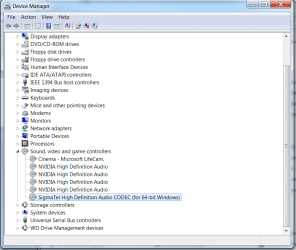
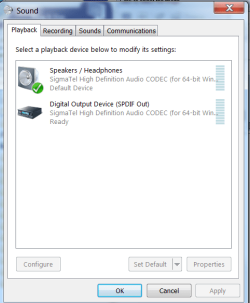
Post screenshots of the Device Manager, Sounds section and the Sound Panel, Playback section, for starters.
http://www.sevenforums.com/tutorials/9733-screenshots-files-upload-post-seven-forums.html


(I see you are in MD. I used to live in Laurel).
 

My Computer My Computer

At a glance

Windows 10 64 bitIntel i7 6700K16GB Corsair DominatorIntel CPU Graphics
Computer type
PC/Desktop
Computer Manufacturer/Model Number
My Own Build
OS
Windows 10 64 bit
CPU
Intel i7 6700K
Motherboard
ASUS ROG Maximus VIII Hero
Memory
16GB Corsair Dominator
Graphics Card(s)
Intel CPU Graphics
Sound Card
RealTek
Monitor(s) Displays
27" Dell S2719dgf
Screen Resolution
2560X1440
Hard Drives
1 TB Samsung 850 EVO SSD for Win 10 Pro
500GB Samsung 850 EVO SSD for Win 10 Insider
2 TB drive for backup
PSU
EVGA Supernova 750G2
Case
BeQuiet Silent Base 600
Cooling
Deepcool Captain 120EX
Keyboard
Microsoft Wireless 2000
Mouse
Microsoft wireless
Internet Speed
100 MB/sec (Cable)
Antivirus
Microsoft Defender and Malwarebytes
Browser
Edge/Firefox
Other Info
Cakewalk (Sonar) by BandLab and Studio One 4.1 Pro recording studio software. MOTU 896Mk3 Hybrid recording interface, Frontier Tranzport wireless control unit, Behringer X-Touch Control Surface.
Five USB connected optical drives for CD Audio production using Nero BurningROM
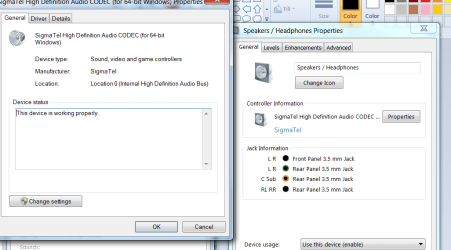
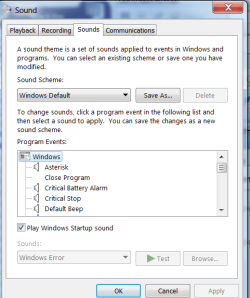
Thanks for your response fireberd. Small world, Laurels right next door to me. I live in Baltimore City close to Catonsville. I figured it was a software problem since i basically went through 3 different audio cards.

DeviceManager.png

Driverdetails.png

Playback.png

Sounds.png
 

My Computer My Computer

At a glance

Windows 7
Computer type
PC/Desktop
Computer Manufacturer/Model Number
Dell XPS 720
OS
Windows 7
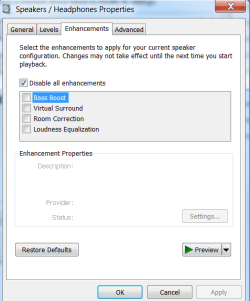
In the Speakers/Headphones Properties panel. Click on "Enhancements" and see if there is something there.

I worked at NASA, Goddard when I lived in Laurel. I went to work for Social Security in Woodlawn and was assigned to Kansas City, Mo on the SSA data network.
 

My Computer My Computer

At a glance

Windows 10 64 bitIntel i7 6700K16GB Corsair DominatorIntel CPU Graphics
Computer type
PC/Desktop
Computer Manufacturer/Model Number
My Own Build
OS
Windows 10 64 bit
CPU
Intel i7 6700K
Motherboard
ASUS ROG Maximus VIII Hero
Memory
16GB Corsair Dominator
Graphics Card(s)
Intel CPU Graphics
Sound Card
RealTek
Monitor(s) Displays
27" Dell S2719dgf
Screen Resolution
2560X1440
Hard Drives
1 TB Samsung 850 EVO SSD for Win 10 Pro
500GB Samsung 850 EVO SSD for Win 10 Insider
2 TB drive for backup
PSU
EVGA Supernova 750G2
Case
BeQuiet Silent Base 600
Cooling
Deepcool Captain 120EX
Keyboard
Microsoft Wireless 2000
Mouse
Microsoft wireless
Internet Speed
100 MB/sec (Cable)
Antivirus
Microsoft Defender and Malwarebytes
Browser
Edge/Firefox
Other Info
Cakewalk (Sonar) by BandLab and Studio One 4.1 Pro recording studio software. MOTU 896Mk3 Hybrid recording interface, Frontier Tranzport wireless control unit, Behringer X-Touch Control Surface.
Five USB connected optical drives for CD Audio production using Nero BurningROM
what! i live right off security, what a coincidence. Thanks for your guidance fireberd, hope this helps, this audio problem has been a pain in my arse.

Enhancements.png
 

My Computer My Computer

At a glance

Windows 7
Computer type
PC/Desktop
Computer Manufacturer/Model Number
Dell XPS 720
OS
Windows 7
Disable the Microsoft LifeCam, in the Device Manager. See if that changes things. Cam's have been known to cause audio problems. Also, in the Sound Panel/Recording Section, you should have an option for "Stereo Mix" (System Mixer). Set that as the default recording device.

I'm retired, I went to work there when "Colt Lanes" bowling alley was across the street from SSA.
 

My Computer My Computer

At a glance

Windows 10 64 bitIntel i7 6700K16GB Corsair DominatorIntel CPU Graphics
Computer type
PC/Desktop
Computer Manufacturer/Model Number
My Own Build
OS
Windows 10 64 bit
CPU
Intel i7 6700K
Motherboard
ASUS ROG Maximus VIII Hero
Memory
16GB Corsair Dominator
Graphics Card(s)
Intel CPU Graphics
Sound Card
RealTek
Monitor(s) Displays
27" Dell S2719dgf
Screen Resolution
2560X1440
Hard Drives
1 TB Samsung 850 EVO SSD for Win 10 Pro
500GB Samsung 850 EVO SSD for Win 10 Insider
2 TB drive for backup
PSU
EVGA Supernova 750G2
Case
BeQuiet Silent Base 600
Cooling
Deepcool Captain 120EX
Keyboard
Microsoft Wireless 2000
Mouse
Microsoft wireless
Internet Speed
100 MB/sec (Cable)
Antivirus
Microsoft Defender and Malwarebytes
Browser
Edge/Firefox
Other Info
Cakewalk (Sonar) by BandLab and Studio One 4.1 Pro recording studio software. MOTU 896Mk3 Hybrid recording interface, Frontier Tranzport wireless control unit, Behringer X-Touch Control Surface.
Five USB connected optical drives for CD Audio production using Nero BurningROM
Back
Top