No Sound out of Front Speakers

NordVind

New member
Local time
6:35 PM
Messages
3
I'm getting now sound out of my speakers when I try to use them for music or games, but I get sound when I test them in the sound panel, but only get sound out of my center and subwoofer. In the sound panel, it says my two front speakers are connected to the green FRONT speaker jack, even though it's plugged into the rear jack. I've tried different drivers and even a regedit found on this forum. I continue to have no sound and I don't know how to fix it.
 

My Computer My Computer

At a glance

Windows 7 (RC) 7100Intel Core 2 Quad Q6600 2.40GHzBFG 8800 GTS 512
OS
Windows 7 (RC) 7100
CPU
Intel Core 2 Quad Q6600 2.40GHz
Motherboard
EVGA nForce 680i LT SLI
Graphics Card(s)
BFG 8800 GTS 512
Monitor(s) Displays
Samsung
I'm getting now sound out of my speakers when I try to use them for music or games, but I get sound when I test them in the sound panel, but only get sound out of my center and subwoofer. In the sound panel, it says my two front speakers are connected to the green FRONT speaker jack, even though it's plugged into the rear jack. I've tried different drivers and even a regedit found on this forum. I continue to have no sound and I don't know how to fix it.
Hello NordVind, and welcome to Windows Seven Forums!

As you have searched the Forum, you already know some sound systems are not being supported properly. There is a quote in this thread: http://www.sevenforums.com/general-discussion/22491-bit-dated-but-worth-reading.html that says there are 26,000 custom audio drivers, so it will take a while for more to be added to 7.

The place to start is to identify your specific audio chipset. So we need to know if you are using a PCI card or onboard sound. A good place for this info is the manufacturer, like the motherboard manufacturer to id the audio chipset. If you need help with this, post back with what you are able to find out.

Robert
 

My Computer My Computer

At a glance

...
OS
...
I'm using onboard sound and my motherboard is the EVGA nForce 680i LT SLI.
 

My Computer My Computer

At a glance

Windows 7 (RC) 7100Intel Core 2 Quad Q6600 2.40GHzBFG 8800 GTS 512
OS
Windows 7 (RC) 7100
CPU
Intel Core 2 Quad Q6600 2.40GHz
Motherboard
EVGA nForce 680i LT SLI
Graphics Card(s)
BFG 8800 GTS 512
Monitor(s) Displays
Samsung
Yes, I'm using that current version. I've tried the newest version and an older version. Neither of them work. My speaker settings have set my front left and right speakers as the front green speaker jack instead of the rear green speaker jack.
 

My Computer My Computer

At a glance

Windows 7 (RC) 7100Intel Core 2 Quad Q6600 2.40GHzBFG 8800 GTS 512
OS
Windows 7 (RC) 7100
CPU
Intel Core 2 Quad Q6600 2.40GHz
Motherboard
EVGA nForce 680i LT SLI
Graphics Card(s)
BFG 8800 GTS 512
Monitor(s) Displays
Samsung
Yes, I'm using that current version. I've tried the newest version and an older version. Neither of them work. My speaker settings have set my front left and right speakers as the front green speaker jack instead of the rear green speaker jack.
Have you tried using the default Windows audio driver? This motherboard I am using now, has the NVIDIA nForce4 Ultra chipset with onboard sound. Windows 7 installed the audio driver and works OK.

Realtek drivers include a "Sound Manager" like this one:

picture.php


look in your control panel:

picture.php


And find the audio driver codex in use there. If you do not see the "Sound Manager" then chances are the driver is not supporting your chipset. I would suggest you update the current audio driver and allow Windows to search the web for the driver. Hopefully that one will work better.

Robert
 

My Computer My Computer

At a glance

...
OS
...
I'm getting now sound out of my speakers when I try to use them for music or games, but I get sound when I test them in the sound panel, but only get sound out of my center and subwoofer. In the sound panel, it says my two front speakers are connected to the green FRONT speaker jack, even though it's plugged into the rear jack. I've tried different drivers and even a regedit found on this forum. I continue to have no sound and I don't know how to fix it.

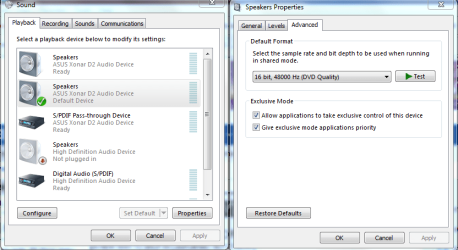
Try doing this. Set the one on the right to DVD quality and retest. This has fixed a few systems so far.
 

Attachments

  • application control of this device.PNG
    application control of this device.PNG
    34.8 KB · Views: 568

My Computer My Computer

At a glance

Windows 7 Ult, Windows 8.1 Pro,Q9650-4.275GHz, E8600 4.5GHz, E6750-3.8GHzG.Skill PC2 9600 1200Mhz 5 5 5 15 2TGTX480
Computer type
PC/Desktop
Computer Manufacturer/Model Number
Home built
OS
Windows 7 Ult, Windows 8.1 Pro,
CPU
Q9650-4.275GHz, E8600 4.5GHz, E6750-3.8GHz
Motherboard
Evga 780i FTW
Memory
G.Skill PC2 9600 1200Mhz 5 5 5 15 2T
Graphics Card(s)
GTX480
Sound Card
Asus Xonar D2
Monitor(s) Displays
HannsG
Screen Resolution
1680X1050
Hard Drives
GSkill Phoenix Pro 120GB SSD
PSU
ThermalTake Toughpower 1000Watt modular
Case
ThermalTake XaserV
Cooling
Xigmatek S1283
Keyboard
Logitech G15
Mouse
Logitech G9
Internet Speed
T1
Back
Top