

- Local time
- 7:25 AM
- Messages
- 394
No updates fail code "WindowsUpdate_80073712"
2019-04 Security Monthly Quality Rollup for Windows 7 for x64-based Systems (KB4493472)
Installation date: 13-May-19 9:32 AM
Installation status: Failed
Error details: Code 80073712
Update type: Important
A security issue has been identified in a Microsoft software product that could affect your system. You can help protect your system by installing this update from Microsoft. For a complete listing of the issues that are included in this update, see the associated Microsoft Knowledge Base article. After you install this update, you may have to restart your system.
More information:
http://support.microsoft.com/help/4493472
Help and Support:
http://support.microsoft.com/help/4493472
(KB4493472 is just the latest of failed windows updates with this code "WindowsUpdate_80073712"
"WindowsUpdate_dt000" that comes up. the only updates i'm getting are from Microsoft.
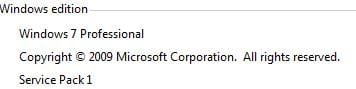
I have Windows 7 Home Premium (64 bit)
Why am I getting "WindowsUpdate_80073712" "WindowsUpdate_dt000" when my updates fail, I have read the following articles
1. https://support.microsoft.com/en-au/help/4493472/windows-7-update-kb4493472
2. Oh look, another broken Windows update! KB4493472 and KB4493446 causing issues - gHacks Tech News
Can someone please assist me with a workaround or should I be worried?
I also please ask for forgiveness in posting with limited information.
2019-04 Security Monthly Quality Rollup for Windows 7 for x64-based Systems (KB4493472)
Installation date: 13-May-19 9:32 AM
Installation status: Failed
Error details: Code 80073712
Update type: Important
A security issue has been identified in a Microsoft software product that could affect your system. You can help protect your system by installing this update from Microsoft. For a complete listing of the issues that are included in this update, see the associated Microsoft Knowledge Base article. After you install this update, you may have to restart your system.
More information:
http://support.microsoft.com/help/4493472
Help and Support:
http://support.microsoft.com/help/4493472
(KB4493472 is just the latest of failed windows updates with this code "WindowsUpdate_80073712"
"WindowsUpdate_dt000" that comes up. the only updates i'm getting are from Microsoft.
I have Windows 7 Home Premium (64 bit)
Why am I getting "WindowsUpdate_80073712" "WindowsUpdate_dt000" when my updates fail, I have read the following articles
1. https://support.microsoft.com/en-au/help/4493472/windows-7-update-kb4493472
2. Oh look, another broken Windows update! KB4493472 and KB4493446 causing issues - gHacks Tech News
Can someone please assist me with a workaround or should I be worried?
I also please ask for forgiveness in posting with limited information.
Attachments


My Computer
- Computer type
- Laptop
- Computer Manufacturer/Model Number
- Sony VAIO / E Series VPCEB46FG
- OS
- Windows 7 Home Premium 64bit
- CPU
- Windows 7 Service Pack 1 x86 NTFS
- Motherboard
- AMD E-350 Processor
- Memory
- 4 GB
- Hard Drives
- 500GB
- Other Info
- 1.6GHz


