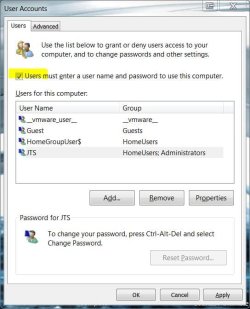
I scheduled a reboot for my HTPC every night at 3am, and I would prefer that it sits idle at the welcome screen after reboot, so that the TRIM function on my OCZ SSD drive will kick in for disk cleanup. But no matter what I try, it always goes directly to the desktop.
I ran 'control userpasswords2' and enabled the check box 'Users must enter a user name and password to use this computer'. But it still automatically logs in to my single account (called 'HTPC'). So basically what I want is this:
I ran 'control userpasswords2' and enabled the check box 'Users must enter a user name and password to use this computer'. But it still automatically logs in to my single account (called 'HTPC'). So basically what I want is this:
- The boot process should wait at the Welcome Screen
- On that Welcome Screen, I only see one account called 'HTPC'
- The HTPC account is an admin account with a blank password.
My Computer
At a glance
Windows 7 build 7022
- OS
- Windows 7 build 7022