No Welcome Screen with one account and blank password?

mobidutch

New member
Local time
5:22 PM
Messages
5
I scheduled a reboot for my HTPC every night at 3am, and I would prefer that it sits idle at the welcome screen after reboot, so that the TRIM function on my OCZ SSD drive will kick in for disk cleanup. But no matter what I try, it always goes directly to the desktop.
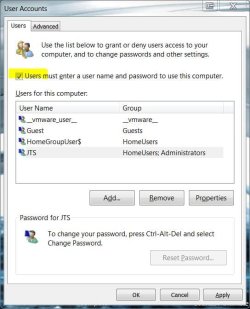
I ran 'control userpasswords2' and enabled the check box 'Users must enter a user name and password to use this computer'. But it still automatically logs in to my single account (called 'HTPC'). So basically what I want is this:
  • The boot process should wait at the Welcome Screen
  • On that Welcome Screen, I only see one account called 'HTPC'
  • The HTPC account is an admin account with a blank password.
Is this not possible?
 

My Computer My Computer

At a glance

Windows 7 build 7022
OS
Windows 7 build 7022
Just assign a password to the HTPC user account...
 

My Computer My Computer

At a glance

Windows 7 Ultimate (64)i7-2600KG.SKILL Ripjaws X Series 8GB (2 x 4GB)ATI 5750
Computer Manufacturer/Model Number
Home Grown
OS
Windows 7 Ultimate (64)
CPU
i7-2600K
Motherboard
Asus P8P67-M Pro
Memory
G.SKILL Ripjaws X Series 8GB (2 x 4GB)
Graphics Card(s)
ATI 5750
Sound Card
On-Board
Monitor(s) Displays
LG W2486L
Screen Resolution
1920X1080
Hard Drives
Intel X-25M 80 Gig SSD | Intel X-25M 160 Gig SSD | WD Black 500MB - External eSata
PSU
Zalman ZM770-XT 770 Watts
Case
Antec 180 mini
Cooling
Cooler Master V8
Internet Speed
15MB - Cable
Other Info
Sissy OC - 4.6 @ 1.3175 24/7 | 18' Idle - 55' Load
Did you tick this box for the HTPC account?:

cup2.JPG
 

My Computer My Computer

At a glance

8 Pro x64i7 3770K 4.6GHz16GB G.Skill Trident X 2666mhzx2 EVGA 780 Ti Superclocked SLI
Computer type
PC/Desktop
Computer Manufacturer/Model Number
Systems by SmartEyeball
OS
8 Pro x64
CPU
i7 3770K 4.6GHz
Motherboard
ASUS P8Z77 WS
Memory
16GB G.Skill Trident X 2666mhz
Graphics Card(s)
x2 EVGA 780 Ti Superclocked SLI
Sound Card
SB X-FI Surround 5.1 PRO USB / ATH-AD900 Headphones
Monitor(s) Displays
x3 Dell U2410 / 58" Samsung
Screen Resolution
5760*1200/ 1920*1200
Hard Drives
2x Intel 520 240GB (RAID 0) * 2x WD Caviar Blacks 2TB (RAID 0) * 2TB WD Caviar Black * Sony Optirac DVD
PSU
Silverstone Strider Evolution 1200W
Case
Thermaltake Level 10 GT Snow Edition
Cooling
Noctua NH-D14
Keyboard
Topre Realforce // Ducky Shine MX Black // Filco Ninja TKL
Mouse
Thermaltake Theron (Highly Recommended) + Razer Imperator
Antivirus
MSE
Browser
IE, FF, WaterFox
Other Info
GT Extreme V2 Sim Racing Cockpit + 40" LCD and K/B Mouse stand ▼
Fanatec CSR Elite Wheel + Clubsport V1 Pedals + CSR shifter/7G-H ▼Saitek X52 Pro ▼ TrackIR 5 Pro
Buttkicker v2 Seat Rumbler with Dedicated 5.1 and Sub Woofer attached to frame ▼
=
Bloody Big Grin
@win7clutz: No, that user has to have a blank password, so that you can just use the select button on the remote to login, without needing a keyboard.

@smarteyeball: Yes, that checkbox is checked.

I ended up un-hiding the Administrator account (and changed the HTPC account to Standard User). Now it does stop at the Welcome Screen, and displays both accounts. I'll just stick with that. Thx.
 

My Computer My Computer

At a glance

Windows 7 build 7022
OS
Windows 7 build 7022
Back
Top