Solved nod32 found wsock32exe. using a lot of cpu resources

ganjiry

Gamer
Guru
Gold Member
VIP
Local time
1:47 PM
Messages
3,026
Location
Droitwich spa uk
hi all.
i just noticed that wsock32 is using 25% of one core of my cpu. after checking in task manager it seems it was first on my pc 01/10/11.
ive heard of winsock. but this seem dodgy to me. nod32 picked it up so i let it get cleaned.

this is it....C:\Users\ryan\AppData\Local\Temp\ex1.exe -Win32/Delf.NVC trojan cleaned by deleting - quarantined [1]
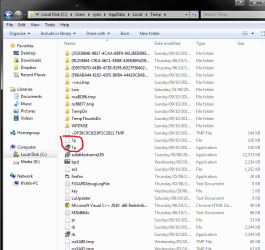
after running nod i found that these 2 files r still there. its ok to delete these isnt it?? also is there anywhere else i should look to see if its hidden itself anywhere else.
cheers for any help folks.

edit i also came across these 7p. in appdata temp. could anyone tell me what they might be plz. any help is very much apreciated.. cheers folks
 

Attachments

  • malware.png
    malware.png
    84.4 KB · Views: 12
  • mal.png
    mal.png
    34.6 KB · Views: 10
Last edited:

My Computer My Computer

At a glance

Win7 Home Premium x64 SP1i7 4770k8Gb Kingston HyperX Beast 2400MHz @2133MHz 11...MSI GTX 780ti Gaming Oc x2
Computer type
PC/Desktop
Computer Manufacturer/Model Number
Custom build
OS
Win7 Home Premium x64 SP1
CPU
i7 4770k
Motherboard
Asus maximus VI Hero
Memory
8Gb Kingston HyperX Beast 2400MHz @2133MHz 11-12-11-30
Graphics Card(s)
MSI GTX 780ti Gaming Oc x2
Sound Card
Onboard ROG SupremeFX
Monitor(s) Displays
Asus VG248QE
Screen Resolution
3840X1080 144Hz
Hard Drives
Samung Evo 256Gb, OCZ Agility4 128Gb
1x1TB hitachi storage
PSU
EVGA Supernova 1000w Platinum
Case
Corsair Air 540
Cooling
Corsair H100i
Keyboard
Coolermaster Quickfire Pro
Mouse
Corsair M65 RGB
Internet Speed
74mb dwn/16up
Antivirus
MSE,Malwarebytes
Browser
Chrome
Hi, ganjiry.

In addition to 7p, there are other files with the September 10 date. I suggest that you download TFC to your desktop

  • Open the file and close any other windows.
  • It will close all programs itself when run, make sure to let it run uninterrupted.
  • Click the Start button to begin the process. The program should not take long to finish its job
  • Once its finished it should reboot your machine, if not, do this yourself to ensure a complete clean


After restarting your computer, update NOD32 and run a full system scan.
 

My Computer My Computer

At a glance

Windows 7 & Windows Vista Ultimate
OS
Windows 7 & Windows Vista Ultimate
hi corrie thanks for the reply . will do straight away. ive used TFC b4. what does it actually do? sorry if dumb question..
 
Last edited:

My Computer My Computer

At a glance

Win7 Home Premium x64 SP1i7 4770k8Gb Kingston HyperX Beast 2400MHz @2133MHz 11...MSI GTX 780ti Gaming Oc x2
Computer type
PC/Desktop
Computer Manufacturer/Model Number
Custom build
OS
Win7 Home Premium x64 SP1
CPU
i7 4770k
Motherboard
Asus maximus VI Hero
Memory
8Gb Kingston HyperX Beast 2400MHz @2133MHz 11-12-11-30
Graphics Card(s)
MSI GTX 780ti Gaming Oc x2
Sound Card
Onboard ROG SupremeFX
Monitor(s) Displays
Asus VG248QE
Screen Resolution
3840X1080 144Hz
Hard Drives
Samung Evo 256Gb, OCZ Agility4 128Gb
1x1TB hitachi storage
PSU
EVGA Supernova 1000w Platinum
Case
Corsair Air 540
Cooling
Corsair H100i
Keyboard
Coolermaster Quickfire Pro
Mouse
Corsair M65 RGB
Internet Speed
74mb dwn/16up
Antivirus
MSE,Malwarebytes
Browser
Chrome
Hi, ganjiry.

Here's more information about TFC:

TFC (Temp File Cleaner) will clear out all temp folders for all user accounts (temp, IE temp, java, FF, Opera, Chrome, Safari), including Administrator, All Users, LocalService, NetworkService, and any other accounts in the user folder. It also cleans out the %systemroot%\temp folder and checks for .tmp files in the %systemdrive% root folder, %systemroot%, and the system32 folder (both 32bit and 64bit on 64bit OSs). It shows the amount removed for each location found (in bytes) and the total removed (in MB).

Before running, it will stop Explorer and all other running applications. When finished, if a reboot is required the user must reboot to finish clearing any in-use temp files.
-- TFC only cleans temp folders.
-- TFC will not clean URL history, prefetch, or cookies. Depending on how often someone cleans their temp folders, their system hardware, and how many accounts are present, it can take anywhere from a few seconds to a minute or more. TFC will completely clear all temp files where other temp file cleaners may fail.
 

My Computer My Computer

At a glance

Windows 7 & Windows Vista Ultimate
OS
Windows 7 & Windows Vista Ultimate
hi again corrie. yeah thought it was somethin along those lines. i was suprised to see that somethin had crept passed. i usually keep things well clean. i ony have the 1 user user ac. run ccleaner every 2wk. run nod32 with malwarebytes pro alongside. first prob ive had for quite a while.

thanks for the explanation tho and thanks for ur help. much apreciated as always:thumbsup:
 

My Computer My Computer

At a glance

Win7 Home Premium x64 SP1i7 4770k8Gb Kingston HyperX Beast 2400MHz @2133MHz 11...MSI GTX 780ti Gaming Oc x2
Computer type
PC/Desktop
Computer Manufacturer/Model Number
Custom build
OS
Win7 Home Premium x64 SP1
CPU
i7 4770k
Motherboard
Asus maximus VI Hero
Memory
8Gb Kingston HyperX Beast 2400MHz @2133MHz 11-12-11-30
Graphics Card(s)
MSI GTX 780ti Gaming Oc x2
Sound Card
Onboard ROG SupremeFX
Monitor(s) Displays
Asus VG248QE
Screen Resolution
3840X1080 144Hz
Hard Drives
Samung Evo 256Gb, OCZ Agility4 128Gb
1x1TB hitachi storage
PSU
EVGA Supernova 1000w Platinum
Case
Corsair Air 540
Cooling
Corsair H100i
Keyboard
Coolermaster Quickfire Pro
Mouse
Corsair M65 RGB
Internet Speed
74mb dwn/16up
Antivirus
MSE,Malwarebytes
Browser
Chrome
You're welcome, ganjiry.

Did TFC remove those entries and is everything back to normal?
 

My Computer My Computer

At a glance

Windows 7 & Windows Vista Ultimate
OS
Windows 7 & Windows Vista Ultimate
yeah it did and everythin is sound. taa very much:)
 

My Computer My Computer

At a glance

Win7 Home Premium x64 SP1i7 4770k8Gb Kingston HyperX Beast 2400MHz @2133MHz 11...MSI GTX 780ti Gaming Oc x2
Computer type
PC/Desktop
Computer Manufacturer/Model Number
Custom build
OS
Win7 Home Premium x64 SP1
CPU
i7 4770k
Motherboard
Asus maximus VI Hero
Memory
8Gb Kingston HyperX Beast 2400MHz @2133MHz 11-12-11-30
Graphics Card(s)
MSI GTX 780ti Gaming Oc x2
Sound Card
Onboard ROG SupremeFX
Monitor(s) Displays
Asus VG248QE
Screen Resolution
3840X1080 144Hz
Hard Drives
Samung Evo 256Gb, OCZ Agility4 128Gb
1x1TB hitachi storage
PSU
EVGA Supernova 1000w Platinum
Case
Corsair Air 540
Cooling
Corsair H100i
Keyboard
Coolermaster Quickfire Pro
Mouse
Corsair M65 RGB
Internet Speed
74mb dwn/16up
Antivirus
MSE,Malwarebytes
Browser
Chrome
Excellent. Thanks for confirming. I'll request this thread be marked completed.
 

My Computer My Computer

At a glance

Windows 7 & Windows Vista Ultimate
OS
Windows 7 & Windows Vista Ultimate
Back
Top