
Windows 7 Keeps crashing (blue screen) after using a lot of memory

tekset5

New member
Local time
2:02 AM
Messages
10
Hi Everyone,

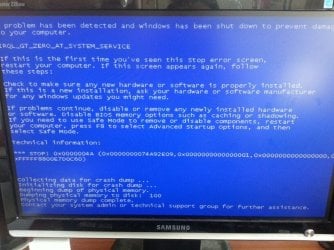
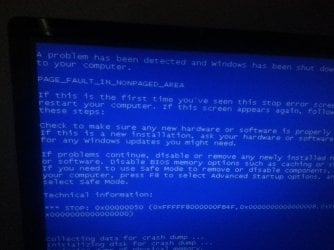
I am sure something similar to this has happened before. Basically, I have 8GB ram, I leave a lot of sites open on chrome and eventually when ram usage reaches around 5-7GB, I get the page fault blue screen come up. It's really frustrating. I have ram memtest and it seems to all be fine there. I don't know what else it could be. Ive considered getting a better computer with 16gb ram, but it makes no sense for this to happen considering ive got swap space and an Intel SSD drive (doubt its the drive considering it happened with the old SSD too which was OCZ).

Any ideas on where to start with diagnosing the problem? I have attached images of the errors that have come up below. Thanks in advance guys!!

Also My specs are below:


Computer Manufacturer: Custom Build
OS: Windows 7 64 bit Ultimate
CPU: Intel Core 2 Duo E8500
Motherboard: ASUS P5Q SE2
Memory: Kingston PC2-6400 4x2GB 9905316-132.A01LF
Graphics Card: NVIDIA GeForce GT610 A1 1024MB
Hard Drives: Intel SSD 120GB 530 Series
IMG-20140122-WA0001.jpg

20130616_155731.jpg
 

My Computer My Computer

At a glance

Windows 7 64 bitIntel Core 2 Duo E8500Kingston PC2-6400 4x2GB 9905316-132.A01LFNVIDIA GeForce GT610 A1 1024MB
Computer type
PC/Desktop
Computer Manufacturer/Model Number
Custom Build
OS
Windows 7 64 bit
CPU
Intel Core 2 Duo E8500
Motherboard
ASUS P5Q SE2
Memory
Kingston PC2-6400 4x2GB 9905316-132.A01LF
Graphics Card(s)
NVIDIA GeForce GT610 A1 1024MB
Sound Card
In built MB
Monitor(s) Displays
22" Samsung
Hard Drives
Intel SSD 120GB 530 Series
Antivirus
Norton Internet Security
Browser
Chrome
Test the memory with memtest. To me it sounds like a memory fault. Once you use up TO a Certain amount of memory the fault shows up.
 

My Computer My Computer

At a glance

7 x64
OS
7 x64
Unfortunately memtest passed when i ran it through like 5-6 cycles. so im thinking its not the memory
 

My Computer My Computer

At a glance

Windows 7 64 bitIntel Core 2 Duo E8500Kingston PC2-6400 4x2GB 9905316-132.A01LFNVIDIA GeForce GT610 A1 1024MB
Computer type
PC/Desktop
Computer Manufacturer/Model Number
Custom Build
OS
Windows 7 64 bit
CPU
Intel Core 2 Duo E8500
Motherboard
ASUS P5Q SE2
Memory
Kingston PC2-6400 4x2GB 9905316-132.A01LF
Graphics Card(s)
NVIDIA GeForce GT610 A1 1024MB
Sound Card
In built MB
Monitor(s) Displays
22" Samsung
Hard Drives
Intel SSD 120GB 530 Series
Antivirus
Norton Internet Security
Browser
Chrome

My Computer My Computer

At a glance

Windows 10 Pro x64 ; Xubuntu x64Intel i7 860 @ 2.80 GHz O/C'ed to 4.0GHz16GB Corsair Vengance DDR3 @ 661 MHz Dual Cha...EVGA NVidia GTX 560 1024MB
Computer type
PC/Desktop
Computer Manufacturer/Model Number
Golden Mk. I.4
OS
Windows 10 Pro x64 ; Xubuntu x64
CPU
Intel i7 860 @ 2.80 GHz O/C'ed to 4.0GHz
Motherboard
Gigabyte P55A-UD3R Rev.1. Award BIOS F13
Memory
16GB Corsair Vengance DDR3 @ 661 MHz Dual Channel (9-9-9-24)
Graphics Card(s)
EVGA NVidia GTX 560 1024MB
Sound Card
Realtek Integrated
Monitor(s) Displays
Dual Samsung SyncMaster 2494HS
Screen Resolution
1920*1080 and 1920*1080
Hard Drives
1*Samsung 840 EVO 120GB SSD;
1*OCZ Vertex 2 60GB SSD;
2*Samsung F3 SpinPoint 1TB in RAID0;
1*Samsung F1 SpinPoint 1TB;
2*Western Digital 1TB External USB 3.0
1*Western Digital 500GB External USB 3.0
1*Seagate 500GB External USB 2.0
PSU
Thermaltake ToughPower QFan 750W
Case
Thermaltake Element S VK60001W2Z
Cooling
Corsair H60 Water Cooling, 2*230mm and 2*80mm case fans
Keyboard
Logitech G110
Mouse
Logitech MX518
You could also try removing 1 or 2 sticks of RAM at a time and seeing if you still get a BSOD.
 

My Computer My Computer

At a glance

Win 7 x64Core I5
Computer type
PC/Desktop
Computer Manufacturer/Model Number
Dell
OS
Win 7 x64
CPU
Core I5
yeah i guess I have to go through the elimination method. i cant be bothered running memtest because it takes too long and I need the comp. I have 4x2gb mem sticks and all are kingston. they are in pairs. both pairs are not exactly identical (model is different) but they share same specs/clock cycles etc. if anything it could be faulty. so ill test with one pair (increased my swap to accomodate a large amount of memory use). then test the other pair. and see what happens. thank god i got ssd to keep the swap fast.

but if its not the ram, could it be something else? is there a way to look up the system logs and see what caused it?
 

My Computer My Computer

At a glance

Windows 7 64 bitIntel Core 2 Duo E8500Kingston PC2-6400 4x2GB 9905316-132.A01LFNVIDIA GeForce GT610 A1 1024MB
Computer type
PC/Desktop
Computer Manufacturer/Model Number
Custom Build
OS
Windows 7 64 bit
CPU
Intel Core 2 Duo E8500
Motherboard
ASUS P5Q SE2
Memory
Kingston PC2-6400 4x2GB 9905316-132.A01LF
Graphics Card(s)
NVIDIA GeForce GT610 A1 1024MB
Sound Card
In built MB
Monitor(s) Displays
22" Samsung
Hard Drives
Intel SSD 120GB 530 Series
Antivirus
Norton Internet Security
Browser
Chrome
You'll never get to the bottom of the issue unless you run MemTest86+ as recommended. There no alternative tests.
 

My Computer My Computer

At a glance

Windows 10 Pro x64 ; Xubuntu x64Intel i7 860 @ 2.80 GHz O/C'ed to 4.0GHz16GB Corsair Vengance DDR3 @ 661 MHz Dual Cha...EVGA NVidia GTX 560 1024MB
Computer type
PC/Desktop
Computer Manufacturer/Model Number
Golden Mk. I.4
OS
Windows 10 Pro x64 ; Xubuntu x64
CPU
Intel i7 860 @ 2.80 GHz O/C'ed to 4.0GHz
Motherboard
Gigabyte P55A-UD3R Rev.1. Award BIOS F13
Memory
16GB Corsair Vengance DDR3 @ 661 MHz Dual Channel (9-9-9-24)
Graphics Card(s)
EVGA NVidia GTX 560 1024MB
Sound Card
Realtek Integrated
Monitor(s) Displays
Dual Samsung SyncMaster 2494HS
Screen Resolution
1920*1080 and 1920*1080
Hard Drives
1*Samsung 840 EVO 120GB SSD;
1*OCZ Vertex 2 60GB SSD;
2*Samsung F3 SpinPoint 1TB in RAID0;
1*Samsung F1 SpinPoint 1TB;
2*Western Digital 1TB External USB 3.0
1*Western Digital 500GB External USB 3.0
1*Seagate 500GB External USB 2.0
PSU
Thermaltake ToughPower QFan 750W
Case
Thermaltake Element S VK60001W2Z
Cooling
Corsair H60 Water Cooling, 2*230mm and 2*80mm case fans
Keyboard
Logitech G110
Mouse
Logitech MX518
what if memtest86 passes? what is the next step?
 

My Computer My Computer

At a glance

Windows 7 64 bitIntel Core 2 Duo E8500Kingston PC2-6400 4x2GB 9905316-132.A01LFNVIDIA GeForce GT610 A1 1024MB
Computer type
PC/Desktop
Computer Manufacturer/Model Number
Custom Build
OS
Windows 7 64 bit
CPU
Intel Core 2 Duo E8500
Motherboard
ASUS P5Q SE2
Memory
Kingston PC2-6400 4x2GB 9905316-132.A01LF
Graphics Card(s)
NVIDIA GeForce GT610 A1 1024MB
Sound Card
In built MB
Monitor(s) Displays
22" Samsung
Hard Drives
Intel SSD 120GB 530 Series
Antivirus
Norton Internet Security
Browser
Chrome
Dont be tempted to skip the test.....there is no substitute.
 

My Computer My Computer

At a glance

Windows 10 Pro x64 ; Xubuntu x64Intel i7 860 @ 2.80 GHz O/C'ed to 4.0GHz16GB Corsair Vengance DDR3 @ 661 MHz Dual Cha...EVGA NVidia GTX 560 1024MB
Computer type
PC/Desktop
Computer Manufacturer/Model Number
Golden Mk. I.4
OS
Windows 10 Pro x64 ; Xubuntu x64
CPU
Intel i7 860 @ 2.80 GHz O/C'ed to 4.0GHz
Motherboard
Gigabyte P55A-UD3R Rev.1. Award BIOS F13
Memory
16GB Corsair Vengance DDR3 @ 661 MHz Dual Channel (9-9-9-24)
Graphics Card(s)
EVGA NVidia GTX 560 1024MB
Sound Card
Realtek Integrated
Monitor(s) Displays
Dual Samsung SyncMaster 2494HS
Screen Resolution
1920*1080 and 1920*1080
Hard Drives
1*Samsung 840 EVO 120GB SSD;
1*OCZ Vertex 2 60GB SSD;
2*Samsung F3 SpinPoint 1TB in RAID0;
1*Samsung F1 SpinPoint 1TB;
2*Western Digital 1TB External USB 3.0
1*Western Digital 500GB External USB 3.0
1*Seagate 500GB External USB 2.0
PSU
Thermaltake ToughPower QFan 750W
Case
Thermaltake Element S VK60001W2Z
Cooling
Corsair H60 Water Cooling, 2*230mm and 2*80mm case fans
Keyboard
Logitech G110
Mouse
Logitech MX518
Back
Top