None of my programes are opening help plz

markshim

New member
Member
Local time
10:21 PM
Messages
87
hi guys,

can anyone help me please?

when i click on my desktop icons to open something all i get is the blue load cirlce going round and nothing happens. if i go into task manger and end the process the blue circle stays the still going round? and i have to restart to get rid of it.

this happened to me a few weeks ago aswell and i had to reinstall windows 7 and the sp1. now it has starte to happen again?

please help me nothing will open but internet exploror is fine?
 

My Computer My Computer

At a glance

Windows 7 Home Premium 64 bitAMD Piledriver 8350 4ghzcorsair Dominators 2x 4gbAsus 7970
OS
Windows 7 Home Premium 64 bit
CPU
AMD Piledriver 8350 4ghz
Motherboard
Asus Sabertooth 990FX Rv2
Memory
corsair Dominators 2x 4gb
Graphics Card(s)
Asus 7970
Monitor(s) Displays
LG M227WD
Hard Drives
Corsair Geforce Gs 480gb SSD OS
Samsung F1 Sinpoint 1tb Games drive
WD Green 1.5tb Storage
PSU
Coolmaster Silent Pro M 1000w
Case
Antec 1200
Cooling
Corsair H80i
Download this first and run it;

Malwarebytes

Tell us what it tells you.

Regards....Mike Connor
 

My Computer My Computer

At a glance

Several, including Windows 7 x64 Ultimate
OS
Several, including Windows 7 x64 Ultimate
hi,

i have done that and did a full system scan and it has found nothing?
 

My Computer My Computer

At a glance

Windows 7 Home Premium 64 bitAMD Piledriver 8350 4ghzcorsair Dominators 2x 4gbAsus 7970
OS
Windows 7 Home Premium 64 bit
CPU
AMD Piledriver 8350 4ghz
Motherboard
Asus Sabertooth 990FX Rv2
Memory
corsair Dominators 2x 4gb
Graphics Card(s)
Asus 7970
Monitor(s) Displays
LG M227WD
Hard Drives
Corsair Geforce Gs 480gb SSD OS
Samsung F1 Sinpoint 1tb Games drive
WD Green 1.5tb Storage
PSU
Coolmaster Silent Pro M 1000w
Case
Antec 1200
Cooling
Corsair H80i
hi,

i have done that and did a full system scan and it has found nothing?

OK. It looks like you have somehow changed a system permission or setting. Have you "Taken Ownership" of any folders on your machine?

Or altered any default permissions?

Regards....Mike Connor
 

My Computer My Computer

At a glance

Several, including Windows 7 x64 Ultimate
OS
Several, including Windows 7 x64 Ultimate
not that i know of. the strange thing is, is that its working again now. but it did this last time and came back for longer.

im not that computer minded but i am learning.
 

My Computer My Computer

At a glance

Windows 7 Home Premium 64 bitAMD Piledriver 8350 4ghzcorsair Dominators 2x 4gbAsus 7970
OS
Windows 7 Home Premium 64 bit
CPU
AMD Piledriver 8350 4ghz
Motherboard
Asus Sabertooth 990FX Rv2
Memory
corsair Dominators 2x 4gb
Graphics Card(s)
Asus 7970
Monitor(s) Displays
LG M227WD
Hard Drives
Corsair Geforce Gs 480gb SSD OS
Samsung F1 Sinpoint 1tb Games drive
WD Green 1.5tb Storage
PSU
Coolmaster Silent Pro M 1000w
Case
Antec 1200
Cooling
Corsair H80i
May just be a temporary "glitch", that can happen sometimes. If it happens again, or persists in happening, come back and we can try some troubleshooting.

Regards....Mike Connor
 

My Computer My Computer

At a glance

Several, including Windows 7 x64 Ultimate
OS
Several, including Windows 7 x64 Ultimate
it will happen again it did this last time, normally when i turn my pc on after being off for awhile
 

My Computer My Computer

At a glance

Windows 7 Home Premium 64 bitAMD Piledriver 8350 4ghzcorsair Dominators 2x 4gbAsus 7970
OS
Windows 7 Home Premium 64 bit
CPU
AMD Piledriver 8350 4ghz
Motherboard
Asus Sabertooth 990FX Rv2
Memory
corsair Dominators 2x 4gb
Graphics Card(s)
Asus 7970
Monitor(s) Displays
LG M227WD
Hard Drives
Corsair Geforce Gs 480gb SSD OS
Samsung F1 Sinpoint 1tb Games drive
WD Green 1.5tb Storage
PSU
Coolmaster Silent Pro M 1000w
Case
Antec 1200
Cooling
Corsair H80i
it will happen again it did this last time, normally when i turn my pc on after being off for awhile

OK. We can try and troubleshoot it, but if it is not happening now there is no easy way to find out what is causing it.

Does it happen every time you start your machine, or only occasionally?

Does it happen when you do a restart?

Regards....Mike Connor
 

My Computer My Computer

At a glance

Several, including Windows 7 x64 Ultimate
OS
Several, including Windows 7 x64 Ultimate
i have just done a restart and its still ok.
it normally does it when my pc has been off over night or for a long time and then i turn it on.

is there anyway you could look at my pc with the remote desktop connection and see if you could see anything?

im just not sure what im looking for
 

My Computer My Computer

At a glance

Windows 7 Home Premium 64 bitAMD Piledriver 8350 4ghzcorsair Dominators 2x 4gbAsus 7970
OS
Windows 7 Home Premium 64 bit
CPU
AMD Piledriver 8350 4ghz
Motherboard
Asus Sabertooth 990FX Rv2
Memory
corsair Dominators 2x 4gb
Graphics Card(s)
Asus 7970
Monitor(s) Displays
LG M227WD
Hard Drives
Corsair Geforce Gs 480gb SSD OS
Samsung F1 Sinpoint 1tb Games drive
WD Green 1.5tb Storage
PSU
Coolmaster Silent Pro M 1000w
Case
Antec 1200
Cooling
Corsair H80i
i have just done a restart and its still ok.
it normally does it when my pc has been off over night or for a long time and then i turn it on.

is there anyway you could look at my pc with the remote desktop connection and see if you could see anything?

im just not sure what im looking for

There are ways to do that, with Team viewer, UltraVNC, Windows remote, and similar software, but I'm sorry I can't do that for you, it might cause all sorts of problems. I don't even know if the forum allows it.

If you let somebody do this, then be very careful.

I don't give any of my details to anybody I don't know on the internet, you can't even access my e-mail here.

Regards....Mike Connor
 

My Computer My Computer

At a glance

Several, including Windows 7 x64 Ultimate
OS
Several, including Windows 7 x64 Ultimate
ok no worries.

i just dont know how to sort this?
 

My Computer My Computer

At a glance

Windows 7 Home Premium 64 bitAMD Piledriver 8350 4ghzcorsair Dominators 2x 4gbAsus 7970
OS
Windows 7 Home Premium 64 bit
CPU
AMD Piledriver 8350 4ghz
Motherboard
Asus Sabertooth 990FX Rv2
Memory
corsair Dominators 2x 4gb
Graphics Card(s)
Asus 7970
Monitor(s) Displays
LG M227WD
Hard Drives
Corsair Geforce Gs 480gb SSD OS
Samsung F1 Sinpoint 1tb Games drive
WD Green 1.5tb Storage
PSU
Coolmaster Silent Pro M 1000w
Case
Antec 1200
Cooling
Corsair H80i
ok no worries.

i just dont know how to sort this?

You could wait till it happens again, and then post here.

Or, when it happens, open the task manager, and see what is running on your machine.

You can also use these;

Process Explorer

System Explorer - Keep Your System Under Control

Instead of the standard task manager, to try and see what is happening and what is causing it.

If you need help installing them, just ask.

Regards....Mike Connor
 

My Computer My Computer

At a glance

Several, including Windows 7 x64 Ultimate
OS
Several, including Windows 7 x64 Ultimate
ok i will try process explorer when it happens again.

thanks for your help
 

My Computer My Computer

At a glance

Windows 7 Home Premium 64 bitAMD Piledriver 8350 4ghzcorsair Dominators 2x 4gbAsus 7970
OS
Windows 7 Home Premium 64 bit
CPU
AMD Piledriver 8350 4ghz
Motherboard
Asus Sabertooth 990FX Rv2
Memory
corsair Dominators 2x 4gb
Graphics Card(s)
Asus 7970
Monitor(s) Displays
LG M227WD
Hard Drives
Corsair Geforce Gs 480gb SSD OS
Samsung F1 Sinpoint 1tb Games drive
WD Green 1.5tb Storage
PSU
Coolmaster Silent Pro M 1000w
Case
Antec 1200
Cooling
Corsair H80i
ok i will try process explorer when it happens again.

thanks for your help

You will need to install Process Explorer and set it as the default task manager. You can then access it by pressing

<Ctrl>+ <Alt>+ <Del>

My pleasure. Let us know how you get on.

Regards....Mike Connor
 

My Computer My Computer

At a glance

Several, including Windows 7 x64 Ultimate
OS
Several, including Windows 7 x64 Ultimate
i just hope i can run process explorer when it happens again, coz it doesn`t let me open programes lol
 

My Computer My Computer

At a glance

Windows 7 Home Premium 64 bitAMD Piledriver 8350 4ghzcorsair Dominators 2x 4gbAsus 7970
OS
Windows 7 Home Premium 64 bit
CPU
AMD Piledriver 8350 4ghz
Motherboard
Asus Sabertooth 990FX Rv2
Memory
corsair Dominators 2x 4gb
Graphics Card(s)
Asus 7970
Monitor(s) Displays
LG M227WD
Hard Drives
Corsair Geforce Gs 480gb SSD OS
Samsung F1 Sinpoint 1tb Games drive
WD Green 1.5tb Storage
PSU
Coolmaster Silent Pro M 1000w
Case
Antec 1200
Cooling
Corsair H80i
i just hope i can run process explorer when it happens again, coz it doesn`t let me open programes lol

That is why you need to install it as the default task-manager. You can access it with <Ctrl>+ <Alt>+ <Del> even when you can't access other programs normally.

You can also set it to open on start-up. Make it the first program in your start configuration.

Regards....Mike Connor
 

My Computer My Computer

At a glance

Several, including Windows 7 x64 Ultimate
OS
Several, including Windows 7 x64 Ultimate
hi,

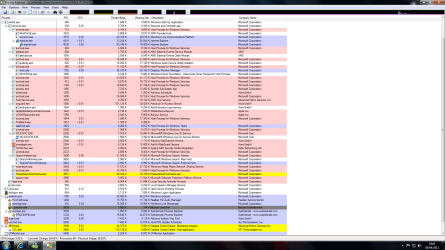
it has started to do it again. i had to restart my pc and now my programes will not work. here is a pic of the process explorer you said to use.
Task manager.png

i don`t know what to look for?
 

My Computer My Computer

At a glance

Windows 7 Home Premium 64 bitAMD Piledriver 8350 4ghzcorsair Dominators 2x 4gbAsus 7970
OS
Windows 7 Home Premium 64 bit
CPU
AMD Piledriver 8350 4ghz
Motherboard
Asus Sabertooth 990FX Rv2
Memory
corsair Dominators 2x 4gb
Graphics Card(s)
Asus 7970
Monitor(s) Displays
LG M227WD
Hard Drives
Corsair Geforce Gs 480gb SSD OS
Samsung F1 Sinpoint 1tb Games drive
WD Green 1.5tb Storage
PSU
Coolmaster Silent Pro M 1000w
Case
Antec 1200
Cooling
Corsair H80i
The only two things I can see there which I would look at closely are "Blizzard Launcher". Uninstall it, and see if that solves the problems, and Punk Buster.

Uninstall that as well ( You can always reinstall it later if you must). This is installed with the game "America's Army".

Regards....Mike Connor
 

My Computer My Computer

At a glance

Several, including Windows 7 x64 Ultimate
OS
Several, including Windows 7 x64 Ultimate
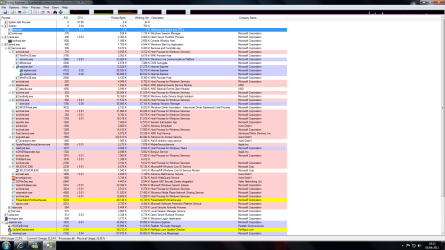
yeh that is not the problem i was trying to open that at the time. this is a pic of the top of the task manger. i don`t know what the highlighted thing is called interupts?

task 2.png

other than that i don`t know what to do as its still doing it ?

:(
 

My Computer My Computer

At a glance

Windows 7 Home Premium 64 bitAMD Piledriver 8350 4ghzcorsair Dominators 2x 4gbAsus 7970
OS
Windows 7 Home Premium 64 bit
CPU
AMD Piledriver 8350 4ghz
Motherboard
Asus Sabertooth 990FX Rv2
Memory
corsair Dominators 2x 4gb
Graphics Card(s)
Asus 7970
Monitor(s) Displays
LG M227WD
Hard Drives
Corsair Geforce Gs 480gb SSD OS
Samsung F1 Sinpoint 1tb Games drive
WD Green 1.5tb Storage
PSU
Coolmaster Silent Pro M 1000w
Case
Antec 1200
Cooling
Corsair H80i
Well, sorry, I have no idea what is causing it, and have no other sensible suggestions to make.

Regards....Mike Connor
 

My Computer My Computer

At a glance

Several, including Windows 7 x64 Ultimate
OS
Several, including Windows 7 x64 Ultimate
Back
Top