Normal service is resumed as Windows 7's growth once again.....

I have been trying to figure out for a long time is why did they bother even releasing IE11 for Windows 7 especially since it was made for Windows 8.1, I can't stand IE11 I have found at least 3 flaws in the time I was using it and 3 times was too many so I rolled my browser back to IE10 and its been working right
 

My Computer My Computer

At a glance

Windows 7 Pro 64bitIntel(R) Core(TM) i3-2350M CPU @ 2.30 GHZ4.00 GBIntel HD Graphiics
Computer type
Laptop
Computer Manufacturer/Model Number
Toshiba Satellite C655-S5547
OS
Windows 7 Pro 64bit
CPU
Intel(R) Core(TM) i3-2350M CPU @ 2.30 GHZ
Memory
4.00 GB
Graphics Card(s)
Intel HD Graphiics
Sound Card
Conexant HD Audio
Monitor(s) Displays
Generic PnP Monitor
Screen Resolution
1366 x 768 x 32 bits (4294967296 colors) @ 60 Hz
Hard Drives
TI106321W0B(C:) 450GB
Keyboard
Standard PS/2 Keyboard
Mouse
Synaptics Pointing Device
Internet Speed
51.68 mb/s download and 12.08 mb/s upload as of 6/24/15
Antivirus
Webroot Secure Anywhere
Browser
IE11, Mozilla Firefox 41.1.01, and Google Chrome if I must
I have been trying to figure out for a long time is why did they bother even releasing IE11 for Windows 7 especially since it was made for Windows 8.1, I can't stand IE11 I have found at least 3 flaws in the time I was using it and 3 times was too many so I rolled my browser back to IE10 and its been working right

I don't have any issues with ie11. I still don't like it, but it works. Must be your pc.
 

My Computer My Computer

At a glance

Windows 10 ProAMD Ryzen 5 2400G Processor with Radeon RX Ve...G.SKILL Ripjaws V Series 16GB (2 x 8GB) 288-P...2047MB NVIDIA GeForce GTX 1060 6GB (EVGA)
Computer type
PC/Desktop
Computer Manufacturer/Model Number
Custom Built
OS
Windows 10 Pro
CPU
AMD Ryzen 5 2400G Processor with Radeon RX Vega 11 Graphics
Motherboard
ASRock X470 Master SLI/AC AM4 AMD Promontory X470 SATA 6Gb/s
Memory
G.SKILL Ripjaws V Series 16GB (2 x 8GB) 288-Pin DDR4 SDRAM D
Graphics Card(s)
2047MB NVIDIA GeForce GTX 1060 6GB (EVGA)
Sound Card
Motherboard Built in
Monitor(s) Displays
Acer R240HY bidx 23.8-Inch IPS HDMI DVI VGA (1920 x 1080) Wi
Screen Resolution
1920 x 1080
Hard Drives
1TB Sandisk SSD PLUS (Main drive)
500 GB Seagate 7200 RPM (Games)
500 GB Western Digital 7200 RPM (Virtual Machines)
PSU
CORSAIR TX Series TX650M 650W 80+ Gold Modular Power Supply
Case
CORSAIR CARBIDE SPEC-02 Mid-Tower Gaming Case, Red LED Fan
Cooling
220mm, two 120mm, and four 60mm fans
Keyboard
Wired Dell keyboard
Mouse
Wireless Logitech mouse
Internet Speed
250mb down, 30mb up
Antivirus
Panda Cloud Antivirus
Browser
Chrome-ish x64
Other Info
Your awesome for reading this.
I have been trying to figure out for a long time is why did they bother even releasing IE11 for Windows 7 especially since it was made for Windows 8.1, I can't stand IE11 I have found at least 3 flaws in the time I was using it and 3 times was too many so I rolled my browser back to IE10 and its been working right

I don't have any issues with ie11. I still don't like it, but it works. Must be your pc.
+1, no issues with IE11. By all means never use something you can't stand. :sarc:
 

My Computer My Computer

At a glance

Windows 7 Ultimate X64 SP1Intel i5-2550K, Differing ~4.4-4.8GHz No buil...16GB G.Skill Sniper 1866MHz @ 2133MHz 2x8GBASUS GTX650TIB-DC2OC-2GD5, (650TI Boost)
Computer type
PC/Desktop
Computer Manufacturer/Model Number
Home Built Desktop By DataTech
OS
Windows 7 Ultimate X64 SP1
CPU
Intel i5-2550K, Differing ~4.4-4.8GHz No built in GPU
Motherboard
ASUS P8Z68-V PRO/GEN3
Memory
16GB G.Skill Sniper 1866MHz @ 2133MHz 2x8GB
Graphics Card(s)
ASUS GTX650TIB-DC2OC-2GD5, (650TI Boost)
Sound Card
Onboard Realtek 5-1
Monitor(s) Displays
Samsung P2570HD
Screen Resolution
1920x1080
Hard Drives
Samsung 840 Pro 256GB SSD for OS, 500GB Seagate Constellation (Enterprise drive) for Data
PSU
Corsair HX650W
Case
Inwin Dragon Rider
Cooling
Hyper 212 EVO w/two Noctua fans, push-pull, @1300 RPM
Keyboard
E-Z Eyes, bright yellow keys with large characters
Mouse
steelseries SENSEI Laser Pro Gaming
Internet Speed
48-51Mbs Mbs down, 11 Mbs up Xfinity Cable
Antivirus
Norton Internet Security 2013
Browser
IE 10, Opera, Pale Moon if needed
Other Info
4 case fans, LG BluRay-RE, ASUS DVD-RW, Mr. Fusion power supply, 1.21 gigawatts.
I have been trying to figure out for a long time is why did they bother even releasing IE11 for Windows 7 especially since it was made for Windows 8.1, I can't stand IE11 I have found at least 3 flaws in the time I was using it and 3 times was too many so I rolled my browser back to IE10 and its been working right

I don't have any issues with ie11. I still don't like it, but it works. Must be your pc.
+1, no issues with IE11. By all means never use something you can't stand. :sarc:

+2 on IE11, although I didn't upgrade to it until just last Friday. I always wait awhile before upgrading or updating anything. I wait around four days before updating M$'s monthly security updates to make sure there are no significant problems being reported. I wait at least a couple of months to upgrade to new versions of IE to give M$ time to iron out the worst of any problems although, in the case of IE11, I just kept forgetting about it. So far, I haven't noticed anything different from IE10 other than it might be a tiny bit snappier.
 

My Computer My Computer

At a glance

Win 7 Ultimate 64 bitIntel i7-3930KKingston HyperX Genesis 32GB Kit (8x4GB Modul...MSI R7850 Twin Frozr 2GD5/OC Radeon HD 7850 2...
Computer type
PC/Desktop
Computer Manufacturer/Model Number
Custom Build
OS
Win 7 Ultimate 64 bit
CPU
Intel i7-3930K
Motherboard
ASUS P9X79 WS
Memory
Kingston HyperX Genesis 32GB Kit (8x4GB Modules) 1600MHz DDR
Graphics Card(s)
MSI R7850 Twin Frozr 2GD5/OC Radeon HD 7850 2GB 256-bit GDDR
Sound Card
Asus Xonar Essence STX
Monitor(s) Displays
3x Asus VG248QE 24", Vizio 32" TV
Screen Resolution
1920 x 1080, ?
Hard Drives
Samsung 128GB 840 Pro SSD (1),
Samsung 4TB 850 EVO SSDs (4)
Samsung 4TB 850 EVO SSDs (16) external backup drives used in 2.5" hot swap bays in the computer.
PSU
Corsair HX750w
Case
Antec Two Hundred v2 (modified)
Cooling
Cooler Master GeminII S524 120mm (fan replaced with a 140mm)
Keyboard
Logitech G510s
Mouse
Logitech M525 (two in use)
Internet Speed
=< 32Mbps down, 8Mbps up
Antivirus
AVAST!, MBAM, SAS, Spybot S&D (all but MBAM free) Glary Util
Browser
IE11
Other Info
LSI 9211-8i HBA card (8 SATA III ports), 2.5" & 3.5" Hot Swap Bays, HooToo HT-CR001 PCI-E to USB 3.0 Internal Hub + 6 Slot Card Reader, and LG Model CH12LS28 BD-ROM Optical Drive. Also, ScanSnap S1500 ADF duplexing scanner, Canon 9000F flat bed scanner, Corsair SP2500 2.1 speakers, Samsung CLP 415nw laser color printer, Cyberpower PP2200SW UPS
I don't like 11 because it messes up gadgets without Bongo's fix which limits them to 100% only DPI.

But the spell check saves enough time I want to find a comparable for Firefox. Anyone?
 

My Computer My Computer

At a glance

Windows 7 Ultimate X64 SP1Intel i5-2550K, Differing ~4.4-4.8GHz No buil...16GB G.Skill Sniper 1866MHz @ 2133MHz 2x8GBASUS GTX650TIB-DC2OC-2GD5, (650TI Boost)
Computer type
PC/Desktop
Computer Manufacturer/Model Number
Home Built Desktop By DataTech
OS
Windows 7 Ultimate X64 SP1
CPU
Intel i5-2550K, Differing ~4.4-4.8GHz No built in GPU
Motherboard
ASUS P8Z68-V PRO/GEN3
Memory
16GB G.Skill Sniper 1866MHz @ 2133MHz 2x8GB
Graphics Card(s)
ASUS GTX650TIB-DC2OC-2GD5, (650TI Boost)
Sound Card
Onboard Realtek 5-1
Monitor(s) Displays
Samsung P2570HD
Screen Resolution
1920x1080
Hard Drives
Samsung 840 Pro 256GB SSD for OS, 500GB Seagate Constellation (Enterprise drive) for Data
PSU
Corsair HX650W
Case
Inwin Dragon Rider
Cooling
Hyper 212 EVO w/two Noctua fans, push-pull, @1300 RPM
Keyboard
E-Z Eyes, bright yellow keys with large characters
Mouse
steelseries SENSEI Laser Pro Gaming
Internet Speed
48-51Mbs Mbs down, 11 Mbs up Xfinity Cable
Antivirus
Norton Internet Security 2013
Browser
IE 10, Opera, Pale Moon if needed
Other Info
4 case fans, LG BluRay-RE, ASUS DVD-RW, Mr. Fusion power supply, 1.21 gigawatts.
I don't like 11 because it messes up gadgets without Bongo's fix which limits them to 100% only DPI.

But the spell check saves enough time I want to find a comparable for Firefox. Anyone?

I don't use gadgets, per M$'s recommendation due to security issues.

Spel chek is nice.
 

My Computer My Computer

At a glance

Win 7 Ultimate 64 bitIntel i7-3930KKingston HyperX Genesis 32GB Kit (8x4GB Modul...MSI R7850 Twin Frozr 2GD5/OC Radeon HD 7850 2...
Computer type
PC/Desktop
Computer Manufacturer/Model Number
Custom Build
OS
Win 7 Ultimate 64 bit
CPU
Intel i7-3930K
Motherboard
ASUS P9X79 WS
Memory
Kingston HyperX Genesis 32GB Kit (8x4GB Modules) 1600MHz DDR
Graphics Card(s)
MSI R7850 Twin Frozr 2GD5/OC Radeon HD 7850 2GB 256-bit GDDR
Sound Card
Asus Xonar Essence STX
Monitor(s) Displays
3x Asus VG248QE 24", Vizio 32" TV
Screen Resolution
1920 x 1080, ?
Hard Drives
Samsung 128GB 840 Pro SSD (1),
Samsung 4TB 850 EVO SSDs (4)
Samsung 4TB 850 EVO SSDs (16) external backup drives used in 2.5" hot swap bays in the computer.
PSU
Corsair HX750w
Case
Antec Two Hundred v2 (modified)
Cooling
Cooler Master GeminII S524 120mm (fan replaced with a 140mm)
Keyboard
Logitech G510s
Mouse
Logitech M525 (two in use)
Internet Speed
=< 32Mbps down, 8Mbps up
Antivirus
AVAST!, MBAM, SAS, Spybot S&D (all but MBAM free) Glary Util
Browser
IE11
Other Info
LSI 9211-8i HBA card (8 SATA III ports), 2.5" & 3.5" Hot Swap Bays, HooToo HT-CR001 PCI-E to USB 3.0 Internal Hub + 6 Slot Card Reader, and LG Model CH12LS28 BD-ROM Optical Drive. Also, ScanSnap S1500 ADF duplexing scanner, Canon 9000F flat bed scanner, Corsair SP2500 2.1 speakers, Samsung CLP 415nw laser color printer, Cyberpower PP2200SW UPS
I have never used Gadgets even on Vista as I think they are gimmicky.
I always use spell check & it has worked on Chrome, IE & Opera over the last 5 years.
 

My Computer My Computer

At a glance

Windows 7 Home Premium 64 bit sp1Intel i5 3570 3.4Ghz Ivy Bridge SKT 1155 quad...G-Skill Rip Jaws 16Gb (8x2) DDR3 -1600 PC3 12...Gigabyte NVIDIA GT610 1Gb DDR3 810/1200 PCI-E...
Computer type
PC/Desktop
Computer Manufacturer/Model Number
Self built using existing case
OS
Windows 7 Home Premium 64 bit sp1
CPU
Intel i5 3570 3.4Ghz Ivy Bridge SKT 1155 quad core
Motherboard
Gigabyte Z77-HD3 SKT 1155 2xSata 3, 4x USB 3.0
Memory
G-Skill Rip Jaws 16Gb (8x2) DDR3 -1600 PC3 12800 CL 10 red
Graphics Card(s)
Gigabyte NVIDIA GT610 1Gb DDR3 810/1200 PCI-E 2.0 Silent
Sound Card
NVIDIA High Definition & Realtech High Definition Audio
Monitor(s) Displays
2 x Philips 226V4L 16:9 aspect ratio
Screen Resolution
1920 x 1080 HD
Hard Drives
Samsung 840 Pro 256gb SSD, SATA 3.
Hitachi Touro Portable 1tb, USB 3.0 HDD used for image b/ups.
PSU
Corsair VS450
Case
Codeng
Cooling
PSU fan & CPU fan
Keyboard
Logitech
Mouse
Logitech Wireless trackball M570
Internet Speed
Wireless 3G. 3mg down & 550kb up.
Antivirus
Bitdefender Internet Security 2020
Browser
Opera (Current Version) & Firefox
Other Info
MS Office 2013 Pro. Davis weather station software. MGE Nova 600 avr UPS.
Tens of millions of consumers use Win7 gadgets which is one of the most popular features. The IE team knows this but - as I experienced at Global MVP Summit when I asked them about it - doesn't care because they place little value on Win7 even though its MS's most successful product and wildly popular with the public. This is why it falls to us to be its advocates as well as support.

The two most popular features on my installs for friends, family and those I help around the world are the collection of 120 Win7 National Editions Backgrounds slideshow which are perhaps the most spectacular (and expensive) pictures ever taken, and gadgets. Both maximize the elegance of the OS reminding us that there has never been an OS so beautiful.

120 Original Windows 7 High Resolution Scenery Regional Wallpapers Free Download » My Digital Life
 

Attachments

  • 5 (16).jpg
    5 (16).jpg
    217.1 KB · Views: 2
  • 1 (4).jpg
    1 (4).jpg
    401.3 KB · Views: 3
  • 2 (6).jpg
    2 (6).jpg
    264.3 KB · Views: 2
  • 4 (6).jpg
    4 (6).jpg
    162.6 KB · Views: 1
Last edited:
I don't like 11 because it messes up gadgets without Bongo's fix which limits them to 100% only DPI.

But the spell check saves enough time I want to find a comparable for Firefox. Anyone?
Not sure, since I don't use IE11 beyond it just being a part of Windows, so I'm not sure how the spell check works in it in particular. I just use the FF one. It underlines misspelled words in red and you can right-mouse click on them to bring up a list of suggested words to choose from. Works fairly well for me, fortunately, as I'm not that great of a speller.
 

My Computer My Computer

At a glance

Windows 7 Professional SP1 64bit, Manjaro Xfc...Intel i7-3930K @ 4.2GHzCorsair Dominator 64GB Quad Channel DDR3 @ 16...EVGA GeForce GTX Titan Black Superclocked (×2...
Computer type
PC/Desktop
OS
Windows 7 Professional SP1 64bit, Manjaro Xfce, Debian 10 64bit Xfce
CPU
Intel i7-3930K @ 4.2GHz
Motherboard
ASUS P9X79 WS
Memory
Corsair Dominator 64GB Quad Channel DDR3 @ 1600MHz
Graphics Card(s)
EVGA GeForce GTX Titan Black Superclocked (×2, SLI)
Monitor(s) Displays
Sony Bravia 46"
Screen Resolution
1920×1080 (Full Screen), 1366×768 (Windows)
Hard Drives
Samsung 860 PRO 4TB SSD, Samsung 850 EVO 1TB SSD, Western Digital WD Gold 16TB 7200 RPM 512MB Cache HDD
PSU
Corsair AX1200 (1200W, 100.4A @ 12V)
Case
Corsair Obsidian 750D
Cooling
Corsair H110, 5 NOCTUA NF-A14 industrialPPC-3000 PWM Fans
Keyboard
Logitech K360
Mouse
Logitech M220
Browser
Firefox Developer Edition, Pale Moon, Tor
Yeah I use that one as well, but then I noticed IE11 correcting my spelling and typos on the fly. I can type 100 wpm but after awhile it gets ridden with typos so to have them corrected as fast as I can type is such a time saver I can't pass it up.

Problem is that without being able to drag bookmarks intact into posts in IE it would waste all that time I save. So I need something like that for Firefox 12 or a better plan for being able to instantly drag from 270 bookmarks into posts and keep typing.
 
Adobe = Dangerous for PC security

Security is the main issue.

Adobe reader is like java. It should be avoided.
First I've heard of it. Please explain.

Surely one of the hundreds of installs I've put Adobe Reader on would have reported it?
There was a period a couple of years ago when a lot of exploits were the result of having Adobe Reader (not Flash) installed on your Window PC.
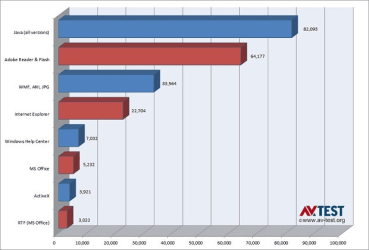
From the year 2000 through today, Java, Adobe Reader and Flash were responsible for 66% of the vulnerabilities exploited by malware on Windows, according to a new study by research group AV-Test Institute.

The study reinforces the well-known rule that keeping applications software up to date is of critical importance for system security. The study does not indicate how many of the exploits were active when the vulnerabilities were unpatched, but such exploits are undoubtedly a small percentage of the total.
Windows Exploits.png
ZDNet - Larry Seltzer
Java, Reader and Flash are most-exploited Windows programs | ZDNet
BTW, nice wallpapers gregrocker (post #209)
 

My Computer My Computer

At a glance

W7 Ultimate SP1, LM19.2 MATE, W10 Home 1703, ...AMD Phenom II x6 1100T, 3.3 GHz12GB DDR3 1333 G-Skill (4GB x 2), G-Skill (2G...NVIDIA GeForce GTX 660
Computer type
PC/Desktop
Computer Manufacturer/Model Number
n/a
OS
W7 Ultimate SP1, LM19.2 MATE, W10 Home 1703, W10 Pro 1703 VM, #All 64 bit
CPU
AMD Phenom II x6 1100T, 3.3 GHz
Motherboard
ASUS M4A88T-M/USB3 (AM3)
Memory
12GB DDR3 1333 G-Skill (4GB x 2), G-Skill (2GB x 2)
Graphics Card(s)
NVIDIA GeForce GTX 660
Sound Card
Realtek?
Monitor(s) Displays
Samsung S23B350
Screen Resolution
1920x1080
Hard Drives
WD Green 2TB (SATA), WD Green 3TB (SATA), WD Blue 4TB (SATA), WD Blue 6TB (SATA)
PSU
Cooler Master
Case
Antec GX300 Tower
Cooling
3x Antec TRICOOL 120mm Fans
Mouse
Wired Optical
Internet Speed
DSL
Antivirus
Avast
Browser
Pale Moon (64 bit)
Other Info
2018-12-27 Upgraded HDDs
2015-12-10 Upgraded case, graphics card, storage
2015-08-15 Upgraded motherboard & RAM
2015-07-15 Upgraded LM17.1 to LM17.2
So change for the sake of change so I can change it back to what I already have and get to waste my time and money in the process?

:sarc:

As far as touch devices go, I prefer running Android (and therefore also Windows 7 with my remote desktop app which list my Android devices' storage as drives in Windows for file transfer, streaming, etc. - at no additional cost beyond my internet connections) on them.

Windows 8 isn't the way of the future; it's a useless tangent (my opinion).

No offense to those of you who like it. I'm glad for you that you do, just don't expect me (nor the majority of people) to follow suit and be convinced otherwise.


Hi there

I have to disagree with you here a LOT.

There is a huge amount of MOBILE computing done now out in the field as well as traditional "Deskbound" computing -- for example in Engineering say a service engineer gets a report of a fault of an electricity substation or pylon -- well in "the old days" a computer generated paper list would be consulted to see who is available, the Engineer would go out and make an inspection, then draft a written report and manually bring it back to the office where it would again be manually entered into some backend system for analysis and the appropriate repair could be scheduled.

Now with mobile devices the control centre can get hold immediately of the nearest available engineer who goes to the site, then using a tablet type of device (maybe a Windows surface pro) fills in an inspection report together with any photos, transmits these to the computer where the whole maintenance (getting parts, scheduling the job, authorising payment to 3rd parties etc etc) can be started immediately. Using a Pen / touch device is FAR EASIER for the field engineer.

Similarly any sort of automated warehousing - retrieving / stacking stocks, picking, packing etc are done with infra red and touch devices. The OS needs to be capable of working with these sorts of devices and W7 just isn't geared without a horrendous total re-write to interfacing with these devices.

I'm getting my Surface Pro 3 (the new Windows one) soon and it's just as good as any workplace desktop is likely to be - it's convenient and for giving demos in meeting rooms etc it's FAR FAR more convenient than a bulky laptop with cables, power issues, screen resolutions etc. The Surface can WIRELESSLY connect to the Smart TV in the meeting room and gone are the days where I'll be forced to sit through meetings with somebody displaying a screen in hideously poor resolution and colour using the old VGA standard on a roll down "projector screen".

Even carrying the device is easier and much lighter than a laptop. (Note I'm addressing remarks here to essentially Pro I.T people rather than dedicated gamers.

Windows 8 and its future variants and developments are geared for these types of devices - you need both a tablet type of device and something that acts as a desktop (now incorporated into a decent SINGLE device) and having an OS that handles both of these devices is the way of the future -- Windows 7 good though it is for "Classic desktop" applications isn't going anywhere in mobile areas -- as well as Engineering don't forget Robotics too and all sorts of other areas which need to interface with a sophisticated OS.

Most Android devices don't have the sophistication of being able to interface with ERP type of backend systems for things like automated warehousing - Windows does and things like the new Surface Pro will just show the TRUE potential of Windows 8.1 and its development. (I say Windows 8.1 because it is a BIG change from Windows 8 which was a bit of a dogs dinner -- 90% of the problems have been fixed in 8.1 and 8.2 is just around the corner.

Things for example like SAP Mobile need some sort of decent processing power on your mobile as well as good connectivity with the back end systems -- your average Android device just won't be good enough -- and while an iPad could do it - why use TWO devices when ONE will do -- a lot of businesses are buying into the Surface Pro 3 -- Ms has a winner here. The IT dept also only needs to use ONE system *say Windows 8.1) for interfacing with the back end stuff rather than have to sort out Android, Apple and zillions of Linux distros that the end clients are using -- simpler too.

For people 100% deskbound to a computer -OK you can stick with W7 - but that's NOT the way of the future -- mobile computing is where its going (generally). There are a few exceptions -- such as gamers but even for creative work such as advertising etc using mobile devices will play a far bigger part than doing this totally from a rigid fixed desktop or bulky non touch enabled laptop with its usually poor 768 X 1366 screen resolution.

Finally - a horrible thing about Android -- I'm sure a lot of users have often encountered this on their mobile phones -- is that application updates often JUST DON'T WORK and there isn't any decent way of bringing back a previous version -- I'm sure you've encountered this - a decent app suddenly stops working after an automatic upgrade. !! No business can operate without some sort of decent change control management -- Android just isn't built for that type of professional use in a large corporate system.

Cheers
jimbo

 
Last edited:

My Computer My Computer

At a glance

Linux CENTOS 7 / various Windows OS'es and se...Intel i7 Intel i58GB, 16GBOn Motherboard
Computer type
PC/Desktop
Computer Manufacturer/Model Number
Custom built, several laptops HP/ASUS
OS
Linux CENTOS 7 / various Windows OS'es and servers
CPU
Intel i7 Intel i5
Memory
8GB, 16GB
Graphics Card(s)
On Motherboard
Sound Card
Realtek HD audio
Monitor(s) Displays
Apple Cinema display, Samsung LCD
Screen Resolution
1920 X 1080
Hard Drives
4 X 1TB SATA
Mouse
Toshiba wireless laser
Internet Speed
> 20MB up
So change for the sake of change so I can change it back to what I already have and get to waste my time and money in the process?

:sarc:

As far as touch devices go, I prefer running Android (and therefore also Windows 7 with my remote desktop app which list my Android devices' storage as drives in Windows for file transfer, streaming, etc. - at no additional cost beyond my internet connections) on them.

Windows 8 isn't the way of the future; it's a useless tangent (my opinion).

No offense to those of you who like it. I'm glad for you that you do, just don't expect me (nor the majority of people) to follow suit and be convinced otherwise.


Hi there

I have to disagree with you here a LOT.

There is a huge amount of MOBILE computing done now out in the field as well as traditional "Deskbound" computing -- for example in Engineering say a service engineer gets a report of a fault of an electricity substation or pylon -- well in "the old days" a computer generated paper list would be consulted to see who is available, the Engineer would go out and make an inspection, then draft a written report and manually bring it back to the office where it would again be manually entered into some backend system for analysis and the appropriate repair could be scheduled.

Now with mobile devices the control centre can get hold immediately of the nearest available engineer who goes to the site, then using a tablet type of device (maybe a Windows surface pro) fills in an inspection report together with any photos, transmits these to the computer where the whole maintenance (getting parts, scheduling the job, authorising payment to 3rd parties etc etc) can be started immediately. Using a Pen / touch device is FAR EASIER for the field engineer.

Similarly any sort of automated warehousing - retrieving / stacking stocks, picking, packing etc are done with infra red and touch devices. The OS needs to be capable of working with these sorts of devices and W7 just isn't geared without a horrendous total re-write to interfacing with these devices.

I'm getting my Surface Pro 3 (the new Windows one) soon and it's just as good as any workplace desktop is likely to be - it's convenient and for giving demos in meeting rooms etc it's FAR FAR more convenient than a bulky laptop with cables, power issues, screen resolutions etc. The Surface can WIRELESSLY connect to the Smart TV in the meeting room and gone are the days where I'll be forced to sit through meetings with somebody displaying a screen in hideously poor resolution and colour using the old VGA standard on a roll down "projector screen".

Even carrying the device is easier and much lighter than a laptop. (Note I'm addressing remarks here to essentially Pro I.T people rather than dedicated gamers.

Windows 8 and its future variants and developments are geared for these types of devices - you need both a tablet type of device and something that acts as a desktop (now incorporated into a decent SINGLE device) and having an OS that handles both of these devices is the way of the future -- Windows 7 good though it is for "Classic desktop" applications isn't going anywhere in mobile areas -- as well as Engineering don't forget Robotics too and all sorts of other areas which need to interface with a sophisticated OS.

Most Android devices don't have the sophistication of being able to interface with ERP type of backend systems for things like automated warehousing - Windows does and things like the new Surface Pro will just show the TRUE potential of Windows 8.1 and its development. (I say Windows 8.1 because it is a BIG change from Windows 8 which was a bit of a dogs dinner -- 90% of the problems have been fixed in 8.1 and 8.2 is just around the corner.

Things for example like SAP Mobile need some sort of decent processing power on your mobile as well as good connectivity with the back end systems -- your average Android device just won't be good enough -- and while an iPad could do it - why use TWO devices when ONE will do -- a lot of businesses are buying into the Surface Pro 3 -- Ms has a winner here. The IT dept also only needs to use ONE system *say Windows 8.1) for interfacing with the back end stuff rather than have to sort out Android, Apple and zillions of Linux distros that the end clients are using -- simpler too.

For people 100% deskbound to a computer -OK you can stick with W7 - but that's NOT the way of the future -- mobile computing is where its going (generally). There are a few exceptions -- such as gamers but even for creative work such as advertising etc using mobile devices will play a far bigger part than doing this totally from a rigid fixed desktop or bulky non touch enabled laptop with its usually poor 768 X 1366 screen resolution.

Finally - a horrible thing about Android -- I'm sure a lot of users have often encountered this on their mobile phones -- is that application updates often JUST DON'T WORK and there isn't any decent way of bringing back a previous version -- I'm sure you've encountered this - a decent app suddenly stops working after an automatic upgrade. !! No business can operate without some sort of decent change control management -- Android just isn't built for that type of professional use in a large corporate system.

Cheers
jimbo

While, when it comes to businesses, I agree that Win 8 is better suited for mobile applications and those uses are increasing, mobile computing is still is only a tangent while desktop computing will still carry the bulk of the work. Win 7 meets desktop needs but can still interface with mobile devices. As long as workers are confined to offices and, especially, desks and cubicles, desktop computing will remain king. M$ is nuts to be ignoring that rather large segment of its user base.

While tablets can replace paper lists, paper and ink or toner is still cheaper unless one is dealing with huge volumes. Paper is also less likely to break if dropped (duh!) and is cheaper to replace if damaged by weather. Paper can be folded to fit in a pocket; a tablet has to be made smaller to do that, requiring cumbersome scrolling to find entries that could have been found much more quickly on a larger sheet of paper. while you disparage smart phones, they actually make more sense for fieldwork than tablets. I worked in warehousing for 30 years for an electric/utility company and, while we were using more and more mobile devices (in fact, I was championing them long before they started to be used), tablets would never survive in use. Not all warehouses are like Amazon's. I worked in the field on line crews before I went into warehousing and supported those crews as well as other fields and I know darned well what their needs are. A tablet will never replace, large multipage prints.

Android isn't just for smartphones; many tablets also use it successfully and at a lower cost. One just has to be selective of the apps being used. And Android has one heck of a better app selection available than Win 8; even iPads have a better selection within their walled garden.

Finally, for many applications, there is no replacement for a full size keyboard with a separate numb pad and even macro keys, more monitor real estate (especially with multiple monitors), and a mouse. Try formatting a full page of music on a tablet (all commercial music engraving is done on computers now), especially multiple pages. The same for documents, multiple graphics (especially advanced CAD work), etc. You may be able to dock a tablet to various peripherals such as keyboards, mice and monitors, but it will lack the power of even a good laptop.

Touch screens are ideal for tablets—for that matter, they are the only practical input device for them—but they will never have the precision of a mouse, especially when fine detail is involved. Even on a laptop, a touch pad makes far more sense than a touchscreen because it takes far less hand and arm movement to do anything. I detest touch pads but I would rather use one that use a touch screen.

In the case of my single monitor (soon to become three) at home, if it was a touch screen, I would have to move my hand 18.5" to get from one side of the screen to the other, and involve my arms and shoulders in the process, something my old shoulders would not have appreciated. Even youngsters would eventually develop problems over time. However, it takes only a 12-14" movement to go from my keyboard top my mouse and that movement requires far less movement of my arms and shoulder. Once my paw is on the mouse, I can go from one side of the screen to the other with only 4" of movement, almost all of which can be accommodated with just my wrist. I can set the mouse to require less movement but I prefer the increased accuracy of my present setting. (Btw, I'm not a gamer).

Tablets are great for people who just surf the web and check emails. Tablets and smartphones have become popular because that is what computing is to most people. Also, most people want instant gratification now and tablets and smartphones can provide that albeit it at lower quality. But for any kind of serious, involved work, the desktops still rule and touch is not practical. Yet, mobile computing was what M$ was trying to drive us to with Win 8 (along with Apple's walled garden and total control) and the public, especially businesses, responded with how they felt about the way M$ was trying to do so by refusing to buy into it (literally).

(Sent from my desktop PC using a real keyboard.)
 

My Computer My Computer

At a glance

Win 7 Ultimate 64 bitIntel i7-3930KKingston HyperX Genesis 32GB Kit (8x4GB Modul...MSI R7850 Twin Frozr 2GD5/OC Radeon HD 7850 2...
Computer type
PC/Desktop
Computer Manufacturer/Model Number
Custom Build
OS
Win 7 Ultimate 64 bit
CPU
Intel i7-3930K
Motherboard
ASUS P9X79 WS
Memory
Kingston HyperX Genesis 32GB Kit (8x4GB Modules) 1600MHz DDR
Graphics Card(s)
MSI R7850 Twin Frozr 2GD5/OC Radeon HD 7850 2GB 256-bit GDDR
Sound Card
Asus Xonar Essence STX
Monitor(s) Displays
3x Asus VG248QE 24", Vizio 32" TV
Screen Resolution
1920 x 1080, ?
Hard Drives
Samsung 128GB 840 Pro SSD (1),
Samsung 4TB 850 EVO SSDs (4)
Samsung 4TB 850 EVO SSDs (16) external backup drives used in 2.5" hot swap bays in the computer.
PSU
Corsair HX750w
Case
Antec Two Hundred v2 (modified)
Cooling
Cooler Master GeminII S524 120mm (fan replaced with a 140mm)
Keyboard
Logitech G510s
Mouse
Logitech M525 (two in use)
Internet Speed
=< 32Mbps down, 8Mbps up
Antivirus
AVAST!, MBAM, SAS, Spybot S&D (all but MBAM free) Glary Util
Browser
IE11
Other Info
LSI 9211-8i HBA card (8 SATA III ports), 2.5" & 3.5" Hot Swap Bays, HooToo HT-CR001 PCI-E to USB 3.0 Internal Hub + 6 Slot Card Reader, and LG Model CH12LS28 BD-ROM Optical Drive. Also, ScanSnap S1500 ADF duplexing scanner, Canon 9000F flat bed scanner, Corsair SP2500 2.1 speakers, Samsung CLP 415nw laser color printer, Cyberpower PP2200SW UPS

My Computer My Computer

At a glance

Windows 7 Home Premium
OS
Windows 7 Home Premium
I think Jimbo is seeing the Surface Pro through Rose Tinted Spectacles. Maybe those stupid M$ adverts have got to you. OK it is a nice device but give me a real desktop computer with a 22" (and larger) monitor. I am lucky enough to have 4 machines running on my 3 monitors on my desk. 2 run exclusively Windows 7 and the other 2 swap between 7 and a non metro 8.1. I have experience of working in the field with a laptop. All of our operations and scheduling part ordering was carried out online. Clients basement...no signal...Clients front room next to Plasma TV ...no signal,way out in the boonies...no signal...system went down...no work that day.....Yet amazingly with a computer at home and a high speed connection I could order all my parts reschedule the calls and order parts. Mobile only works if the infrastructure is there and it certainly is not here in Indiana. I wonder how it is in hilly areas as where I am is flat as a panckae yet there are still no and poor reception pockets. Hell sometimes I never knew if I had ordered the part due to poor signal as the system hung. Then 3 of the parts showed up due to errors. No Jimbo as an engineer I prefer a computer and a printed backup as the paper does not suddenly go blank on me when I need it the most.
For me that would be Windows 7 or Windows 8.1 with the metro balls up cut off. IE Castrated.
 

My Computer My Computer

At a glance

Windows 7 x64 Ultimate and numerous virtual m...AMD FX-8350 Vishera 32nm Technology @ 4.2 GHz...G Skill 32.0GB Dual-Channel DDR3 @ 1204MHz (1...EVGA GeForce GTX 960 4GB Super SC ACX 2.0+ wi...
Computer type
PC/Desktop
Computer Manufacturer/Model Number
Bluethunder II
OS
Windows 7 x64 Ultimate and numerous virtual machines
CPU
AMD FX-8350 Vishera 32nm Technology @ 4.2 GHz default
Motherboard
ASUSTeK COMPUTER INC. SABERTOOTH 990FX R2.0 (Socket 942)
Memory
G Skill 32.0GB Dual-Channel DDR3 @ 1204MHz (11-13-13-31)
Graphics Card(s)
EVGA GeForce GTX 960 4GB Super SC ACX 2.0+ with Back Plate
Sound Card
Creative X-Fi Titanium HD Audiophile PCIe
Monitor(s) Displays
LG L227WTG x 3
Screen Resolution
1680 x 1050 16:10
Hard Drives
238GB Samsung850 PRO SATA Disk Device (SSD)
1863GB Seagate ST2000DM 001-1CH164 (SATA)
1397GB Seagate ST1500DL 003-9VT16L(SATA)
466GB Western Digital WDC WD50 03AZEX-00K1GA0 (SATA) x 2
932GB Seagate ST310005 28AS SATA Disk Device (SATA)
PSU
Enermax Revolution87+ 1000 Watts Gold Certified Power Supply
Case
Rocketfish Full Tower
Cooling
Cooler Master Hyper 212 EVO Push Pull 120mm Fans
Keyboard
Logitech K740
Mouse
Logitech G100S Laser LED + Logitech Gamepad F310
Internet Speed
500 mbs down and 30mbs up
Antivirus
Malwarebytes Pro & Avast and MSE on certain Virtual Machines
Browser
Firefox (Main) Chrome, Internet Explorer (Back Up)
Other Info
Logitech X 230 2.1 Stereo System and 5.1 Yamaha RX V2090
B&W DM6 Monitor Speakers + Center and Surround Speakers
Using Mouse Without Borders (Google it)
You think mobile coverage is bad on your side of the Mississippi? It's worse on my side.
 

My Computer My Computer

At a glance

Win 7 Ultimate 64 bitIntel i7-3930KKingston HyperX Genesis 32GB Kit (8x4GB Modul...MSI R7850 Twin Frozr 2GD5/OC Radeon HD 7850 2...
Computer type
PC/Desktop
Computer Manufacturer/Model Number
Custom Build
OS
Win 7 Ultimate 64 bit
CPU
Intel i7-3930K
Motherboard
ASUS P9X79 WS
Memory
Kingston HyperX Genesis 32GB Kit (8x4GB Modules) 1600MHz DDR
Graphics Card(s)
MSI R7850 Twin Frozr 2GD5/OC Radeon HD 7850 2GB 256-bit GDDR
Sound Card
Asus Xonar Essence STX
Monitor(s) Displays
3x Asus VG248QE 24", Vizio 32" TV
Screen Resolution
1920 x 1080, ?
Hard Drives
Samsung 128GB 840 Pro SSD (1),
Samsung 4TB 850 EVO SSDs (4)
Samsung 4TB 850 EVO SSDs (16) external backup drives used in 2.5" hot swap bays in the computer.
PSU
Corsair HX750w
Case
Antec Two Hundred v2 (modified)
Cooling
Cooler Master GeminII S524 120mm (fan replaced with a 140mm)
Keyboard
Logitech G510s
Mouse
Logitech M525 (two in use)
Internet Speed
=< 32Mbps down, 8Mbps up
Antivirus
AVAST!, MBAM, SAS, Spybot S&D (all but MBAM free) Glary Util
Browser
IE11
Other Info
LSI 9211-8i HBA card (8 SATA III ports), 2.5" & 3.5" Hot Swap Bays, HooToo HT-CR001 PCI-E to USB 3.0 Internal Hub + 6 Slot Card Reader, and LG Model CH12LS28 BD-ROM Optical Drive. Also, ScanSnap S1500 ADF duplexing scanner, Canon 9000F flat bed scanner, Corsair SP2500 2.1 speakers, Samsung CLP 415nw laser color printer, Cyberpower PP2200SW UPS
Mobile is growing big time. It surly has take it's place in the computing world.
One can choose mobile or stationary or better yet both.
It's not one or the other.

Just give us a operating system or systems that work great on both.
Normally a fit all (anything) does just that. Fits everything but fits nothing well.

For all those that use mobile device; it's not mandatory to throw away your PC.
Your allowed to own and use both if you so desire. At least in this country of mine.
 

My Computer My Computer

At a glance

Windows 10 Pro. 64/ version 1709 Windows 7 Pr...Intel i7-6800K @ 4.3Corsair Platinum 16 gig @2400EVGA GTX 1070 OC
Computer type
PC/Desktop
Computer Manufacturer/Model Number
Home made Desktop
OS
Windows 10 Pro. 64/ version 1709 Windows 7 Pro/64
CPU
Intel i7-6800K @ 4.3
Motherboard
ASUS X-99 Deluxe II
Memory
Corsair Platinum 16 gig @2400
Graphics Card(s)
EVGA GTX 1070 OC
Monitor(s) Displays
Asus 27" LED LCD/VE278Q
Screen Resolution
1920-1080 or 1280-720 HDMI
Hard Drives
INTEL SSD 730-240 Gb Sata 3.0/
PSU
EVGA Platium 1200W
Case
Phanteks Luxe Tempered Glass 8 fans/ one radiator
Cooling
XSPC/ Water Cooled CPU
Keyboard
Das 4 Professional
Mouse
Logitech M705/MX Anywhere 2-S
Internet Speed
100 mbits
Antivirus
Microsoft Security Essentials/ Malwarebytes Premium 3.0/ SAS
Browser
I.E. 11 default/Firefox/ ISP Time Warner Cable/Spectrum
Other Info
LG BluRay Burner/
Sound system-KLipsch-THX/
Icy Dock ssd Hot Swap bays.
I think Jimbo is seeing the Surface Pro through Rose Tinted Spectacles. Maybe those stupid M$ adverts have got to you. OK it is a nice device but give me a real desktop computer with a 22" (and larger) monitor. I am lucky enough to have 4 machines running on my 3 monitors on my desk. 2 run exclusively Windows 7 and the other 2 swap between 7 and a non metro 8.1. I have experience of working in the field with a laptop. All of our operations and scheduling part ordering was carried out online. Clients basement...no signal...Clients front room next to Plasma TV ...no signal,way out in the boonies...no signal...system went down...no work that day.....Yet amazingly with a computer at home and a high speed connection I could order all my parts reschedule the calls and order parts. Mobile only works if the infrastructure is there and it certainly is not here in Indiana. I wonder how it is in hilly areas as where I am is flat as a panckae yet there are still no and poor reception pockets. Hell sometimes I never knew if I had ordered the part due to poor signal as the system hung. Then 3 of the parts showed up due to errors. No Jimbo as an engineer I prefer a computer and a printed backup as the paper does not suddenly go blank on me when I need it the most.
For me that would be Windows 7 or Windows 8.1 with the metro balls up cut off. IE Castrated.


Hi there

I think YOU have actually missed the point - the Surface pro 3 with the docking station can be used PERFECTLY as a "Classical computer" and plugged in to ENORMOUS monitors if you want to -- and it's so much lighter and more portable than typical laptops. Out in the field you can also use it as a standard laptop - although it really is easier with the On screen keyboard for submitting small reports - so it works in BOTH modes if you want.

Mobile might be a problem IF you have bad mobile coverage out in the "boonies" -- however that's going to be a diminishing problem in the future -- and certainly if I'm out in the field as an Engineer its far easier to make a quick report with a decent mobile device - especially if the application is properly devised so you can use a lot of drop downs - and then send the report to the back end computer -- I don't know about you but if you are in a very windy, muddy and wet place mucking about with pencil / paper etc is a real pain.

Mobile is an increasing part of modern computing infrastructure and a modern OS needs to be able to provide for it.

The number of purely deskbound people sitting in those 1960's style of "tiny cubes" in an office is definitely rapidly diminishing (thank goodness - that was probably the most hideous office design and work environment of all time). Of course "Classical desktop OS'es are here to stay but they need to integrate too with mobile devices.

(Note also in the whole of my posts I NEVER mentioned Metro apps -- to me those are also an irrelevance -- better suited to mobile phones -- I was talking about a MOBILE computing infrastructure which is another ballgame entirely).

Cheers
jimbo
 

My Computer My Computer

At a glance

Linux CENTOS 7 / various Windows OS'es and se...Intel i7 Intel i58GB, 16GBOn Motherboard
Computer type
PC/Desktop
Computer Manufacturer/Model Number
Custom built, several laptops HP/ASUS
OS
Linux CENTOS 7 / various Windows OS'es and servers
CPU
Intel i7 Intel i5
Memory
8GB, 16GB
Graphics Card(s)
On Motherboard
Sound Card
Realtek HD audio
Monitor(s) Displays
Apple Cinema display, Samsung LCD
Screen Resolution
1920 X 1080
Hard Drives
4 X 1TB SATA
Mouse
Toshiba wireless laser
Internet Speed
> 20MB up
The number of purely deskbound people sitting in those 1960's style of "tiny cubes" in an office is definitely rapidly diminishing

Where's the evidence for this? In the company I work for I can guarantee there are thousands of people working in that exact environment, and any other Aerospace or automotive company. And call centers, and distribution companies, and God knows how many other businesses. None of them need a mobile device as they're all still deskbound, they're not going to be sitting in a windy, wet field with a Surface Pro.
 

My Computer My Computer

At a glance

W7 Pro x64 SP1 | W10 Pro IP x64 | W8.1 Pro x6...i7-4790k @ 4GHz (4.4GHz Boost)16GB DDR3 Kingston HyperX Fury @ 1600MHz CL 9...EVGA GTX 980 Classified
Computer type
PC/Desktop
Computer Manufacturer/Model Number
Custom Build
OS
W7 Pro x64 SP1 | W10 Pro IP x64 | W8.1 Pro x64 VM | Linux Mint VM
CPU
i7-4790k @ 4GHz (4.4GHz Boost)
Motherboard
ASUS Sabertooth Z87 (BIOS Rev 2004)
Memory
16GB DDR3 Kingston HyperX Fury @ 1600MHz CL 9-9-9-27
Graphics Card(s)
EVGA GTX 980 Classified
Sound Card
Realtek Onboard
Monitor(s) Displays
Samsung S27D390
Screen Resolution
1920 x 1080
Hard Drives
240GB Intel 520 Series SSD |
Samsung 850 EVO 120GB SSD |
2TB WD Caviar Black |
2TB WD Caviar Green
PSU
Corsair HX850-80 Gold Modular
Case
Cooler Master Silencio 650
Cooling
Corsair H80i w/2 x Corsair SP120 | 2 x 120mm Noctua NF-S12B
Keyboard
Microsoft Sidewinder X4
Mouse
Gigabyte M6900 optical
Internet Speed
152mb
Antivirus
F-Secure
Browser
Firefox 38.0
Other Info
Backup Rig: Win 7 Pro 64-bit | AMD A10-5800k | ASUS F2A85-V Pro | 8GB Samsung DDR3 @1600MHz | 120GB Toshiba SDD | 2TB Seagate HDD | Cooler Master Silencio 550
Back
Top