
You are using an out of date browser. It may not display this or other websites correctly.
You should upgrade or use an alternative browser.
You should upgrade or use an alternative browser.
Normal Temps?????????????????
- Thread starter kirkland
- Start date
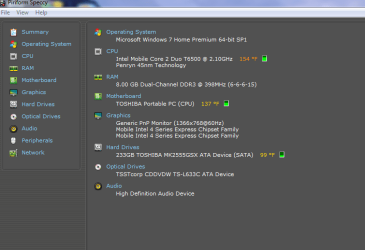
Seems like the processor heatsink is having a hard time exhausting the hot air because of dust blocking it, time to clean it.
My Computer
- Computer type
- PC/Desktop
- OS
- Microsoft Windows 10 Professional / Windows 7 Professional
- CPU
- Intel i5-3570
- Motherboard
- Lenovo Mahobay
- Memory
- 16GB DDR3
- Graphics Card(s)
- AMD Radeon HD 7850 2GB
- Sound Card
- (1) Realtek HD Audio (2) AMD HD Audio
- Monitor(s) Displays
- LG LS192WS
- Screen Resolution
- 1440 x 900 @ 32bit color
- Hard Drives
- (1) SUV300S37A/120G (2) ST3500413AS SATA Disk Device AHCI mode enabled.
- PSU
- Corsair HX620
- Case
- Thermaltake V4 Black Edition
- Cooling
- Cooler Master Hyper 212 + Artic Silver 5 on CPU/GPU
- Keyboard
- Dell SK-8115
- Mouse
- Razer Copperhead with MAPED mat (awesome!)
- Internet Speed
- 100 Mbps up/down
- Browser
- Chrome
- Local time
- 12:12 AM
- Messages
- 370
I did a double-take on those before noticing the "°F"  but yes, the CPU heatsink seems like it could do with a de-dust.
but yes, the CPU heatsink seems like it could do with a de-dust.My Computer
- Computer Manufacturer/Model Number
- CreepinJesus Mk. IV
- OS
- Windows 7 Ultimate x64
- CPU
- Intel Core i5-2500 3.3GHz
- Motherboard
- Asus P8H67-M PRO
- Memory
- 8GB DDR3 1333MHz
- Graphics Card(s)
- On-board
- Sound Card
- On-board
- Monitor(s) Displays
- Samsung SyncMaster BX2250 22.5" LED-backlit LCD
- Screen Resolution
- 1920 * 1080
- Hard Drives
- OCZ Agility 3 120GB, SATA-III
- PSU
- Thermaltake Toughpower Grand TPG-650M
- Case
- Lian-Li PC-A04
- Cooling
- Standard fans. They blow.
- Keyboard
- Logitech K360
- Mouse
- Generic Logitech from the bargain-bin by the checkout
- Internet Speed
- Over 9000! ...Mbps.
- Other Info
- Chocolate digestives are my favourite biscuit.
Seems like the processor heatsink is having a hard time exhausting the hot air because of dust blocking it, time to clean it.
It is sitting on a cheap 3 fan cooler from honkong
My Computer
- OS
- 32 bit 7 home premium
I did a double-take on those before noticing the "°F"
Blast it with a can of air or disassmble and blast with a can of air?
My Computer
- OS
- 32 bit 7 home premium

Disassembling it gives the best results, but is trickier. Find a service/disassembly manual for your laptop.
DO NOT remove the heatsink from the CPU.
Also, drag the computer outside before cleaning, as you're going to raise a dust storm, and you don't want that in your home.
DO NOT remove the heatsink from the CPU.
Also, drag the computer outside before cleaning, as you're going to raise a dust storm, and you don't want that in your home.
My Computer
- Computer type
- PC/Desktop
- Computer Manufacturer/Model Number
- custom built
- OS
- Win 7 Pro 64-bit 7601
- CPU
- AMD Phenom 9650 QuadCore, revision DR-B3
- Motherboard
- ASUS M4A78
- Memory
- 5 GB yes I run 2x 2GB and 1x 1GB, different brand, spank me.
- Graphics Card(s)
- NVIDIA GeForce 9800 GT 512 Mb, unknown manufacturer.
- Sound Card
- Crappy Realtek Integrated Audio
- Monitor(s) Displays
- Fujitsu Siemens P19-3P
- Screen Resolution
- 1280 x 1024 x 32 bits @ 60 Hz Oh yeah, 4:3 rocks!
- Hard Drives
- (1) MAXTOR S TM3320613AS SATA Disk Device (2) STM35004 18AS SATA Disk Device (3) TOSHIBA USB 2.5"-HDD
- PSU
- whatever, around 450w
- Case
- Scavenged from old company PC, 10+ years old
- Cooling
- CPU fan, GPU fan, case fan, nothing fancy
- Keyboard
- Microsoft, PS/2, white.
- Mouse
- Optical, logitec.
- Internet Speed
- effective max speeds: 70-ish kB/s down 30-ish kB/s up
- Antivirus
- Avira, free edition.
- Browser
- Firefox with FXChrome to make it look like Google Chrome :P
- Other Info
- Was discarded by previous owner due to "horrible performance".
Was running Win Xp from a IDE drive. Yeah. Was a pain.
SATA II drive and Win7 and it zips away! Yay!
x BlueRobot
Closed by request
- Local time
- 11:12 PM
- Messages
- 6,784
The CPU seems to be fairly hot, have you tried removing any dust from the heatsinks and vents?
Another point to add, if you are using a laptop, then get yourself a cooling pad and raise the back of the laptop a few CM from the surface of whatever you are using to create a better flow of cool air.
SpeedFan - Access temperature sensor in your computer
SpeedFan will allow you to monitor your fan speeds, to see if any of the fan blades are being disrupted due to a build-up of dust and other debris.
Another point to add, if you are using a laptop, then get yourself a cooling pad and raise the back of the laptop a few CM from the surface of whatever you are using to create a better flow of cool air.
SpeedFan - Access temperature sensor in your computer
SpeedFan will allow you to monitor your fan speeds, to see if any of the fan blades are being disrupted due to a build-up of dust and other debris.
My Computer
- Computer type
- Laptop

- Local time
- 5:12 PM
- Messages
- 1,652
Seems like the processor heatsink is having a hard time exhausting the hot air because of dust blocking it, time to clean it.
It is sitting on a cheap 3 fan cooler from honkong
Yes, well there you go - that is probably normal but not good.
My Computer
- Computer type
- PC/Desktop
- Computer Manufacturer/Model Number
- Home built (GeneO industries)/Model 4
- OS
- Windows 10 Pro. EFI boot partition, full EFI boot
- CPU
- i7 4770k 4.4GHz (44-44-43-43 turbo) @ 1.248V
- Motherboard
- ASUS Maximus VI Hero
- Memory
- 16GB (8GBx2) @2200 MHz G.skill Sniper 10-11-10-30-1, 1.6V
- Graphics Card(s)
- MSI GTX 970 Gaming 4G
- Sound Card
- Onboard SupremeFX Audio
- Monitor(s) Displays
- NEC Spectraview 2490WUXi-SV
- Screen Resolution
- 1920 x 1200
- Hard Drives
- Samsung 850 Pro 256GB (OS), Samsung 2x 128GB 840 Pro SSD in RAID0, 3x WD Blue 6Gb/s 1TB RAID0, WD 2TB Black external USB 3.0, 2TB WD20EARS Green external USB 3.0, 2x 500GB Seagate and 1 750 GB external USB, 1x 350GB external USB3
- PSU
- Seasonic X-850 (2012 KM3 model)
- Case
- Fractal Design Define R4
- Cooling
- NH-D14, NF-F12, NF-A15; NF-P14, NF-P12,NF-A14, S12A PWM
- Keyboard
- Cooler Master Storm Quickfire Rapid - Brown
- Mouse
- Logitech G602
- Internet Speed
- 126.4 Mb/s down, 24.3 Mb/s up
- Other Info
- USB 3.0 x8 , SATA III x8, eSATA, USB 2.0 x6. Samsung DVD R/W drive.
WEI: CPU 7.8, Memory 7.9, Graphics 7.9, Disk 7.9
Is that for a laptop or a desktop?
If it's a desktop, they are a bit high and probably indicates problems in coolers or excessive heat or ventilation failures.
If it's a notebook, those are used to higher temperatures due to their natural lack of ventilation, so I would be cautious and keep an eye, but not alarmed as they normally rise temperatures to those extents.
In any case, while a bit high, they're still far from damaging the CPU and well within the operative range, as long as they don't rise any further.
If it's a desktop, they are a bit high and probably indicates problems in coolers or excessive heat or ventilation failures.
If it's a notebook, those are used to higher temperatures due to their natural lack of ventilation, so I would be cautious and keep an eye, but not alarmed as they normally rise temperatures to those extents.
In any case, while a bit high, they're still far from damaging the CPU and well within the operative range, as long as they don't rise any further.
My Computer
- Computer type
- Laptop
- Computer Manufacturer/Model Number
- Toshiba Sattelite A665-S6092
- OS
- Windows 7 Ultimate x64
- CPU
- Intel Core i7-740QM
- Memory
- 8 GB DDR3
- Graphics Card(s)
- NVIDIA GeForce 330GT
- Screen Resolution
- 1366x768
- Hard Drives
- Samsung 840 SSD 500GB
1TB USB3 external HD
- Cooling
- Coolermaster Notepal U3 notebook cooling pad
- Internet Speed
- 3mbps ASDL
- Antivirus
- ClamWin 0.98.7
- Browser
- Opera 12.17 x86 (main), Firefox 38 (sec), IE11 (last resort)
badtux
New member
Most laptops run their fans as slow as possible to save battery power. The end result is that it's typical for laptops to run their CPU's at 70C to 80C, even the "fruity" laptops that you pay a $1,000 tax to have the magic glowing emblem on the back run at that temperature. My HP Envy 17 is actually an exception to that general rule, it usually runs its CPU at 40C and I rarely hear the fans.
Oh, converting to non-standard American measurements, that's around 160F-180F for typical laptops and mine is running around 105F but is very atypical -- I've never before owned a laptop that ran its processor this cool. I think it's because the ventilation system on the Envy 17 was designed for much hotter processor than the Sandy Bridge that's in mine, Sandy Bridge sips power compared to earlier high-end I7's.
Oh, converting to non-standard American measurements, that's around 160F-180F for typical laptops and mine is running around 105F but is very atypical -- I've never before owned a laptop that ran its processor this cool. I think it's because the ventilation system on the Envy 17 was designed for much hotter processor than the Sandy Bridge that's in mine, Sandy Bridge sips power compared to earlier high-end I7's.
My Computer
- Computer Manufacturer/Model Number
- HP Envy 17
- OS
- Windows 7 Professional 64 Bit
- CPU
- Intel Core i7-3720QM 2.6Ghz
- Motherboard
- Ivy Bridge
- Memory
- 16GB
- Graphics Card(s)
- AMD Radeon HD 7850M
- Monitor(s) Displays
- 27" Samsung
- Screen Resolution
- 1080p
- Hard Drives
- 160GB SSD C:
750GB Hybrid D:
- Keyboard
- Logitech K750 Solar
- Mouse
- Logitech Anywhere MX Darkfield
- Internet Speed
- Cable
- Other Info
- WEI=7.6/7.6/6.8/6.8/7.6
The CPU seems to be fairly hot, have you tried removing any dust from the heatsinks and vents?
Another point to add, if you are using a laptop, then get yourself a cooling pad and raise the back of the laptop a few CM from the surface of whatever you are using to create a better flow of cool air.
SpeedFan - Access temperature sensor in your computer
SpeedFan will allow you to monitor your fan speeds, to see if any of the fan blades are being disrupted due to a build-up of dust and other debris.
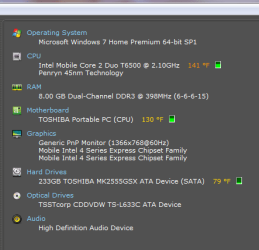
these are the temps after it was off all night and just turned on
My Computer
- OS
- 32 bit 7 home premium
the cpu seems to be fairly hot, have you tried removing any dust from the heatsinks and vents?
Another point to add, if you are using a laptop, then get yourself a cooling pad and raise the back of the laptop a few cm from the surface of whatever you are using to create a better flow of cool air.
speedfan - access temperature sensor in your computer
speedfan will allow you to monitor your fan speeds, to see if any of the fan blades are being disrupted due to a build-up of dust and other debris.
these are the temps after it was off all night and just turned on
My Computer
- OS
- 32 bit 7 home premium
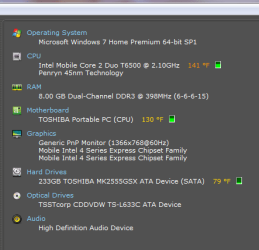
these temps are after it was off all night and just turned on View attachment 239469
how can these temps start out high?
My Computer
- OS
- 32 bit 7 home premium
x BlueRobot
Closed by request
- Local time
- 11:12 PM
- Messages
- 6,784
Most probably very poor air circulation; have you cleaned the vents and inside the case of the desktop/laptop?
Are the vents being obstructed by anything? What are the condition of the fans? Are all the fans working?
Are the vents being obstructed by anything? What are the condition of the fans? Are all the fans working?
My Computer
- Computer type
- Laptop
View attachment 239467the cpu seems to be fairly hot, have you tried removing any dust from the heatsinks and vents?
Another point to add, if you are using a laptop, then get yourself a cooling pad and raise the back of the laptop a few cm from the surface of whatever you are using to create a better flow of cool air.
speedfan - access temperature sensor in your computer
speedfan will allow you to monitor your fan speeds, to see if any of the fan blades are being disrupted due to a build-up of dust and other debris.
these are the temps after it was off all night and just turned on
it is seeting on a 3 fan cooler i have that cant figure out how to use fan speed to adj fs
My Computer
- OS
- 32 bit 7 home premium
nothing blocking vents when i turned laptop on it did'nt have time to heat up but fanspeed and speccu says it is HOTHOT? it is only 3years old it allways feel hot when it came out of the box after sitting on the desk it felt verry warm 2 hours ove it being onMost probably very poor air circulation; have you cleaned the vents and inside the case of the desktop/laptop?
Are the vents being obstructed by anything? What are the condition of the fans? Are all the fans working?
My Computer
- OS
- 32 bit 7 home premium
x BlueRobot
Closed by request
- Local time
- 11:12 PM
- Messages
- 6,784
Have you cleaned all the heatsinks and inside the case yet?
What do you usually use your laptop on? Do you have it sitting on a bed or your lap for example?
What do you usually use your laptop on? Do you have it sitting on a bed or your lap for example?
My Computer
- Computer type
- Laptop
badtux
New member
Once again, these are completely and totally normal CPU temperatures for a modern laptop. Manufacturers deliberately set the fans as low as possible in order to reduce noise and power consumption, with the result being that the CPU's get hot -- but still well below their design temperature (which for a modern Sandy Bridge processor is 100C, or 212F, though I would not recommend running them hotter than 80C, or 176F, in normal use). You're still well below those limits. Note that the fruity laptops typically run their CPU's at 80C, as you can probably tell if you put one of them on your lap and it leaves a red mark on your left leg  .
.
You *may* be able to set the fan speed in the BIOS screen, or *may* be able to use a program like Speedfan to speed it up, or *may* be able to use your manufacturer's power control program (that came with the computer) to adjust the fan speed, but if you can't do any of that, well. It's not going to hurt your CPU. Your CPU can literally be boiling hot before it is too hot, and your CPU temperature is well below even what the fruity laptops run their CPU's at.
.You *may* be able to set the fan speed in the BIOS screen, or *may* be able to use a program like Speedfan to speed it up, or *may* be able to use your manufacturer's power control program (that came with the computer) to adjust the fan speed, but if you can't do any of that, well. It's not going to hurt your CPU. Your CPU can literally be boiling hot before it is too hot, and your CPU temperature is well below even what the fruity laptops run their CPU's at.
My Computer
- Computer Manufacturer/Model Number
- HP Envy 17
- OS
- Windows 7 Professional 64 Bit
- CPU
- Intel Core i7-3720QM 2.6Ghz
- Motherboard
- Ivy Bridge
- Memory
- 16GB
- Graphics Card(s)
- AMD Radeon HD 7850M
- Monitor(s) Displays
- 27" Samsung
- Screen Resolution
- 1080p
- Hard Drives
- 160GB SSD C:
750GB Hybrid D:
- Keyboard
- Logitech K750 Solar
- Mouse
- Logitech Anywhere MX Darkfield
- Internet Speed
- Cable
- Other Info
- WEI=7.6/7.6/6.8/6.8/7.6
have you cleaned all the heatsinks and inside the case yet?
What do you usually use your laptop on? Do you have it sitting on a bed or your lap for example?
i have it setting on the desk on a three fan cooler pad
My Computer
- OS
- 32 bit 7 home premium
Similar threads

- Replies
- 15
- Views
- 5K


- Replies
- 9
- Views
- 3K
