Not connecting wirelessly

thewolfe

New member
Power User
Local time
4:37 PM
Messages
203
Just installed Win7 on a Dell 1525 laptop.

I was at another location since I installed Win 7 and it worked immediately. Now I'm home and it's seeing but not connecting to my network wirelessly.

Did have a message that my security was not strong enough but that message hasn't popped up again.

My router in a Linksys DI624 802 11G I've had it for a while and naturally can't remember my username and password.

What next?
 

My Computer

Computer Manufacturer/Model Number
Dell Inspiron 1525
OS
Windows 7
CPU
Intel Core(TM)2 Duo T5750 2.00 GHz
Memory
3GB
Hard Drives
232 GB
Update

Just tried to get on the router website using IE instead of Firefox and I got on.

Not sure what to do next.

Also whatever I do I want to make sure it doesn't affect my wired connected machines.

Looks like I only have a WEP encryption on the router settings.
 
Last edited:

My Computer

Computer Manufacturer/Model Number
Dell Inspiron 1525
OS
Windows 7
CPU
Intel Core(TM)2 Duo T5750 2.00 GHz
Memory
3GB
Hard Drives
232 GB
Did you enter your WEP key into your wireless connection on the laptop?
 

My Computer

Computer Manufacturer/Model Number
Proline
OS
Windows 7 Pro 64 bit
CPU
Intel(R) Core(TM) i7 CPU 870 @ 2.93GHz
Motherboard
H55-G43(MS-7638)
Memory
4GB
Graphics Card(s)
NVIDIA GeForce GTX 470
Sound Card
Onboard
Monitor(s) Displays
Proline LCD 19 inch
Screen Resolution
1280 x 1024
Hard Drives
2 x SATA 250 Gig 1 x External 2TB
PSU
RX 730 SS
Case
Proline
Cooling
Standard
Keyboard
PS2
Mouse
PS2
Internet Speed
To embarrassed to tell lol
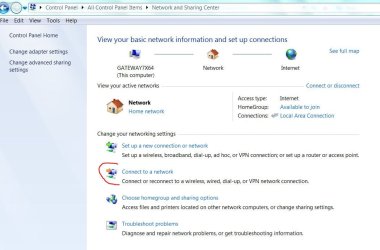
thewolfe, You see the wireless network when you click on connect on this advanced network sharing page? What does the results say? anything? Good luck to you with your problem.
connect to network.JPG
 

My Computer

Computer Manufacturer/Model Number
Gateway GT5692
OS
Windows 7 Ulti. x64
CPU
AMD Phenom 8450 triple-core 2.10 ghz
Memory
4GB
Graphics Card(s)
ATI Radion HD 3200
Monitor(s) Displays
Gateway FPD1775W
Screen Resolution
1280x720
Hard Drives
465.6613 Gibibytes
Did you enter your WEP key into your wireless connection on the laptop?
Not an option.
when you click on connect on this advanced network sharing page? What does the results say?
"Windows was unable to connect to thewolfe"
 

My Computer

Computer Manufacturer/Model Number
Dell Inspiron 1525
OS
Windows 7
CPU
Intel Core(TM)2 Duo T5750 2.00 GHz
Memory
3GB
Hard Drives
232 GB
Got it! Retyped my password and I'm up and running. Must have typed in the wrong password originally.

Sorry for the stupidity and thanks for the posts.

Sevenforums has been a life saver.
 

My Computer

Computer Manufacturer/Model Number
Dell Inspiron 1525
OS
Windows 7
CPU
Intel Core(TM)2 Duo T5750 2.00 GHz
Memory
3GB
Hard Drives
232 GB
NEXT...

When I set up the network on my Win7 machine and it said to write down a 10 letter-number sequence. Can you tell me what that is called and what's it's for?​
 
Last edited:

My Computer

Computer Manufacturer/Model Number
Dell Inspiron 1525
OS
Windows 7
CPU
Intel Core(TM)2 Duo T5750 2.00 GHz
Memory
3GB
Hard Drives
232 GB
Glad that you have had some success with your problem. As for the 10 number sequence ? I don't recall coming across that. Sounds like it wants a strong password of letters upper case and lower case and also numbers.
 

My Computer

Computer Manufacturer/Model Number
Gateway GT5692
OS
Windows 7 Ulti. x64
CPU
AMD Phenom 8450 triple-core 2.10 ghz
Memory
4GB
Graphics Card(s)
ATI Radion HD 3200
Monitor(s) Displays
Gateway FPD1775W
Screen Resolution
1280x720
Hard Drives
465.6613 Gibibytes
The password wasn't a network like "WEP"....
Oh well.
 
Last edited:

My Computer

Computer Manufacturer/Model Number
Dell Inspiron 1525
OS
Windows 7
CPU
Intel Core(TM)2 Duo T5750 2.00 GHz
Memory
3GB
Hard Drives
232 GB
Oh yes homegroup. I don't use that because I have 3xp computers still on my small home network and I like to keep them all networked to share files with each other. Homegroup only works with windows 7.
 

My Computer

Computer Manufacturer/Model Number
Gateway GT5692
OS
Windows 7 Ulti. x64
CPU
AMD Phenom 8450 triple-core 2.10 ghz
Memory
4GB
Graphics Card(s)
ATI Radion HD 3200
Monitor(s) Displays
Gateway FPD1775W
Screen Resolution
1280x720
Hard Drives
465.6613 Gibibytes
That leads me to another question.

If I get another machine running Win 7, will I be able to network them all? Will I have to use Mshome/Homegroup or both?
How does that work?
 

My Computer

Computer Manufacturer/Model Number
Dell Inspiron 1525
OS
Windows 7
CPU
Intel Core(TM)2 Duo T5750 2.00 GHz
Memory
3GB
Hard Drives
232 GB
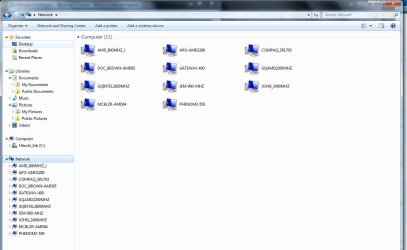
If you use a business type workgroup NOT Homegroup you can network win7, Vista, XP, etc computers :D
 

Attachments

  • Network_computers.JPG
    Network_computers.JPG
    94.5 KB · Views: 2

My Computer

Computer type
PC/Desktop
Computer Manufacturer/Model Number
Built them myself, Science Experiments !
OS
Win7 Enterprise, Win7 x86 (Ult 7600), Win7 x64 Ult 7600, TechNet RTM on AMD x64 (2.8Ghz)
CPU
AMD fx8350 4ghz, AMD-32 2400mhz, AMD-64 3200mhz, AMDx64 2.8G
Motherboard
SIS 755, ECS-K8M890M-M (Ult 7600), GigaByte & others
Memory
2gb, 4gb on the Ult 7600, 4gb on Technet RTM, 32gb on FX8350
Graphics Card(s)
Draw my own Graphics, several nVidia cards
Sound Card
on motherboard
Monitor(s) Displays
19" flat scr, 28" I-Inc widescr,22" Emprex Widescr, 23" Acer
Screen Resolution
1280 x 1024, 1440 x 900, 1920 x 1080
Hard Drives
6 pata Ide HD's & 2 Sata HD's
added 80gb external on Ult 7600 computer,
numerous extra 1tb, 2TB, 3Tb SATA HD's
A collection of ext HD Docks w/ HDs
PSU
430w, 550w, 600w, 700, 800, etc
Case
All Generic Full Towers
Cooling
Open Air & a few fans, some w/ colored LEDs
Keyboard
Compaq & Dell recycled from GoodWill
Mouse
Made in China Optical Wired Mouse
Internet Speed
Fast Cable InterNet
Antivirus
AVG Free on 24 different Desktops, NO Problems!
Browser
IE 8 is preferred, but use FireFox sometimes
Other Info
Linksys Routers, switches, & Hubs
Too Many USB Flash Drives to count, Biggest is 64GB !
Eight computers in my home network.
Sixteen computers at my business network.
Linked via TeamViewer !
Lots of old used spare computer parts everywhere!
Back
Top