BlioodKira
New member
- Local time
- 9:00 PM
- Messages
- 3
Ok, so i will start with the problem at hand.
From 23 October my Internet dropped suddenly, until that day from August when i first got my Internet till 22 October it worked fine.
I have found out that the problems are from Packets Received. When i connect to the Internet it works for like 5 to 10 minutes then i don't receive packets and my Internet doesn't work anymore (it shows me that i am connected but the Internet doesn't work)
I have some screen-shots.
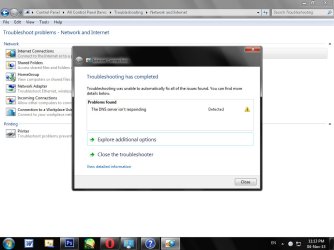
(here it shows that i am connected but the Internet is actually down)

(this is my program for tracking packets and in this picture is how it supposed to look)
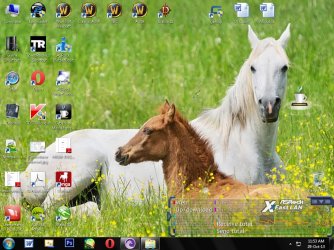
(in this one i don'e receive packets, and even the packets send are interrupting)
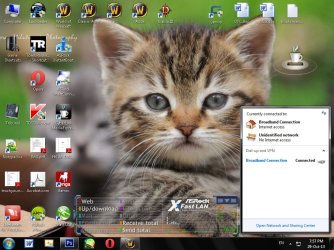
You can see clearly that i am connected
Info about my pc[/SIZE]
My IP Config (from cmd)
My computer is directly connected through cable (Ethernet) NO WIRELESS!!!
BUT!
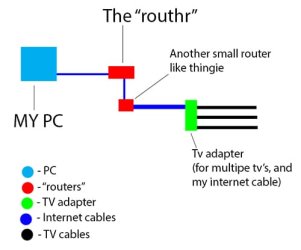
I don't know what that thing (router like) is called.
My Internet comes from a "router" that is connected to the TV cable.
What did i TRY to do to fix this problem (NOTHING WORKED)
- Make static IP
- Change DNS server address
- Reset ip from cmd
- Scan my pc (i use IObit malware fighter)
- System Restore
NONE OF THIS WORKED
Let's not forget that i called them as well they have sand some dudes that said something like "the green light is on that means the Internet works!!!"
And the second time witch was today they rehanged my Internet cable plug in and the TV adapter.
(a small diagram that shows how my internee is connected to the tv cable)
This is how my packets look like at the moment, it is an improvement from how it was but my internet still drops, even as i tried to post this i had to reconnect a few times.
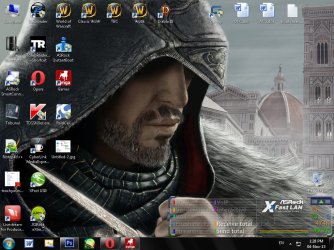
My packets drops faster(i get dc'ed faster) when i use:
- Online games (ex wow)
- View videos on youtube or any other web site
- Download torrent content
Any other suggestions before i start reinstalling my windows ?
From 23 October my Internet dropped suddenly, until that day from August when i first got my Internet till 22 October it worked fine.
I have found out that the problems are from Packets Received. When i connect to the Internet it works for like 5 to 10 minutes then i don't receive packets and my Internet doesn't work anymore (it shows me that i am connected but the Internet doesn't work)
I have some screen-shots.
(here it shows that i am connected but the Internet is actually down)
(this is my program for tracking packets and in this picture is how it supposed to look)
(in this one i don'e receive packets, and even the packets send are interrupting)
You can see clearly that i am connected
Info about my pc[/SIZE]
Code:
Windows edition:
Windows 7 Ultimate
Service Pack 1

System:
Rating- 4.0 Windows Experience Index
Processor- Intel(R) Pentium(R) CPU G630 @ 2.70GHz 2.70GHz
Installed memory (RAM) - 4.00 GB (3.48 GB usable)
System type- 32-bit Operating System
My IP Config (from cmd)
Code:
Microsoft Windows [Version 6.1.7601]
Copyright (c) 2009 Microsoft Corporation.  All rights reserved.

C:\Users\Cosmin>ipconfig

Windows IP Configuration


PPP adapter Broadband Connection:

   Connection-specific DNS Suffix  . :
   Link-local IPv6 Address . . . . . : fe80::4f74:a4be%15
   IPv4 Address. . . . . . . . . . . : 79.116.164.190
   Subnet Mask . . . . . . . . . . . : 255.255.255.255
   Default Gateway . . . . . . . . . : fe80::1%15
                                       0.0.0.0

Ethernet adapter Local Area Connection:

   Connection-specific DNS Suffix  . :
   Link-local IPv6 Address . . . . . : fe80::6003:7f8f:f99a:8c41%11
   Autoconfiguration IPv4 Address. . : 169.254.140.65
   Subnet Mask . . . . . . . . . . . : 255.255.0.0
   Default Gateway . . . . . . . . . :

Tunnel adapter isatap.{2A189C7A-5A80-44B0-BF3A-4A338F17BA41}:

   Media State . . . . . . . . . . . : Media disconnected
   Connection-specific DNS Suffix  . :

Tunnel adapter Local Area Connection* 11:

   Media State . . . . . . . . . . . : Media disconnected
   Connection-specific DNS Suffix  . :

Tunnel adapter 6TO4 Adapter:

   Connection-specific DNS Suffix  . :
   IPv6 Address. . . . . . . . . . . : 2002:4f74:a4be::4f74:a4be
   Default Gateway . . . . . . . . . : 2002:c058:6301::1

Tunnel adapter isatap.{49CBA7CD-A89A-4143-9CD5-F84D88416EA1}:

   Media State . . . . . . . . . . . : Media disconnected
   Connection-specific DNS Suffix  . :

C:\Users\Cosmin>
My computer is directly connected through cable (Ethernet) NO WIRELESS!!!
BUT!
I don't know what that thing (router like) is called.
My Internet comes from a "router" that is connected to the TV cable.
What did i TRY to do to fix this problem (NOTHING WORKED)
- Make static IP
- Change DNS server address
- Reset ip from cmd
- Scan my pc (i use IObit malware fighter)
- System Restore
NONE OF THIS WORKED
Let's not forget that i called them as well they have sand some dudes that said something like "the green light is on that means the Internet works!!!"
And the second time witch was today they rehanged my Internet cable plug in and the TV adapter.
(a small diagram that shows how my internee is connected to the tv cable)
This is how my packets look like at the moment, it is an improvement from how it was but my internet still drops, even as i tried to post this i had to reconnect a few times.
My packets drops faster(i get dc'ed faster) when i use:
- Online games (ex wow)
- View videos on youtube or any other web site
- Download torrent content
Any other suggestions before i start reinstalling my windows ?
My Computer
- Computer type
- PC/Desktop
- Computer Manufacturer/Model Number
- Unknown
- OS
- Windows 7 Ultimate x32 bit
- CPU
- G630 @ 2.70GHz
- Motherboard
- Intel Premium
- Memory
- 4.GB RAM, 470 internal memory
- Antivirus
- IObit Malware fighter
- Browser
- Opera