Notepad: Where did my text go?

Aurora

New member
Member
Local time
1:24 AM
Messages
56
Hello, I have a Notepad question. When I use Notepad, how do I get back to my original work without saving that work, when I call up and begin another notepad?

On my older XP, the typed text would just become cradled in the traybar. I would then call up a new notepad and begin another item and could toggle back and forth between several, many notepad items. Presently, When I call up a new notepad, my previous work disappears and I do not know how to get back to it? Where did it go? I have never been able to go right back to it? Now I must save my notepad work to my desktop so that I do not lose it. What am I doing wrong that I can't use many instances of notepad at the same time like I use to? Thanks for all your wonderful help here!
 

My Computer My Computer

Computer Manufacturer/Model Number
HP
OS
Windows 7; 64 bit
CPU
i7
Motherboard
860
Memory
8 GB Ram
Graphics Card(s)
Radeon
Monitor(s) Displays
HP 2310m
Hard Drives
1 Terabyte HD
Hold the shift key when clicking the icon to open multiple instances of an app.

Consider a better text editor that supports MDI/tabbed interface.
 

My Computer My Computer

OS
Windows 7 Ultimate x64
CPU
P4 3.2
Motherboard
Intel 815GM
Memory
DDR 400
Graphics Card(s)
ATI HD3850
Sound Card
C-Media 7.1
Monitor(s) Displays
SyncMaster 244T
Screen Resolution
1920*1200
Hard Drives
Several
PSU
500
Case
PowerSpec $24
Cooling
ThermalTake copper
Internet Speed
Blazing
Hi Aurora,

You should still be able to access it. Try this as a test. Open Notepad and position it on the left of the screen. Do not maximise it. Now, open another Notepad and position it on the right. Again, do not maximise it. You should be able to click in both windows and type characters. Now mouse over the icon in the Taskbar. Do miniature previews of the notepad windows appear? If you click on one of these, the relevant window will become active.

If you really can't have more than one notepad window open at any one time, then it's strange since I've had several open at the same time without any problems.
 

My Computer My Computer

Computer type
PC/Desktop
Computer Manufacturer/Model Number
Dwarf Dwf/11/2012 r09/2013
OS
Windows 8.1 Pro RTM x64
CPU
Intel Core-i5-3570K 4-core @ 3.4GHz (Ivy Bridge) (OC 4.4GHz)
Motherboard
ASRock Z77 Extreme4-M
Memory
4 x 4GB DDR3-1600 Corsair Vengeance CMZ8GX3M2A1600C9B (16GB)
Graphics Card(s)
MSI GeForce GTX770 Gaming OC 2GB
Sound Card
Realtek High Definition on board solution (ALC 898)
Monitor(s) Displays
ViewSonic VA1912w Widescreen (VGA)
Screen Resolution
1440x900
Hard Drives
OCZ Agility 3 SSD 120GB SATA III x2 (RAID 0)
Samsung HD501LJ 500GB SATA II x2
Hitachi HDS721010CLA332 1TB SATA II
Iomega 1.5TB Ext USB 2.0
WD 2.0TB Ext USB 3.0
PSU
XFX Pro Series 850W Semi-Modular
Case
Gigabyte IF233
Cooling
1 x 120mm Front Inlet 1 x 120mm Rear Exhaust
Keyboard
Microsoft Comfort Curve Keyboard 3000 (USB)
Mouse
Microsoft Comfort Mouse 3000 for Business (USB)
Internet Speed
NetGear DG834Gv3 ADSL Modem/Router (Ethernet) ~4.0 Mb/s (O2)
Antivirus
Avast! 8.0.1497
Browser
IE 11
Other Info
Optical Drive: HL-DT-ST BD-RE BH10LS30 SATA Bluray
Lexmark S305 Printer/Scanner/Copier (USB)
WEI Score: 8.1/8.1/8.5/8.5/8.25
Asus Eee PC 1011PX Netbook (Windows 7 x86 Starter)
Try notepad++

It has tabs, can (by default) reopen all your note files that were open when you closed it. Single app that can handle multiple text files. Plus spell checking and code highlighting (if your a coder). Can handle unicode files and files between platforms.

Free
 

My Computer My Computer

Computer Manufacturer/Model Number
Scratch built
OS
Windows 7 x64 Ultimate
CPU
i7 960
Motherboard
Asus P6X58D
Memory
12 Gig Corsair Dominator
Graphics Card(s)
Nvidia 480
Sound Card
Maudio Delta 44 + breakout box
Monitor(s) Displays
Dell UltraSharp U2410 24in and Samsung 21 dual monitors
Screen Resolution
1920x1200 and 1280x1024
Hard Drives
Primary: Intel X-25M G2 160G SSD
Secondary: Segate baracuda 1.0 TB
HDs in AHCI mode.
PSU
Corasair TX850
Case
Cooler Master HAF
Cooling
Corsair H50
Keyboard
Logitech G15 + N52 game pad
Mouse
Logitech MX518
Internet Speed
15kbs down 4.5kbps up
Other Info
WEI 7.6
CPU & RAM 7.6
Graphics 7.9
Hard disk 7.7
Thank you so much DeVandal! Yes, the shift key gives me mutiply instances of Notepad. I didn't have to use that before with XP? I guess
Windows 7 did not carry that automatic feature over? Yes, I have other
editors I can go to and use and did prior as I could not bring up a second empty Notepad page. I have several: Wordpad, Edit Lite, MS Word but some have nag screens. I will look for a MDI/tabbed interface. Thanks for your help!
 

My Computer My Computer

Computer Manufacturer/Model Number
HP
OS
Windows 7; 64 bit
CPU
i7
Motherboard
860
Memory
8 GB Ram
Graphics Card(s)
Radeon
Monitor(s) Displays
HP 2310m
Hard Drives
1 Terabyte HD
Actually, the shift key is not the only way. You can also right click the taskbar icon and select Notepad to open another instance.
 

My Computer My Computer

OS
Windows 7 Ultimate x64
CPU
P4 3.2
Motherboard
Intel 815GM
Memory
DDR 400
Graphics Card(s)
ATI HD3850
Sound Card
C-Media 7.1
Monitor(s) Displays
SyncMaster 244T
Screen Resolution
1920*1200
Hard Drives
Several
PSU
500
Case
PowerSpec $24
Cooling
ThermalTake copper
Internet Speed
Blazing
Hey Dwarf, I tried to bring up 2 instances as you said but the single opened Notepad will just flash or blink as to say 'hey silly, I am already open'. And the opened Notepad is what is in the traybar and not the Notepad Icon, so again, it flashes to say I am already open. I am able with the shift key to open multiple instances. I would have never, ever figured that out by myself! I will check out all the other choices as well. I thank everyone for posting! Very helpful!
 

My Computer My Computer

Computer Manufacturer/Model Number
HP
OS
Windows 7; 64 bit
CPU
i7
Motherboard
860
Memory
8 GB Ram
Graphics Card(s)
Radeon
Monitor(s) Displays
HP 2310m
Hard Drives
1 Terabyte HD
Yes, DeVandal, I was able to open another instance through the start menu/programs. Not sure where the 'taskbar icon' is. Mine is just a full bar across the bottom screen but did not find Notepad with a right click on the bar.

BTW, as a sidebar, I did not find Notepad in the Accessories in the Programs menu?? That's odd, it had Wordpad in Accessories but not Notepad? To find Notepad, I typed it into the Search programs and files. The file location shows it in System 32, deep, deep in the bowels of the OS. I opened it from there. I can post these other questions as their own?

BTW, I think the best thing about Windows 7 is the 'Search programs and files' in the Start Menu. It is such a better searcher than XP was. Yea!
 

My Computer My Computer

Computer Manufacturer/Model Number
HP
OS
Windows 7; 64 bit
CPU
i7
Motherboard
860
Memory
8 GB Ram
Graphics Card(s)
Radeon
Monitor(s) Displays
HP 2310m
Hard Drives
1 Terabyte HD
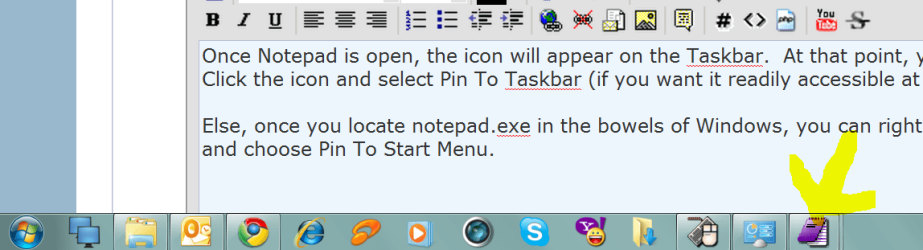
Once Notepad is open, the icon will appear on the Taskbar. At that point, you can Right Click the icon and select Pin To Taskbar (if you want it readily accessible at all times).

Else, once you locate notepad.exe in the bowels of Windows, you can right click the file and choose Pin To Start Menu.

note: my icon will look different than yours. I actually use two text editors. Seen here is MetaPad by LiquidNinja. It is my favorite writing tool. I also use EditPad Pro for my coding work.

And, I absolutely hate the new search method. What can you do? I can't find a copy of Windows 6.5 ;-)
 

Attachments

  • Capture.PNG
    Capture.PNG
    33.4 KB · Views: 4

My Computer My Computer

OS
Windows 7 Ultimate x64
CPU
P4 3.2
Motherboard
Intel 815GM
Memory
DDR 400
Graphics Card(s)
ATI HD3850
Sound Card
C-Media 7.1
Monitor(s) Displays
SyncMaster 244T
Screen Resolution
1920*1200
Hard Drives
Several
PSU
500
Case
PowerSpec $24
Cooling
ThermalTake copper
Internet Speed
Blazing
you can also click taskbar icon with your middle-mouse button (scroll wheel) if you have one to open a new instance. :)
 

My Computer My Computer

Computer Manufacturer/Model Number
mickey megabyte 1234
OS
ultimate 64 sp1
CPU
i5 2500K [email protected]
Motherboard
MSI P67A-GD53
Memory
8 gigs GSkill Ripjaws 1600
Graphics Card(s)
amd hd6950
Sound Card
creative x-fi gamer
Monitor(s) Displays
samsung 24"
Screen Resolution
1920x1080
Hard Drives
ocz vertex 2e 60 gig, samsung f3 1tb, buffalo 2tb ext
PSU
antec 550
Case
antec three hundred
Cooling
i'm a cooling fan
Keyboard
saitek eclipse ii
Mouse
logitech g3
Internet Speed
about 4 Mbps
Other Info
i love win7
you can also click taskbar icon with your middle-mouse button (scroll wheel) if you have one to open a new instance. :)
I had to rep that one. Awesome. Anything that eliminates ANY effort on my part is welcome. Great tip.
 

My Computer My Computer

OS
Windows 7 Ultimate x64
CPU
P4 3.2
Motherboard
Intel 815GM
Memory
DDR 400
Graphics Card(s)
ATI HD3850
Sound Card
C-Media 7.1
Monitor(s) Displays
SyncMaster 244T
Screen Resolution
1920*1200
Hard Drives
Several
PSU
500
Case
PowerSpec $24
Cooling
ThermalTake copper
Internet Speed
Blazing
thanks DV - it's one of my favourites :)
 

My Computer My Computer

Computer Manufacturer/Model Number
mickey megabyte 1234
OS
ultimate 64 sp1
CPU
i5 2500K [email protected]
Motherboard
MSI P67A-GD53
Memory
8 gigs GSkill Ripjaws 1600
Graphics Card(s)
amd hd6950
Sound Card
creative x-fi gamer
Monitor(s) Displays
samsung 24"
Screen Resolution
1920x1080
Hard Drives
ocz vertex 2e 60 gig, samsung f3 1tb, buffalo 2tb ext
PSU
antec 550
Case
antec three hundred
Cooling
i'm a cooling fan
Keyboard
saitek eclipse ii
Mouse
logitech g3
Internet Speed
about 4 Mbps
Other Info
i love win7
Yes, understood now. Right-click on the an open Notepad will bring up the Notepad Icon(gives fresh Notepad page) and a list of all recent Notepad items. Also, can brings up a fresh Notepad from the center wheel of my mouse. All very cool! I also pinned Notepad to my start menu after going after it in the belly of Windows 7. Not sure why it wasn't pinned in start menu from the beginning? but has always been pinned to my taskbar?

With this good information on how to use Notepad, it still wouldn't be considered a 'tabbed' interface? Thanks for all your help on this.
You all really, really ((((((ROCK))))))!

PS. Wish there was a way to rename this thread so it helps others directly with this Notepad problem here. Notepad: How to use many instances of Notepad at once.
 

My Computer My Computer

Computer Manufacturer/Model Number
HP
OS
Windows 7; 64 bit
CPU
i7
Motherboard
860
Memory
8 GB Ram
Graphics Card(s)
Radeon
Monitor(s) Displays
HP 2310m
Hard Drives
1 Terabyte HD
all these things just don't apply to notepad...
 

My Computer My Computer

Computer Manufacturer/Model Number
mickey megabyte 1234
OS
ultimate 64 sp1
CPU
i5 2500K [email protected]
Motherboard
MSI P67A-GD53
Memory
8 gigs GSkill Ripjaws 1600
Graphics Card(s)
amd hd6950
Sound Card
creative x-fi gamer
Monitor(s) Displays
samsung 24"
Screen Resolution
1920x1080
Hard Drives
ocz vertex 2e 60 gig, samsung f3 1tb, buffalo 2tb ext
PSU
antec 550
Case
antec three hundred
Cooling
i'm a cooling fan
Keyboard
saitek eclipse ii
Mouse
logitech g3
Internet Speed
about 4 Mbps
Other Info
i love win7
I finally got an answer to my notepad problem. Yeah

I am not computer literate. I use technology that is simple that doesn't have all the techy features because I don't understand the jargon.

I got a new Win.7 laptop. Before when I was researching a topic I would cut & paste the data into a notepad & minimize it & continue doing that. Sometimes I would have 7 or 8 notepads minimized in my taskbar.

When I changed to a new Win 7 laptop I tried to do that but I couldn't open & minimize multiple Notpads. I thought it was Firefox doing an update that changed everything. I asked on FF Forums but no one had the answer to my dilemma. They tried to help me but I was asking the wrong question.

I realized it might have started when I got the new laptop & the problem maybe started with Wind.7.
When I asked the question on Google I was brought to this post. Halleluyqh!!!

I finally had my answer & it was so simple! Right click on the Notepad icon. I had
moved it to my taskbar from the Start menu when I got the new comp. I did read here that there was a more advanced version of Notepad that will let you close the comp. & they will not disappear.

If anyone reads this & can tell me if that program can be used simply with out a lot of settings, changes etc. I would be so grateful.

newbie3posy
 

My Computer My Computer

Computer Manufacturer/Model Number
ASUS k53
OS
windows7 home Premium 64 bit
CPU
iS THATTHE PROCESSOR? if yes, Intel i7
Motherboard
don't know-read my user name.
Memory
maybe 6.5 G not sure but it's a lot.
Monitor(s) Displays
15.6
Hard Drives
don't know.....big
PSU
don't know
Case
ALUMINUM
Cooling
ice cool! ASUS LAPTOPS HAVE A SYSTEM-NEVER GETS HOT.
Have you investigated WordPad, also included with Windows?
 

My Computer My Computer

Computer type
PC/Desktop
Computer Manufacturer/Model Number
Ignatz Special; 4 speed manual gearbox; factory air conditioning; one of one
OS
Windows 7 Home Premium SP1, 64-bit
CPU
Intel Skylake i5-6600K, not overclocked
Motherboard
AsRock Z170M Extreme 4, micro ATX
Memory
8 GB HyperX DDR4-2666 (2 x 4 GB)
Graphics Card(s)
none; graphics are integrated on CPU
Sound Card
onboard: Realtek ALC1150; external: USB Behringer UF0-202
Monitor(s) Displays
Dell S2340M 23 inch IPS
Screen Resolution
1600 x 900
Hard Drives
System: Crucial MX100 series SSD, 128 GB;
Data: Samsung Spinpoint 103SJ, 1 TB;
Backup: WD Caviar Green WD30EZRX-00D8PB0, 3 TB
PSU
Rosewill SilentNight 500 watt fanless, semi-modular
Case
Antec Solo II
Cooling
Noctua NH-U12S; Noctua F12 intake, Noctua S12A exhaust
Keyboard
Microsoft 200 6JH-00001 USB
Mouse
Dell or Microsoft optical wired; USB
Antivirus
Microsoft Security Essentials and Malwarebytes Premium
Browser
Pale Moon
Other Info
All fans PWM; speeds at idle: CPU circa 500 rpm; intake circa 600 rpm; exhaust circa 600 rpm; CPU temps 27 idle and 47 C load in a warm room (27 C/81 F) when running Intel Extreme Tuning Utility stress test.
Or, if you do any kind of coding or looking at html or xml files, download Notepad++. Awesome multi-document notepad with syntax highlighting and proper windows/unix line ending handling etc...
 

My Computer My Computer

Computer Manufacturer/Model Number
Scratch built
OS
Windows 7 x64 Ultimate
CPU
i7 960
Motherboard
Asus P6X58D
Memory
12 Gig Corsair Dominator
Graphics Card(s)
Nvidia 480
Sound Card
Maudio Delta 44 + breakout box
Monitor(s) Displays
Dell UltraSharp U2410 24in and Samsung 21 dual monitors
Screen Resolution
1920x1200 and 1280x1024
Hard Drives
Primary: Intel X-25M G2 160G SSD
Secondary: Segate baracuda 1.0 TB
HDs in AHCI mode.
PSU
Corasair TX850
Case
Cooler Master HAF
Cooling
Corsair H50
Keyboard
Logitech G15 + N52 game pad
Mouse
Logitech MX518
Internet Speed
15kbs down 4.5kbps up
Other Info
WEI 7.6
CPU & RAM 7.6
Graphics 7.9
Hard disk 7.7
Back
Top