Nothing launches anymore in my desktop Pc :o

Lazares

New member
Local time
9:29 PM
Messages
26
Location
Tampere,Planet Earth
In last night before went to zzz was going to check emails and some game news with my Desktop Pc from Pc Gamer website,but browser didn't get connection to net even Steam was Online and Laptop next to me online as well. Laptop is connected to Modem with Ethernet Cable and was working so went to zzz and hoped that it's similar when only browser can't connect,but Steam can. Today when launched my Desktop Rig it seems that browser still can't connect and Steam notifies about launching as admin,but doesn't go to phase where u put username & pw,but Rig just loads for a moment and then nothing.

Raptr client also doesn't even go to login screen & would inform that can't connect to net,but instead gives pop up window about raptrstub log file for details. This is so weird and never happened before..At 1st i thought that my Desktop Pc's integrated network card is blown cause still after 8hrs of zzz can't connect and espesially weird and scary now when applications don't even go to login phase "client showing on screen".

This scary problem came now just before i've got rest of the components together for building new Rig. I'm only missing Cpu & Motherboard & get them in early next month. I wonder if could even use Vlc to watch videos..Haven't tried it yet. My Windows 7 Home Premium is Legit and bought from good store. Might not upgrade to Win 10 even it's offered as free. Naturally checking review's from good sources 1st. There have been too many Win OS disappointments. Win Vista,Win 8 and Win 2k. When ran Win 7 x64 Home Premium SP1's Troubleshooter it couldn't find the reason. Mean Network Adapter and other Troubleshooter's. I can login to Teamspeak 3 Voip client's servers & network status shows that Net is online. When tried to ping to google.com's "8.8.8.8" @ Command prompt as admin i got through with perfct latency 37ms.

Latest error messages with some applications: "WSAStartup() failed,or you have the incorrect version of Winsock installed" and "ABORT: WSAStartup failed (No Error) (.\socket.c/2937)" Made a call to ISP and ISP's friendly tech service person asked questions,checked the Line status and said that it's working optimally just as i figured it is before made the call.

Seems that 1st System Restore point would be from 16.1.2015 & details show that i would not lose much data and the ones that i would lose would be easy to get back. Ofc 1st would like to know what's causing this mysterious problem that prevents opening certain applications even upto their login screen and browser not connecting to web.

Friendly regards: Terry

EDIT: Can launch VLC player and watch videos so that's good. Tried to launch Swtor and Gw2 games and even they won't go as far as launcher coming to screen for pw type,but instead popped a window with error msg after 1min loading with no game client on screen.
 

Attachments

Last edited:

My Computer My Computer

At a glance

Windows 7 x64 Home PremiumIntel Core I5-2320 3.00GHZ8GBASUS HD 7770 DirectCU 1Gb
Computer type
PC/Desktop
Computer Manufacturer/Model Number
Asustek Computer Inc.
OS
Windows 7 x64 Home Premium
CPU
Intel Core I5-2320 3.00GHZ
Motherboard
Asus P8 H61 PRO Rev 3.0 - New H6I B3 Revision
Memory
8GB
Graphics Card(s)
ASUS HD 7770 DirectCU 1Gb
Sound Card
Speakers (High Definition Audio Device)
Monitor(s) Displays
Acer X243h (24")
Screen Resolution
1920*1080
Hard Drives
Seagate 1.5TB and can't remember more details and how to look.
PSU
Corsair 550W
Case
Antec 300 Versatile Mini Tower
Cooling
No extra cooler and have fan blowing up through hole
Keyboard
Hewlett Packard
Mouse
Logitech 2 buttons and wheel
Internet Speed
20mb download & 1mb upload. Adsl.
Antivirus
Bitdefender 2014 Internet Security "Bought one"
Browser
Mozilla Firefox 35.0
Did you run the network troubleshooter from right clicking the network icon in System tray?

Go over your install closely using the Troubleshooting Steps for Windows 7 which will uncover most problems.

Do you have a wireless adapter you can try to compare? Change the ethernet cable? Try another ethernet port?
 
Will give these a look

Did you run the network troubleshooter from right clicking the network icon in System tray?

Go over your install closely using the Troubleshooting Steps for Windows 7 which will uncover most problems.

Do you have a wireless adapter you can try to compare? Change the ethernet cable? Try another ethernet port?

I don't have Network Icon in system tray cause removed it from there a while back. Network status is shown to be active and functional when checking it from control panel's Network and Sharing center. Also did Win 7's all available Network troubleshooter's and no problems were found. Including Network Adapter Troubleshooter,it loaded only for a moment reported all fine. Image is in 1st post's attachments with DM Log Collector etc. I might have other working Ethernet Cable that can try and haven't tried other Ethernet Port.

Laptop is working perfectly on Port 2 and will try desktop 1st in other port and if no effect then other cable. Wondering why some application's don't even launch as far as giving the actual launcher to screen and using login details..Like Steam,Raptr and Swtor for wat tried so far :rolleyes:

Thanks a lot for reply,i'll check out these steps that u suggested and update the situation after.

Friendly regards: Terry
 
Last edited:

My Computer My Computer

At a glance

Windows 7 x64 Home PremiumIntel Core I5-2320 3.00GHZ8GBASUS HD 7770 DirectCU 1Gb
Computer type
PC/Desktop
Computer Manufacturer/Model Number
Asustek Computer Inc.
OS
Windows 7 x64 Home Premium
CPU
Intel Core I5-2320 3.00GHZ
Motherboard
Asus P8 H61 PRO Rev 3.0 - New H6I B3 Revision
Memory
8GB
Graphics Card(s)
ASUS HD 7770 DirectCU 1Gb
Sound Card
Speakers (High Definition Audio Device)
Monitor(s) Displays
Acer X243h (24")
Screen Resolution
1920*1080
Hard Drives
Seagate 1.5TB and can't remember more details and how to look.
PSU
Corsair 550W
Case
Antec 300 Versatile Mini Tower
Cooling
No extra cooler and have fan blowing up through hole
Keyboard
Hewlett Packard
Mouse
Logitech 2 buttons and wheel
Internet Speed
20mb download & 1mb upload. Adsl.
Antivirus
Bitdefender 2014 Internet Security "Bought one"
Browser
Mozilla Firefox 35.0
We want to see attachments here using the paper clip in reply box or most of us will not view them - especially using the pirates' .rar attachment.

If this is a laptop what about its wireless connection?
 
Update and still no net access via browser or Steam for example.

Update now after did troubleshooter for all tabs that are available and it couldn't identify the problem. All green and changed Desktop's Ethernet cable Port to one where i had Tv's Digibox and no effect :( Used fresh new Ethernet cable when connected to that. Had one available that came with Digibox package. How to connect to something by using tracert in Dos command prompt "or what it was called" to see if i can connect at all to Net with my Desktop even troubleshooter says all good and Green light shown anywhere ?

Still many applications don't go even to login details phase,but just stop launching and don't remain to processes list..So weird and feels that all of sudden my Desktop Rig has stopped functioning in a way to start launching certain applications..:shock:

Going to shop soon and launching defrag for OS Drive.

Friendly regards: Terry
 

My Computer My Computer

At a glance

Windows 7 x64 Home PremiumIntel Core I5-2320 3.00GHZ8GBASUS HD 7770 DirectCU 1Gb
Computer type
PC/Desktop
Computer Manufacturer/Model Number
Asustek Computer Inc.
OS
Windows 7 x64 Home Premium
CPU
Intel Core I5-2320 3.00GHZ
Motherboard
Asus P8 H61 PRO Rev 3.0 - New H6I B3 Revision
Memory
8GB
Graphics Card(s)
ASUS HD 7770 DirectCU 1Gb
Sound Card
Speakers (High Definition Audio Device)
Monitor(s) Displays
Acer X243h (24")
Screen Resolution
1920*1080
Hard Drives
Seagate 1.5TB and can't remember more details and how to look.
PSU
Corsair 550W
Case
Antec 300 Versatile Mini Tower
Cooling
No extra cooler and have fan blowing up through hole
Keyboard
Hewlett Packard
Mouse
Logitech 2 buttons and wheel
Internet Speed
20mb download & 1mb upload. Adsl.
Antivirus
Bitdefender 2014 Internet Security "Bought one"
Browser
Mozilla Firefox 35.0
We want to see attachments here using the paper clip in reply box or most of us will not view them - especially using the pirates' .rar attachment.

If this is a laptop what about its wireless connection?

Hi and thanks for reply.

What is paper clip in reply box method ? It's Desktop like mentioned above and now Laptop is still normally connected to Net and using it with full bandwith that i have given by ISP. Laptop connected to Modem via Ethernet cable. I added the DM Log Collector info into 1st post and will check other ways for providing it if that zip not good way to deliver it.

AntisuperSpyware software and Bitdefender Antivir hasn't found anything suspicious so really weird what is causing this strange problem. Where can't launch some applications even to normal login screen,but they close before it comes like it should come no matter the case.. :(

Friendly regards: Terry
 
Last edited:

My Computer My Computer

At a glance

Windows 7 x64 Home PremiumIntel Core I5-2320 3.00GHZ8GBASUS HD 7770 DirectCU 1Gb
Computer type
PC/Desktop
Computer Manufacturer/Model Number
Asustek Computer Inc.
OS
Windows 7 x64 Home Premium
CPU
Intel Core I5-2320 3.00GHZ
Motherboard
Asus P8 H61 PRO Rev 3.0 - New H6I B3 Revision
Memory
8GB
Graphics Card(s)
ASUS HD 7770 DirectCU 1Gb
Sound Card
Speakers (High Definition Audio Device)
Monitor(s) Displays
Acer X243h (24")
Screen Resolution
1920*1080
Hard Drives
Seagate 1.5TB and can't remember more details and how to look.
PSU
Corsair 550W
Case
Antec 300 Versatile Mini Tower
Cooling
No extra cooler and have fan blowing up through hole
Keyboard
Hewlett Packard
Mouse
Logitech 2 buttons and wheel
Internet Speed
20mb download & 1mb upload. Adsl.
Antivirus
Bitdefender 2014 Internet Security "Bought one"
Browser
Mozilla Firefox 35.0
Did you look to see the paper clip icon in reply box? There.

Do you have or can you borrow a wireless adapter to see how that works?

Type Troubleshooting in Start Search box, click on Internet category to run the Network Adapter troubleshooter. What does it find?
 
Did you look to see the paper clip icon in reply box? There.

Do you have or can you borrow a wireless adapter to see how that works?

Type Troubleshooting in Start Search box, click on Internet category to run the Network Adapter troubleshooter. What does it find?

No i don't have wireless adapter and don't know where to borrow one at the moment. Writing Troubleshooting to start search box doesn't bring Internet category to me,but does bring the: Control Panel (3) on top and below that tab there are: Troubleshooting,Troubleshooting History,Calibrate Display color. When ran Win 7 x64 Home Premium SP1's Network Adapter Troubleshooter as it should be done it couldn't find the reason or fix and it was expected :/ Troubleshooter report window doesn't have fullscreen option :/

Would be nice to try out some tracert option to some location via dos prompt to see if my Desktop's network card can connect to www. Even troubleshooter is saying all ok and network and sharing window showing all ok in control panel.

Friendly regards: Terry
 

Attachments

  • Net connection Online,but can't connect with Browser,Steam,Raptr...jpg
    Net connection Online,but can't connect with Browser,Steam,Raptr...jpg
    76.6 KB · Views: 2
  • raptrstub.exe.log
    raptrstub.exe.log
    1.1 KB · Views: 0
Last edited:

My Computer My Computer

At a glance

Windows 7 x64 Home PremiumIntel Core I5-2320 3.00GHZ8GBASUS HD 7770 DirectCU 1Gb
Computer type
PC/Desktop
Computer Manufacturer/Model Number
Asustek Computer Inc.
OS
Windows 7 x64 Home Premium
CPU
Intel Core I5-2320 3.00GHZ
Motherboard
Asus P8 H61 PRO Rev 3.0 - New H6I B3 Revision
Memory
8GB
Graphics Card(s)
ASUS HD 7770 DirectCU 1Gb
Sound Card
Speakers (High Definition Audio Device)
Monitor(s) Displays
Acer X243h (24")
Screen Resolution
1920*1080
Hard Drives
Seagate 1.5TB and can't remember more details and how to look.
PSU
Corsair 550W
Case
Antec 300 Versatile Mini Tower
Cooling
No extra cooler and have fan blowing up through hole
Keyboard
Hewlett Packard
Mouse
Logitech 2 buttons and wheel
Internet Speed
20mb download & 1mb upload. Adsl.
Antivirus
Bitdefender 2014 Internet Security "Bought one"
Browser
Mozilla Firefox 35.0
Restore Pc feature to 16.1.2015,but want to know what's causing this

Back from freezing shop trip and mysterious problem remains. I found out that i haven't disabled System Restore for my Desktop Pc like i thought i would have and seems that 1st system restore point would be from 16.1.2015 and details show that i would not lose much data and the ones that i would lose would be easy to get back. I would ofc 1st would like to know that what's causing this mysterious problem that prevents opening certain applications even upto their login screen and browser not connecting to web.

Some just give error msg before that or doesn't report anything and loading just stops. Also latest Mozilla and Chrome browser not working since last night 4am. Steam worked then and so did Raptr client,but now none of these work and not even to login screen phase.

Friendly regards: Terry
 
Last edited:

My Computer My Computer

At a glance

Windows 7 x64 Home PremiumIntel Core I5-2320 3.00GHZ8GBASUS HD 7770 DirectCU 1Gb
Computer type
PC/Desktop
Computer Manufacturer/Model Number
Asustek Computer Inc.
OS
Windows 7 x64 Home Premium
CPU
Intel Core I5-2320 3.00GHZ
Motherboard
Asus P8 H61 PRO Rev 3.0 - New H6I B3 Revision
Memory
8GB
Graphics Card(s)
ASUS HD 7770 DirectCU 1Gb
Sound Card
Speakers (High Definition Audio Device)
Monitor(s) Displays
Acer X243h (24")
Screen Resolution
1920*1080
Hard Drives
Seagate 1.5TB and can't remember more details and how to look.
PSU
Corsair 550W
Case
Antec 300 Versatile Mini Tower
Cooling
No extra cooler and have fan blowing up through hole
Keyboard
Hewlett Packard
Mouse
Logitech 2 buttons and wheel
Internet Speed
20mb download & 1mb upload. Adsl.
Antivirus
Bitdefender 2014 Internet Security "Bought one"
Browser
Mozilla Firefox 35.0
Now checked updates and scanned Rig with Quick Scan using Windows Defender and no harmful things found. Did it even said on earlier post that AntiSuperSpyware or Bitdefender didn't find anything. Windows Defender was able to access net "or so it claims and not saying that no connection" and informed that no database update available. Latest updates download is from yesterday 20.1.2015 23:30 and this frustrating mysterious problem started 21.1.2015 around 3:30 - 4:30am.

Windows Defender didn't say can't access net to check updates so Net is working with Desktop Pc just as with Laptop i imagine,but mysteriously can't access any site with 2x Web Browser's mentioned earlier and some applications act strangely cause not even going to login screen.

Friendly regards: Terry
 
Last edited:

My Computer My Computer

At a glance

Windows 7 x64 Home PremiumIntel Core I5-2320 3.00GHZ8GBASUS HD 7770 DirectCU 1Gb
Computer type
PC/Desktop
Computer Manufacturer/Model Number
Asustek Computer Inc.
OS
Windows 7 x64 Home Premium
CPU
Intel Core I5-2320 3.00GHZ
Motherboard
Asus P8 H61 PRO Rev 3.0 - New H6I B3 Revision
Memory
8GB
Graphics Card(s)
ASUS HD 7770 DirectCU 1Gb
Sound Card
Speakers (High Definition Audio Device)
Monitor(s) Displays
Acer X243h (24")
Screen Resolution
1920*1080
Hard Drives
Seagate 1.5TB and can't remember more details and how to look.
PSU
Corsair 550W
Case
Antec 300 Versatile Mini Tower
Cooling
No extra cooler and have fan blowing up through hole
Keyboard
Hewlett Packard
Mouse
Logitech 2 buttons and wheel
Internet Speed
20mb download & 1mb upload. Adsl.
Antivirus
Bitdefender 2014 Internet Security "Bought one"
Browser
Mozilla Firefox 35.0
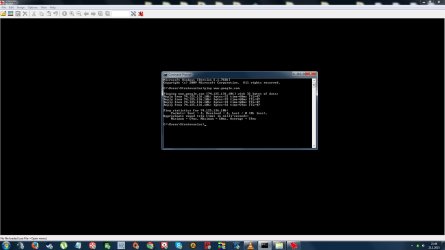
Pinged www.google.com in Command Prompt

And IT didn't time out and gave good Ping's..So what is this mystery problem that's been making harm to me and my precious Destop Rig for about 18hrs :rolleyes:

Friendly regards: Terry
 

Attachments

  • Pinged google.com and i guess this shows Net being Online with Desktop Pc..So weird and frustrat.jpg
    Pinged google.com and i guess this shows Net being Online with Desktop Pc..So weird and frustrat.jpg
    80.3 KB · Views: 2

My Computer My Computer

At a glance

Windows 7 x64 Home PremiumIntel Core I5-2320 3.00GHZ8GBASUS HD 7770 DirectCU 1Gb
Computer type
PC/Desktop
Computer Manufacturer/Model Number
Asustek Computer Inc.
OS
Windows 7 x64 Home Premium
CPU
Intel Core I5-2320 3.00GHZ
Motherboard
Asus P8 H61 PRO Rev 3.0 - New H6I B3 Revision
Memory
8GB
Graphics Card(s)
ASUS HD 7770 DirectCU 1Gb
Sound Card
Speakers (High Definition Audio Device)
Monitor(s) Displays
Acer X243h (24")
Screen Resolution
1920*1080
Hard Drives
Seagate 1.5TB and can't remember more details and how to look.
PSU
Corsair 550W
Case
Antec 300 Versatile Mini Tower
Cooling
No extra cooler and have fan blowing up through hole
Keyboard
Hewlett Packard
Mouse
Logitech 2 buttons and wheel
Internet Speed
20mb download & 1mb upload. Adsl.
Antivirus
Bitdefender 2014 Internet Security "Bought one"
Browser
Mozilla Firefox 35.0
Teamspeak 3 connection..SO this IS Really weird..

WHATTA :rolleyes: Opened Teamspeak 3 and can login to server there..So yes Desktop Pc's net is working..in A WAY..:sarc: But Steam,Raptr and Evolve gaming library client's not going even to their login screen as brief loading and then spinning loading icon disappears from next to rat pointer. Web Browser's not having access to any site and not using proxy,but Lan settings are put for automatic detection. Have tried: Ipconfig /release,Ipconfig /renew,ipconfig /flushdns and modem reset with no luck :(

Need assistance.

Friendly regards: Terry
 

My Computer My Computer

At a glance

Windows 7 x64 Home PremiumIntel Core I5-2320 3.00GHZ8GBASUS HD 7770 DirectCU 1Gb
Computer type
PC/Desktop
Computer Manufacturer/Model Number
Asustek Computer Inc.
OS
Windows 7 x64 Home Premium
CPU
Intel Core I5-2320 3.00GHZ
Motherboard
Asus P8 H61 PRO Rev 3.0 - New H6I B3 Revision
Memory
8GB
Graphics Card(s)
ASUS HD 7770 DirectCU 1Gb
Sound Card
Speakers (High Definition Audio Device)
Monitor(s) Displays
Acer X243h (24")
Screen Resolution
1920*1080
Hard Drives
Seagate 1.5TB and can't remember more details and how to look.
PSU
Corsair 550W
Case
Antec 300 Versatile Mini Tower
Cooling
No extra cooler and have fan blowing up through hole
Keyboard
Hewlett Packard
Mouse
Logitech 2 buttons and wheel
Internet Speed
20mb download & 1mb upload. Adsl.
Antivirus
Bitdefender 2014 Internet Security "Bought one"
Browser
Mozilla Firefox 35.0
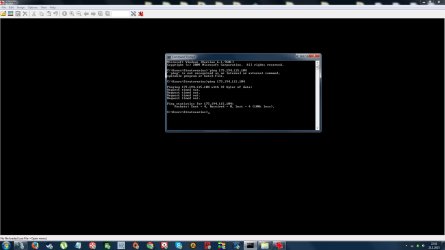
Right way to test Ping..Timed out :/

Aah duh pinging Google via Dos Command Prompt has nothing to do with Web Browser working cause google.com is not the website, 173.194.115.104 is what you connect to, google.com is just the name that your DNS server takes to get you there. I tried this IP now and all 4x tries timed out..So yeah Steam doesn't even get me to login window popup and web browser's not gaining access to any website,but i can login to Teamspeak 3 servers..

Friendly regards: Terry
 

Attachments

  • Ping to 173.194.115.104 timed out (Google.com).jpg
    Ping to 173.194.115.104 timed out (Google.com).jpg
    74.6 KB · Views: 2

My Computer My Computer

At a glance

Windows 7 x64 Home PremiumIntel Core I5-2320 3.00GHZ8GBASUS HD 7770 DirectCU 1Gb
Computer type
PC/Desktop
Computer Manufacturer/Model Number
Asustek Computer Inc.
OS
Windows 7 x64 Home Premium
CPU
Intel Core I5-2320 3.00GHZ
Motherboard
Asus P8 H61 PRO Rev 3.0 - New H6I B3 Revision
Memory
8GB
Graphics Card(s)
ASUS HD 7770 DirectCU 1Gb
Sound Card
Speakers (High Definition Audio Device)
Monitor(s) Displays
Acer X243h (24")
Screen Resolution
1920*1080
Hard Drives
Seagate 1.5TB and can't remember more details and how to look.
PSU
Corsair 550W
Case
Antec 300 Versatile Mini Tower
Cooling
No extra cooler and have fan blowing up through hole
Keyboard
Hewlett Packard
Mouse
Logitech 2 buttons and wheel
Internet Speed
20mb download & 1mb upload. Adsl.
Antivirus
Bitdefender 2014 Internet Security "Bought one"
Browser
Mozilla Firefox 35.0
When i try to launch Elder Scrolls Online game i get window on screen that says: ABORT: WSAStartup failed (No Error) (.\socket.c/2937) and Raptr client says to check that raptrstub log file and at bottom it says: 2015/01//21 23:23:09 WSAStartup failed: error code 11003 :rolleyes:

I found one thread which was made looong time ago in here and this Winsock thing is mentioned there:
http://www.sevenforums.com/network-sharing/308441-wsastartup-winsock-error.html
Is this and my problem connected ? Web browser not connecting to net,but can connect with Teamspeak 3 Voip client,Steam not even going forward more than 5x seconds of loading so not going to login details phase. Raptr gives that error msg mentioned above and Elder scrolls Online game gives that strange error msg that has something to do with Winsock / Flash :sarc:

Friendly regards: Terry
 

My Computer My Computer

At a glance

Windows 7 x64 Home PremiumIntel Core I5-2320 3.00GHZ8GBASUS HD 7770 DirectCU 1Gb
Computer type
PC/Desktop
Computer Manufacturer/Model Number
Asustek Computer Inc.
OS
Windows 7 x64 Home Premium
CPU
Intel Core I5-2320 3.00GHZ
Motherboard
Asus P8 H61 PRO Rev 3.0 - New H6I B3 Revision
Memory
8GB
Graphics Card(s)
ASUS HD 7770 DirectCU 1Gb
Sound Card
Speakers (High Definition Audio Device)
Monitor(s) Displays
Acer X243h (24")
Screen Resolution
1920*1080
Hard Drives
Seagate 1.5TB and can't remember more details and how to look.
PSU
Corsair 550W
Case
Antec 300 Versatile Mini Tower
Cooling
No extra cooler and have fan blowing up through hole
Keyboard
Hewlett Packard
Mouse
Logitech 2 buttons and wheel
Internet Speed
20mb download & 1mb upload. Adsl.
Antivirus
Bitdefender 2014 Internet Security "Bought one"
Browser
Mozilla Firefox 35.0
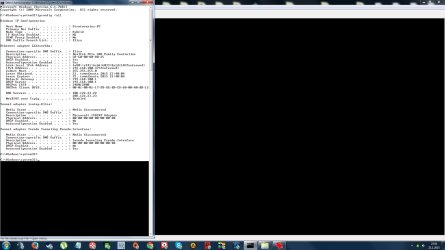
IPCONFIG /ALL Screens

Ipconfig /ALL info.

Friendly regards: Terry
 

Attachments

My Computer My Computer

At a glance

Windows 7 x64 Home PremiumIntel Core I5-2320 3.00GHZ8GBASUS HD 7770 DirectCU 1Gb
Computer type
PC/Desktop
Computer Manufacturer/Model Number
Asustek Computer Inc.
OS
Windows 7 x64 Home Premium
CPU
Intel Core I5-2320 3.00GHZ
Motherboard
Asus P8 H61 PRO Rev 3.0 - New H6I B3 Revision
Memory
8GB
Graphics Card(s)
ASUS HD 7770 DirectCU 1Gb
Sound Card
Speakers (High Definition Audio Device)
Monitor(s) Displays
Acer X243h (24")
Screen Resolution
1920*1080
Hard Drives
Seagate 1.5TB and can't remember more details and how to look.
PSU
Corsair 550W
Case
Antec 300 Versatile Mini Tower
Cooling
No extra cooler and have fan blowing up through hole
Keyboard
Hewlett Packard
Mouse
Logitech 2 buttons and wheel
Internet Speed
20mb download & 1mb upload. Adsl.
Antivirus
Bitdefender 2014 Internet Security "Bought one"
Browser
Mozilla Firefox 35.0
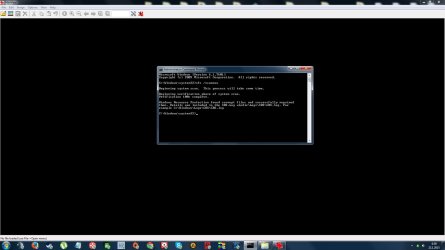
2nd Run of SFC /Scannow in CMD as Admin

Says that found corrupt files and repaired them. On 1st run said that wasn't able to fix some. Web Browser still not gaining access to websites and the earlier mentioned Applications are still behaving strangely and mean that not even going to login details phase. Pondering if should run this command for 3rd time..Going to reboot soon and hopefully some of the mentioned applications works after that.

Shame that no helpful response or just responses so far for this nasty problem..One person posted couple times and i already had tried the simple things that was suggested. Like using the silly Troubleshooter that Win OS has. Cheers for GregRocker for the small effort for providing assist though.

Friendly regards: Terry
 

Attachments

  • Sfc Scannow 2nd run and this time all fixed. Ofc use mark on front of scannow.jpg
    Sfc Scannow 2nd run and this time all fixed. Ofc use mark on front of scannow.jpg
    76.2 KB · Views: 1

My Computer My Computer

At a glance

Windows 7 x64 Home PremiumIntel Core I5-2320 3.00GHZ8GBASUS HD 7770 DirectCU 1Gb
Computer type
PC/Desktop
Computer Manufacturer/Model Number
Asustek Computer Inc.
OS
Windows 7 x64 Home Premium
CPU
Intel Core I5-2320 3.00GHZ
Motherboard
Asus P8 H61 PRO Rev 3.0 - New H6I B3 Revision
Memory
8GB
Graphics Card(s)
ASUS HD 7770 DirectCU 1Gb
Sound Card
Speakers (High Definition Audio Device)
Monitor(s) Displays
Acer X243h (24")
Screen Resolution
1920*1080
Hard Drives
Seagate 1.5TB and can't remember more details and how to look.
PSU
Corsair 550W
Case
Antec 300 Versatile Mini Tower
Cooling
No extra cooler and have fan blowing up through hole
Keyboard
Hewlett Packard
Mouse
Logitech 2 buttons and wheel
Internet Speed
20mb download & 1mb upload. Adsl.
Antivirus
Bitdefender 2014 Internet Security "Bought one"
Browser
Mozilla Firefox 35.0
I said to type Troubleshooting in Start Search box, so obviously you'd click on the result that says Troubleshooting, which then has an Internet category to click for Network adapter troubleshooter. Why is that a problem?

I have been out all day so only just got back to see this. If the bare minimum first steps get taken care of I can elevate this to a Networking MVP. But first let's see what the troubleshooter says.

What type of install is this, the Asus factory install which has the worst written software in the industry and which no tech enthusiast would run in the first place? Compare the install you have to the perfect install in Clean Reinstall Windows 7 which has been used by over a million consumers who have no subsequent problems such as you're having when they stick with its tools and methods.
 
Y i ran proper scan with Troubleshooter & no luck. Tricky case for it

I said to type Troubleshooting in Start Search box, so obviously you'd click on the result that says Troubleshooting, which then has an Internet category to click for Network adapter troubleshooter. Why is that a problem?

Hi GregRocker. I replied on page 1 if recall that i launched troubleshooter properly before u suggested it and explained it in reply to your suggestion. U must've seen all the post's that i've made which shows that it's not about worthless Win 7 OS Troubleshooter giving any detailed help or fix for this problem. It didn't do anything when i actually used it "told it earlier that it couldn't identify any problem with connection" and it's one the basic things that i've done when net has hiccup's. Plus some other things ofc that i know of and explained them on page 2 in one post.

Weird & Shame that no replies from tech wise ppl who could provide some detailed info and possible fix after seen the posted attachments & details written :rolleyes: . Y did post many and was a bit silly not to put more attachments to same post to lighten the situation up,but been writing as clearly as possible. Lates error msg received when tried to launch application: WSAStartup() failed,or you have the incorrect version of Winsock installed.

Back tomorrow and hopefully assist from someone with tech knowledge :p

Wish good day & Gn for all O/

Friendly regards: Terry
 

My Computer My Computer

At a glance

Windows 7 x64 Home PremiumIntel Core I5-2320 3.00GHZ8GBASUS HD 7770 DirectCU 1Gb
Computer type
PC/Desktop
Computer Manufacturer/Model Number
Asustek Computer Inc.
OS
Windows 7 x64 Home Premium
CPU
Intel Core I5-2320 3.00GHZ
Motherboard
Asus P8 H61 PRO Rev 3.0 - New H6I B3 Revision
Memory
8GB
Graphics Card(s)
ASUS HD 7770 DirectCU 1Gb
Sound Card
Speakers (High Definition Audio Device)
Monitor(s) Displays
Acer X243h (24")
Screen Resolution
1920*1080
Hard Drives
Seagate 1.5TB and can't remember more details and how to look.
PSU
Corsair 550W
Case
Antec 300 Versatile Mini Tower
Cooling
No extra cooler and have fan blowing up through hole
Keyboard
Hewlett Packard
Mouse
Logitech 2 buttons and wheel
Internet Speed
20mb download & 1mb upload. Adsl.
Antivirus
Bitdefender 2014 Internet Security "Bought one"
Browser
Mozilla Firefox 35.0
Actually unlike XP, WIn7's troubleshooters actually work so it's important to make sure they are run correctly and there was no reason to believe you'd chosen the correct one.

I suggest you knock off the nonsense because no one will help you if you continue to behave in a weird and insulting manner, and as soon as someone reports it you'll likely get permanently banned.

So continue working through the Troubleshooting Steps for Windows 7. You say you ran SFC but what were the results of the malware scans suggested in steps? THese should be done before SFC. If SFC then can't repair all System files in 3 attempts, the next step would be a Repair Install if all other steps have been completed.
 
Back
Top