Will this card work in my desktop PC?

Efdy

New member
Member
VIP
Local time
2:02 AM
Messages
137
Location
USA
Can you advise me, please? My Nvidia FX5200 died. I know it was the video card that failed because I took it out and tried an old video card in there, and the computer works normally.

This is the computer: Windows 7 32-bit, Dell Dimension 4600 desktop, P4 CPU 2.6GHz, 450W PSU, 3GB RAM, 8X AGP slot, one ASUS 24-inch monitor.

This is the card: EVGA GeForce 6200 512 MB DDR2 AGP 8X VGA/DVI-I/S-Video Graphics Card, 512-A8-N403-LR
Amazon.com: EVGA GeForce 6200 512 MB DDR2 AGP 8X VGA/DVI-I/S-Video Graphics Card, 512-A8-N403-LR: Electronics

There are drivers for the card to use with Windows 7 32-bit at Nvidia. I don't know what might not make it work. I wanted to check before ordering it. All I use it for is playing really old games in coop mode with the newer computer.

Should this be able to show 1920x1080 or even 1280x720? It wouldn't be only 4:3, would it?

Thank you for helping me.
 

My Computer My Computer

Computer type
PC/Desktop
Computer Manufacturer/Model Number
I do not know. It was put together with separately purchased parts.
OS
Windows 7 Ultimate 64-bit SP1
CPU
Intel Core i5-3570K
Motherboard
ASUS P8Z77-V PRO
Memory
Corsair Vengeance Blue 4x8 GB
Graphics Card(s)
Nvidia GTX 1060
Sound Card
M-Audio Delta 1010LT
Monitor(s) Displays
2 Asus VS247H-P 23.6-Inch LED-Lit LCD monitors
Screen Resolution
1920x1080
Hard Drives
Western Digital WD1002FAEX Caviar Black 1TB SATA III
(no SSD)
My Passport Ultra external hard drive 2TB
PSU
CORSAIR RM650 650W 80 PLUS GOLD Full Modular PSU
Case
Corsair Obsidian Series Black 550D Mid Tower
Cooling
Zalman CNPS9500AT CPU Cooler
Keyboard
Azio Large Print Tri-Color Backlit Wired Keyboard (KB505U)
Mouse
Logitech Gaming Mouse G300
Internet Speed
6-8Mbps down, 2Mbps up
Antivirus
Malwarebytes Premium
Browser
IE, Firefox, Chrome
Other Info
2nd PC: Dell Dimension 4600
OS: Windows 7 Home Premium 32-bit SP1
PSU: EVGA 500W 80+ thingo
CPU: Intel Pentium 4
RAM: 3.00 GB Dual Channel DDR @ 199MHz
MB: Dell 02Y832
GPU: 512MB Nvidia GeForce 6200
HDD: 465GB WDC WD5000AAKS-00A7B2 ATA (SATA)
Opt Drive: HL-DT-ST DVD-ROM GDR8162B ATA Device
Opt Drive: TSSTcorp CD-RW TS-H292C ATA Device
Audio: Creative SB Live
Monitor: Asus-VS247H-P
Hello Efdy now that is one golden oldie if you don't mind me saying and according to this EVGA - Product Specs - e-GeForce 6200 AGP you need at least 300W from the PSU which you have of course but I think that if you use this calculator it might give you an idea of what the rest of the machine plus the new card will need.
OuterVision Power Supply Calculator fill it in as best you can to find the power requirement taking into consideration what the specs say in that other link.

Having said that I am now thinking that the PSU is really getting on in years if it is the original one and it may be an idea to find out just what it is putting out first because if it is not functioning properly it may mean a new one or at least a good second hand one. I ma saying this because it would be a disappointment to find after the fact that the PSU is not up to the job. So just follow this
Using HW Info
PART A:
You can test the volts on the PSU with HW Info HWiNFO - Download < download the right bit version and close the right hand window select Sensors and scroll down to the power section where you will see what the volts are doing see my pic. In my pic the section (Nuvoton) with VBATT as a dead give away you are in the section for the rail voltages. There are other section titles and one that pops up often is ITE (sometimes the usual one for Gigabyte boards)
Now the voltage on the different rails have to be within 5% =+/- of what is required or the machine will not work properly if at all.
Limits +/- (minimum - correct - maximum)
12v1 = 11.4 - 12 - 12.6v
12v2 = 11.4 - 12- 12.6v
5v = 4.75 – 5 - 5.25v
3.3v = 3.135 – 3 – 3.465v
-12v = -10.80 - -12 - -13.20v
+5VSB = 4.75 – 5 - 5.25v
The Power good signal voltage at pin 8 on the 24 pin plug (grey cable) should be the same as the 5v rail reading/s
See this for the rail voltage info
PSUs 101: A Detailed Look Into Power Supplies (Section 2.)
The original right hand window shows the machine running and is handy for that but for looking at the components in some detail close it and use the main left hand side panel
FOR OTHER COMPONENTS
PART B:
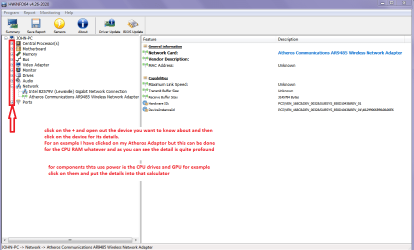
Open each small square with + in it on the section the components are in and then click on the individual component/s (it will highlight in blue) - in the right hand side will appear all sorts of details including brands speeds and other essential info that particular device. See pic for example.
 

Attachments

  • HW INFO DESKTOP PSU.PNG
    HW INFO DESKTOP PSU.PNG
    51.3 KB · Views: 1

My Computer My Computer

Computer type
PC/Desktop
Computer Manufacturer/Model Number
Own build (new) Desk1 / Asus ROG Win 7 / Desk2 1st build
OS
Desk1 7 Home Prem / Desk2 10 Pro / Main lap Asus ROG 10 Pro 2 laptop Toshiba 7 Pro Asus P2520 7 & 10
CPU
Desk1 i5 3750K / Laptop i7 GTX 860M / Desk2 i5 2500
Motherboard
Desk1 Asus P877-V / Desk2 Gigabyte H67 UD3H / Laptop ?
Memory
Desk1 8GB (1866) / Desk2 16GB (1333) / Laptop 8Gb DDR3
Graphics Card(s)
Desk 1& 2NVidia GTX 650 & Laptops on board Intel
Sound Card
Desk 1 & 2 -XONAR DG Realtek High Def audio Laptop
Monitor(s) Displays
Desk 1 Benq HD 2450 / Desk2 Philips 24" / Laptop 17.5"
Screen Resolution
1920x1080 D1 & D2 & Laptop 1
Hard Drives
Desk1 Samsung 120GB 830 SSD
Asus ROG 256GB 850 Pro SSD
Desk2 Samsung 840 256 SSD
Toshiba 120GB EVO
PSU
Desk 1 Corsair HX 1050/ Laptop ? / Desk 2 Corsair HX 650
Case
Desk 1 Cooler HAF XM ? Toshiba laptop / Desk2 Coolermaster
Cooling
Fans on all Desk1 -2 Desk2 - all Coolermasters 5 Laptop ?
Keyboard
Desk 1 MS Sidewinder X6 Desk 2 MS Sidewinder X 4
Mouse
Desk 1&2 - Gigabyte MS 900 gamer - laptop - Logitec wireless
Internet Speed
ADSL2+
Other Info
One other Desktop (tester) and spare Toshba laptop both with SSD's
Running Kaspersky 2016 ISS on all machines config'd identically
Logitec audio stereo systems on each machine (x3)
Canon MG5250MFC
Router/modem TP-Link running WPA2SK
As you look for a card you need to be sure you get one that is for the AGP slot. Do not get a card that needs a pci-e slot, which is true of most cards you will find. All the cards listed below have the same or more resolution options than your fx5200, all are AGP, all are cheap, all require low power.

Every card ever made has drivers that are online somewhere, usually not too hard to find. Guru3D is one such site.
download from Guru3D.com

Read through the spec comparisons on the game-debate links.


The 6200 is a slight upgrade from your existing card, as shown below. $44 as you said on amazon.
Nvidia GeForce 6200 compare Nvidia GeForce FX 5200 GPU

The HD 3450 is a huge upgrade from your fx5200, for $55
AMD Radeon HD 3450 compare Nvidia GeForce FX 5200 GPU

Amazon.com: Club 3D Radeon HD3450 512 MB AGP 8x Graphics Card, CGA-3452: Electronics

The HD 2600 pro is an extreme upgrade from your fx5200 existing card, for $70
Amazon.com: ASUS AH2600PRO/HTDP/512M/A ATI RADEON HD 2600PRO 512MB 128-bit GDDR2 8X/4X AGP HDCP Dual-Link AVIVO HD Video Card w/Dual DVI, HDTV: Electronics

AMD Radeon HD 2600 Pro compare Nvidia GeForce FX 5200 GPU

And if you have the moxie to use a something like a twist-tie to wrap through the upper hole and secure the card to your case, the below Radeon 9600 is a pretty big upgrade from the fx5200 for only $16 because the guy lost the mounting bracket, hence the price...
AMD Radeon 9600 Series compare Nvidia GeForce FX 5200 GPU

Amazon.com: FIC A96M ATI RADEON 9600 128MB 128-bit DDR 4X/8X AGP Video Card (No Bracket) w/DVI, S-Video: Electronics

With most fx5200 cards you can use either a DVI or VGA cable so I'm not sure which you are using for your monitor (your monitor might actually take either one), but of course make sure your new video card has the right output port.

chances are you can find even better prices on ebay...
 
Last edited:

My Computer My Computer

Computer type
PC/Desktop
Computer Manufacturer/Model Number
diy
OS
Win7 pro x64
CPU
stock i7 7700k
Motherboard
Gigabyte Z270N-WIFI mini-ITX
Memory
Corsair Vengeance LPX 16GB (2x8GB) DDR4 @ 3200MHz
Graphics Card(s)
integrated Intel HD 630
Sound Card
onboard Realtek ALC1220
Monitor(s) Displays
two vertically mounted samsung 55" 4k un55mu8000
Screen Resolution
1920x1280
Hard Drives
256GB Samsung EVO 960 M.2 pci-e NVMe SSD
PSU
SilverStone Nightjar ST45NF 450Watt Fanless
Case
No case. Motherboard is mounted directly onto power supply
Cooling
Evercool low profile 815EP with Panaflow 12L fan at 7v
Keyboard
Ortek MCK-86 mini
Mouse
Belkin 5-button USB
Internet Speed
spectrum 400mbps

My Computer My Computer

Computer type
PC/Desktop
Computer Manufacturer/Model Number
ASUS X550ZE
OS
Windows 7 Home Premium 64-BIT
CPU
AMD A8 7200P
Motherboard
N/A
Memory
8GB 1600mhz
Graphics Card(s)
Radeon R5 (APU) + Radeon R5 M230 2GB Dual Graphics
Sound Card
Realtek ALC269 with SonicMaster
Monitor(s) Displays
Laptop Display
Screen Resolution
1920 x 1080 @60hz
Hard Drives
WDC WD50 00LPVX-80V0TT0 (500GB)
PSU
Laptop Charger
Mouse
ARMAGGEDON TEXTRON SCORPION 7
Internet Speed
100 mbps DOWN / 50 mbps UP
Antivirus
Windows Defender
Browser
Mozzila FireFox, Valve Steam in-game internet browser
Thank you for the helpful replies. Previously, I had two Radeon cards in there including the Sapphire 3650 HD and I think a Radeon 9800 (maybe 9600, one or the other, years ago). I am interested in the EVGA GeForce 6200 from Amazon.com because it is new and has a two-year warranty.

I don't think my HW Info report thing shows that power stuff. I tried the portable and installed versions. I will try to attach a screenshot.

Thank you again for the replies. I will check back again later.
 

Attachments

  • Untitled.png
    Untitled.png
    30.9 KB · Views: 4

My Computer My Computer

Computer type
PC/Desktop
Computer Manufacturer/Model Number
I do not know. It was put together with separately purchased parts.
OS
Windows 7 Ultimate 64-bit SP1
CPU
Intel Core i5-3570K
Motherboard
ASUS P8Z77-V PRO
Memory
Corsair Vengeance Blue 4x8 GB
Graphics Card(s)
Nvidia GTX 1060
Sound Card
M-Audio Delta 1010LT
Monitor(s) Displays
2 Asus VS247H-P 23.6-Inch LED-Lit LCD monitors
Screen Resolution
1920x1080
Hard Drives
Western Digital WD1002FAEX Caviar Black 1TB SATA III
(no SSD)
My Passport Ultra external hard drive 2TB
PSU
CORSAIR RM650 650W 80 PLUS GOLD Full Modular PSU
Case
Corsair Obsidian Series Black 550D Mid Tower
Cooling
Zalman CNPS9500AT CPU Cooler
Keyboard
Azio Large Print Tri-Color Backlit Wired Keyboard (KB505U)
Mouse
Logitech Gaming Mouse G300
Internet Speed
6-8Mbps down, 2Mbps up
Antivirus
Malwarebytes Premium
Browser
IE, Firefox, Chrome
Other Info
2nd PC: Dell Dimension 4600
OS: Windows 7 Home Premium 32-bit SP1
PSU: EVGA 500W 80+ thingo
CPU: Intel Pentium 4
RAM: 3.00 GB Dual Channel DDR @ 199MHz
MB: Dell 02Y832
GPU: 512MB Nvidia GeForce 6200
HDD: 465GB WDC WD5000AAKS-00A7B2 ATA (SATA)
Opt Drive: HL-DT-ST DVD-ROM GDR8162B ATA Device
Opt Drive: TSSTcorp CD-RW TS-H292C ATA Device
Audio: Creative SB Live
Monitor: Asus-VS247H-P
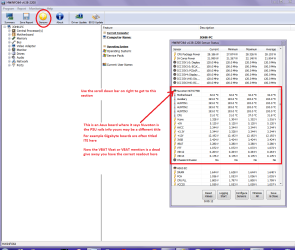
Ok lets not worry re the PSU if that is all the Sensor picked up because in that shot of my Ivy Bridge machine PSU you can see the info I wanted to see by just scrolling down the side bar. As I said in the ditty the section with the Vbatt is a dead give away that you are in the right spot.

But anyway have a look at what John and Roaster have posted as I really am no expert with GPU and the specs in particular:)
 

My Computer My Computer

Computer type
PC/Desktop
Computer Manufacturer/Model Number
Own build (new) Desk1 / Asus ROG Win 7 / Desk2 1st build
OS
Desk1 7 Home Prem / Desk2 10 Pro / Main lap Asus ROG 10 Pro 2 laptop Toshiba 7 Pro Asus P2520 7 & 10
CPU
Desk1 i5 3750K / Laptop i7 GTX 860M / Desk2 i5 2500
Motherboard
Desk1 Asus P877-V / Desk2 Gigabyte H67 UD3H / Laptop ?
Memory
Desk1 8GB (1866) / Desk2 16GB (1333) / Laptop 8Gb DDR3
Graphics Card(s)
Desk 1& 2NVidia GTX 650 & Laptops on board Intel
Sound Card
Desk 1 & 2 -XONAR DG Realtek High Def audio Laptop
Monitor(s) Displays
Desk 1 Benq HD 2450 / Desk2 Philips 24" / Laptop 17.5"
Screen Resolution
1920x1080 D1 & D2 & Laptop 1
Hard Drives
Desk1 Samsung 120GB 830 SSD
Asus ROG 256GB 850 Pro SSD
Desk2 Samsung 840 256 SSD
Toshiba 120GB EVO
PSU
Desk 1 Corsair HX 1050/ Laptop ? / Desk 2 Corsair HX 650
Case
Desk 1 Cooler HAF XM ? Toshiba laptop / Desk2 Coolermaster
Cooling
Fans on all Desk1 -2 Desk2 - all Coolermasters 5 Laptop ?
Keyboard
Desk 1 MS Sidewinder X6 Desk 2 MS Sidewinder X 4
Mouse
Desk 1&2 - Gigabyte MS 900 gamer - laptop - Logitec wireless
Internet Speed
ADSL2+
Other Info
One other Desktop (tester) and spare Toshba laptop both with SSD's
Running Kaspersky 2016 ISS on all machines config'd identically
Logitec audio stereo systems on each machine (x3)
Canon MG5250MFC
Router/modem TP-Link running WPA2SK
Yippie!

Yay. My new GeForce 6200 was delivered, and everything is functioning well. Maybe I should get a new PSU anyway. This one is very many years old. It's too bad that I can't get sensor readings for stuff. I don't even know how hot my CPU thing is. Thank you guys again for helping me.
 

My Computer My Computer

Computer type
PC/Desktop
Computer Manufacturer/Model Number
I do not know. It was put together with separately purchased parts.
OS
Windows 7 Ultimate 64-bit SP1
CPU
Intel Core i5-3570K
Motherboard
ASUS P8Z77-V PRO
Memory
Corsair Vengeance Blue 4x8 GB
Graphics Card(s)
Nvidia GTX 1060
Sound Card
M-Audio Delta 1010LT
Monitor(s) Displays
2 Asus VS247H-P 23.6-Inch LED-Lit LCD monitors
Screen Resolution
1920x1080
Hard Drives
Western Digital WD1002FAEX Caviar Black 1TB SATA III
(no SSD)
My Passport Ultra external hard drive 2TB
PSU
CORSAIR RM650 650W 80 PLUS GOLD Full Modular PSU
Case
Corsair Obsidian Series Black 550D Mid Tower
Cooling
Zalman CNPS9500AT CPU Cooler
Keyboard
Azio Large Print Tri-Color Backlit Wired Keyboard (KB505U)
Mouse
Logitech Gaming Mouse G300
Internet Speed
6-8Mbps down, 2Mbps up
Antivirus
Malwarebytes Premium
Browser
IE, Firefox, Chrome
Other Info
2nd PC: Dell Dimension 4600
OS: Windows 7 Home Premium 32-bit SP1
PSU: EVGA 500W 80+ thingo
CPU: Intel Pentium 4
RAM: 3.00 GB Dual Channel DDR @ 199MHz
MB: Dell 02Y832
GPU: 512MB Nvidia GeForce 6200
HDD: 465GB WDC WD5000AAKS-00A7B2 ATA (SATA)
Opt Drive: HL-DT-ST DVD-ROM GDR8162B ATA Device
Opt Drive: TSSTcorp CD-RW TS-H292C ATA Device
Audio: Creative SB Live
Monitor: Asus-VS247H-P
Efdy now you can use this Speccy - Free Download - Piriform to find the temps on anything - in the Summary screen it should show the graphics temp I am not sure now because I am stuck in hospital and cannot check on my desktops and honestly cannot remember.

The PSU yes I think it is good idea and a Corsair as you have got now is my favourite brand and is a quality product from whoever makes them (PSU's are made by companies not necessarily the brand title;)) - they used to be made by Seasonic a top brand itself.
Now the size is up to you and personally I would go for the best you can afford the RM series was a lower end of the top end PSU's model if my memory serves me right and the AX and HX are the best but may be too pricey for you if you go for a large one.

Use this to find the size for your machine you just need to enter the components and it will automatically calculate the size. It does so giving you a little "overkill" also so that if you decide to add more components in they would be covered. OuterVision Power Supply Calculator
In any case just because you have a large output PSU doesn't mean you will be using a lot more form the mains it doesn't work like that because the PSU only converts the mains power into the low voltage power that the machine is using at the time. So for example at idle the machine is drawing much less power than if you were heavy gaming.

As you have a 650W one now probably a 650W or 750W is going to be ideal. There are some really well priced ones here Corsiar psu - Newegg.com so much better than out here:(
Oh and you might take this opportunity to get a modular one while you are at it mate so much easier to fit or replace and tidier.;)

I'll stop raving on now :geek:
 

My Computer My Computer

Computer type
PC/Desktop
Computer Manufacturer/Model Number
Own build (new) Desk1 / Asus ROG Win 7 / Desk2 1st build
OS
Desk1 7 Home Prem / Desk2 10 Pro / Main lap Asus ROG 10 Pro 2 laptop Toshiba 7 Pro Asus P2520 7 & 10
CPU
Desk1 i5 3750K / Laptop i7 GTX 860M / Desk2 i5 2500
Motherboard
Desk1 Asus P877-V / Desk2 Gigabyte H67 UD3H / Laptop ?
Memory
Desk1 8GB (1866) / Desk2 16GB (1333) / Laptop 8Gb DDR3
Graphics Card(s)
Desk 1& 2NVidia GTX 650 & Laptops on board Intel
Sound Card
Desk 1 & 2 -XONAR DG Realtek High Def audio Laptop
Monitor(s) Displays
Desk 1 Benq HD 2450 / Desk2 Philips 24" / Laptop 17.5"
Screen Resolution
1920x1080 D1 & D2 & Laptop 1
Hard Drives
Desk1 Samsung 120GB 830 SSD
Asus ROG 256GB 850 Pro SSD
Desk2 Samsung 840 256 SSD
Toshiba 120GB EVO
PSU
Desk 1 Corsair HX 1050/ Laptop ? / Desk 2 Corsair HX 650
Case
Desk 1 Cooler HAF XM ? Toshiba laptop / Desk2 Coolermaster
Cooling
Fans on all Desk1 -2 Desk2 - all Coolermasters 5 Laptop ?
Keyboard
Desk 1 MS Sidewinder X6 Desk 2 MS Sidewinder X 4
Mouse
Desk 1&2 - Gigabyte MS 900 gamer - laptop - Logitec wireless
Internet Speed
ADSL2+
Other Info
One other Desktop (tester) and spare Toshba laptop both with SSD's
Running Kaspersky 2016 ISS on all machines config'd identically
Logitec audio stereo systems on each machine (x3)
Canon MG5250MFC
Router/modem TP-Link running WPA2SK
I would NOT recommend Speccy for checking Processor temps because it's buggy as hell.

Use core temp for CPU and GPU-Z for graphics cards
 

My Computer My Computer

Computer type
PC/Desktop
Computer Manufacturer/Model Number
ASUS X550ZE
OS
Windows 7 Home Premium 64-BIT
CPU
AMD A8 7200P
Motherboard
N/A
Memory
8GB 1600mhz
Graphics Card(s)
Radeon R5 (APU) + Radeon R5 M230 2GB Dual Graphics
Sound Card
Realtek ALC269 with SonicMaster
Monitor(s) Displays
Laptop Display
Screen Resolution
1920 x 1080 @60hz
Hard Drives
WDC WD50 00LPVX-80V0TT0 (500GB)
PSU
Laptop Charger
Mouse
ARMAGGEDON TEXTRON SCORPION 7
Internet Speed
100 mbps DOWN / 50 mbps UP
Antivirus
Windows Defender
Browser
Mozzila FireFox, Valve Steam in-game internet browser

My Computer My Computer

Computer type
PC/Desktop
Computer Manufacturer/Model Number
Home made Desktop
OS
Windows 10 Pro. 64/ version 1709 Windows 7 Pro/64
CPU
Intel i7-6800K @ 4.3
Motherboard
ASUS X-99 Deluxe II
Memory
Corsair Platinum 16 gig @2400
Graphics Card(s)
EVGA GTX 1070 OC
Monitor(s) Displays
Asus 27" LED LCD/VE278Q
Screen Resolution
1920-1080 or 1280-720 HDMI
Hard Drives
INTEL SSD 730-240 Gb Sata 3.0/
PSU
EVGA Platium 1200W
Case
Phanteks Luxe Tempered Glass 8 fans/ one radiator
Cooling
XSPC/ Water Cooled CPU
Keyboard
Das 4 Professional
Mouse
Logitech M705/MX Anywhere 2-S
Internet Speed
100 mbits
Antivirus
Microsoft Security Essentials/ Malwarebytes Premium 3.0/ SAS
Browser
I.E. 11 default/Firefox/ ISP Time Warner Cable/Spectrum
Other Info
LG BluRay Burner/
Sound system-KLipsch-THX/
Icy Dock ssd Hot Swap bays.
Hi,
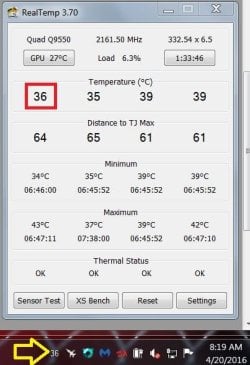
For a Intel cpu I use realtemp
Coretemp is good for amd or intel but I prefer realtemp it also shows gpu temp too if added
Download Real Temp | techPowerUp

realtemp good cpu...JPG
 

My Computer My Computer

Computer type
PC/Desktop
Computer Manufacturer/Model Number
Custom assembled by me :}
OS
Win-7-Pro64bit 7-H-Prem-64bit
CPU
i7-5930K 2nd i9-9940x both water blocked VRM's too
Motherboard
ASUS SABERTOOTH X99 2nd ASUS x299 Apex
Memory
Trident-z 3200C14 2nd Trident-z 3600C16
Graphics Card(s)
EVGA 1080ti ftw3 2nd Titan Xp both water blocked
Sound Card
Built-in Realtek
Monitor(s) Displays
1-AOC G2460PG 24"G-Sync 144Hz/ 2nd 1-ASUS VG248QE 24" 144Hz
Screen Resolution
1920 x 1080 144Hz
Hard Drives
2-Samsung M.2 Evo & Evo Plus
2-Samsung 850 EVO 500GB SSD's/ 3-2.5 W.D. Black 1tb-&3-1tb/3-3.5 WD Black 1tb hdd's
PSU
EVGA SuperNOVA 1000-P2 2nd 1200-P2
Case
2-Corsair Obsidian Series 450D Black ATX Mid Tower
Cooling
Custom water loops
Keyboard
Logitech G710+/ 2nd Logitech G910
Mouse
2-RedDragon M901 Perdition 16400 dpi Gaming mouse = wired
Internet Speed
Comcast Ping 19ms 89.31mbps download speed 6.12mbps upload
Antivirus
Malwarebytes Pro/ Superantispyware Pro
Browser
FireFox & Pale moon
Other Info
2nd ASUS X299 Apex/Intel i9-9940x with Custom water loop/7H-Prem-x64/Corsair 450D case/Ram Trident-z 3600C16 4x8gb / Samsung970Evo plus 500gb SSD/Dual ssd EZ swap evo/PSU EVGA SuperNova 1200w-P2 80+Platinum/GPU Titan Xp /8-ML-140 on push-pull on 2-280GTX rads
Thank you all for further helpful information. I genuinely appreciate it. To the ICIT2LOL person, I'm sorry you are in hospital. I hope you get well. Good luck to you.
 

My Computer My Computer

Computer type
PC/Desktop
Computer Manufacturer/Model Number
I do not know. It was put together with separately purchased parts.
OS
Windows 7 Ultimate 64-bit SP1
CPU
Intel Core i5-3570K
Motherboard
ASUS P8Z77-V PRO
Memory
Corsair Vengeance Blue 4x8 GB
Graphics Card(s)
Nvidia GTX 1060
Sound Card
M-Audio Delta 1010LT
Monitor(s) Displays
2 Asus VS247H-P 23.6-Inch LED-Lit LCD monitors
Screen Resolution
1920x1080
Hard Drives
Western Digital WD1002FAEX Caviar Black 1TB SATA III
(no SSD)
My Passport Ultra external hard drive 2TB
PSU
CORSAIR RM650 650W 80 PLUS GOLD Full Modular PSU
Case
Corsair Obsidian Series Black 550D Mid Tower
Cooling
Zalman CNPS9500AT CPU Cooler
Keyboard
Azio Large Print Tri-Color Backlit Wired Keyboard (KB505U)
Mouse
Logitech Gaming Mouse G300
Internet Speed
6-8Mbps down, 2Mbps up
Antivirus
Malwarebytes Premium
Browser
IE, Firefox, Chrome
Other Info
2nd PC: Dell Dimension 4600
OS: Windows 7 Home Premium 32-bit SP1
PSU: EVGA 500W 80+ thingo
CPU: Intel Pentium 4
RAM: 3.00 GB Dual Channel DDR @ 199MHz
MB: Dell 02Y832
GPU: 512MB Nvidia GeForce 6200
HDD: 465GB WDC WD5000AAKS-00A7B2 ATA (SATA)
Opt Drive: HL-DT-ST DVD-ROM GDR8162B ATA Device
Opt Drive: TSSTcorp CD-RW TS-H292C ATA Device
Audio: Creative SB Live
Monitor: Asus-VS247H-P
Yep well I juts suggested Speccy as a rough guide really it doesn't matter what one uses as I think we all have our own personal favourites in info software.

Yep thanks Efdy I have another three weks to go and then hopefully home and maybe even back to work.

John:)
 

My Computer My Computer

Computer type
PC/Desktop
Computer Manufacturer/Model Number
Own build (new) Desk1 / Asus ROG Win 7 / Desk2 1st build
OS
Desk1 7 Home Prem / Desk2 10 Pro / Main lap Asus ROG 10 Pro 2 laptop Toshiba 7 Pro Asus P2520 7 & 10
CPU
Desk1 i5 3750K / Laptop i7 GTX 860M / Desk2 i5 2500
Motherboard
Desk1 Asus P877-V / Desk2 Gigabyte H67 UD3H / Laptop ?
Memory
Desk1 8GB (1866) / Desk2 16GB (1333) / Laptop 8Gb DDR3
Graphics Card(s)
Desk 1& 2NVidia GTX 650 & Laptops on board Intel
Sound Card
Desk 1 & 2 -XONAR DG Realtek High Def audio Laptop
Monitor(s) Displays
Desk 1 Benq HD 2450 / Desk2 Philips 24" / Laptop 17.5"
Screen Resolution
1920x1080 D1 & D2 & Laptop 1
Hard Drives
Desk1 Samsung 120GB 830 SSD
Asus ROG 256GB 850 Pro SSD
Desk2 Samsung 840 256 SSD
Toshiba 120GB EVO
PSU
Desk 1 Corsair HX 1050/ Laptop ? / Desk 2 Corsair HX 650
Case
Desk 1 Cooler HAF XM ? Toshiba laptop / Desk2 Coolermaster
Cooling
Fans on all Desk1 -2 Desk2 - all Coolermasters 5 Laptop ?
Keyboard
Desk 1 MS Sidewinder X6 Desk 2 MS Sidewinder X 4
Mouse
Desk 1&2 - Gigabyte MS 900 gamer - laptop - Logitec wireless
Internet Speed
ADSL2+
Other Info
One other Desktop (tester) and spare Toshba laptop both with SSD's
Running Kaspersky 2016 ISS on all machines config'd identically
Logitec audio stereo systems on each machine (x3)
Canon MG5250MFC
Router/modem TP-Link running WPA2SK
Speccy doesn't show me any temperatures, but now I know what all my stuff is on that desktop computer. It was built for me by Dell, and that was before I knew anything, not that I know much still. I listed my parts when I built the one listed in my system description.

Core Temp doesn't show me temperatures either that I can see. Real Temp doesn't support the P4 processor in that desktop PC.

But thank you guys for taking time to help me so much since I joined this website. It has been invaluable to me to come here and read the topics people have started about stuff I needed solutions for too, and when I had to start a thread like this one, people were so informative. I offered to help my friend's daughter find solutions to her desktop computer problems when I was over at my friend's home one day. They acted like I just wanted to have sex with her. They don't get it. People help each other with their computers.
 

My Computer My Computer

Computer type
PC/Desktop
Computer Manufacturer/Model Number
I do not know. It was put together with separately purchased parts.
OS
Windows 7 Ultimate 64-bit SP1
CPU
Intel Core i5-3570K
Motherboard
ASUS P8Z77-V PRO
Memory
Corsair Vengeance Blue 4x8 GB
Graphics Card(s)
Nvidia GTX 1060
Sound Card
M-Audio Delta 1010LT
Monitor(s) Displays
2 Asus VS247H-P 23.6-Inch LED-Lit LCD monitors
Screen Resolution
1920x1080
Hard Drives
Western Digital WD1002FAEX Caviar Black 1TB SATA III
(no SSD)
My Passport Ultra external hard drive 2TB
PSU
CORSAIR RM650 650W 80 PLUS GOLD Full Modular PSU
Case
Corsair Obsidian Series Black 550D Mid Tower
Cooling
Zalman CNPS9500AT CPU Cooler
Keyboard
Azio Large Print Tri-Color Backlit Wired Keyboard (KB505U)
Mouse
Logitech Gaming Mouse G300
Internet Speed
6-8Mbps down, 2Mbps up
Antivirus
Malwarebytes Premium
Browser
IE, Firefox, Chrome
Other Info
2nd PC: Dell Dimension 4600
OS: Windows 7 Home Premium 32-bit SP1
PSU: EVGA 500W 80+ thingo
CPU: Intel Pentium 4
RAM: 3.00 GB Dual Channel DDR @ 199MHz
MB: Dell 02Y832
GPU: 512MB Nvidia GeForce 6200
HDD: 465GB WDC WD5000AAKS-00A7B2 ATA (SATA)
Opt Drive: HL-DT-ST DVD-ROM GDR8162B ATA Device
Opt Drive: TSSTcorp CD-RW TS-H292C ATA Device
Audio: Creative SB Live
Monitor: Asus-VS247H-P
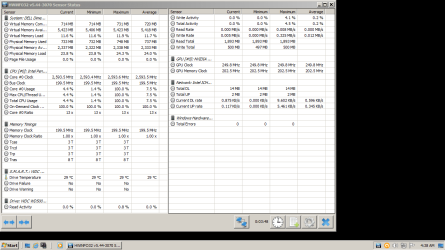
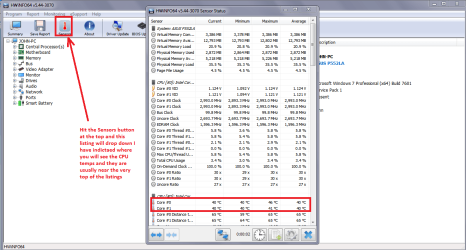
Ok mate now just try this one and use PART B: and hit the Sensors button it should flip down a listing of what they are picking up. The format is now slightly different to my pic for opening up the different components in a machine but it still does that in great detail.
Using HW Info
PART A:
You can test the volts on the PSU with HW Info HWiNFO - Download < download the right bit version and close the right hand window select Sensors and scroll down to the power section where you will see what the volts are doing see my pic. In my pic the section (Nuvoton) with VBATT as a dead give away you are in the section for the rail voltages. There are other section titles and one that pops up often is ITE (sometimes the usual one for Gigabyte boards)
Now the voltage on the different rails have to be within 5% =+/- of what is required or the machine will not work properly if at all.
Limits +/- (minimum - correct - maximum)
12v1 = 11.4 - 12 - 12.6v
12v2 = 11.4 - 12- 12.6v
5v = 4.75 – 5 - 5.25v
3.3v = 3.135 – 3 – 3.465v
-12v = -10.80 - -12 - -13.20v
+5VSB = 4.75 – 5 - 5.25v
The Power good signal voltage at pin 8 on the 24 pin plug (grey cable) should be the same as the 5v rail reading/s
See this for the rail voltage info
PSUs 101: A Detailed Look Into Power Supplies (Section 2.)
The original right hand window shows the machine running and is handy for that but for looking at the components in some detail close it and use the main left hand side panel
FOR OTHER COMPONENTS
PART B:
Open each small square with + in it on the section the components are in and then click on the individual component/s (it will highlight in blue) - in the right hand side will appear all sorts of details including brands speeds and other essential info that particular device. See pic for example.

Now an alternative is to go into the BIOS and find the temps there but this program is very good at finding very detailed info on the different components in a machine.

As for helping out mate well some people can be quite strange:rolleyes:
 

Attachments

  • HW INFO SENSORS.PNG
    HW INFO SENSORS.PNG
    46.9 KB · Views: 1
  • HW INFO DEVICES.PNG
    HW INFO DEVICES.PNG
    32.3 KB · Views: 1

My Computer My Computer

Computer type
PC/Desktop
Computer Manufacturer/Model Number
Own build (new) Desk1 / Asus ROG Win 7 / Desk2 1st build
OS
Desk1 7 Home Prem / Desk2 10 Pro / Main lap Asus ROG 10 Pro 2 laptop Toshiba 7 Pro Asus P2520 7 & 10
CPU
Desk1 i5 3750K / Laptop i7 GTX 860M / Desk2 i5 2500
Motherboard
Desk1 Asus P877-V / Desk2 Gigabyte H67 UD3H / Laptop ?
Memory
Desk1 8GB (1866) / Desk2 16GB (1333) / Laptop 8Gb DDR3
Graphics Card(s)
Desk 1& 2NVidia GTX 650 & Laptops on board Intel
Sound Card
Desk 1 & 2 -XONAR DG Realtek High Def audio Laptop
Monitor(s) Displays
Desk 1 Benq HD 2450 / Desk2 Philips 24" / Laptop 17.5"
Screen Resolution
1920x1080 D1 & D2 & Laptop 1
Hard Drives
Desk1 Samsung 120GB 830 SSD
Asus ROG 256GB 850 Pro SSD
Desk2 Samsung 840 256 SSD
Toshiba 120GB EVO
PSU
Desk 1 Corsair HX 1050/ Laptop ? / Desk 2 Corsair HX 650
Case
Desk 1 Cooler HAF XM ? Toshiba laptop / Desk2 Coolermaster
Cooling
Fans on all Desk1 -2 Desk2 - all Coolermasters 5 Laptop ?
Keyboard
Desk 1 MS Sidewinder X6 Desk 2 MS Sidewinder X 4
Mouse
Desk 1&2 - Gigabyte MS 900 gamer - laptop - Logitec wireless
Internet Speed
ADSL2+
Other Info
One other Desktop (tester) and spare Toshba laptop both with SSD's
Running Kaspersky 2016 ISS on all machines config'd identically
Logitec audio stereo systems on each machine (x3)
Canon MG5250MFC
Router/modem TP-Link running WPA2SK
Hello friends, i'm from Germany and this thread here helped me out, i had the same question. Just want to leave a thank you here. Ahman :D
 

My Computer My Computer

Computer type
PC/Desktop
OS
Windows 7 Ultimate x64
Yeah! That's how I kept my PCs running all these years. :) Thanks, Seven Forums. I'm going to learn your language so I can watch old movies and the news and talk to people from there.

Okay, I'm going to try again with HWInfo. Thank you for further details on how to use. I feel so good--sort of--because this is like one of the only places anyone just acts like it's okay to be me, and all they want is to show me how to use my rigs properly. I found that Other Info thing in my profile here under System Specs, where I listed my older desktop PC according to Speccy. The PSU on my older desktop was only 450W--the 650W is on my newer desktop PC that I built. That thing you told me about said to get at least 340W PSU. The PSU I purchased now to replace the old Corsair unit is EVGA 500W fully modular. I purchased this unit because customer reviews were good at Amazon including the noise level, and the price was low ($40), and the warranty is for years.

Thanks again. I really do appreciate getting helpful information here. I can't see something to donate with PayPal, but I'll look again.
 

My Computer My Computer

Computer type
PC/Desktop
Computer Manufacturer/Model Number
I do not know. It was put together with separately purchased parts.
OS
Windows 7 Ultimate 64-bit SP1
CPU
Intel Core i5-3570K
Motherboard
ASUS P8Z77-V PRO
Memory
Corsair Vengeance Blue 4x8 GB
Graphics Card(s)
Nvidia GTX 1060
Sound Card
M-Audio Delta 1010LT
Monitor(s) Displays
2 Asus VS247H-P 23.6-Inch LED-Lit LCD monitors
Screen Resolution
1920x1080
Hard Drives
Western Digital WD1002FAEX Caviar Black 1TB SATA III
(no SSD)
My Passport Ultra external hard drive 2TB
PSU
CORSAIR RM650 650W 80 PLUS GOLD Full Modular PSU
Case
Corsair Obsidian Series Black 550D Mid Tower
Cooling
Zalman CNPS9500AT CPU Cooler
Keyboard
Azio Large Print Tri-Color Backlit Wired Keyboard (KB505U)
Mouse
Logitech Gaming Mouse G300
Internet Speed
6-8Mbps down, 2Mbps up
Antivirus
Malwarebytes Premium
Browser
IE, Firefox, Chrome
Other Info
2nd PC: Dell Dimension 4600
OS: Windows 7 Home Premium 32-bit SP1
PSU: EVGA 500W 80+ thingo
CPU: Intel Pentium 4
RAM: 3.00 GB Dual Channel DDR @ 199MHz
MB: Dell 02Y832
GPU: 512MB Nvidia GeForce 6200
HDD: 465GB WDC WD5000AAKS-00A7B2 ATA (SATA)
Opt Drive: HL-DT-ST DVD-ROM GDR8162B ATA Device
Opt Drive: TSSTcorp CD-RW TS-H292C ATA Device
Audio: Creative SB Live
Monitor: Asus-VS247H-P
Sorry late reply Efdy yes do try the HW stuff again it is a really handy tool for finding not only the specs in great detail for components but also finding faults too.

That PSU sounds a real buzz and something I am considering for my next build - a fully modular or at least semi modular - makes taking the darn thing out so much easier;)

The calculator is such a good piece of kit too and I like both the Extreme one and the Coolermaster one too and what I like about them is the advised watts being a tad over plus a bit in reserve..

The price too is so much better than what we have to pay out here:cry: I would be paying around $150-160 for something similar but I am going Corsair though.
 

My Computer My Computer

Computer type
PC/Desktop
Computer Manufacturer/Model Number
Own build (new) Desk1 / Asus ROG Win 7 / Desk2 1st build
OS
Desk1 7 Home Prem / Desk2 10 Pro / Main lap Asus ROG 10 Pro 2 laptop Toshiba 7 Pro Asus P2520 7 & 10
CPU
Desk1 i5 3750K / Laptop i7 GTX 860M / Desk2 i5 2500
Motherboard
Desk1 Asus P877-V / Desk2 Gigabyte H67 UD3H / Laptop ?
Memory
Desk1 8GB (1866) / Desk2 16GB (1333) / Laptop 8Gb DDR3
Graphics Card(s)
Desk 1& 2NVidia GTX 650 & Laptops on board Intel
Sound Card
Desk 1 & 2 -XONAR DG Realtek High Def audio Laptop
Monitor(s) Displays
Desk 1 Benq HD 2450 / Desk2 Philips 24" / Laptop 17.5"
Screen Resolution
1920x1080 D1 & D2 & Laptop 1
Hard Drives
Desk1 Samsung 120GB 830 SSD
Asus ROG 256GB 850 Pro SSD
Desk2 Samsung 840 256 SSD
Toshiba 120GB EVO
PSU
Desk 1 Corsair HX 1050/ Laptop ? / Desk 2 Corsair HX 650
Case
Desk 1 Cooler HAF XM ? Toshiba laptop / Desk2 Coolermaster
Cooling
Fans on all Desk1 -2 Desk2 - all Coolermasters 5 Laptop ?
Keyboard
Desk 1 MS Sidewinder X6 Desk 2 MS Sidewinder X 4
Mouse
Desk 1&2 - Gigabyte MS 900 gamer - laptop - Logitec wireless
Internet Speed
ADSL2+
Other Info
One other Desktop (tester) and spare Toshba laptop both with SSD's
Running Kaspersky 2016 ISS on all machines config'd identically
Logitec audio stereo systems on each machine (x3)
Canon MG5250MFC
Router/modem TP-Link running WPA2SK
Thank you again for helping me. I just noticed my 2nd PC specs say Windows Home Premium. I left out the 7. Both systems are Windows 7. So many people said they like that OS best. I guess I did too. I forgot how long support lasts, but I'm probably going to keep using Windows 7 till then.

I thought it was cool that I could keep putting new stuff in my old Dell Dimension 4600 desktop PC, hardware and software. It's almost 14 years old. I hope it will continue to function for a while longer because these recent purchases were much less than buying a new computer.
 

My Computer My Computer

Computer type
PC/Desktop
Computer Manufacturer/Model Number
I do not know. It was put together with separately purchased parts.
OS
Windows 7 Ultimate 64-bit SP1
CPU
Intel Core i5-3570K
Motherboard
ASUS P8Z77-V PRO
Memory
Corsair Vengeance Blue 4x8 GB
Graphics Card(s)
Nvidia GTX 1060
Sound Card
M-Audio Delta 1010LT
Monitor(s) Displays
2 Asus VS247H-P 23.6-Inch LED-Lit LCD monitors
Screen Resolution
1920x1080
Hard Drives
Western Digital WD1002FAEX Caviar Black 1TB SATA III
(no SSD)
My Passport Ultra external hard drive 2TB
PSU
CORSAIR RM650 650W 80 PLUS GOLD Full Modular PSU
Case
Corsair Obsidian Series Black 550D Mid Tower
Cooling
Zalman CNPS9500AT CPU Cooler
Keyboard
Azio Large Print Tri-Color Backlit Wired Keyboard (KB505U)
Mouse
Logitech Gaming Mouse G300
Internet Speed
6-8Mbps down, 2Mbps up
Antivirus
Malwarebytes Premium
Browser
IE, Firefox, Chrome
Other Info
2nd PC: Dell Dimension 4600
OS: Windows 7 Home Premium 32-bit SP1
PSU: EVGA 500W 80+ thingo
CPU: Intel Pentium 4
RAM: 3.00 GB Dual Channel DDR @ 199MHz
MB: Dell 02Y832
GPU: 512MB Nvidia GeForce 6200
HDD: 465GB WDC WD5000AAKS-00A7B2 ATA (SATA)
Opt Drive: HL-DT-ST DVD-ROM GDR8162B ATA Device
Opt Drive: TSSTcorp CD-RW TS-H292C ATA Device
Audio: Creative SB Live
Monitor: Asus-VS247H-P
Yes my friend the Home and Home Premium versions are really enough for the average user. I have Pro on my laptops only because they were sold as either 10 or could have a downgrade to 7 and that had to be Pro and I chose the latter.
Now having said that I do run machines in 10 as I think it is now far better than when it was first released but for choice of GUI I like 7 and have the 10 machines set up with a 7 GUI look;)

Now you seem to be a rather enthusiastic fellow and I am glad you are enjoying the experience of toying with machines and apart from always being fascinated by electronics anyway that is how I got started with computing.

So you might find this a help out and it not only gets your machines working a little bit faster but also a bit more efficient.
*USING OPTIMISE TUTORIAL
Just a little something that will make your machine a little faster and more efficient is this Optimize Windows 7
It is my bible when installing an OS on my machines and also when I am fixing friends and family machines too.
Now if you go through it slowly you will find lots of tweaks and they are all really thoroughly done by the authour Brink a fellow who is in my mind brilliant and if you need to ask questions he is just the most obliging person around.
The other thing is that you may lose some of the "bling" such as transparency (you don't have to I find it unnecessary) and all the tweaks are reversible.
If you do get stuck just post back in that tutorial and you will get help. Another bonus using this tutorial is that it helps you find your way around your machine and Windows 7!
Just one tip I would say you start with is do this Registry - Backup and Restore do this and it will save you a lot of grief if you are ever doing things in the registry and even if you don't it is a good back up to have if your system ever gets corrupted.
(pretyped to save time)

However I have blathered on a bit but good luck with your computing it is a marvelous hobby/pastime and useful too;)

John:)
 

My Computer My Computer

Computer type
PC/Desktop
Computer Manufacturer/Model Number
Own build (new) Desk1 / Asus ROG Win 7 / Desk2 1st build
OS
Desk1 7 Home Prem / Desk2 10 Pro / Main lap Asus ROG 10 Pro 2 laptop Toshiba 7 Pro Asus P2520 7 & 10
CPU
Desk1 i5 3750K / Laptop i7 GTX 860M / Desk2 i5 2500
Motherboard
Desk1 Asus P877-V / Desk2 Gigabyte H67 UD3H / Laptop ?
Memory
Desk1 8GB (1866) / Desk2 16GB (1333) / Laptop 8Gb DDR3
Graphics Card(s)
Desk 1& 2NVidia GTX 650 & Laptops on board Intel
Sound Card
Desk 1 & 2 -XONAR DG Realtek High Def audio Laptop
Monitor(s) Displays
Desk 1 Benq HD 2450 / Desk2 Philips 24" / Laptop 17.5"
Screen Resolution
1920x1080 D1 & D2 & Laptop 1
Hard Drives
Desk1 Samsung 120GB 830 SSD
Asus ROG 256GB 850 Pro SSD
Desk2 Samsung 840 256 SSD
Toshiba 120GB EVO
PSU
Desk 1 Corsair HX 1050/ Laptop ? / Desk 2 Corsair HX 650
Case
Desk 1 Cooler HAF XM ? Toshiba laptop / Desk2 Coolermaster
Cooling
Fans on all Desk1 -2 Desk2 - all Coolermasters 5 Laptop ?
Keyboard
Desk 1 MS Sidewinder X6 Desk 2 MS Sidewinder X 4
Mouse
Desk 1&2 - Gigabyte MS 900 gamer - laptop - Logitec wireless
Internet Speed
ADSL2+
Other Info
One other Desktop (tester) and spare Toshba laptop both with SSD's
Running Kaspersky 2016 ISS on all machines config'd identically
Logitec audio stereo systems on each machine (x3)
Canon MG5250MFC
Router/modem TP-Link running WPA2SK
Back
Top