Notification Area Icons - Customize

How to Customize the Notification Area Icons in Windows 7


   Information
This will show you how to change the Notification Area icons to be any custom icon you would like instead in Windows 7.
   Note
Tools needed :
1. Resource Hacker .
2. System File Replacer
3. IcoFX - The Free Icon Editor ; if you want to make or edit icons .
   Warning
To be safe and secured, it is better to http://www.sevenforums.com/tutorials/663-backup-complete-computer-create-image-backup.html before starting any customization activities. Moreover, I recommend to have manual backup (copy and paste in a secured place) of the files before modifying, so that it may be changed easily to default as and when it is needed .

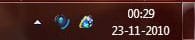
From 1.JPG to 2.JPG

(In the preview, the icons are from Alpha Dista Pack )


OPTION ONE

Change Volume Notification Icon


NOTE: To change the volume icon, it is to edit SndVolSSO.dll ; situated in C:\Windows\system32.
1. Open Resource Hacker ; Browse to C:\Windows\system32\SndVolSSO.dll .

2. Change the icon group numbers in the box with appropriate icons as stated in step 3. 3.JPG
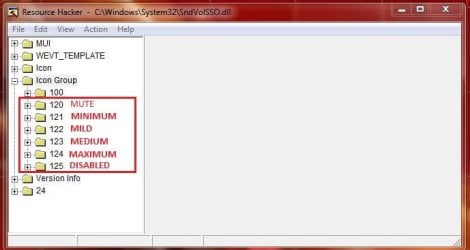
3. Expand (click on theplus sign before) 120 , click on 1033 .

4. Now Click on Action > Replace icon . In the resulting window click on "Open File With a New Icon" and then "Replace" .
NOTE: If in between this action it says "Out of System Resources", dont worry, nad just click on "OK" button . If the original or replacement icon dont have all the 12 layers, such notification occurs. Do the same thing for the rest icon group numbers. 4.JPG
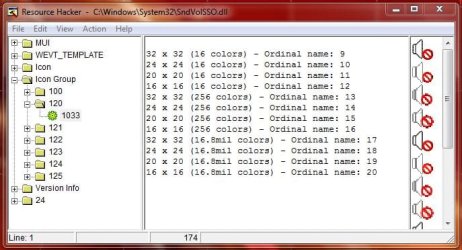
5. Now Click File > Save As ... give the name "SndVolSSO.dll ; and save it on Desktop.

6. Open System File Replacer, browse to the original first, then browse to the new, replace file and reboot . The change will take place after restart.


OPTION TWO

Change Network Notification Icon


NOTE: To change the Network icon, it is to edit pnidui.dll , situated in C:Windows\system32. 1. Open Resource Hacker and browse to C:\Windows\System32\pnidui.dll

2. Change the icon groups located in the box with appropriate icons. 5.JPG
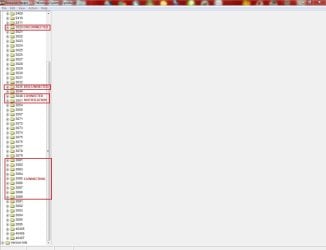
3. Proceed as in volume icon , when finished save the file as pnidui.dll on desktop.

4. Replace the newly created file with the original using System File Replacer and reboot . The change will take place just after the reboot .


OPTION THREE

Change Action Center Notification Icon


NOTE: To change the Network icon, it is to edit ActionCenter.dll , situated in C:Windows\system32. 1. Open Resource Hacker and browse to C:\Windows\System32\ActionCenter.dll

2. Change the icon groups located in the box with appropriate icons . (Usually it is not needed to change 8 and 9; but you may do it if you want .) 6.JPG
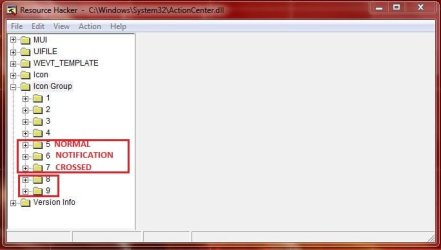
3. Proceed as in volume icon , when finished save the file as ActionCenter.dll on desktop .

4. Replace the newly created file with the original using System File Replacer and reboot. The change will take place just after the reboot .


OPTION FOUR

How to Restore Default Icons


NOTE: To restore defaults, you are to get the dll files back up manually, in a secured place . Just replace the modded files in system location with the original dll files from your backup, and restart your computer . All the defaults will be restored .

This tutorial is incomplete ; as I dont know which file reveals the Power (battery) icon . If anybody can add it, it would be great .


Last edited by a moderator:
Awesome!

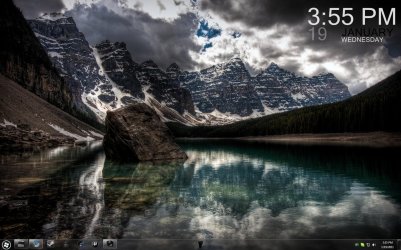
Now that uTorrent is fixed, any idea on Skype? The same process didn't work.

Thanks for the help, by the way.
 

Attachments

  • UpdatedDesktop.jpg
    UpdatedDesktop.jpg
    248.2 KB · Views: 334

My Computer

OS
Windows 7 Professional x64
CPU
Intel Core i7 970
Motherboard
Gigabyte GA-X58A-UD9
Memory
6GB STT Speed (Hypers)
Graphics Card(s)
Nvidia GTX 570, 470
Monitor(s) Displays
Dell 22"
Screen Resolution
1680x1050
Hard Drives
WD Caviar Black 500GB
WD Caviar Black 1TB
Samsung Spinpoint F3 1TB
Seagate Barracuda
PSU
Corsair HX1000
It didn't work on my computer.
I couldn't figure out why -at least yet-.
Does the tutorial works for 7 Ultimate x64 SP1?

iconpv.png
 

Attachments

Last edited:

My Computer

Computer Manufacturer/Model Number
ASUS G72 Notebook
OS
Windows 7 Ultimate 64-bit
CPU
Intel® Core™2 Duo mobile processor P8700 2.53 GHz
Memory
6GB DDRII
Graphics Card(s)
NVIDIA GeForce GTX 260M
Sound Card
EAX Advanced HD 4.0 + Logitech Wireless Headset G930
Monitor(s) Displays
17.3" LED-backlit LCD high-definition plus widescreen
Screen Resolution
1600 x 900
Hard Drives
2 x Seagate Momentus 500 GB 5400.6 SATA 3Gb/s
Cooling
Targus
Mouse
Logitech Wireless Trackball M570
Internet Speed
3 to 6 Mbps Download / .5 to 1 Mbps Upload
Other Info
Clear Modem with Wi-fi*
Comodo Internet Security Premium
While I set mine up, it was before SP1. However, I have since updated and everything still works.
 

My Computer

OS
Windows 7 Professional x64
CPU
Intel Core i7 970
Motherboard
Gigabyte GA-X58A-UD9
Memory
6GB STT Speed (Hypers)
Graphics Card(s)
Nvidia GTX 570, 470
Monitor(s) Displays
Dell 22"
Screen Resolution
1680x1050
Hard Drives
WD Caviar Black 500GB
WD Caviar Black 1TB
Samsung Spinpoint F3 1TB
Seagate Barracuda
PSU
Corsair HX1000
It works for me too ..... in my Home Premium x64 SP1 .
 

My Computer

Computer type
PC/Desktop
Computer Manufacturer/Model Number
Self Assembled
OS
Microsoft Windows 10 Pro Insider Preview 64-bit
CPU
Intel(R) Core(TM) i3-4130 CPU @ 3.40GHz
Motherboard
Gigabyte Technology Co., Ltd. B85M-D3H
Memory
Corsair Vengence 4GB x2 (8.00GB Dual-Channel DDR3 @ 798MHz)
Graphics Card(s)
2047MB GeForce GTS 450 (ZOTAC International)
Sound Card
Onboard (Realtek High Definition Audio)
Monitor(s) Displays
LG Flatron E2040T
Screen Resolution
1600x900
Hard Drives
Western Digital 1 TB
Seagate 500 GB
PSU
Corsair VS550
Case
Cooler Master K380
Cooling
Cooler Master Seidon 120V Plus
Keyboard
Logitech MK260r
Mouse
Logitech MK260r
Internet Speed
PMPL Broadband
Antivirus
Windows Defender + MBAM
Browser
Firefox
Other Info
Dell Studio 15" Laptop
I can't get it too work
Windows 7 x64 no-sp1
 

My Computer

Computer Manufacturer/Model Number
HP dv4-2145dx
OS
windows 7 home X64
CPU
AMD turion II dual-core mobile M520
Memory
4gb
Graphics Card(s)
ati radeon hd 4200 128mb
Monitor(s) Displays
laptop display
Screen Resolution
1280x800
Hard Drives
300gb harddrive
Hi! How can i make it work with utorrent notification icon?
 

My Computer

OS
Windows 7 64bit

My Computer

Computer type
PC/Desktop
Computer Manufacturer/Model Number
Custom Build
OS
Windows 10 Pro x64
CPU
Intel Core i5 4440 @Stock
Motherboard
Gigabyte Z97 D3H
Memory
4 x 4GB HyperX Fury DDR3
Graphics Card(s)
Gigabyte GTX 1050Ti O4G
Sound Card
Integrated
Monitor(s) Displays
Dell P2417H
Screen Resolution
1920 x 1080
Hard Drives
Samsung EVO 850 120GB / Toshiba DT01ACA050 1TB 7200prm 32MB
PSU
Riotoro Onyx 750W
Case
NZXT H500 Black-Red
Cooling
Stock CPU + NZXT 120mm + 2x120mm red fans
Keyboard
Modecom Volcano Lanparty
Mouse
Asus ROG Gladius / DeepCool E-Pad Plus
Internet Speed
DOCSIS 50/3 Mbit
Browser
Google Chrome
Other Info
Asus K55VJ(i5 3210M, GT635M / 2GB, 8GB DDR3, 500GB HDD)
You're welcome. ;)
 

My Computer

Computer type
PC/Desktop
Computer Manufacturer/Model Number
Custom Build
OS
Windows 10 Pro x64
CPU
Intel Core i5 4440 @Stock
Motherboard
Gigabyte Z97 D3H
Memory
4 x 4GB HyperX Fury DDR3
Graphics Card(s)
Gigabyte GTX 1050Ti O4G
Sound Card
Integrated
Monitor(s) Displays
Dell P2417H
Screen Resolution
1920 x 1080
Hard Drives
Samsung EVO 850 120GB / Toshiba DT01ACA050 1TB 7200prm 32MB
PSU
Riotoro Onyx 750W
Case
NZXT H500 Black-Red
Cooling
Stock CPU + NZXT 120mm + 2x120mm red fans
Keyboard
Modecom Volcano Lanparty
Mouse
Asus ROG Gladius / DeepCool E-Pad Plus
Internet Speed
DOCSIS 50/3 Mbit
Browser
Google Chrome
Other Info
Asus K55VJ(i5 3210M, GT635M / 2GB, 8GB DDR3, 500GB HDD)
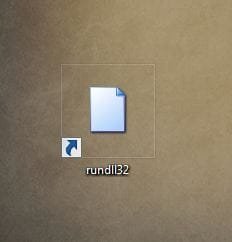
Hi, Does anyone know how to change the icon for Windows host process ( Rundll32 )

Any help would be appreciated.

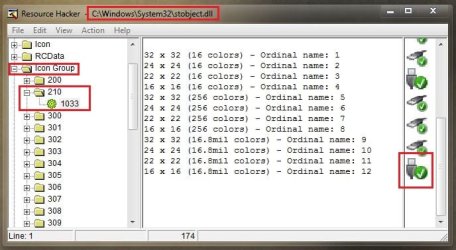
I have already changed Windows Explorer ( safely remove hardware ) ( Stobject.dll ) but would like to change the icon that tells you it's safe to remove.
 

My Computer

OS
Win 7 32 bit home premium
Hi, Does anyone know how to change the icon for Windows host process ( Rundll32 )

Any help would be appreciated.

I have already changed Windows Explorer ( safely remove hardware ) ( Stobject.dll ) but would like to change the icon that tells you it's safe to remove.

This one ?

Untitled.jpg

I guess it is here ....

Capture.JPG
 

My Computer

Computer type
PC/Desktop
Computer Manufacturer/Model Number
Self Assembled
OS
Microsoft Windows 10 Pro Insider Preview 64-bit
CPU
Intel(R) Core(TM) i3-4130 CPU @ 3.40GHz
Motherboard
Gigabyte Technology Co., Ltd. B85M-D3H
Memory
Corsair Vengence 4GB x2 (8.00GB Dual-Channel DDR3 @ 798MHz)
Graphics Card(s)
2047MB GeForce GTS 450 (ZOTAC International)
Sound Card
Onboard (Realtek High Definition Audio)
Monitor(s) Displays
LG Flatron E2040T
Screen Resolution
1600x900
Hard Drives
Western Digital 1 TB
Seagate 500 GB
PSU
Corsair VS550
Case
Cooler Master K380
Cooling
Cooler Master Seidon 120V Plus
Keyboard
Logitech MK260r
Mouse
Logitech MK260r
Internet Speed
PMPL Broadband
Antivirus
Windows Defender + MBAM
Browser
Firefox
Other Info
Dell Studio 15" Laptop
hi arc, No that's not the one.

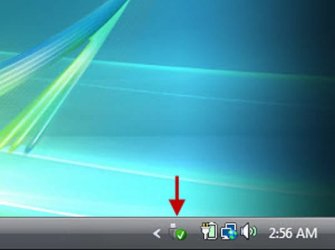
The one I am looking for is the one that shows up when you eject the usb.

It looks exactly the same as the Windows Explorer one.
It's a little grey usb plug with a green circle and a tick inside it.
 

Attachments

  • 91908.image0.jpg
    91908.image0.jpg
    27.7 KB · Views: 768

My Computer

OS
Win 7 32 bit home premium
You have told it earlier that you have looked at in Stobject.dll .... so I thought ....
Anyway .... it should be here ...
Capture.JPG

Is it ?
 

My Computer

Computer type
PC/Desktop
Computer Manufacturer/Model Number
Self Assembled
OS
Microsoft Windows 10 Pro Insider Preview 64-bit
CPU
Intel(R) Core(TM) i3-4130 CPU @ 3.40GHz
Motherboard
Gigabyte Technology Co., Ltd. B85M-D3H
Memory
Corsair Vengence 4GB x2 (8.00GB Dual-Channel DDR3 @ 798MHz)
Graphics Card(s)
2047MB GeForce GTS 450 (ZOTAC International)
Sound Card
Onboard (Realtek High Definition Audio)
Monitor(s) Displays
LG Flatron E2040T
Screen Resolution
1600x900
Hard Drives
Western Digital 1 TB
Seagate 500 GB
PSU
Corsair VS550
Case
Cooler Master K380
Cooling
Cooler Master Seidon 120V Plus
Keyboard
Logitech MK260r
Mouse
Logitech MK260r
Internet Speed
PMPL Broadband
Antivirus
Windows Defender + MBAM
Browser
Firefox
Other Info
Dell Studio 15" Laptop
You have told it earlier that you have looked at in Stobject.dll .... so I thought ....
Anyway .... it should be here ...
View attachment 199316

Is it ?


No that's not the one.

That is the one for "SAFELY REMOVE HARDWARE AND EJECT MEDIA" I have already changed that one.

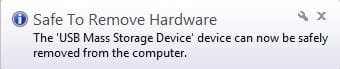
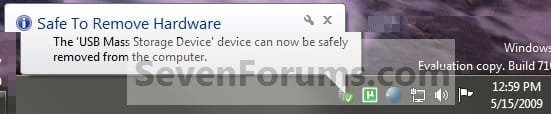
The one I want to change now is "THE USB MASS STORAGE DEVICE CAN NOW BE SAFELY REMOVED FROM THE COMPUTER" It looks exactly the same as the remove hardware one but must be in a different location.

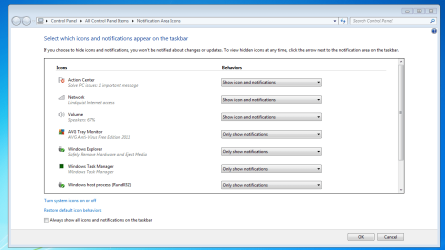
If you click on "CUSTOMIZE" in the system tray you will see it labelled as " Windows host process (Rundll32)


EDIT:- here is a picture of the icon I want to change.
 

Attachments

  • Step2.jpg
    Step2.jpg
    12 KB · Views: 706
Last edited:

My Computer

OS
Win 7 32 bit home premium
This may help better :-

It's the bottom icon.
 

Attachments

  • captureutd.png
    captureutd.png
    35.2 KB · Views: 244

My Computer

OS
Win 7 32 bit home premium
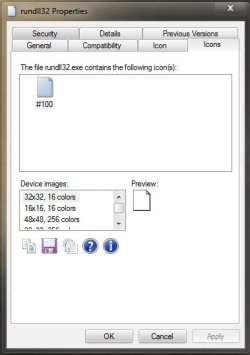
I am sorry mate ... I can see the Rundll32.exe icon as this one :(
Capture.JPG

But I hope a positive input from Jerry :p

Edit : Again, I can see only one icon under Rundll .... :(

Capture1.JPG
 

My Computer

Computer type
PC/Desktop
Computer Manufacturer/Model Number
Self Assembled
OS
Microsoft Windows 10 Pro Insider Preview 64-bit
CPU
Intel(R) Core(TM) i3-4130 CPU @ 3.40GHz
Motherboard
Gigabyte Technology Co., Ltd. B85M-D3H
Memory
Corsair Vengence 4GB x2 (8.00GB Dual-Channel DDR3 @ 798MHz)
Graphics Card(s)
2047MB GeForce GTS 450 (ZOTAC International)
Sound Card
Onboard (Realtek High Definition Audio)
Monitor(s) Displays
LG Flatron E2040T
Screen Resolution
1600x900
Hard Drives
Western Digital 1 TB
Seagate 500 GB
PSU
Corsair VS550
Case
Cooler Master K380
Cooling
Cooler Master Seidon 120V Plus
Keyboard
Logitech MK260r
Mouse
Logitech MK260r
Internet Speed
PMPL Broadband
Antivirus
Windows Defender + MBAM
Browser
Firefox
Other Info
Dell Studio 15" Laptop
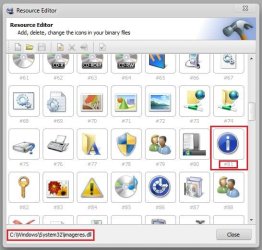
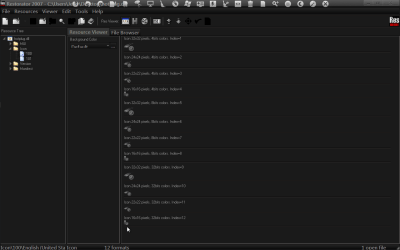
Try the hotplug.dll icon #100 in System32
Jerry
Restorator 2007 - CUsersJerryDesktophotplug.dll.png
 

My Computer

Computer type
Laptop
Computer Manufacturer/Model Number
Sager NP9170
OS
Win 7 Pro x64 / Win 10 Pro
CPU
Intel(R) Core(TM) i7-3630QM CPU @ 2.40GHz
Motherboard
CLEVO P170EM
Memory
12 GB
Graphics Card(s)
(1) Intel(R) HD Graphics 4000 (2) NVIDIA GeForce GTX 675M
Sound Card
(1) Realtek High Definition Audio (2) Intel(R) Display Aud
Monitor(s) Displays
17.3
Screen Resolution
1920x1080
Hard Drives
(1) Samsung 860 EVO 500GB(OS) (1) Samsung 860 EVO 500GB(Data)
Keyboard
Backlite
Antivirus
MSE, Malwarebytes Pro
Browser
Firefox
Other Info
DESKTOP: Custom-built.
OS: Win 10 Pro x64.
CASE: Rosewill R5.
CPU: Intel I5 4670K CPU @ 3.40GHz.
CPU COOLER: Cool Master Hyper 212 EVO.
MOTHERBOARD: Asus Z87-A.
MEMORY: Kingston HyperX 2x4 GB.
GPU: Nvidia Geforce 650 TI.
PSU: Corsair TX750.
DRIVES: (1) Samsung 840 120 GB SSD (2) Western Digital blue 500 GB 7200 RPM.

My Computer

Computer type
PC/Desktop
Computer Manufacturer/Model Number
Self Assembled
OS
Microsoft Windows 10 Pro Insider Preview 64-bit
CPU
Intel(R) Core(TM) i3-4130 CPU @ 3.40GHz
Motherboard
Gigabyte Technology Co., Ltd. B85M-D3H
Memory
Corsair Vengence 4GB x2 (8.00GB Dual-Channel DDR3 @ 798MHz)
Graphics Card(s)
2047MB GeForce GTS 450 (ZOTAC International)
Sound Card
Onboard (Realtek High Definition Audio)
Monitor(s) Displays
LG Flatron E2040T
Screen Resolution
1600x900
Hard Drives
Western Digital 1 TB
Seagate 500 GB
PSU
Corsair VS550
Case
Cooler Master K380
Cooling
Cooler Master Seidon 120V Plus
Keyboard
Logitech MK260r
Mouse
Logitech MK260r
Internet Speed
PMPL Broadband
Antivirus
Windows Defender + MBAM
Browser
Firefox
Other Info
Dell Studio 15" Laptop
Thanks Jerry and Arc that's the one.

I've got it done now, I knew you guys would come good for me. :D
 

My Computer

OS
Win 7 32 bit home premium

My Computer

Computer type
Laptop
Computer Manufacturer/Model Number
Sager NP9170
OS
Win 7 Pro x64 / Win 10 Pro
CPU
Intel(R) Core(TM) i7-3630QM CPU @ 2.40GHz
Motherboard
CLEVO P170EM
Memory
12 GB
Graphics Card(s)
(1) Intel(R) HD Graphics 4000 (2) NVIDIA GeForce GTX 675M
Sound Card
(1) Realtek High Definition Audio (2) Intel(R) Display Aud
Monitor(s) Displays
17.3
Screen Resolution
1920x1080
Hard Drives
(1) Samsung 860 EVO 500GB(OS) (1) Samsung 860 EVO 500GB(Data)
Keyboard
Backlite
Antivirus
MSE, Malwarebytes Pro
Browser
Firefox
Other Info
DESKTOP: Custom-built.
OS: Win 10 Pro x64.
CASE: Rosewill R5.
CPU: Intel I5 4670K CPU @ 3.40GHz.
CPU COOLER: Cool Master Hyper 212 EVO.
MOTHERBOARD: Asus Z87-A.
MEMORY: Kingston HyperX 2x4 GB.
GPU: Nvidia Geforce 650 TI.
PSU: Corsair TX750.
DRIVES: (1) Samsung 840 120 GB SSD (2) Western Digital blue 500 GB 7200 RPM.
Back
Top