Novice question on dual boot

goopy

New member
Member
VIP
Local time
7:29 AM
Messages
138
Greetings.
Novice here needs advice setting up dual boot configuration on the same disk.
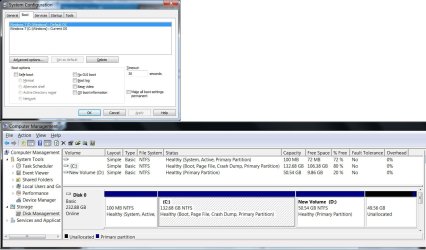
First attempt was to use DISM++ to install two different flavours of windows 7 (x64 and x86) to partitions C: and D: respectively on a MBR disk. Boot info was stored in the 100MB system partition.
When the system boots up, the windows boot manager displays both options as windows 7. Not very informative, one would say. How does one modify it to show something like Windows 7(x86) and Windows 7 (x64)?
Many thanks and best regards,
 

Attachments
  • dualboot.jpg
    dualboot.jpg
    121.3 KB · Views: 2

My Computer My Computer

At a glance

Windows 7 Ultimate x86
Computer type
PC/Desktop
OS
Windows 7 Ultimate x86

My Computers My Computers

  • At a glance

    7 X64i5 84002x8gb 3200mhz
    Computer type
    PC/Desktop
    OS
    7 X64
    CPU
    i5 8400
    Motherboard
    gigabyte b365m ds3h
    Memory
    2x8gb 3200mhz
    Hard Drives
    various
    PSU
    pure power 11 400w cm
    Case
    Coolermaster
    Cooling
    cryorig m9i
  • At a glance

    7x64g54008gb ddr4 2400
    Computer type
    PC/Desktop
    OS
    7x64
    CPU
    g5400
    Motherboard
    ga b365m ds3h
    Memory
    8gb ddr4 2400
    PSU
    xfx pro 450w
The command SIW2 refers to is bcdedit. Open a command prompt window as Administrator, and type "bcdedit /?" for an inkling of what you can control.

For your purposes, you want to boot into one of your OSes, open a command prompt window as Administrator, and use the command syntax:
bcdedit /set {current} description "text I want to see goes here"​

This will change the boot item entry for the currently booted OS. You can also set the text of the other OS as well, but you'd have to suss out what arcane code to substitute for "current" between the curly brackets. It's much easier to reboot into the other OS so that one is "current", and repeat the procedure using the same syntax from there.
 

My Computer My Computer

At a glance

Windows 7/8.1/10 multibootIntel Core i7-770048GB (2x16GB Crucial DDR4-3200 + 2x8GB Hynix ...Intel HD630 + AMD Radeon R7 450 PCIe
Computer type
PC/Desktop
Computer Manufacturer/Model Number
Dell Optiplex 7050
OS
Windows 7/8.1/10 multiboot
CPU
Intel Core i7-7700
Motherboard
Dell, Intel Q270 chipset
Memory
48GB (2x16GB Crucial DDR4-3200 + 2x8GB Hynix DDR4-2400)
Graphics Card(s)
Intel HD630 + AMD Radeon R7 450 PCIe
Monitor(s) Displays
Asus VC279 (27")
Screen Resolution
1920x1080
Hard Drives
Toshiba M.2 NVMe (256GB),
Samsung 960 Evo (500GB),
WD Red Plus 80EFBX (8TB)

My Computer My Computer

At a glance

Win 10 x64, Linux Lite, Win 7 x64, BlackArch,...
Computer type
PC/Desktop
Computer Manufacturer/Model Number
HP Desktop & Compaq Laptop
OS
Win 10 x64, Linux Lite, Win 7 x64, BlackArch, & Kali
Hard Drives
Samsung 850 Pro 256Gb,
Hitachi HDD 1Tb,
Crucial MX SSD 250Gb
Segate 3Tb USB 3.0 Ext. Backup HDD
Internet Speed
150Mbps dn, 20Mbps up
Antivirus
Avast Free, Malwarebytes Anti-Exploit & Anti-Ransomware
Browser
Firefox, Chrome, Opera, & VPN
Greetings gentlemen, many thanks for the kind reply.

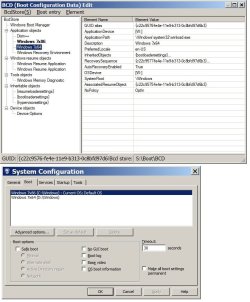
You can use commands, or easier with bootice
View attachment 410028

Thanks for this incredibly useful tool, SIW2.
1. If an OS image is restored to a new partition, can Bootice be used to add a boot entry on the new disk linking to this partion?
2. Is there a reason to use the older v1.3.3 version?
Many thanks and best regards,

The command SIW2 refers to is bcdedit. Open a command prompt window as Administrator, and type "bcdedit /?" for an inkling of what you can control.
For your purposes, you want to boot into one of your OSes, open a command prompt window as Administrator, and use the command syntax:
Code:
bcdedit /set {current} description "text I want to see goes here"
This will change the boot item entry for the currently booted OS. You can also set the text of the other OS as well, but you'd have to suss out what arcane code to substitute for "current" between the curly brackets. It's much easier to reboot into the other OS so that one is "current", and repeat the procedure using the same syntax from there.

Greetings Dan. Your macrium video was a most impressive piece of work. Much better than the official FAQ.
Have a couple of questions on running macrium under W7:
1. When using macrium to restore a partition, there's an option to copy the boot info. Does the feature work for both single and multi boot configurations?
2. I've had no luck using bcdboot to create boot entry under W7. Is this feature deprecated under W7? Does macrium use this command?
3. DISM++ uses its own copy of bcdboot(v10.0.10586) which apparently works under W7. Would it be safe to replace the W7 copy with the one from w10?
4. I notice your have the MSR partition removed under GPT. So this reserve partition is not needed at all?
Many thanks and best regards,
 

Attachments

  • bootice.jpg
    bootice.jpg
    83.6 KB · Views: 1

My Computer My Computer

At a glance

Windows 7 Ultimate x86
Computer type
PC/Desktop
OS
Windows 7 Ultimate x86
1. When using macrium to restore a partition, there's an option to copy the boot info. Does the feature work for both single and multi boot configurations?
2. I've had no luck using bcdboot to create boot entry under W7. Is this feature deprecated under W7? Does macrium use this command?
3. DISM++ uses its own copy of bcdboot(v10.0.10586) which apparently works under W7. Would it be safe to replace the W7 copy with the one from w10?
4. I notice your have the MSR partition removed under GPT. So this reserve partition is not needed at all?
I'm not familiar with the "copy boot info" option, so can't comment. Either I've overlooked it, or perhaps we're using different versions of the program. (I have 7.1)

But without further information, I don't know what Macrium might be defining as "boot info", anyway. It might be the BCD, or it might be the Disk ID, or the disk's GUID, or who knows what. I've never worried about it because it's so easy to rebuild the boot setup with the Macrium tool that it just seems like a moot issue.

The bcdboot command is not deprecated, but it's almost certainly been enhanced for Win8 and Win10. I wouldn't expect any issues using the later version -- it has to be backward compatible, after all, as the same startup process is used for Vista, 7, 8.x, and 10.

I'm not sure what you're talking about "replacing", though. In Win7 the bcdboot executable is embedded in the recovery environment, so it's not like it's a simple matter to copy-and-paste a different version. (The RE is a .wim file, not a normal partition where you can tinker with the files.)

I find the recovery environment such a user-unfriendly place that I seldom go there, and even remove it from my own computers. It's the reason more user-friendly utilities like Easy BCD, Visual BCD, and BootICE exist in the first place.

But, again, the Macrium boot repair tool is so simple and manages to work in perhaps 90% of the cases I've tried, so it's the first place I turn.

As for the MSR, it's an unused placeholder partition on most systems. It's usually superfluous and can be deleted. AFAIK, it's there in case you want to use dynamic disks (ugh!) or bitlocker, where I think it holds the tools to unlock the OS partition if you've encrypted it with bitlocker.
 

My Computer My Computer

At a glance

Windows 7/8.1/10 multibootIntel Core i7-770048GB (2x16GB Crucial DDR4-3200 + 2x8GB Hynix ...Intel HD630 + AMD Radeon R7 450 PCIe
Computer type
PC/Desktop
Computer Manufacturer/Model Number
Dell Optiplex 7050
OS
Windows 7/8.1/10 multiboot
CPU
Intel Core i7-7700
Motherboard
Dell, Intel Q270 chipset
Memory
48GB (2x16GB Crucial DDR4-3200 + 2x8GB Hynix DDR4-2400)
Graphics Card(s)
Intel HD630 + AMD Radeon R7 450 PCIe
Monitor(s) Displays
Asus VC279 (27")
Screen Resolution
1920x1080
Hard Drives
Toshiba M.2 NVMe (256GB),
Samsung 960 Evo (500GB),
WD Red Plus 80EFBX (8TB)

My Computers My Computers

  • At a glance

    Windows 7 pro/Windows 10 ProIntel i7 860 Quad core 2.8 ghz8 gbATI Radeon HD 5770 1 gb ram
    Computer type
    PC/Desktop
    Computer Manufacturer/Model Number
    HP Pavillion Elite HPE-250f
    OS
    Windows 7 pro/Windows 10 Pro
    CPU
    Intel i7 860 Quad core 2.8 ghz
    Memory
    8 gb
    Graphics Card(s)
    ATI Radeon HD 5770 1 gb ram
    Monitor(s) Displays
    Alienware 25 AW2521HF & Viewsonic
    Screen Resolution
    1920 x1080 & 1680x1050
    Hard Drives
    WD blue 1 tb & 500 gb.
    Browser
    FF of course.
    Other Info
    https://www.bestbuy.com/site/hp-pavilion-elite-desktop-intel-core-i7-processor-8gb-memory-1tb-hard-drive/9921493.p?skuId=9921493
  • At a glance

    Windows 2012 R2 Data center/Linux Minti3 9100 3.6GHz, 8M cache, 4C/4T8GB 2666MT/s DDR4 ECC UDIMM
    Computer type
    PC/Desktop
    System Manufacturer/Model Number
    Dell Poweredge T140
    OS
    Windows 2012 R2 Data center/Linux Mint
    CPU
    i3 9100 3.6GHz, 8M cache, 4C/4T
    Memory
    8GB 2666MT/s DDR4 ECC UDIMM
    Monitor(s) Displays
    Viewsonic
    Screen Resolution
    1680x1050
    Hard Drives
    1 TB & 750 GB
    Other Info
    https://www.dell.com/en-us/work/shop/productdetailstxn/poweredge-t140?~ck=bt
I'm not familiar with the "copy boot info" option, so can't comment. Either I've overlooked it, or perhaps we're using different versions of the program. (I have 7.1)

But without further information, I don't know what Macrium might be defining as "boot info", anyway. It might be the BCD, or it might be the Disk ID, or the disk's GUID, or who knows what. I've never worried about it because it's so easy to rebuild the boot setup with the Macrium tool that it just seems like a moot issue.

The bcdboot command is not deprecated, but it's almost certainly been enhanced for Win8 and Win10. I wouldn't expect any issues using the later version -- it has to be backward compatible, after all, as the same startup process is used for Vista, 7, 8.x, and 10.

I'm not sure what you're talking about "replacing", though. In Win7 the bcdboot executable is embedded in the recovery environment, so it's not like it's a simple matter to copy-and-paste a different version. (The RE is a .wim file, not a normal partition where you can tinker with the files.)

I find the recovery environment such a user-unfriendly place that I seldom go there, and even remove it from my own computers. It's the reason more user-friendly utilities like Easy BCD, Visual BCD, and BootICE exist in the first place.

But, again, the Macrium boot repair tool is so simple and manages to work in perhaps 90% of the cases I've tried, so it's the first place I turn.

As for the MSR, it's an unused placeholder partition on most systems. It's usually superfluous and can be deleted. AFAIK, it's there in case you want to use dynamic disks (ugh!) or bitlocker, where I think it holds the tools to unlock the OS partition if you've encrypted it with bitlocker.
Thanks for the kind reply, Dan.

1. I get the following error message when running bcdboot under W7. The same command works under W10. That's why I asked if the W7 version is deprecated. Are you able to get it to run under W7?
The W7 bcdboot.exe copy can be found in the C:\Windows\System32\ folder, with version number 6.1.7601.17514. Is there a patch that brings it up to date?
Code:
Microsoft Windows [Version 6.1.7601]
Copyright (c) 2009 Microsoft Corporation.  All rights reserved.

C:\Windows\system32>bcdboot C:\Windows /s S:
BFSVC: Failed to create a new system store. Status = [c000003a]
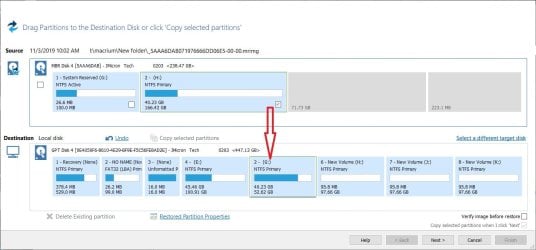
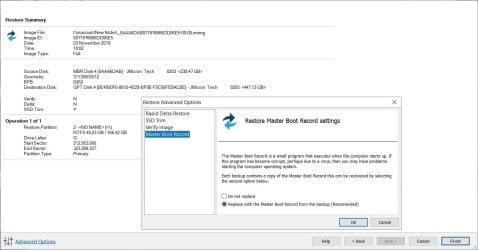
2. I've attached a screen shot of Macrium's "Restore Master Boot Record Settings" when restoring an image to a partition under W7. In the example shown, I'm trying to create a dual boot configuration by adding a W7 OS partition (H) to the blank partition (G) on a W10 disk.
Will Macrium do the job properly, adding a new boot entry to the system partition without wiping out the original one, and dealing with different partition schemes of source and target?

3. Another common issue when using Macrium to restoring an image is disk id conflict. What is the best way to ensure the target does not get assigned the same disk id as the source?

Many thanks and best regards,
 

Attachments

  • macrestore.jpg
    macrestore.jpg
    89.3 KB · Views: 2
  • summary.jpg
    summary.jpg
    79.7 KB · Views: 0

My Computer My Computer

At a glance

Windows 7 Ultimate x86
Computer type
PC/Desktop
OS
Windows 7 Ultimate x86
Oh, I see -- you're trying to use Win7's bcdboot to modify something on a Win10 system. I don't know what has been assigned S: in your command "bcdboot C:\Windows /s S:", but I wouldn't expect a 7 utility to be forward compatible with 10. I'd expect a 10 utility to be backward compatible with 7, but not the other way around.

And I was looking for a "copy boot info" setting when you were referring to the MBR. That's not boot info.

The MBR option is the same as what's covered by the "Fix Windows Boot Problems" function, illustrated in several places in my video. It's the second of the four preselected checkboxes just before clicking "Finish" to execute the fix-it function.

Normally there's no need to rewrite the MBR. You might need to do that if the MBR had been corrupted by a boot sector virus, but otherwise it won't matter. As a general policy, there's usually no harm in rewriting the MBR, so you can leave the option selected if you wish.

IAC, your target is a GPT disk, and the MBR is ignored on a GPT disk, so it's irrelevant.

But here's the real problem: according to your screenshot in post #8, it looks like you're trying to clone or restore an MBR-installed Win7 to GPT. That won't work. I've discussed that starting at 14:45 in my video.

You can copy 8 or 10 from MBR to GPT, or vice versa, and you can copy 7 from GPT to MBR, but you cannot copy 7 from MBR to GPT. It won't boot unless you somehow repair 7 to add some missing EFI-related files.

I don't see any point in using 7 with a GPT disk, so I don't know how to do that kind of repair. Your target disk is only 500 GB so, personally, I would have just done an MBR-style dual-boot.

But I know a lot of people seem to be obsessed with UEFI like it's some shiny new toy, so maybe they have some solutions on how to convert Win7 from Legacy/MBR to UEFI/GPT boot. Maybe using the 10 version of bcdboot against the 7 partition might work, but as I said, I've no experience with that. If you do try that, I would expect you'd probably have to do it from UEFI mode, not from a Legacy mode command prompt.
 

My Computer My Computer

At a glance

Windows 7/8.1/10 multibootIntel Core i7-770048GB (2x16GB Crucial DDR4-3200 + 2x8GB Hynix ...Intel HD630 + AMD Radeon R7 450 PCIe
Computer type
PC/Desktop
Computer Manufacturer/Model Number
Dell Optiplex 7050
OS
Windows 7/8.1/10 multiboot
CPU
Intel Core i7-7700
Motherboard
Dell, Intel Q270 chipset
Memory
48GB (2x16GB Crucial DDR4-3200 + 2x8GB Hynix DDR4-2400)
Graphics Card(s)
Intel HD630 + AMD Radeon R7 450 PCIe
Monitor(s) Displays
Asus VC279 (27")
Screen Resolution
1920x1080
Hard Drives
Toshiba M.2 NVMe (256GB),
Samsung 960 Evo (500GB),
WD Red Plus 80EFBX (8TB)
Oh, I see -- you're trying to use Win7's bcdboot to modify something on a Win10 system. I don't know what has been assigned S: in your command "bcdboot C:\Windows /s S:", but I wouldn't expect a 7 utility to be forward compatible with 10. I'd expect a 10 utility to be backward compatible with 7, but not the other way around.

And I was looking for a "copy boot info" setting when you were referring to the MBR. That's not boot info.

The MBR option is the same as what's covered by the "Fix Windows Boot Problems" function, illustrated in several places in my video. It's the second of the four preselected checkboxes just before clicking "Finish" to execute the fix-it function.

Normally there's no need to rewrite the MBR. You might need to do that if the MBR had been corrupted by a boot sector virus, but otherwise it won't matter. As a general policy, there's usually no harm in rewriting the MBR, so you can leave the option selected if you wish.

IAC, your target is a GPT disk, and the MBR is ignored on a GPT disk, so it's irrelevant.

But here's the real problem: according to your screenshot in post #8, it looks like you're trying to clone or restore an MBR-installed Win7 to GPT. That won't work. I've discussed that starting at 14:45 in my video.

You can copy 8 or 10 from MBR to GPT, or vice versa, and you can copy 7 from GPT to MBR, but you cannot copy 7 from MBR to GPT. It won't boot unless you somehow repair 7 to add some missing EFI-related files.

I don't see any point in using 7 with a GPT disk, so I don't know how to do that kind of repair. Your target disk is only 500 GB so, personally, I would have just done an MBR-style dual-boot.

But I know a lot of people seem to be obsessed with UEFI like it's some shiny new toy, so maybe they have some solutions on how to convert Win7 from Legacy/MBR to UEFI/GPT boot. Maybe using the 10 version of bcdboot against the 7 partition might work, but as I said, I've no experience with that. If you do try that, I would expect you'd probably have to do it from UEFI mode, not from a Legacy mode command prompt.


Greetings Dan.

1. Running bcdboot under W7
I've been trying to find out if the bcdboot tool that ships with W7 is deprecated, but there appears to be little interest on this forum. Finally got a chance to play with the W10 version running in W7, and it worked as expected. So if you need to use this tool under W7, grab hold of the copy that ships with the 1909 ISO.
Code:
C:\Windows\system32>E:\buda\bcdboot C:\Windows /s S:
Boot files successfully created.
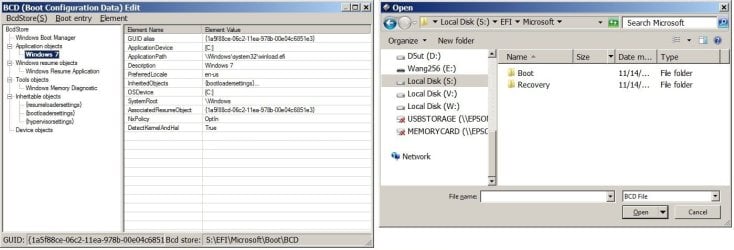
However, bcdboot doesn't seem to set up the Recovery Environment (RE) in the boot entry. For W10, the Recovery folder is placed in the System partition in a MBR setup, and a separate partition in a GPT setup. For W7 it is placed in the C: drive. Does anyone one know how to do this manually?


2. Macrium Reflect
Turning on the Restore MBR Setting seems to mess up the multi-boot entries. So remember to disable it when using MR to restore a partition, and run bcdboot to add the boot entry.


3. DISM++

This is a capable tool to manage multi-boot configurations if a graphical interface is preferred. SIW is the man to look for if there's any question. Also use the following commands, courtesy of Dan, to change the boot selection menu screen and modify the OS description.
Code:
bcdboot C:\Windows
Code:
bcdedit /set {current} description "text I want to see goes here"
Many thanks and best regards,
 

Attachments

  • w10bcd.jpg
    w10bcd.jpg
    82 KB · Views: 0

My Computer My Computer

At a glance

Windows 7 Ultimate x86
Computer type
PC/Desktop
OS
Windows 7 Ultimate x86
set up the Recovery Environment (RE)

cmd prompt

Reagentc /setreimage /path <dir_name> [/target <dir_name>] [/bootkey <scan_code>]

e.g. if winre.wim is in c:\recovery\somefolder

Reagentc /setreimage /path c:\recovery\somefolder

Also if you have the installation media copied to a hard drive - for example you can extract the installation iso to a spare partition

reagentc /setosimage

for details
reagentc /?
 

My Computers My Computers

  • At a glance

    7 X64i5 84002x8gb 3200mhz
    Computer type
    PC/Desktop
    OS
    7 X64
    CPU
    i5 8400
    Motherboard
    gigabyte b365m ds3h
    Memory
    2x8gb 3200mhz
    Hard Drives
    various
    PSU
    pure power 11 400w cm
    Case
    Coolermaster
    Cooling
    cryorig m9i
  • At a glance

    7x64g54008gb ddr4 2400
    Computer type
    PC/Desktop
    OS
    7x64
    CPU
    g5400
    Motherboard
    ga b365m ds3h
    Memory
    8gb ddr4 2400
    PSU
    xfx pro 450w
Back
Top