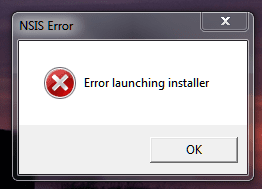
Solved NSIS Error

thewolfe

New member
Power User
Local time
1:46 PM
Messages
203
I'm getting a pop-up NSIS error - Error launching installer. I think it was after I uninstalled Comodo or zone alarm on one of my computers.

Can I check the "event viewer" to find out what program is causing the error. Or you have other suggestions on how to get rid of my annoying friend?
 

My Computer

Computer Manufacturer/Model Number
Dell Inspiron 1525
OS
Windows 7
CPU
Intel Core(TM)2 Duo T5750 2.00 GHz
Memory
3GB
Hard Drives
232 GB
AutoRuns will show you what it set to run on startup. If it's an erroneous installer launch I'd check the RunOnce first. Typically that's set and then the machine is rebooted so the installer can get at files before they're locked by the system.
 

My Computer

Computer Manufacturer/Model Number
HP Media Center
OS
Windows 7 32 bit
CPU
AMD 5200+ dual core
Memory
2 GB
Graphics Card(s)
NVidia GeForce 6150SE 128 MB
Monitor(s) Displays
CRT
Screen Resolution
1280x1024
Hard Drives
500 GB Sata internal :

SIIG USB 3.0 docking stations w/WD Caviar Black 6 Gb/s drives
Keyboard
PS/2
Mouse
PS/2 Wheel Mouse
Other Info
SIIG USB 3.0 PCIexpress card.
Click here DDS

:ar: Click on Download Now button

:ar: When the download is complete . Drag the DDS program from the Downloads folder to your Desktop

:ar: Double click the DDS icon on the Desktop then click the Run button to run the tool.

:ar: Place a check next to attach.txt and click Start . When done, DDS will open two logs
  • DDS.txt
  • Attach.txt

:ar: Save two logs onto your desktop and upload them with your reply

How To Upload a File
Click on the Go Advanced button under the Message box . Scroll down to Additional Options then click on Manage Attachments in the Attach Files sections . Click the Browse button locate the file then click on the Open button . In the Upload File from your Computer section click on the Upload button . Wait until it finishes uploading then close the window . Then click Submit Reply .
 

My Computer

Computer Manufacturer/Model Number
Custom Built
OS
Windows 7 Ultimate 32-Bit & Windows 7 Ultimate 64-Bit
CPU
Intel Core i7 CPU 950 @ 3.07GHz
Motherboard
ASUS P6T DELUXE V2
Memory
OCZ 6GB (3 x 2GB) 240-Pin DDR3 SDRAM DDR3 1600 OCZ3X1600R2
Graphics Card(s)
ATI Radeon HD 5700 Series
Sound Card
OnBoard
Hard Drives
WD6400AACS-00M3B0 (640GB SATA )
PSU
CORSAIR 850w
Case
NZXT LEXA
Cooling
Intel Stock Heatsink Fan
Keyboard
Microsoft Wireless Laser Keyboard 7000
Mouse
Microsoft Wireless Laser Mouse 7000
Thanks for the post. I found the culprit, it's was Comodo Dragon. I uninstalled it and all is well. I had re-installed Comodo firewall and that must have come along with.
 

My Computer

Computer Manufacturer/Model Number
Dell Inspiron 1525
OS
Windows 7
CPU
Intel Core(TM)2 Duo T5750 2.00 GHz
Memory
3GB
Hard Drives
232 GB
If you solved your issue then mark this thread solved .
 

My Computer

Computer Manufacturer/Model Number
Custom Built
OS
Windows 7 Ultimate 32-Bit & Windows 7 Ultimate 64-Bit
CPU
Intel Core i7 CPU 950 @ 3.07GHz
Motherboard
ASUS P6T DELUXE V2
Memory
OCZ 6GB (3 x 2GB) 240-Pin DDR3 SDRAM DDR3 1600 OCZ3X1600R2
Graphics Card(s)
ATI Radeon HD 5700 Series
Sound Card
OnBoard
Hard Drives
WD6400AACS-00M3B0 (640GB SATA )
PSU
CORSAIR 850w
Case
NZXT LEXA
Cooling
Intel Stock Heatsink Fan
Keyboard
Microsoft Wireless Laser Keyboard 7000
Mouse
Microsoft Wireless Laser Mouse 7000
Nsis error, error lauching installer

hi all

Please help for NSIS ERROR, ERROR LAUCHING INSTALLER

recently I have 2 times blue screen.

thanks
 

Attachments

My Computer

Computer type
Laptop
Computer Manufacturer/Model Number
HP
OS
Microsoft Windows 7 Home Premium 64bit sp1
CPU
Intel(R) Core(TM) i5-3317U CPU @ 1.70GHz | U3E1 | 1701/100mh
Motherboard
Hewlett-Packard | | 1895
Memory
4,0G
Graphics Card(s)
intel HD graphic 4000
Antivirus
Avast
NSIS error Launch installer

NSIS:

I have been getting this error for a short time, and latest updates have failed to install. Ran the DSS system but not that good on reading or finding the errors in these TXT files.
 

Attachments

  • DDS.txt
    DDS.txt
    27.4 KB · Views: 4
  • Attach.txt
    Attach.txt
    18.3 KB · Views: 2
  • Picture 2013-12-07 07_31_34.png
    Picture 2013-12-07 07_31_34.png
    6.8 KB · Views: 58

My Computer

Computer type
PC/Desktop
Computer Manufacturer/Model Number
HP P7-1020
OS
Windows Home Premium x64 7 SP1
CPU
AMD Phenom(TM) II x4 960T Processor 3.00 GH
Memory
8 GB
Graphics Card(s)
on mother board,
Hard Drives
internal 500GB, external 350GB
Antivirus
Nortons Internet Security 2014
Browser
Firefox V25.0
After reading some of the other problems with this error, I downloaded a package called Reimage did the scan and then discovered after the scan it would cost me 69.00, so deleted it. Did the removal using REVO uninstaller. Still got the problem, but then discovered some how a system called Conduit.com was now on my computer. Did some research and found using MS's uninstall that the system still thought Reimage was in system, tried to remove it using MS uninstall, and system just hung telling me it was removing it. After 5-8 minutes I killed it went back to Revo Uninstaller, found following on pc, conduit.con, and sweet-updater.
Got rid of both and did the restart. Still got the NSIS error. But a little disturbed at some systems forcing you to take garbage you did not ask for or told it not to install, and still get it in to the system. When I booted the system up this morning no ERROR. Not exactly sure where it went or what caused it to disappear, but until I don't see this for a few days, will be happy. :)
 

My Computer

Computer type
PC/Desktop
Computer Manufacturer/Model Number
HP P7-1020
OS
Windows Home Premium x64 7 SP1
CPU
AMD Phenom(TM) II x4 960T Processor 3.00 GH
Memory
8 GB
Graphics Card(s)
on mother board,
Hard Drives
internal 500GB, external 350GB
Antivirus
Nortons Internet Security 2014
Browser
Firefox V25.0
having problem uploading files
 

Attachments

My Computer

Computer type
Laptop
Computer Manufacturer/Model Number
HP
OS
windows 7 home premium 64 bit
hi still shwing error window installer as resource not available, or enter an alternate path to a folder containing installation package "epp.msi"
 

My Computer

Computer type
Laptop
Computer Manufacturer/Model Number
HP
OS
windows 7 home premium 64 bit
Hi, I never had problem with this error before. It's first time. I tried to instal DragonNest EU. At the beginning problem shows at 38%. After sawp the setup problem shows at the start. I played in this game 2 years ago and 1 year ago without problems.
View attachment dds.txt
View attachment attach.txt
 

My Computer

Computer type
PC/Desktop
OS
Windows 7 Professional 32bit
I uploded the dds.txt and the attach.txt. I have a problem running Dropbox. I tryed to unistall it but i couldn't. Please, could you help me?
Thank you in advance
R
 

Attachments

Last edited:

My Computer

Computer type
Laptop
Computer Manufacturer/Model Number
Asus
OS
Windows 7 Ultimate x64
CPU
Corei3
pls help for this
 

Attachments

My Computer

Computer type
PC/Desktop
OS
windows 7 32 bit
Motherboard
gigabyte
Memory
2gb
Graphics Card(s)
1gb
Please help

I see this thread is idle at the mo, but just got this laptop due to old one dying, it's a 'refurbished' laptop, and I'm getting NSIS error when trying to install programmes etc.
Hopefully someone is still watching this post that can help. I have looked through things, but most programmes have been removed. so something hidden that I'm missing. Please help.
 

Attachments

My Computer

Computer type
PC/Desktop
OS
windows 7 pro 6
Back
Top