Solved nVIDIA Driver not working after BSOD

blackrider99

New member
Local time
4:10 PM
Messages
13
Hey everyone,

Yesterday I experienced my first BSOD on my ASUS K52Jc laptop, running Windows 7, the BSOD was completely random.

After restarting itself, the resolution was reset to 800x600 (or the default, something along those lines). After logging in, Windows reinstalled the Display Driver - Intel(R) HD Graphics, which thus fixed my resolution problem, however the nVIDIA GeForce 310M driver was not working. I know this by checking the Device Manager, not located there, and the nVIDIA Control Panel does not work, as my computer says I dont have the graphics card.

Thus, I attempted to install the latest three versions of the driver (from both ASUS and nVIDIA websites), however each time I received an error prior to the installation, something along the lines of not being compatible with my system. I also attempted several system restores back to previous dates.

Does anyone have a possible solution to my problem, as my last resort will be sending it to ASUS for repair, which is unwanted as I am approaching exams. It is bareable without nVIDIA function, but not ideal.

If you need more info on anything, including system specs just let me know.

-64-bit Win 7
-4GB RAM
-ASUS K52Jc (i5)

NOTE: Both the Intel(R) HD Graphics and nVIDIA GeForce 310M were functioning and installed prior to the BSOD
 

My Computer

OS
Queensland
Silly answer But.... Are you installing the correct driver for your OS and not The same driver for another OS

Edit: Just to let you know you may have answered your own question you actual NVIDIA card may be the reason you had the BSOD infact if that's whats not responding id say it pretty much is the reason.

What NVIDIA do you have and is the computer showing you have the card you need to install drivers?

Little bit more info ? Laptop specs? graphics?
 

My Computer

Computer type
PC/Desktop
OS
Windows 7 Ultimate 64
CPU
AMD FX - 8350 Oc
Motherboard
ASUS Crosshair V Formula-Z AMD 990FX
Memory
16GB Corsair Vengeance
Graphics Card(s)
HD 4870 1GB
Sound Card
Onboard.
Monitor(s) Displays
Samsung Syncmaster 2032MW & ASUS p191
Screen Resolution
1680x1050
Hard Drives
1 TB WD
320gb WD
PSU
650w OCZ PSU
Case
Zalman Z11
Cooling
Antec H20 920 , 6x Antec Quiet
Keyboard
Logitech RAZ71 Keyboard
Mouse
Logitech RAZ71 Wireless Mouse
Internet Speed
120mb Virgin
Antivirus
Malwarebytes
Browser
Chrome
thank you for your reply, and yes, I have downloaded the Win7-64 bit driver

EDIT: Card: GeForce 310M (CUDA 1GB)
Specs: Win7 Home Premium, SP1, Core i5, 64-bit, 4GB Ram (anything else)

And when i go into device manager, it doesnt show up, so the computer isnt reconising it
 

My Computer

OS
Queensland
Have you checked the Bios to see if anything is disabled maybe and also also you say you tried to install it did you to to force install or just run setup?
 

My Computer

Computer type
PC/Desktop
OS
Windows 7 Ultimate 64
CPU
AMD FX - 8350 Oc
Motherboard
ASUS Crosshair V Formula-Z AMD 990FX
Memory
16GB Corsair Vengeance
Graphics Card(s)
HD 4870 1GB
Sound Card
Onboard.
Monitor(s) Displays
Samsung Syncmaster 2032MW & ASUS p191
Screen Resolution
1680x1050
Hard Drives
1 TB WD
320gb WD
PSU
650w OCZ PSU
Case
Zalman Z11
Cooling
Antec H20 920 , 6x Antec Quiet
Keyboard
Logitech RAZ71 Keyboard
Mouse
Logitech RAZ71 Wireless Mouse
Internet Speed
120mb Virgin
Antivirus
Malwarebytes
Browser
Chrome
Im sorry if i come across stupid, i know some things but not a lot. How/where can i check the BIOS, and i just ran the setup...

EDIT: i downloaded the file, which gets transfered to a folder on my C drive. I run the setup.exe application, and it does a 'System Check' - then gives me the message NVIDIA installer cannot continue: This graphics driver could not find compatible graphics hardware.
 

My Computer

OS
Queensland
Wait you have just re installed windows ? your not telling me much until after :P your jumping the gun

and most motherboards as soon as you fire up press delete button a few times it will take you to bios search the options for anything to do with your video and see if anything was disbaled etc and let me know :)?
 

My Computer

Computer type
PC/Desktop
OS
Windows 7 Ultimate 64
CPU
AMD FX - 8350 Oc
Motherboard
ASUS Crosshair V Formula-Z AMD 990FX
Memory
16GB Corsair Vengeance
Graphics Card(s)
HD 4870 1GB
Sound Card
Onboard.
Monitor(s) Displays
Samsung Syncmaster 2032MW & ASUS p191
Screen Resolution
1680x1050
Hard Drives
1 TB WD
320gb WD
PSU
650w OCZ PSU
Case
Zalman Z11
Cooling
Antec H20 920 , 6x Antec Quiet
Keyboard
Logitech RAZ71 Keyboard
Mouse
Logitech RAZ71 Wireless Mouse
Internet Speed
120mb Virgin
Antivirus
Malwarebytes
Browser
Chrome
btw first can you go to device manager (start button>right click computer>select manage>on the left click device manager)

Then can you double click display adapter and print screen me what it says?
 

My Computer

Computer type
PC/Desktop
OS
Windows 7 Ultimate 64
CPU
AMD FX - 8350 Oc
Motherboard
ASUS Crosshair V Formula-Z AMD 990FX
Memory
16GB Corsair Vengeance
Graphics Card(s)
HD 4870 1GB
Sound Card
Onboard.
Monitor(s) Displays
Samsung Syncmaster 2032MW & ASUS p191
Screen Resolution
1680x1050
Hard Drives
1 TB WD
320gb WD
PSU
650w OCZ PSU
Case
Zalman Z11
Cooling
Antec H20 920 , 6x Antec Quiet
Keyboard
Logitech RAZ71 Keyboard
Mouse
Logitech RAZ71 Wireless Mouse
Internet Speed
120mb Virgin
Antivirus
Malwarebytes
Browser
Chrome
No I havent reinstalled windows.

Timeline:
-BSOD
-Computer restarts
-Automatically installs Intel(R) HD Graphics which was one of the drivers installed prior BSOD
-Attempt to install NVIDIA driver, system restore to previous date, etc. - fails

As said in the OP, the under the Display Adapters, it only displays the Intel(R) HD Graphics, no NVIDIA present

I will restart and hit delete a few time, Ill get back to you!
 

My Computer

OS
Queensland
My bet is switch the bios to using your NVIDIA card as opposed to using your intel one. After reading it seems a common issue with either your laptop or Nvidia card. My guess is that because you had a BSOD your laptop has switched to using its generic motherboard Intel chip as a safety feature. I would see if you can change it to NVIDIA in bios that would be the reason as non detection as your laptop is powering the intel HD not your NVIDIA from what i understand is happening and doing from previous problems with this model.
 

My Computer

Computer type
PC/Desktop
OS
Windows 7 Ultimate 64
CPU
AMD FX - 8350 Oc
Motherboard
ASUS Crosshair V Formula-Z AMD 990FX
Memory
16GB Corsair Vengeance
Graphics Card(s)
HD 4870 1GB
Sound Card
Onboard.
Monitor(s) Displays
Samsung Syncmaster 2032MW & ASUS p191
Screen Resolution
1680x1050
Hard Drives
1 TB WD
320gb WD
PSU
650w OCZ PSU
Case
Zalman Z11
Cooling
Antec H20 920 , 6x Antec Quiet
Keyboard
Logitech RAZ71 Keyboard
Mouse
Logitech RAZ71 Wireless Mouse
Internet Speed
120mb Virgin
Antivirus
Malwarebytes
Browser
Chrome
P.s sorry my bad your BIOS should be F2 forgot it was asus laptop. your looking for external video or NVIDIA video as im pretty sure it has been disabled and using INTEL HD
 

My Computer

Computer type
PC/Desktop
OS
Windows 7 Ultimate 64
CPU
AMD FX - 8350 Oc
Motherboard
ASUS Crosshair V Formula-Z AMD 990FX
Memory
16GB Corsair Vengeance
Graphics Card(s)
HD 4870 1GB
Sound Card
Onboard.
Monitor(s) Displays
Samsung Syncmaster 2032MW & ASUS p191
Screen Resolution
1680x1050
Hard Drives
1 TB WD
320gb WD
PSU
650w OCZ PSU
Case
Zalman Z11
Cooling
Antec H20 920 , 6x Antec Quiet
Keyboard
Logitech RAZ71 Keyboard
Mouse
Logitech RAZ71 Wireless Mouse
Internet Speed
120mb Virgin
Antivirus
Malwarebytes
Browser
Chrome
Alright I'm on my phone looking at the bios screen.

I have the tabs main, advanced, boot, security, save&exit.

If you have any idea, how would I set the nvidia using the bios like you said?

Edit: I just read your ps, I'll have a look at the f2 option :)
Reedit: took me to the same page
 

My Computer

OS
Queensland
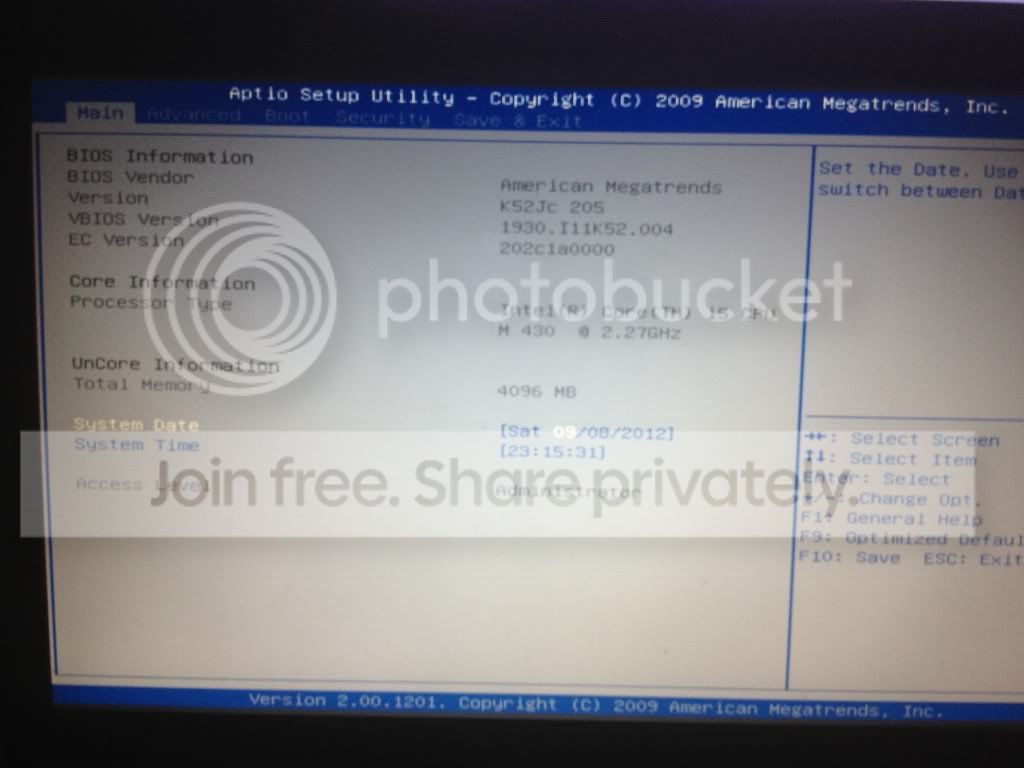
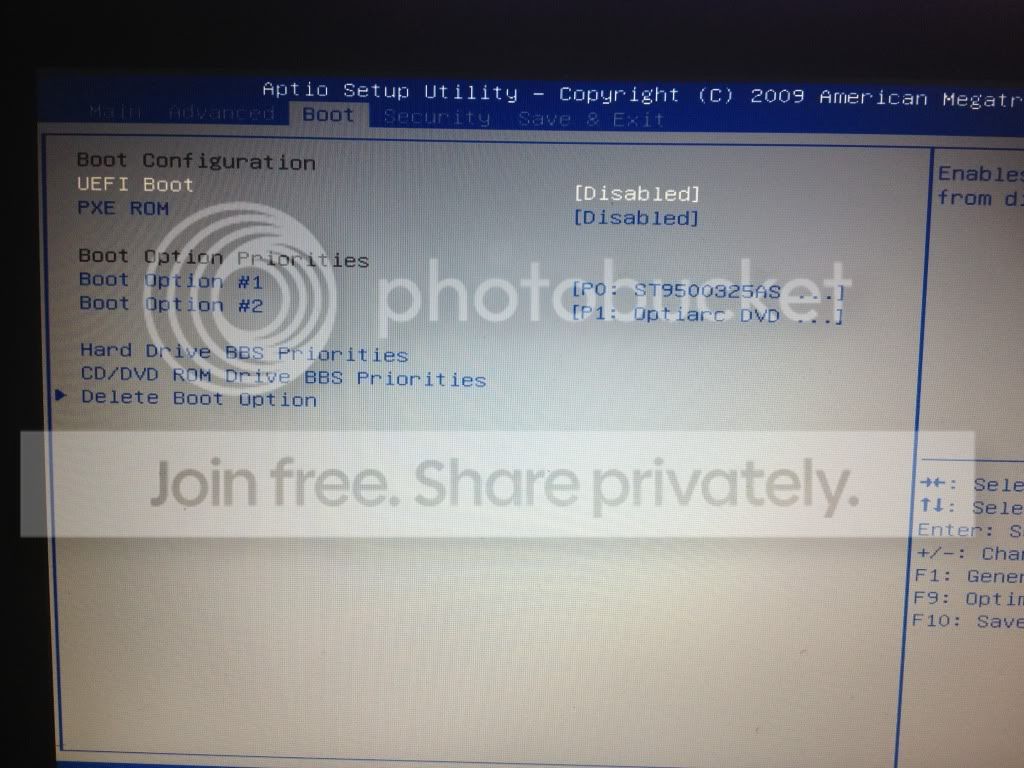
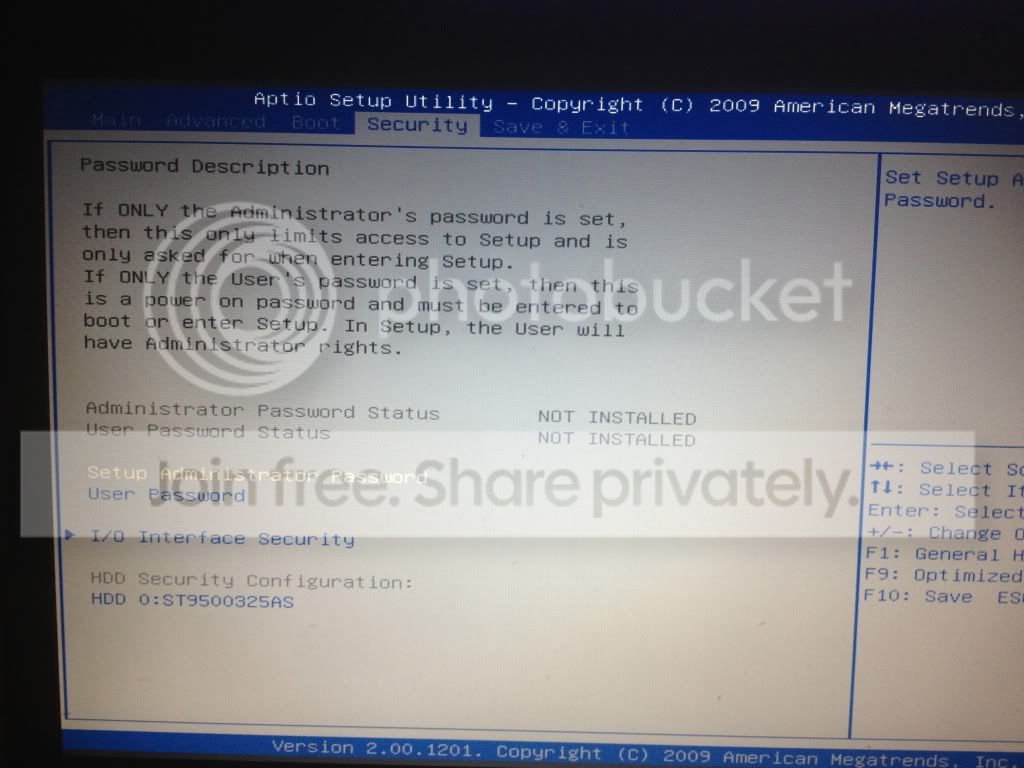
can you take a picture of your bios options please and send them me on here whilst your on bios so i can see your options :)
 

My Computer

Computer type
PC/Desktop
OS
Windows 7 Ultimate 64
CPU
AMD FX - 8350 Oc
Motherboard
ASUS Crosshair V Formula-Z AMD 990FX
Memory
16GB Corsair Vengeance
Graphics Card(s)
HD 4870 1GB
Sound Card
Onboard.
Monitor(s) Displays
Samsung Syncmaster 2032MW & ASUS p191
Screen Resolution
1680x1050
Hard Drives
1 TB WD
320gb WD
PSU
650w OCZ PSU
Case
Zalman Z11
Cooling
Antec H20 920 , 6x Antec Quiet
Keyboard
Logitech RAZ71 Keyboard
Mouse
Logitech RAZ71 Wireless Mouse
Internet Speed
120mb Virgin
Antivirus
Malwarebytes
Browser
Chrome
This is a post from someone with your problem and laptop ::

"I'm here to ask for help, I have a laptop Asus X52Jc with double video card Nvidia Geforce 310M and Intel HD Graphics (technology Nvidia Optimus)

There are 2 options in the bios for video card
1) Run the laptop only whit video card Intel HD Graphics
2) Run the laptop with nvidia optimus (the switch between the two video cards is automatic)"


You want to select an option like he has stated for the 2nd one run with nvidia or similar to make it run permanently

Continue to take a picture of your bios options please and send them me on here whilst your on bios so i can see your options :)
 

My Computer

Computer type
PC/Desktop
OS
Windows 7 Ultimate 64
CPU
AMD FX - 8350 Oc
Motherboard
ASUS Crosshair V Formula-Z AMD 990FX
Memory
16GB Corsair Vengeance
Graphics Card(s)
HD 4870 1GB
Sound Card
Onboard.
Monitor(s) Displays
Samsung Syncmaster 2032MW & ASUS p191
Screen Resolution
1680x1050
Hard Drives
1 TB WD
320gb WD
PSU
650w OCZ PSU
Case
Zalman Z11
Cooling
Antec H20 920 , 6x Antec Quiet
Keyboard
Logitech RAZ71 Keyboard
Mouse
Logitech RAZ71 Wireless Mouse
Internet Speed
120mb Virgin
Antivirus
Malwarebytes
Browser
Chrome
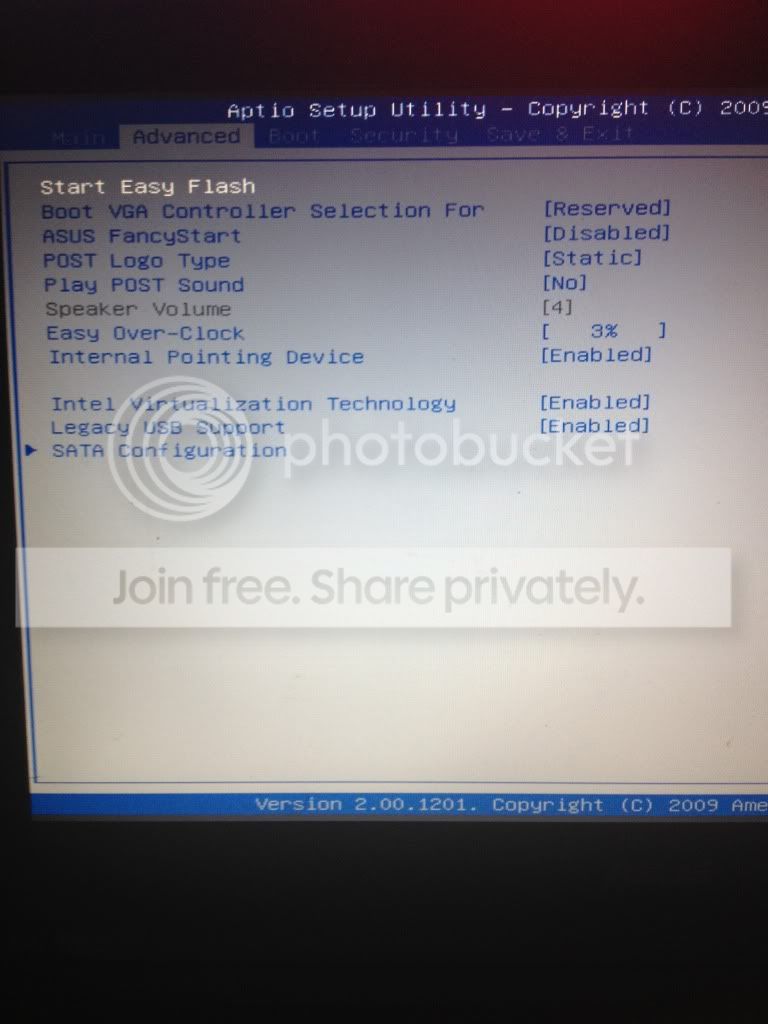
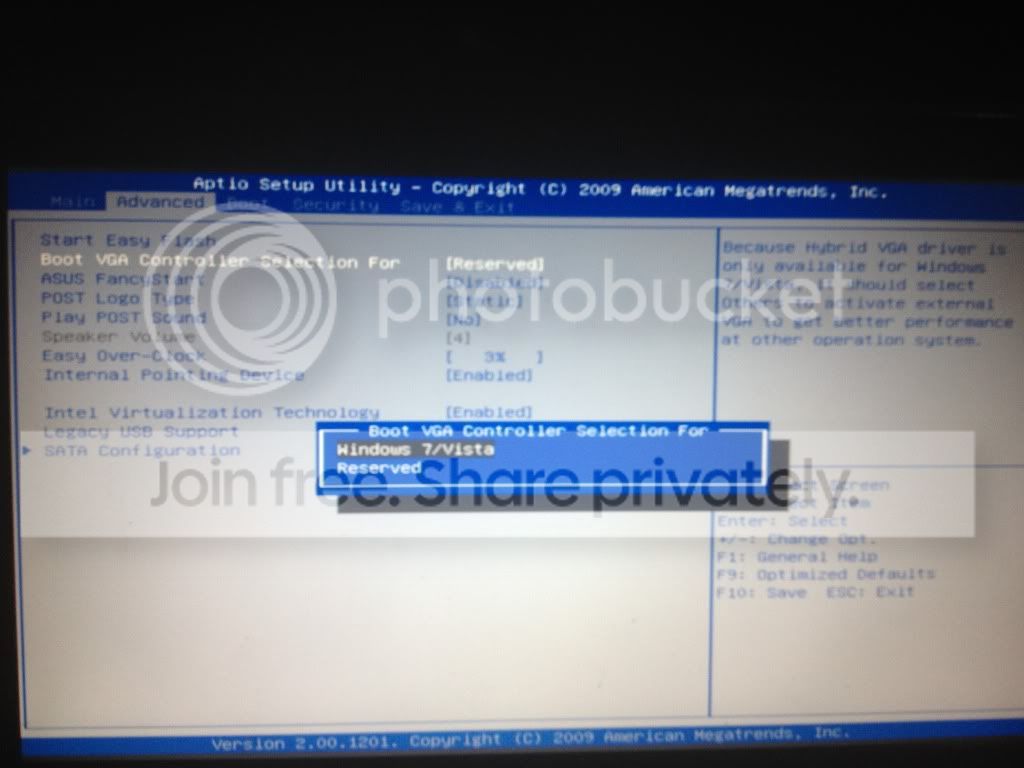
I couldnt manage to upload on my phone which is unfortunate, i didnt really see any options like what you have described, this is the advanced tab, ill upload the others asap, i just wanted to make sure it worked, and this page seemed the most relevant

IMG_11771.jpg
 

My Computer

OS
Queensland
Hello yes upload them asap but you see where it says BOOT Vga controller selection for .... select that and will it let you choose Windows7/Vista if so select and save and exit bios try that .... remind me aswell did you say that NVIDIA control centre if you right click desktop does not load up ?
 

My Computer

Computer type
PC/Desktop
OS
Windows 7 Ultimate 64
CPU
AMD FX - 8350 Oc
Motherboard
ASUS Crosshair V Formula-Z AMD 990FX
Memory
16GB Corsair Vengeance
Graphics Card(s)
HD 4870 1GB
Sound Card
Onboard.
Monitor(s) Displays
Samsung Syncmaster 2032MW & ASUS p191
Screen Resolution
1680x1050
Hard Drives
1 TB WD
320gb WD
PSU
650w OCZ PSU
Case
Zalman Z11
Cooling
Antec H20 920 , 6x Antec Quiet
Keyboard
Logitech RAZ71 Keyboard
Mouse
Logitech RAZ71 Wireless Mouse
Internet Speed
120mb Virgin
Antivirus
Malwarebytes
Browser
Chrome
read what i put above :) ? and thanks for screenshots helps ;)
 

My Computer

Computer type
PC/Desktop
OS
Windows 7 Ultimate 64
CPU
AMD FX - 8350 Oc
Motherboard
ASUS Crosshair V Formula-Z AMD 990FX
Memory
16GB Corsair Vengeance
Graphics Card(s)
HD 4870 1GB
Sound Card
Onboard.
Monitor(s) Displays
Samsung Syncmaster 2032MW & ASUS p191
Screen Resolution
1680x1050
Hard Drives
1 TB WD
320gb WD
PSU
650w OCZ PSU
Case
Zalman Z11
Cooling
Antec H20 920 , 6x Antec Quiet
Keyboard
Logitech RAZ71 Keyboard
Mouse
Logitech RAZ71 Wireless Mouse
Internet Speed
120mb Virgin
Antivirus
Malwarebytes
Browser
Chrome
Ok ill give this a try (should i make a restore point??)

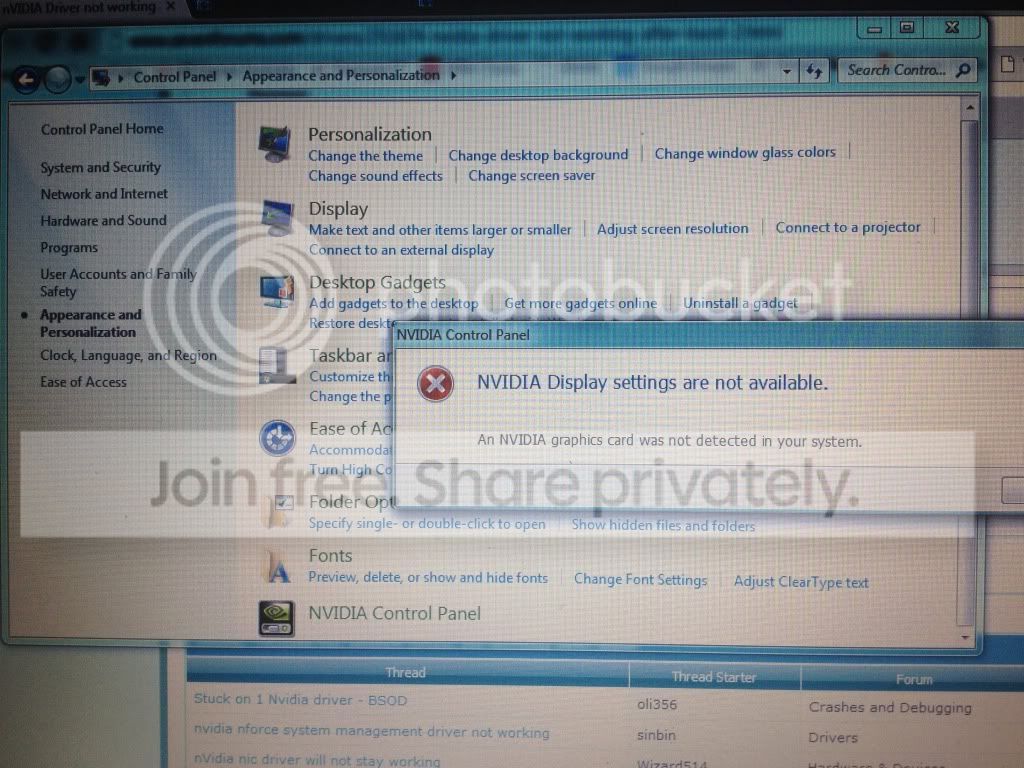
And when i go into control panel>nvidia control panel it does not work (refer to pic)

IMG_11831.jpg
 

My Computer

OS
Queensland
Yes make a restore point always! and when ever your trying things BACKUP! always

But yes try what i said about the bios please :)
 

My Computer

Computer type
PC/Desktop
OS
Windows 7 Ultimate 64
CPU
AMD FX - 8350 Oc
Motherboard
ASUS Crosshair V Formula-Z AMD 990FX
Memory
16GB Corsair Vengeance
Graphics Card(s)
HD 4870 1GB
Sound Card
Onboard.
Monitor(s) Displays
Samsung Syncmaster 2032MW & ASUS p191
Screen Resolution
1680x1050
Hard Drives
1 TB WD
320gb WD
PSU
650w OCZ PSU
Case
Zalman Z11
Cooling
Antec H20 920 , 6x Antec Quiet
Keyboard
Logitech RAZ71 Keyboard
Mouse
Logitech RAZ71 Wireless Mouse
Internet Speed
120mb Virgin
Antivirus
Malwarebytes
Browser
Chrome
i selected what you suggested, and have done nothing else except open chrome

IMG_11841.jpg
 

My Computer

OS
Queensland
Back
Top