NVIDIA Drivers - Avoid Problems

How to Avoid NVIDIA Driver Problems


   Information
This tutorial will show you how to do a clean install of NVIDIA graphics drivers for those having problems with the drivers.


Here's How:

1. Download the driver you want to install from your computer manufacturer or from NVIDIA.com.
See also: http://www.sevenforums.com/graphic-cards/602-latest-nvidia-forceware-video-drivers-windows-7-a.html
2. The first thing to do is open Windows updates, in the left column click change settings, in the drop down box select check for updates but let me choose whether to download and install them. The purpose of this is to keep Windows update from automatically installing a driver. We do not want conflicts with drivers.
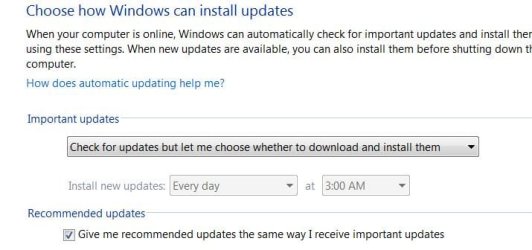
Update settings.JPG
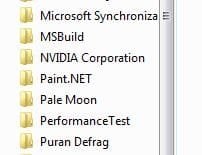
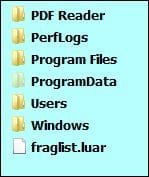
3. Next go to your "C" dive and there should be a folder named Nvidia.
C drive.JPG
4. Open the folder and you will find a folder named 'Display Drivers', inside that folder will be all the drivers you have installed designated by number.

Display%20drivers.JPG
5. Delete all of the folders with numbers but Do Not delete the Display Driver Folder itself.

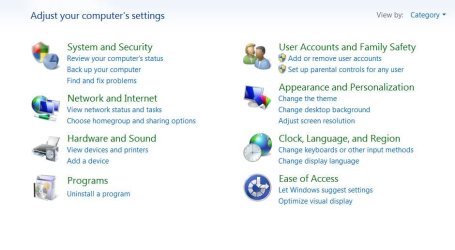
6. Next go to Control Panel (category View) and Uninstall a Program
uninstall a program.JPG
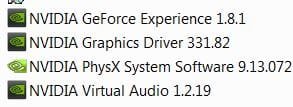
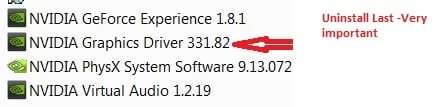
7. Scroll down to the Nvidia drivers and begin to uninstall them but read the info box below before you start.

   Information
If you have an Nvidia chipset, DO NOT uninstall the chipset driver only the Display drivers. Also, uninstall all of the display type drivers but BE SURE TO UNINSTALL THE GRAPHICS DRIVER LAST.
uninstall drivers CP.JPG

uninstall drivers CP 1.jpg
8. When you uninstall the Graphics driver, Windows will request a reboot, do so. Upon reboot Windows will install a graphics adapter, that is good.

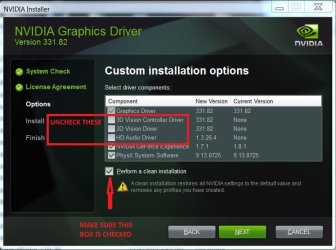
9. Open the new driver you downloaded, agree to terms and select custom install. Under custom install uncheck everything except the Graphics driver, PhysX and GeForce experience, if you want that. Be sure the 'CLEAN INSTALL' box is checked
clean install drivers SET UP.jpg
10. Your set up should look like this.
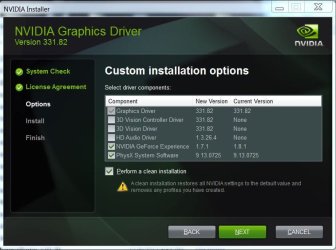
clean install drivers.JPG
11. Click next and begin the installation, after which you will reboot. This should give you a clean install of your drivers. You can now re set Windows Update to your preferred setting, as you are through.


Last edited:
There were motherboards from Nvidia a few years ago called nForce.
 

My Computer

Computer type
PC/Desktop
Computer Manufacturer/Model Number
Dell Vostro 400/Dell XPS 8700(Slightly Customized for me by Dell)/Toshiba Satellite T135
OS
Windows 7 Professional 32-bit/Windows 8 64-bit/Win7 Pro64-bit
CPU
Intel Core 2 Quad Q6600/Intel Core i7 4790/Intel Pentium
Memory
2GB/16GB/4GB
Graphics Card(s)
Intel G33/G31 Express(Vostro)/NVIDIA GeForce GTX 745(XPS)
Monitor(s) Displays
HP 2009m(Vostro)/ViewSonic VX2250wm-LED(XPS)
Screen Resolution
1600x900(Vostro)/1920x1080(XPS)
Hard Drives
Seagate ST3160815AS(Vostro)/Western Digital Blue(Satellite)
External:
Western Digital My Passport 0748
Samsung HM121HC
Keyboard
Dell L100)(Vostro)/Dell KB2133p(XPS)
Mouse
Dell M-UAV-DEL8(XPS)
Internet Speed
100 Mbit/s(Only when IPTV is plugged out)
Antivirus
Avast, Malwarebytes PRO
Browser
Internet Explorer 11
Other Info
Note: Names with slashes between two different parts mean that the left is my old desktop and the right is my old laptop and the middle is my new desktop.(Unless specified)
Ping is horrible for servers overseas in US and Europe.
New laptop:LG Gram(Not available in US) Processor:Intel Core i3 4th Gen Ultra Low Power RAM:4GB Hard Drive:SK Hynix OEM MSATA or M.2 Graphics:Intel HD

My Computers

System One System Two

  • Computer type
    PC/Desktop
    Computer Manufacturer/Model Number
    ALWAYS UNDER CONSTRUCTION
    OS
    Windows 11 Pro
    CPU
    Ryzen 9 5900X
    Motherboard
    Asus X570 Crosshair Viii Hero
    Memory
    32GB G Skill DDR4-3600
    Graphics Card(s)
    EVGA RTX 3080 FTW 3 Ultra
    Sound Card
    On Board/Sennheiser PC37X Headset
    Monitor(s) Displays
    3 X Asus 27"
    Screen Resolution
    2560x1440
    Hard Drives
    2 X 1 TB NVME drives
    PSU
    EVGA 850
    Case
    Phanteks Eclipse P400A
    Cooling
    EVGA 280 AIO
    Keyboard
    Logitech G510s/ Logitech G13
    Mouse
    Logitech G502
    Internet Speed
    24/1
    Antivirus
    ESET/MBAM Pro/SAS Pro
    Browser
    Chrome/ Firefox/ Edge
  • Computer type
    Laptop
    System Manufacturer/Model Number
    Dell 16 Plus
    OS
    Windows 11 Pro
    CPU
    Intel Ultra 9 288V
    Memory
    32 GB LPDDR5X 8533
    Monitor(s) Displays
    16" Mini-LED HDR600 Touch 90 Hz
    Screen Resolution
    2560X1600
    Hard Drives
    1 TB NVME
Great job but

" If you have an Nvidia chipset, DO NOT uninstall the chipset driver only the Display drivers. Also, uninstall all of the display type drivers but BE SURE TO UNINSTALL THE GRAPHICS DRIVER LAST."

is slightly ambiguous. Which ones are Display drivers compared to the shipset drivers?
Read step number 4 again.
 

My Computer

Computer type
PC/Desktop
Computer Manufacturer/Model Number
Home Built Desktop By DataTech
OS
Windows 7 Ultimate X64 SP1
CPU
Intel i5-2550K, Differing ~4.4-4.8GHz No built in GPU
Motherboard
ASUS P8Z68-V PRO/GEN3
Memory
16GB G.Skill Sniper 1866MHz @ 2133MHz 2x8GB
Graphics Card(s)
ASUS GTX650TIB-DC2OC-2GD5, (650TI Boost)
Sound Card
Onboard Realtek 5-1
Monitor(s) Displays
Samsung P2570HD
Screen Resolution
1920x1080
Hard Drives
Samsung 840 Pro 256GB SSD for OS, 500GB Seagate Constellation (Enterprise drive) for Data
PSU
Corsair HX650W
Case
Inwin Dragon Rider
Cooling
Hyper 212 EVO w/two Noctua fans, push-pull, @1300 RPM
Keyboard
E-Z Eyes, bright yellow keys with large characters
Mouse
steelseries SENSEI Laser Pro Gaming
Internet Speed
48-51Mbs Mbs down, 11 Mbs up Xfinity Cable
Antivirus
Norton Internet Security 2013
Browser
IE 10, Opera, Pale Moon if needed
Other Info
4 case fans, LG BluRay-RE, ASUS DVD-RW, Mr. Fusion power supply, 1.21 gigawatts.
Hi essenbe,
My pc uses Nvidia yet there is NO folder in the root of C:drive.
 

My Computer

Computer Manufacturer/Model Number
Look in my Signature.
OS
Win7 H.Prem. 32bit+SP1
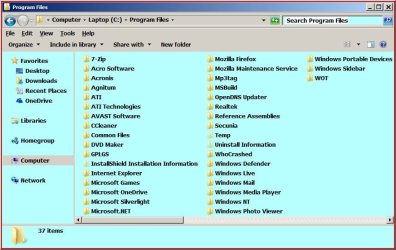
Try in Program files or Program files(X86), maybe both.
 

My Computer

Computer type
PC/Desktop
Computer Manufacturer/Model Number
Home Built Desktop By DataTech
OS
Windows 7 Ultimate X64 SP1
CPU
Intel i5-2550K, Differing ~4.4-4.8GHz No built in GPU
Motherboard
ASUS P8Z68-V PRO/GEN3
Memory
16GB G.Skill Sniper 1866MHz @ 2133MHz 2x8GB
Graphics Card(s)
ASUS GTX650TIB-DC2OC-2GD5, (650TI Boost)
Sound Card
Onboard Realtek 5-1
Monitor(s) Displays
Samsung P2570HD
Screen Resolution
1920x1080
Hard Drives
Samsung 840 Pro 256GB SSD for OS, 500GB Seagate Constellation (Enterprise drive) for Data
PSU
Corsair HX650W
Case
Inwin Dragon Rider
Cooling
Hyper 212 EVO w/two Noctua fans, push-pull, @1300 RPM
Keyboard
E-Z Eyes, bright yellow keys with large characters
Mouse
steelseries SENSEI Laser Pro Gaming
Internet Speed
48-51Mbs Mbs down, 11 Mbs up Xfinity Cable
Antivirus
Norton Internet Security 2013
Browser
IE 10, Opera, Pale Moon if needed
Other Info
4 case fans, LG BluRay-RE, ASUS DVD-RW, Mr. Fusion power supply, 1.21 gigawatts.
Odd, here's what mine has. I don't have one in root of C:\.

nVidia.JPG
 

My Computer

Computer type
PC/Desktop
Computer Manufacturer/Model Number
Home Built Desktop By DataTech
OS
Windows 7 Ultimate X64 SP1
CPU
Intel i5-2550K, Differing ~4.4-4.8GHz No built in GPU
Motherboard
ASUS P8Z68-V PRO/GEN3
Memory
16GB G.Skill Sniper 1866MHz @ 2133MHz 2x8GB
Graphics Card(s)
ASUS GTX650TIB-DC2OC-2GD5, (650TI Boost)
Sound Card
Onboard Realtek 5-1
Monitor(s) Displays
Samsung P2570HD
Screen Resolution
1920x1080
Hard Drives
Samsung 840 Pro 256GB SSD for OS, 500GB Seagate Constellation (Enterprise drive) for Data
PSU
Corsair HX650W
Case
Inwin Dragon Rider
Cooling
Hyper 212 EVO w/two Noctua fans, push-pull, @1300 RPM
Keyboard
E-Z Eyes, bright yellow keys with large characters
Mouse
steelseries SENSEI Laser Pro Gaming
Internet Speed
48-51Mbs Mbs down, 11 Mbs up Xfinity Cable
Antivirus
Norton Internet Security 2013
Browser
IE 10, Opera, Pale Moon if needed
Other Info
4 case fans, LG BluRay-RE, ASUS DVD-RW, Mr. Fusion power supply, 1.21 gigawatts.
Funnily enough I was looking for my NVIDIA folder yesterday and couldn't find it anywhere.
 

My Computer

Computer type
PC/Desktop
Computer Manufacturer/Model Number
Custom Build
OS
W7 Pro x64 SP1 | W10 Pro IP x64 | W8.1 Pro x64 VM | Linux Mint VM
CPU
i7-4790k @ 4GHz (4.4GHz Boost)
Motherboard
ASUS Sabertooth Z87 (BIOS Rev 2004)
Memory
16GB DDR3 Kingston HyperX Fury @ 1600MHz CL 9-9-9-27
Graphics Card(s)
EVGA GTX 980 Classified
Sound Card
Realtek Onboard
Monitor(s) Displays
Samsung S27D390
Screen Resolution
1920 x 1080
Hard Drives
240GB Intel 520 Series SSD |
Samsung 850 EVO 120GB SSD |
2TB WD Caviar Black |
2TB WD Caviar Green
PSU
Corsair HX850-80 Gold Modular
Case
Cooler Master Silencio 650
Cooling
Corsair H80i w/2 x Corsair SP120 | 2 x 120mm Noctua NF-S12B
Keyboard
Microsoft Sidewinder X4
Mouse
Gigabyte M6900 optical
Internet Speed
152mb
Antivirus
F-Secure
Browser
Firefox 38.0
Other Info
Backup Rig: Win 7 Pro 64-bit | AMD A10-5800k | ASUS F2A85-V Pro | 8GB Samsung DDR3 @1600MHz | 120GB Toshiba SDD | 2TB Seagate HDD | Cooler Master Silencio 550
It is usually in C:/Nvidia like Britton30 said above. I have heard of some people where it is not there. When you install drivers does the drivers tell you where it installs itself?
 

My Computers

System One System Two

  • Computer type
    PC/Desktop
    Computer Manufacturer/Model Number
    ALWAYS UNDER CONSTRUCTION
    OS
    Windows 11 Pro
    CPU
    Ryzen 9 5900X
    Motherboard
    Asus X570 Crosshair Viii Hero
    Memory
    32GB G Skill DDR4-3600
    Graphics Card(s)
    EVGA RTX 3080 FTW 3 Ultra
    Sound Card
    On Board/Sennheiser PC37X Headset
    Monitor(s) Displays
    3 X Asus 27"
    Screen Resolution
    2560x1440
    Hard Drives
    2 X 1 TB NVME drives
    PSU
    EVGA 850
    Case
    Phanteks Eclipse P400A
    Cooling
    EVGA 280 AIO
    Keyboard
    Logitech G510s/ Logitech G13
    Mouse
    Logitech G502
    Internet Speed
    24/1
    Antivirus
    ESET/MBAM Pro/SAS Pro
    Browser
    Chrome/ Firefox/ Edge
  • Computer type
    Laptop
    System Manufacturer/Model Number
    Dell 16 Plus
    OS
    Windows 11 Pro
    CPU
    Intel Ultra 9 288V
    Memory
    32 GB LPDDR5X 8533
    Monitor(s) Displays
    16" Mini-LED HDR600 Touch 90 Hz
    Screen Resolution
    2560X1600
    Hard Drives
    1 TB NVME
Here's mine:-

1.jpg

2.jpg

RR.JPG
 

My Computer

Computer Manufacturer/Model Number
Look in my Signature.
OS
Win7 H.Prem. 32bit+SP1
Anyone using Ccleaner? There is an option in applications for Nvidia installation files.

I was wondering where my C:\Nvidia folder went a while back and noticed that option in Ccleaner.

That being said, I do have an Nvidia folder in program files.
 

My Computer

Computer type
PC/Desktop
Computer Manufacturer/Model Number
Self Built
OS
Win 10 Pro x64
CPU
Intel I5-2500K @3.3GHz
Motherboard
Asrock P67 Extreme4
Memory
16GB G.Skill Ripjaws X (4x4GB)
Graphics Card(s)
EVGA GeForce 750 Ti SC 2GB
Sound Card
ASUS Xonar DG 5.1 Channels 24-bit 96KHz PCI Interface Sound
Monitor(s) Displays
auria eq2367
Screen Resolution
1920 x 1080
Hard Drives
250GB Samsung 850 EVO SSD
1TB WD Blue
1TB Hitachi
PSU
SeaSonic X 650W 80 Plus Gold
Case
Corsair Obsidian 750D
Cooling
Corsair H60, Three 140mm case fans
Keyboard
Logitech Wireless Keyboard K520
Mouse
Logitech Wireless Mouse M310
Internet Speed
Wave Broadband ~ 100 dn 5 up
Antivirus
Windows Defender, Malwarebytes Premium
Browser
Edge, IE11, Chrome
Other Info
Laptop specs: HP g7-1365dx /
CPU: AMD A6-3420M APU with Radeon(tm) HD Graphics /
RAM: Crucial 8Gb (2x4Gb) /
SSD: Crucial M4-CT128M4SSD2 ATA Device/ FW 000F /
GFX: AMD Radeon HD 6520G /
OS: Windows 10 Pro x64
I see that Derek, under Utilities/NVIDIA Install files.
 
Last edited:

My Computer

Computer type
PC/Desktop
Computer Manufacturer/Model Number
Home Built Desktop By DataTech
OS
Windows 7 Ultimate X64 SP1
CPU
Intel i5-2550K, Differing ~4.4-4.8GHz No built in GPU
Motherboard
ASUS P8Z68-V PRO/GEN3
Memory
16GB G.Skill Sniper 1866MHz @ 2133MHz 2x8GB
Graphics Card(s)
ASUS GTX650TIB-DC2OC-2GD5, (650TI Boost)
Sound Card
Onboard Realtek 5-1
Monitor(s) Displays
Samsung P2570HD
Screen Resolution
1920x1080
Hard Drives
Samsung 840 Pro 256GB SSD for OS, 500GB Seagate Constellation (Enterprise drive) for Data
PSU
Corsair HX650W
Case
Inwin Dragon Rider
Cooling
Hyper 212 EVO w/two Noctua fans, push-pull, @1300 RPM
Keyboard
E-Z Eyes, bright yellow keys with large characters
Mouse
steelseries SENSEI Laser Pro Gaming
Internet Speed
48-51Mbs Mbs down, 11 Mbs up Xfinity Cable
Antivirus
Norton Internet Security 2013
Browser
IE 10, Opera, Pale Moon if needed
Other Info
4 case fans, LG BluRay-RE, ASUS DVD-RW, Mr. Fusion power supply, 1.21 gigawatts.
Also, some times Windows Update will have an Nvidia Driver, I believe it will uninstall the C:/Nvidia folder and the current driver will probably be in Windows Updates or wherever Windows installs drivers. I have my Windows update set like the tutorial suggests all the time and will usually not install hardware updates but go find one that is more current. Don't tell Greg.
 

My Computers

System One System Two

  • Computer type
    PC/Desktop
    Computer Manufacturer/Model Number
    ALWAYS UNDER CONSTRUCTION
    OS
    Windows 11 Pro
    CPU
    Ryzen 9 5900X
    Motherboard
    Asus X570 Crosshair Viii Hero
    Memory
    32GB G Skill DDR4-3600
    Graphics Card(s)
    EVGA RTX 3080 FTW 3 Ultra
    Sound Card
    On Board/Sennheiser PC37X Headset
    Monitor(s) Displays
    3 X Asus 27"
    Screen Resolution
    2560x1440
    Hard Drives
    2 X 1 TB NVME drives
    PSU
    EVGA 850
    Case
    Phanteks Eclipse P400A
    Cooling
    EVGA 280 AIO
    Keyboard
    Logitech G510s/ Logitech G13
    Mouse
    Logitech G502
    Internet Speed
    24/1
    Antivirus
    ESET/MBAM Pro/SAS Pro
    Browser
    Chrome/ Firefox/ Edge
  • Computer type
    Laptop
    System Manufacturer/Model Number
    Dell 16 Plus
    OS
    Windows 11 Pro
    CPU
    Intel Ultra 9 288V
    Memory
    32 GB LPDDR5X 8533
    Monitor(s) Displays
    16" Mini-LED HDR600 Touch 90 Hz
    Screen Resolution
    2560X1600
    Hard Drives
    1 TB NVME
Anyone using Ccleaner? There is an option in applications for Nvidia installation files.

I was wondering where my C:\Nvidia folder went a while back and noticed that option in Ccleaner.

That being said, I do have an Nvidia folder in program files.

Yep, last run a couple of days ago so that could explain what happened to mine. I did notice it in CCleaner as well but thought nothing of it. You're solving all of my puzzles today Derek!
 

My Computer

Computer type
PC/Desktop
Computer Manufacturer/Model Number
Custom Build
OS
W7 Pro x64 SP1 | W10 Pro IP x64 | W8.1 Pro x64 VM | Linux Mint VM
CPU
i7-4790k @ 4GHz (4.4GHz Boost)
Motherboard
ASUS Sabertooth Z87 (BIOS Rev 2004)
Memory
16GB DDR3 Kingston HyperX Fury @ 1600MHz CL 9-9-9-27
Graphics Card(s)
EVGA GTX 980 Classified
Sound Card
Realtek Onboard
Monitor(s) Displays
Samsung S27D390
Screen Resolution
1920 x 1080
Hard Drives
240GB Intel 520 Series SSD |
Samsung 850 EVO 120GB SSD |
2TB WD Caviar Black |
2TB WD Caviar Green
PSU
Corsair HX850-80 Gold Modular
Case
Cooler Master Silencio 650
Cooling
Corsair H80i w/2 x Corsair SP120 | 2 x 120mm Noctua NF-S12B
Keyboard
Microsoft Sidewinder X4
Mouse
Gigabyte M6900 optical
Internet Speed
152mb
Antivirus
F-Secure
Browser
Firefox 38.0
Other Info
Backup Rig: Win 7 Pro 64-bit | AMD A10-5800k | ASUS F2A85-V Pro | 8GB Samsung DDR3 @1600MHz | 120GB Toshiba SDD | 2TB Seagate HDD | Cooler Master Silencio 550
Derek is that kind of guy.
 

My Computers

System One System Two

  • Computer type
    PC/Desktop
    Computer Manufacturer/Model Number
    ALWAYS UNDER CONSTRUCTION
    OS
    Windows 11 Pro
    CPU
    Ryzen 9 5900X
    Motherboard
    Asus X570 Crosshair Viii Hero
    Memory
    32GB G Skill DDR4-3600
    Graphics Card(s)
    EVGA RTX 3080 FTW 3 Ultra
    Sound Card
    On Board/Sennheiser PC37X Headset
    Monitor(s) Displays
    3 X Asus 27"
    Screen Resolution
    2560x1440
    Hard Drives
    2 X 1 TB NVME drives
    PSU
    EVGA 850
    Case
    Phanteks Eclipse P400A
    Cooling
    EVGA 280 AIO
    Keyboard
    Logitech G510s/ Logitech G13
    Mouse
    Logitech G502
    Internet Speed
    24/1
    Antivirus
    ESET/MBAM Pro/SAS Pro
    Browser
    Chrome/ Firefox/ Edge
  • Computer type
    Laptop
    System Manufacturer/Model Number
    Dell 16 Plus
    OS
    Windows 11 Pro
    CPU
    Intel Ultra 9 288V
    Memory
    32 GB LPDDR5X 8533
    Monitor(s) Displays
    16" Mini-LED HDR600 Touch 90 Hz
    Screen Resolution
    2560X1600
    Hard Drives
    1 TB NVME
Here's my Nvidia history.
WU offered an update that was older than the then version from Nvidia. I uninstalled all of it, checked for updates, then selected the 'Hide' option, then installed the version from Nvidia.
No long after, Nvidia released an update giving me BSOD'S when trying to update 'Windows Exporience Index'.
Currently using Graphics version 7.1 + Display version 285.xx.
I use CCleaner also.
 

My Computer

Computer Manufacturer/Model Number
Look in my Signature.
OS
Win7 H.Prem. 32bit+SP1

My Computer

Computer type
PC/Desktop
Computer Manufacturer/Model Number
Dell Vostro 400/Dell XPS 8700(Slightly Customized for me by Dell)/Toshiba Satellite T135
OS
Windows 7 Professional 32-bit/Windows 8 64-bit/Win7 Pro64-bit
CPU
Intel Core 2 Quad Q6600/Intel Core i7 4790/Intel Pentium
Memory
2GB/16GB/4GB
Graphics Card(s)
Intel G33/G31 Express(Vostro)/NVIDIA GeForce GTX 745(XPS)
Monitor(s) Displays
HP 2009m(Vostro)/ViewSonic VX2250wm-LED(XPS)
Screen Resolution
1600x900(Vostro)/1920x1080(XPS)
Hard Drives
Seagate ST3160815AS(Vostro)/Western Digital Blue(Satellite)
External:
Western Digital My Passport 0748
Samsung HM121HC
Keyboard
Dell L100)(Vostro)/Dell KB2133p(XPS)
Mouse
Dell M-UAV-DEL8(XPS)
Internet Speed
100 Mbit/s(Only when IPTV is plugged out)
Antivirus
Avast, Malwarebytes PRO
Browser
Internet Explorer 11
Other Info
Note: Names with slashes between two different parts mean that the left is my old desktop and the right is my old laptop and the middle is my new desktop.(Unless specified)
Ping is horrible for servers overseas in US and Europe.
New laptop:LG Gram(Not available in US) Processor:Intel Core i3 4th Gen Ultra Low Power RAM:4GB Hard Drive:SK Hynix OEM MSATA or M.2 Graphics:Intel HD
Thank you for the tutorial....It is too soon to say if this will fix my "one black screen" problem, but I will say that it did make the two demanding games I play very smooth and a fairly big FPS improvement as well.

I will update you on whether or not this resolved the black screen issue.

Thanks again...I really appreciate your help!!

Rick
 

My Computer

Computer type
PC/Desktop
Computer Manufacturer/Model Number
Custom Build
OS
Windows 7 64 BIT
CPU
Intel i7 2700k
Motherboard
Gigabyte Z68AP-D3
Memory
Corsair Vengeance 1600 DDR3 Dual Channel 8GB
Graphics Card(s)
Gigabyte GTX 770 OC 4 GB DDR5
Hard Drives
Samsung 840 EVO 500GB
Western Digital 1TB Caviar Black 7200 RPM
Antivirus
Avast
Browser
Google Chrome
Thank you for the tutorial....It is too soon to say if this will fix my "one black screen" problem, but I will say that it did make the two demanding games I play very smooth and a fairly big FPS improvement as well.

I will update you on whether or not this resolved the black screen issue.

Thanks again...I really appreciate your help!!

Rick

Hi Rick, I'm glad it has helped and I hope it resolves your Black Screen problems. Thanks for letting me know. I appreciate it.
 

My Computers

System One System Two

  • Computer type
    PC/Desktop
    Computer Manufacturer/Model Number
    ALWAYS UNDER CONSTRUCTION
    OS
    Windows 11 Pro
    CPU
    Ryzen 9 5900X
    Motherboard
    Asus X570 Crosshair Viii Hero
    Memory
    32GB G Skill DDR4-3600
    Graphics Card(s)
    EVGA RTX 3080 FTW 3 Ultra
    Sound Card
    On Board/Sennheiser PC37X Headset
    Monitor(s) Displays
    3 X Asus 27"
    Screen Resolution
    2560x1440
    Hard Drives
    2 X 1 TB NVME drives
    PSU
    EVGA 850
    Case
    Phanteks Eclipse P400A
    Cooling
    EVGA 280 AIO
    Keyboard
    Logitech G510s/ Logitech G13
    Mouse
    Logitech G502
    Internet Speed
    24/1
    Antivirus
    ESET/MBAM Pro/SAS Pro
    Browser
    Chrome/ Firefox/ Edge
  • Computer type
    Laptop
    System Manufacturer/Model Number
    Dell 16 Plus
    OS
    Windows 11 Pro
    CPU
    Intel Ultra 9 288V
    Memory
    32 GB LPDDR5X 8533
    Monitor(s) Displays
    16" Mini-LED HDR600 Touch 90 Hz
    Screen Resolution
    2560X1600
    Hard Drives
    1 TB NVME
Nice one Steve you have made it look so easy - for me anyway:D
 

My Computer

Computer type
PC/Desktop
Computer Manufacturer/Model Number
Own build (new) Desk1 / Asus ROG Win 7 / Desk2 1st build
OS
Desk1 7 Home Prem / Desk2 10 Pro / Main lap Asus ROG 10 Pro 2 laptop Toshiba 7 Pro Asus P2520 7 & 10
CPU
Desk1 i5 3750K / Laptop i7 GTX 860M / Desk2 i5 2500
Motherboard
Desk1 Asus P877-V / Desk2 Gigabyte H67 UD3H / Laptop ?
Memory
Desk1 8GB (1866) / Desk2 16GB (1333) / Laptop 8Gb DDR3
Graphics Card(s)
Desk 1& 2NVidia GTX 650 & Laptops on board Intel
Sound Card
Desk 1 & 2 -XONAR DG Realtek High Def audio Laptop
Monitor(s) Displays
Desk 1 Benq HD 2450 / Desk2 Philips 24" / Laptop 17.5"
Screen Resolution
1920x1080 D1 & D2 & Laptop 1
Hard Drives
Desk1 Samsung 120GB 830 SSD
Asus ROG 256GB 850 Pro SSD
Desk2 Samsung 840 256 SSD
Toshiba 120GB EVO
PSU
Desk 1 Corsair HX 1050/ Laptop ? / Desk 2 Corsair HX 650
Case
Desk 1 Cooler HAF XM ? Toshiba laptop / Desk2 Coolermaster
Cooling
Fans on all Desk1 -2 Desk2 - all Coolermasters 5 Laptop ?
Keyboard
Desk 1 MS Sidewinder X6 Desk 2 MS Sidewinder X 4
Mouse
Desk 1&2 - Gigabyte MS 900 gamer - laptop - Logitec wireless
Internet Speed
ADSL2+
Other Info
One other Desktop (tester) and spare Toshba laptop both with SSD's
Running Kaspersky 2016 ISS on all machines config'd identically
Logitec audio stereo systems on each machine (x3)
Canon MG5250MFC
Router/modem TP-Link running WPA2SK
Back
Top