NVIDIA Drivers - Avoid Problems

How to Avoid NVIDIA Driver Problems


   Information
This tutorial will show you how to do a clean install of NVIDIA graphics drivers for those having problems with the drivers.


Here's How:

1. Download the driver you want to install from your computer manufacturer or from NVIDIA.com.
See also: http://www.sevenforums.com/graphic-cards/602-latest-nvidia-forceware-video-drivers-windows-7-a.html
2. The first thing to do is open Windows updates, in the left column click change settings, in the drop down box select check for updates but let me choose whether to download and install them. The purpose of this is to keep Windows update from automatically installing a driver. We do not want conflicts with drivers.
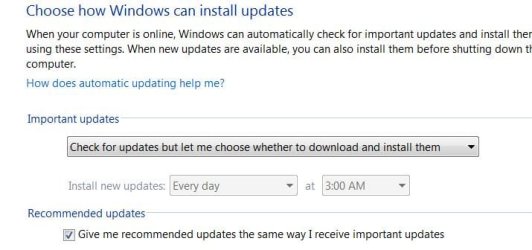
Update settings.JPG
3. Next go to your "C" dive and there should be a folder named Nvidia.
C drive.JPG
4. Open the folder and you will find a folder named 'Display Drivers', inside that folder will be all the drivers you have installed designated by number.

Display%20drivers.JPG
5. Delete all of the folders with numbers but Do Not delete the Display Driver Folder itself.

6. Next go to Control Panel (category View) and Uninstall a Program
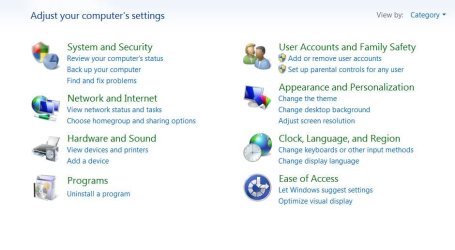
uninstall a program.JPG
7. Scroll down to the Nvidia drivers and begin to uninstall them but read the info box below before you start.

   Information
If you have an Nvidia chipset, DO NOT uninstall the chipset driver only the Display drivers. Also, uninstall all of the display type drivers but BE SURE TO UNINSTALL THE GRAPHICS DRIVER LAST.
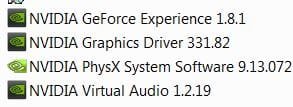
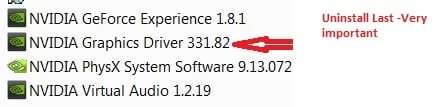
uninstall drivers CP.JPG

uninstall drivers CP 1.jpg
8. When you uninstall the Graphics driver, Windows will request a reboot, do so. Upon reboot Windows will install a graphics adapter, that is good.

9. Open the new driver you downloaded, agree to terms and select custom install. Under custom install uncheck everything except the Graphics driver, PhysX and GeForce experience, if you want that. Be sure the 'CLEAN INSTALL' box is checked
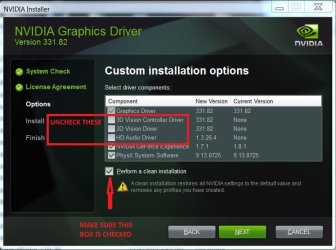
clean install drivers SET UP.jpg
10. Your set up should look like this.
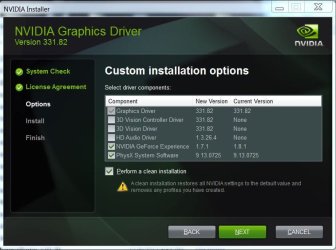
clean install drivers.JPG
11. Click next and begin the installation, after which you will reboot. This should give you a clean install of your drivers. You can now re set Windows Update to your preferred setting, as you are through.


Last edited:
Thanks a lot John. I really appreciate it.
 

My Computers

System One System Two

  • Computer type
    PC/Desktop
    Computer Manufacturer/Model Number
    ALWAYS UNDER CONSTRUCTION
    OS
    Windows 11 Pro
    CPU
    Ryzen 9 5900X
    Motherboard
    Asus X570 Crosshair Viii Hero
    Memory
    32GB G Skill DDR4-3600
    Graphics Card(s)
    EVGA RTX 3080 FTW 3 Ultra
    Sound Card
    On Board/Sennheiser PC37X Headset
    Monitor(s) Displays
    3 X Asus 27"
    Screen Resolution
    2560x1440
    Hard Drives
    2 X 1 TB NVME drives
    PSU
    EVGA 850
    Case
    Phanteks Eclipse P400A
    Cooling
    EVGA 280 AIO
    Keyboard
    Logitech G510s/ Logitech G13
    Mouse
    Logitech G502
    Internet Speed
    24/1
    Antivirus
    ESET/MBAM Pro/SAS Pro
    Browser
    Chrome/ Firefox/ Edge
  • Computer type
    Laptop
    System Manufacturer/Model Number
    Dell 16 Plus
    OS
    Windows 11 Pro
    CPU
    Intel Ultra 9 288V
    Memory
    32 GB LPDDR5X 8533
    Monitor(s) Displays
    16" Mini-LED HDR600 Touch 90 Hz
    Screen Resolution
    2560X1600
    Hard Drives
    1 TB NVME
Sweet tutorial Steve :thumbsup:
Works great on win-10 too :)
 

My Computer

Computer type
PC/Desktop
Computer Manufacturer/Model Number
Custom assembled by me :}
OS
Win-7-Pro64bit 7-H-Prem-64bit
CPU
i7-5930K 2nd i9-9940x both water blocked VRM's too
Motherboard
ASUS SABERTOOTH X99 2nd ASUS x299 Apex
Memory
Trident-z 3200C14 2nd Trident-z 3600C16
Graphics Card(s)
EVGA 1080ti ftw3 2nd Titan Xp both water blocked
Sound Card
Built-in Realtek
Monitor(s) Displays
1-AOC G2460PG 24"G-Sync 144Hz/ 2nd 1-ASUS VG248QE 24" 144Hz
Screen Resolution
1920 x 1080 144Hz
Hard Drives
2-Samsung M.2 Evo & Evo Plus
2-Samsung 850 EVO 500GB SSD's/ 3-2.5 W.D. Black 1tb-&3-1tb/3-3.5 WD Black 1tb hdd's
PSU
EVGA SuperNOVA 1000-P2 2nd 1200-P2
Case
2-Corsair Obsidian Series 450D Black ATX Mid Tower
Cooling
Custom water loops
Keyboard
Logitech G710+/ 2nd Logitech G910
Mouse
2-RedDragon M901 Perdition 16400 dpi Gaming mouse = wired
Internet Speed
Comcast Ping 19ms 89.31mbps download speed 6.12mbps upload
Antivirus
Malwarebytes Pro/ Superantispyware Pro
Browser
FireFox & Pale moon
Other Info
2nd ASUS X299 Apex/Intel i9-9940x with Custom water loop/7H-Prem-x64/Corsair 450D case/Ram Trident-z 3600C16 4x8gb / Samsung970Evo plus 500gb SSD/Dual ssd EZ swap evo/PSU EVGA SuperNova 1200w-P2 80+Platinum/GPU Titan Xp /8-ML-140 on push-pull on 2-280GTX rads
Thanks Mike. That's the way I always do it, but some do it different and never have problems. I wrote it mainly for those who do have problems and, of course, for those like me who don't want any.
 

My Computers

System One System Two

  • Computer type
    PC/Desktop
    Computer Manufacturer/Model Number
    ALWAYS UNDER CONSTRUCTION
    OS
    Windows 11 Pro
    CPU
    Ryzen 9 5900X
    Motherboard
    Asus X570 Crosshair Viii Hero
    Memory
    32GB G Skill DDR4-3600
    Graphics Card(s)
    EVGA RTX 3080 FTW 3 Ultra
    Sound Card
    On Board/Sennheiser PC37X Headset
    Monitor(s) Displays
    3 X Asus 27"
    Screen Resolution
    2560x1440
    Hard Drives
    2 X 1 TB NVME drives
    PSU
    EVGA 850
    Case
    Phanteks Eclipse P400A
    Cooling
    EVGA 280 AIO
    Keyboard
    Logitech G510s/ Logitech G13
    Mouse
    Logitech G502
    Internet Speed
    24/1
    Antivirus
    ESET/MBAM Pro/SAS Pro
    Browser
    Chrome/ Firefox/ Edge
  • Computer type
    Laptop
    System Manufacturer/Model Number
    Dell 16 Plus
    OS
    Windows 11 Pro
    CPU
    Intel Ultra 9 288V
    Memory
    32 GB LPDDR5X 8533
    Monitor(s) Displays
    16" Mini-LED HDR600 Touch 90 Hz
    Screen Resolution
    2560X1600
    Hard Drives
    1 TB NVME
Thank heavens for this one Steve it is going to save a lot of typing:D
Mind you I don't know about having that stuff alongside the C: dive mate :p LOL!!
 

My Computer

Computer type
PC/Desktop
Computer Manufacturer/Model Number
Own build (new) Desk1 / Asus ROG Win 7 / Desk2 1st build
OS
Desk1 7 Home Prem / Desk2 10 Pro / Main lap Asus ROG 10 Pro 2 laptop Toshiba 7 Pro Asus P2520 7 & 10
CPU
Desk1 i5 3750K / Laptop i7 GTX 860M / Desk2 i5 2500
Motherboard
Desk1 Asus P877-V / Desk2 Gigabyte H67 UD3H / Laptop ?
Memory
Desk1 8GB (1866) / Desk2 16GB (1333) / Laptop 8Gb DDR3
Graphics Card(s)
Desk 1& 2NVidia GTX 650 & Laptops on board Intel
Sound Card
Desk 1 & 2 -XONAR DG Realtek High Def audio Laptop
Monitor(s) Displays
Desk 1 Benq HD 2450 / Desk2 Philips 24" / Laptop 17.5"
Screen Resolution
1920x1080 D1 & D2 & Laptop 1
Hard Drives
Desk1 Samsung 120GB 830 SSD
Asus ROG 256GB 850 Pro SSD
Desk2 Samsung 840 256 SSD
Toshiba 120GB EVO
PSU
Desk 1 Corsair HX 1050/ Laptop ? / Desk 2 Corsair HX 650
Case
Desk 1 Cooler HAF XM ? Toshiba laptop / Desk2 Coolermaster
Cooling
Fans on all Desk1 -2 Desk2 - all Coolermasters 5 Laptop ?
Keyboard
Desk 1 MS Sidewinder X6 Desk 2 MS Sidewinder X 4
Mouse
Desk 1&2 - Gigabyte MS 900 gamer - laptop - Logitec wireless
Internet Speed
ADSL2+
Other Info
One other Desktop (tester) and spare Toshba laptop both with SSD's
Running Kaspersky 2016 ISS on all machines config'd identically
Logitec audio stereo systems on each machine (x3)
Canon MG5250MFC
Router/modem TP-Link running WPA2SK
Nice tutorial, and it will avoid some problems compared to a normal windows update install.
However, Nvidia drivers tend to leave a lot of trash behind in registry and folders.
Since this tutorial is meant for people with driver issues, people who might want to try previous drivers because the current one gives problems, or people with a messed up driver store full of old leftovers,
I would recommend a cleaner removal of display drivers:

-Make sure any graphics related program, like afterburner, is not running while uninstalling
-or preferably start in Windows safe mode!
(in safe mode, windows will use the standard VGA driver, so there will be less problems with 'files in use' while uninstalling)
-Instead of NVidia's built in uninstaller i would recommend using a 2nd party removal tool, like DDU from guru3d. (It's supposed to also trace, and remove, leftovers from earlier driver installs).
-Then reboot windows in normal mode and install the new NVidia driver:
--choose custom install
--check: "perform a clean installation"
--uncheck all the things that you don't use:
If you don't use 3d, there's no use to install 3d vision.
If you don't use sound over hdmi there's no use of installing the hd audio driver.
(I only install the graphics driver and PhysX).
-Then install, reboot, and you should be good to go.

The files in c:/Nvidia are just the installation files that are extracted by the setup package. they are useful when a new driver gives problems, so you can reinstall the previous version.
When the new driver is fine, they are safe to remove from your drive. (they just use a lot of space).
 

My Computer

Computer type
PC/Desktop
Computer Manufacturer/Model Number
custom build
OS
Windows 7 Ultimate x64
CPU
i7 2600k
Motherboard
GA Z68X-UD4-B3
Memory
CMZ16GX3M4A1600C9
Graphics Card(s)
Gainward GeForce GTX 580 1536MB Phantom
Hard Drives
OCZ Agility 3 120GB
Western Digital Caviar Green 2 TB WD20EARS
Antivirus
Norton AV
Browser
Firefox
problem nvidia

hello sir, i wanna ask to you .
i have installed my nvidia with your steps , but after i install it , my nvidia become blur and there is a line in nvidia controll panel. and i cannot play game too.
can you help me to fix it ?
 

Attachments

  • 2.png
    2.png
    84.8 KB · Views: 221

My Computer

Computer type
PC/Desktop
Computer Manufacturer/Model Number
Asus
OS
Windows 7 Ultimate x64
Memory
4GB
Graphics Card(s)
NVIDIA GEFORCE 740M
Browser
GOOGLE CHROME
After step 8....after it installs the graphics adaptor it requests a reboot. Only problem is when computer reboots IT INSTALLS the Nvidia driver I just uninstalled.

Should I skip this reboot and try step 9 immediately ?

If Nvidia installer package worked correctly in 1st place........lot of people having problem using it with all panels black right after using it and right after windows splash screen appears...only way out seems to be letting windows due a repair (which is a roll back in time). Only reason I am trying methodology in this thread which isnt working out for me either. All I want is the updated driver so when pop for the Dell 4K panel......
 

My Computer

Computer Manufacturer/Model Number
Custom build; parts from the Egg
OS
windows 7 Professional 64 Bit
CPU
I7-3930
Motherboard
Asus P9X79 PRO
Memory
G.Skill 4X 4 GB DR3 240 pin 16GB total
Graphics Card(s)
EVGA 670
Sound Card
Energy Take 5, Sennheiser HD 205 phones, X-FI
Monitor(s) Displays
Hanns G 21.5" HH221 and Samsung 19" 940BW and Hannspree
Screen Resolution
2X 1920X1080 and 1X 1440X900
Hard Drives
3-- internal 250 GB WD; 1-- internal 1 TB Samsung ---plus 3 WD external HDs (sizes vary to 1.5 TB); Crucial M4 128GB SSD, 1 Pioneer BDR-207 Bluray writer;
and 1--LG Lightscribe DVD drive
PSU
1000 Watt XFX Pro Series
Case
Thermaltake Chaser
Cooling
Corsair H80
Keyboard
Logitech Wireless and backlit
Mouse
Logitech Rollerball
Other Info
79 " long desk from Ikea. Sauder 71 inch long "speaker" shelf.

Optical and analog outs to a Yamaha RX-V 650 driving Energy Take 5.1 speaker system. Technics TT. Realistic mixer. Senns cans.
After step 8....after it installs the graphics adaptor it requests a reboot. Only problem is when computer reboots IT INSTALLS the Nvidia driver I just uninstalled.

Should I skip this reboot and try step 9 immediately ?
When I do it, I disconnect network so that it cannot install the driver via windows update at reboot.
 

My Computer

Computer type
PC/Desktop
Computer Manufacturer/Model Number
Self Assembled
OS
Microsoft Windows 10 Pro Insider Preview 64-bit
CPU
Intel(R) Core(TM) i3-4130 CPU @ 3.40GHz
Motherboard
Gigabyte Technology Co., Ltd. B85M-D3H
Memory
Corsair Vengence 4GB x2 (8.00GB Dual-Channel DDR3 @ 798MHz)
Graphics Card(s)
2047MB GeForce GTS 450 (ZOTAC International)
Sound Card
Onboard (Realtek High Definition Audio)
Monitor(s) Displays
LG Flatron E2040T
Screen Resolution
1600x900
Hard Drives
Western Digital 1 TB
Seagate 500 GB
PSU
Corsair VS550
Case
Cooler Master K380
Cooling
Cooler Master Seidon 120V Plus
Keyboard
Logitech MK260r
Mouse
Logitech MK260r
Internet Speed
PMPL Broadband
Antivirus
Windows Defender + MBAM
Browser
Firefox
Other Info
Dell Studio 15" Laptop
If you will notice step #2 says to set Windows Update to 'let me decide what to install'. It will not install an Nvidia driver. It will only install a display adaptor which is needed. There is still a driver store on board which contains an Nvidia driver. Unless you set Windows Update as in step #2, it will install it, otherwise it won't.
 

My Computers

System One System Two

  • Computer type
    PC/Desktop
    Computer Manufacturer/Model Number
    ALWAYS UNDER CONSTRUCTION
    OS
    Windows 11 Pro
    CPU
    Ryzen 9 5900X
    Motherboard
    Asus X570 Crosshair Viii Hero
    Memory
    32GB G Skill DDR4-3600
    Graphics Card(s)
    EVGA RTX 3080 FTW 3 Ultra
    Sound Card
    On Board/Sennheiser PC37X Headset
    Monitor(s) Displays
    3 X Asus 27"
    Screen Resolution
    2560x1440
    Hard Drives
    2 X 1 TB NVME drives
    PSU
    EVGA 850
    Case
    Phanteks Eclipse P400A
    Cooling
    EVGA 280 AIO
    Keyboard
    Logitech G510s/ Logitech G13
    Mouse
    Logitech G502
    Internet Speed
    24/1
    Antivirus
    ESET/MBAM Pro/SAS Pro
    Browser
    Chrome/ Firefox/ Edge
  • Computer type
    Laptop
    System Manufacturer/Model Number
    Dell 16 Plus
    OS
    Windows 11 Pro
    CPU
    Intel Ultra 9 288V
    Memory
    32 GB LPDDR5X 8533
    Monitor(s) Displays
    16" Mini-LED HDR600 Touch 90 Hz
    Screen Resolution
    2560X1600
    Hard Drives
    1 TB NVME
^ yup windows update is set fine. I disabled my internet adaptor as well. After it installed the vga driver and before rebooting I checked control panel once again. To my surprise their was nvidia stuff appearing----so somewhere it is picking nvidia up. I deleted those yet again and rebooted. It reboot using generic display driver. I ran the latest nvidia update----and----same as last night.....got to windows splash screen and then 2 of the 3 panels went to amber status light and main display went off windows splash screen to grey and did nothing whatsoever.

I had to run windows startup repair for the FOURTH TIME since last night. Usually I do not let computer problems lick me but I am in gear of having to do a complete system recovery if I keep mucking around. Each repair is taking longer and longer. I guess a 4K display isn't necessary but I do want to get a larger 4th monitor to replace one I broke a year ago.

I think it must have something to do with display fusion and/or nvidia not being completely deleted. OR perhaps I am not supposed to connect anything but one monitor until after the update. No idea ---so confused. 1st time I changed from AMD to nvidia there was a bunch of flickering and scary stuff going on and I even had to plug and unplug cables etc but all worked. Then I did one update and that went well. Now all of a sudden no go. I guess I will be stuck on driver 311.06. Ah well.

Funny thing s MANY people have been having problems with the same exact symptom--black screens after windows splash for over a year and still no solution. Finally there was a detailed thread over there that practically mirrors the advice in this one. Then a later update says dont use that. Known problem. Have to use some sort of driver cleaner (display driver Uninstaller) to get all remnants and blah blah blah.

Why it have to be so hard. Ive built multiple systems. Up until now (except the new ASUS MB that required a BIOS update right out of the box to work with my graphics card) it has been pretty easy. I mean most things I can solve in a few hours.

Sorry for long winded rant. I guess I could get the recommended driver cleaner and make sure display fusion is perhaps deleted as well and try yet again...but what a hassle.

I should be able to use the latest Dell 4K at normal HD resolution and fill screen, correct?

argh--maddening.
 

My Computer

Computer Manufacturer/Model Number
Custom build; parts from the Egg
OS
windows 7 Professional 64 Bit
CPU
I7-3930
Motherboard
Asus P9X79 PRO
Memory
G.Skill 4X 4 GB DR3 240 pin 16GB total
Graphics Card(s)
EVGA 670
Sound Card
Energy Take 5, Sennheiser HD 205 phones, X-FI
Monitor(s) Displays
Hanns G 21.5" HH221 and Samsung 19" 940BW and Hannspree
Screen Resolution
2X 1920X1080 and 1X 1440X900
Hard Drives
3-- internal 250 GB WD; 1-- internal 1 TB Samsung ---plus 3 WD external HDs (sizes vary to 1.5 TB); Crucial M4 128GB SSD, 1 Pioneer BDR-207 Bluray writer;
and 1--LG Lightscribe DVD drive
PSU
1000 Watt XFX Pro Series
Case
Thermaltake Chaser
Cooling
Corsair H80
Keyboard
Logitech Wireless and backlit
Mouse
Logitech Rollerball
Other Info
79 " long desk from Ikea. Sauder 71 inch long "speaker" shelf.

Optical and analog outs to a Yamaha RX-V 650 driving Energy Take 5.1 speaker system. Technics TT. Realistic mixer. Senns cans.
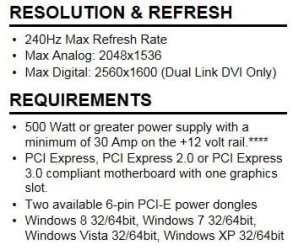
The screen going black after the loading Windows notification has been around for quite awhile. When you delete the driver folder in C:/Nvidia/Display Drivers, those are the drivers you have removed from your system. Checking the clean install box during the installation process is supposed to remove all left over drivers. You have to have a card capable of a 4K display. According to your System Specs, you have a GTX 670. I have a 4 GB SC 670 and the max display resolution is, from Nvidia's web site
670.JPG
 

My Computers

System One System Two

  • Computer type
    PC/Desktop
    Computer Manufacturer/Model Number
    ALWAYS UNDER CONSTRUCTION
    OS
    Windows 11 Pro
    CPU
    Ryzen 9 5900X
    Motherboard
    Asus X570 Crosshair Viii Hero
    Memory
    32GB G Skill DDR4-3600
    Graphics Card(s)
    EVGA RTX 3080 FTW 3 Ultra
    Sound Card
    On Board/Sennheiser PC37X Headset
    Monitor(s) Displays
    3 X Asus 27"
    Screen Resolution
    2560x1440
    Hard Drives
    2 X 1 TB NVME drives
    PSU
    EVGA 850
    Case
    Phanteks Eclipse P400A
    Cooling
    EVGA 280 AIO
    Keyboard
    Logitech G510s/ Logitech G13
    Mouse
    Logitech G502
    Internet Speed
    24/1
    Antivirus
    ESET/MBAM Pro/SAS Pro
    Browser
    Chrome/ Firefox/ Edge
  • Computer type
    Laptop
    System Manufacturer/Model Number
    Dell 16 Plus
    OS
    Windows 11 Pro
    CPU
    Intel Ultra 9 288V
    Memory
    32 GB LPDDR5X 8533
    Monitor(s) Displays
    16" Mini-LED HDR600 Touch 90 Hz
    Screen Resolution
    2560X1600
    Hard Drives
    1 TB NVME
GeForce GTX 670 | Specifications | GeForce

Spec tab def does show it is capable of 4K (naturally using the right connector and the driver to make it so). And thus why I want the updated driver.

I upgraded ASUS mobo with 1st bios that "works better with Windows 8" this evening (although I NEVER plan to get 8). I didn't get the latest 2014 beta because all that is new is it allows for is 16GBX8 RAM install, and at 300 dollars plus a stick who can afford that..lol. But I figure a newer BIOS cannot hurt. I will wait until next weekend and try again perhaps. When my 4th panel broke a year ago I left the cable just dangling still attached to the card. Who knows...maybe that wigged the install. Anyway excess cable detached. When I try again I'll update again. Checked the clean install..followed all the steps. YEs I saw it has been around for a while---too bad---think it wouldn't have to be this hard. It wasn't a few to 3 years back.

edit--and oh if I just canno get the driver updated or the card ends up not supporting 4K then I am not adverse to going back to AMD driver and a Radeon R9 290X. And I am not a gamer so dont require the highest performance.
 
Last edited:

My Computer

Computer Manufacturer/Model Number
Custom build; parts from the Egg
OS
windows 7 Professional 64 Bit
CPU
I7-3930
Motherboard
Asus P9X79 PRO
Memory
G.Skill 4X 4 GB DR3 240 pin 16GB total
Graphics Card(s)
EVGA 670
Sound Card
Energy Take 5, Sennheiser HD 205 phones, X-FI
Monitor(s) Displays
Hanns G 21.5" HH221 and Samsung 19" 940BW and Hannspree
Screen Resolution
2X 1920X1080 and 1X 1440X900
Hard Drives
3-- internal 250 GB WD; 1-- internal 1 TB Samsung ---plus 3 WD external HDs (sizes vary to 1.5 TB); Crucial M4 128GB SSD, 1 Pioneer BDR-207 Bluray writer;
and 1--LG Lightscribe DVD drive
PSU
1000 Watt XFX Pro Series
Case
Thermaltake Chaser
Cooling
Corsair H80
Keyboard
Logitech Wireless and backlit
Mouse
Logitech Rollerball
Other Info
79 " long desk from Ikea. Sauder 71 inch long "speaker" shelf.

Optical and analog outs to a Yamaha RX-V 650 driving Energy Take 5.1 speaker system. Technics TT. Realistic mixer. Senns cans.
tried again

Ok I was bored so I tried again since removing the cable and updating the mobo BIOS. Result is exactly the same. 2 monitors black and the primary is grey and does nothing after the windows splash screen. Every time I have to attempt to reboot 5 times before it offers to let me do a startup repair which always works after about 15 min. I was smart this time around and did some critical update install right before so it wouldn't pick a repair point before yesterday when I made some changes.

So things back to my humming along and splendid normal 3 monitor blazing away. No complaints. I just want that latest Nvidia driver installed and can't make it happen !

WOULD IT HELP TO>>>> 1) I noticed display fusion service running. Should I make sure this is stopped before doing the process ? 2) Would it help to totally unplug the other 2 monitors from the card when attempting the update--or would it matter ?

Thanks in advance ! So scratching my head here.
 

My Computer

Computer Manufacturer/Model Number
Custom build; parts from the Egg
OS
windows 7 Professional 64 Bit
CPU
I7-3930
Motherboard
Asus P9X79 PRO
Memory
G.Skill 4X 4 GB DR3 240 pin 16GB total
Graphics Card(s)
EVGA 670
Sound Card
Energy Take 5, Sennheiser HD 205 phones, X-FI
Monitor(s) Displays
Hanns G 21.5" HH221 and Samsung 19" 940BW and Hannspree
Screen Resolution
2X 1920X1080 and 1X 1440X900
Hard Drives
3-- internal 250 GB WD; 1-- internal 1 TB Samsung ---plus 3 WD external HDs (sizes vary to 1.5 TB); Crucial M4 128GB SSD, 1 Pioneer BDR-207 Bluray writer;
and 1--LG Lightscribe DVD drive
PSU
1000 Watt XFX Pro Series
Case
Thermaltake Chaser
Cooling
Corsair H80
Keyboard
Logitech Wireless and backlit
Mouse
Logitech Rollerball
Other Info
79 " long desk from Ikea. Sauder 71 inch long "speaker" shelf.

Optical and analog outs to a Yamaha RX-V 650 driving Energy Take 5.1 speaker system. Technics TT. Realistic mixer. Senns cans.
Well possibly no one's looking anymore...but just in case...

Last night I successfully upgraded the vbios of the EVGA GTX 670 card.

Today after work I used display driver uninstaller used in safe mode. Took additional steps of unplugging ethernet cable, unplugging 2 of the monitors, making sure displayfusion svc was stopped--but I guess safe mode would have taken care of that. I even uninstalled the one microsoft update (KB3004394) that is supposedly known to cause this problem under windows 8...thought I'd give a shot.

As in all other tries the latest Nvidia driver did install. But with a slightly different result this time. With one monitor, instead of getting stuck on grey after the Windows 7 splash screen it just went to pure black and power off.

I plugged everything back in. I was able to do a boot to safe and revert back in time straight away instead of having to reboot 5 times to force a startup repair--so learned one thing--quickly making sure numlock is off on the keyboard lets one go ahead and actually select things from the start windows normal, start in safe mode, etc screen.

And done that way is TONS quicker than the forced way..I will venture to say 3 minutes rather than 30.

So once again I am back to my perfectly acceptable for now 3 monitor setup in the configuration I like...albeit with the 3.11 driver still. LOL It has to be something simple right...? Or maybe Nvidias latest driver installs really are just FUBAR....

I am going to post on the DDU section of Nvidia forums as well but I know the author will want event logs and such--totally forgot to do that before I startup repaired. edit--guess the roll back dont matter there--I still have events logged for the latest failed attempts.

Any other ideas before I just say give and forget about it until I just do a totally new build (likely a year plus after Windows 10 is stable).
 
Last edited:

My Computer

Computer Manufacturer/Model Number
Custom build; parts from the Egg
OS
windows 7 Professional 64 Bit
CPU
I7-3930
Motherboard
Asus P9X79 PRO
Memory
G.Skill 4X 4 GB DR3 240 pin 16GB total
Graphics Card(s)
EVGA 670
Sound Card
Energy Take 5, Sennheiser HD 205 phones, X-FI
Monitor(s) Displays
Hanns G 21.5" HH221 and Samsung 19" 940BW and Hannspree
Screen Resolution
2X 1920X1080 and 1X 1440X900
Hard Drives
3-- internal 250 GB WD; 1-- internal 1 TB Samsung ---plus 3 WD external HDs (sizes vary to 1.5 TB); Crucial M4 128GB SSD, 1 Pioneer BDR-207 Bluray writer;
and 1--LG Lightscribe DVD drive
PSU
1000 Watt XFX Pro Series
Case
Thermaltake Chaser
Cooling
Corsair H80
Keyboard
Logitech Wireless and backlit
Mouse
Logitech Rollerball
Other Info
79 " long desk from Ikea. Sauder 71 inch long "speaker" shelf.

Optical and analog outs to a Yamaha RX-V 650 driving Energy Take 5.1 speaker system. Technics TT. Realistic mixer. Senns cans.
Took the additional steps of unplugging a bunch of USB enabled devices and for grins let the driver update from windows update. It promptly gave an error code. But when I looked in Nvidia panel and GPU-Z the new update was listed. However on re-boot, SAME THING, nothing past windows splash screen. Did the usual restart repair.

BUT this time my Sound has totally whacked out. After plugging all back in and even deleting and re installing Roland Octacapture...NOTHING...just says cannot play testtone---

Now it will be time to let Macrium Reflect do a system image restore from several weeks ago, I think of just C drive and hopefully I will have my sound back. I will just leave well enough alone I guess. I've never had such problems after only wanting to update a graphics driver !
 

My Computer

Computer Manufacturer/Model Number
Custom build; parts from the Egg
OS
windows 7 Professional 64 Bit
CPU
I7-3930
Motherboard
Asus P9X79 PRO
Memory
G.Skill 4X 4 GB DR3 240 pin 16GB total
Graphics Card(s)
EVGA 670
Sound Card
Energy Take 5, Sennheiser HD 205 phones, X-FI
Monitor(s) Displays
Hanns G 21.5" HH221 and Samsung 19" 940BW and Hannspree
Screen Resolution
2X 1920X1080 and 1X 1440X900
Hard Drives
3-- internal 250 GB WD; 1-- internal 1 TB Samsung ---plus 3 WD external HDs (sizes vary to 1.5 TB); Crucial M4 128GB SSD, 1 Pioneer BDR-207 Bluray writer;
and 1--LG Lightscribe DVD drive
PSU
1000 Watt XFX Pro Series
Case
Thermaltake Chaser
Cooling
Corsair H80
Keyboard
Logitech Wireless and backlit
Mouse
Logitech Rollerball
Other Info
79 " long desk from Ikea. Sauder 71 inch long "speaker" shelf.

Optical and analog outs to a Yamaha RX-V 650 driving Energy Take 5.1 speaker system. Technics TT. Realistic mixer. Senns cans.
I haven't followed your steps to-the-letter but regarding the problem of "where's this nvidia driver coming from?" it is likely the Driver Store. I have had good luck using [url=http://driverstoreexplorer.codeplex.com/]DriverStore Explorer to clean-out old junk I know I don't want to see any more. I believe this is where Windows stores 3rd party drivers and all "roll-back" items.[/URL]

Another useful tool is DriverView from Nirsoft which will show you exactly what is actually running on your system.
http://driverstoreexplorer.codeplex.com/
 

My Computer

Computer type
Laptop
Computer Manufacturer/Model Number
Dell Latitude E6540 Laptop
OS
Windows 7 Professional 64bit
CPU
Intel Core i7 4600M @ 2.90GHz
Motherboard
Dell Inc. 0CYT5F (SOCKET 0)
Memory
16.0GB Dual-Channel DDR3 @ 797MHz (11-11-11-28)
Graphics Card(s)
Intel HD Graphics 4600 (Dell) 2048MB ATI AMD Radeon HD 8790M
Sound Card
Realtek High Definition Audio
Monitor(s) Displays
HP ZR30w (2560x1600@60Hz)
Hard Drives
256GB LITEONIT LMT-256M6M-41 mm SATA (SSD)
1TB Samsung SSD 860 EVO mSATA SATA (SSD)
2TB USB 3.0 USB Device
115GB SanDisk Ultra Fit USB
Other Info
Multiple Dell E-Port Plus II Port Replicator/Docking Stations 0Y72NH USB 3.0 + 130W AC Adapters
I will remember to check in to those. For now, this evening I was able to successfully run Macrium Reflect free version last image I backed up 3 weeks ago. After telling the rescue media where a USB3 driver folder was it went smoothly...less than 38 minutes and I'm back to exactly where I was when I started down the slippery slope.

Glad my sound is back. I use an Octacapture card with all analog outs to a 5.1 input on a Yamaha receiver. A steallar setup that I hated when I hosed it last night--to the point of staying up until 1 AM trying to fix it !
 

My Computer

Computer Manufacturer/Model Number
Custom build; parts from the Egg
OS
windows 7 Professional 64 Bit
CPU
I7-3930
Motherboard
Asus P9X79 PRO
Memory
G.Skill 4X 4 GB DR3 240 pin 16GB total
Graphics Card(s)
EVGA 670
Sound Card
Energy Take 5, Sennheiser HD 205 phones, X-FI
Monitor(s) Displays
Hanns G 21.5" HH221 and Samsung 19" 940BW and Hannspree
Screen Resolution
2X 1920X1080 and 1X 1440X900
Hard Drives
3-- internal 250 GB WD; 1-- internal 1 TB Samsung ---plus 3 WD external HDs (sizes vary to 1.5 TB); Crucial M4 128GB SSD, 1 Pioneer BDR-207 Bluray writer;
and 1--LG Lightscribe DVD drive
PSU
1000 Watt XFX Pro Series
Case
Thermaltake Chaser
Cooling
Corsair H80
Keyboard
Logitech Wireless and backlit
Mouse
Logitech Rollerball
Other Info
79 " long desk from Ikea. Sauder 71 inch long "speaker" shelf.

Optical and analog outs to a Yamaha RX-V 650 driving Energy Take 5.1 speaker system. Technics TT. Realistic mixer. Senns cans.
Wait I just thought of something--Essenbee you said the card has to be capable of 4K...I figured that was just to run the resoultion at 4K on a 4K panel..BUT maybe it means----to even install the driver successfully..... hmmmm... And you are likely right about the card ultimately not being capable to do 4K rez----The specs I saw were for GeForce tricked out "reference" card. My lowly card has only 2MB Video Ram compared to the reference which had 5.

But then again I was on A AMD forum the other night and I see R 9 290X owners are having the EXACT same problems with stuck windows boots. Maybe 4K is just not ready for prime time quite yet unless EVERYTHING in the system is new.
 

My Computer

Computer Manufacturer/Model Number
Custom build; parts from the Egg
OS
windows 7 Professional 64 Bit
CPU
I7-3930
Motherboard
Asus P9X79 PRO
Memory
G.Skill 4X 4 GB DR3 240 pin 16GB total
Graphics Card(s)
EVGA 670
Sound Card
Energy Take 5, Sennheiser HD 205 phones, X-FI
Monitor(s) Displays
Hanns G 21.5" HH221 and Samsung 19" 940BW and Hannspree
Screen Resolution
2X 1920X1080 and 1X 1440X900
Hard Drives
3-- internal 250 GB WD; 1-- internal 1 TB Samsung ---plus 3 WD external HDs (sizes vary to 1.5 TB); Crucial M4 128GB SSD, 1 Pioneer BDR-207 Bluray writer;
and 1--LG Lightscribe DVD drive
PSU
1000 Watt XFX Pro Series
Case
Thermaltake Chaser
Cooling
Corsair H80
Keyboard
Logitech Wireless and backlit
Mouse
Logitech Rollerball
Other Info
79 " long desk from Ikea. Sauder 71 inch long "speaker" shelf.

Optical and analog outs to a Yamaha RX-V 650 driving Energy Take 5.1 speaker system. Technics TT. Realistic mixer. Senns cans.
The specs I quoted in that post came from the EVGA Web Site for your card. However, this tutorial was not really written for people in your circumstances. I wrote it for people who were having driver problems because of leftover drivers and driver crashes because of it. It has helped quite a few people in those circumstances. But, it is not a bad idea to install drivers that way in any case. There are a lot of drivers in the 'Express Install' package that few people use and need. In some of those cases, the Nvidia drivers conflict with the Motherboard drivers too. You have Audio and HDMI drivers in your Motherboard drivers. Two sets can conflict with each other and cause other problems. The intent is a clean install and reducing the possibility of driver conflicts. It does not sound as though that is the problem you are experiencing. I do know there are a lot of people running 4K monitors. So, it can be done. Your particular problem, I have no idea about or why, assuming your card is capable of running 4K. 2 GB of Vram will get eaten up pretty fast running 4K, I would think.
 

My Computers

System One System Two

  • Computer type
    PC/Desktop
    Computer Manufacturer/Model Number
    ALWAYS UNDER CONSTRUCTION
    OS
    Windows 11 Pro
    CPU
    Ryzen 9 5900X
    Motherboard
    Asus X570 Crosshair Viii Hero
    Memory
    32GB G Skill DDR4-3600
    Graphics Card(s)
    EVGA RTX 3080 FTW 3 Ultra
    Sound Card
    On Board/Sennheiser PC37X Headset
    Monitor(s) Displays
    3 X Asus 27"
    Screen Resolution
    2560x1440
    Hard Drives
    2 X 1 TB NVME drives
    PSU
    EVGA 850
    Case
    Phanteks Eclipse P400A
    Cooling
    EVGA 280 AIO
    Keyboard
    Logitech G510s/ Logitech G13
    Mouse
    Logitech G502
    Internet Speed
    24/1
    Antivirus
    ESET/MBAM Pro/SAS Pro
    Browser
    Chrome/ Firefox/ Edge
  • Computer type
    Laptop
    System Manufacturer/Model Number
    Dell 16 Plus
    OS
    Windows 11 Pro
    CPU
    Intel Ultra 9 288V
    Memory
    32 GB LPDDR5X 8533
    Monitor(s) Displays
    16" Mini-LED HDR600 Touch 90 Hz
    Screen Resolution
    2560X1600
    Hard Drives
    1 TB NVME
Hmm regarding NVidia drivers I have just had a an interesting experience with my new laptop in that Asus support advised me to download drivers for the GTX 860M and after five different drivers all said there was no such device on board.

Now I happened to be able to get onto the Asus support site in Sydney and within an hour my GPU is functional and all because the drivers for the GPU from NVidia and the global Asus support site were not what was needed and the driver had to come through an Asus support site did not know about and not the one that one can Google!!

It turns out that this machine was made in the US and probably a refurbished one and the fellow I spoke to was so knowledgeable it reaffirmed my faith in Asus. Mind you it took three months of trying before the fix could be applied!!

So it seems that NVidia drivers are not the same for any old machine(I mean at least Asus ones)
 

My Computer

Computer type
PC/Desktop
Computer Manufacturer/Model Number
Own build (new) Desk1 / Asus ROG Win 7 / Desk2 1st build
OS
Desk1 7 Home Prem / Desk2 10 Pro / Main lap Asus ROG 10 Pro 2 laptop Toshiba 7 Pro Asus P2520 7 & 10
CPU
Desk1 i5 3750K / Laptop i7 GTX 860M / Desk2 i5 2500
Motherboard
Desk1 Asus P877-V / Desk2 Gigabyte H67 UD3H / Laptop ?
Memory
Desk1 8GB (1866) / Desk2 16GB (1333) / Laptop 8Gb DDR3
Graphics Card(s)
Desk 1& 2NVidia GTX 650 & Laptops on board Intel
Sound Card
Desk 1 & 2 -XONAR DG Realtek High Def audio Laptop
Monitor(s) Displays
Desk 1 Benq HD 2450 / Desk2 Philips 24" / Laptop 17.5"
Screen Resolution
1920x1080 D1 & D2 & Laptop 1
Hard Drives
Desk1 Samsung 120GB 830 SSD
Asus ROG 256GB 850 Pro SSD
Desk2 Samsung 840 256 SSD
Toshiba 120GB EVO
PSU
Desk 1 Corsair HX 1050/ Laptop ? / Desk 2 Corsair HX 650
Case
Desk 1 Cooler HAF XM ? Toshiba laptop / Desk2 Coolermaster
Cooling
Fans on all Desk1 -2 Desk2 - all Coolermasters 5 Laptop ?
Keyboard
Desk 1 MS Sidewinder X6 Desk 2 MS Sidewinder X 4
Mouse
Desk 1&2 - Gigabyte MS 900 gamer - laptop - Logitec wireless
Internet Speed
ADSL2+
Other Info
One other Desktop (tester) and spare Toshba laptop both with SSD's
Running Kaspersky 2016 ISS on all machines config'd identically
Logitec audio stereo systems on each machine (x3)
Canon MG5250MFC
Router/modem TP-Link running WPA2SK
Back
Top