NVIDIA Drivers - Avoid Problems

How to Avoid NVIDIA Driver Problems


   Information
This tutorial will show you how to do a clean install of NVIDIA graphics drivers for those having problems with the drivers.


Here's How:

1. Download the driver you want to install from your computer manufacturer or from NVIDIA.com.
See also: http://www.sevenforums.com/graphic-cards/602-latest-nvidia-forceware-video-drivers-windows-7-a.html
2. The first thing to do is open Windows updates, in the left column click change settings, in the drop down box select check for updates but let me choose whether to download and install them. The purpose of this is to keep Windows update from automatically installing a driver. We do not want conflicts with drivers.
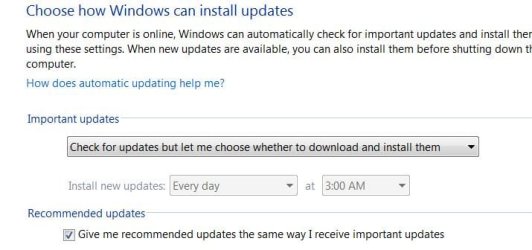
Update settings.JPG
3. Next go to your "C" dive and there should be a folder named Nvidia.
C drive.JPG
4. Open the folder and you will find a folder named 'Display Drivers', inside that folder will be all the drivers you have installed designated by number.

Display%20drivers.JPG
5. Delete all of the folders with numbers but Do Not delete the Display Driver Folder itself.

6. Next go to Control Panel (category View) and Uninstall a Program
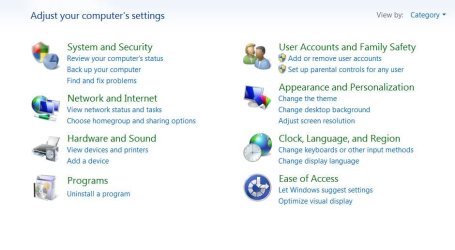
uninstall a program.JPG
7. Scroll down to the Nvidia drivers and begin to uninstall them but read the info box below before you start.

   Information
If you have an Nvidia chipset, DO NOT uninstall the chipset driver only the Display drivers. Also, uninstall all of the display type drivers but BE SURE TO UNINSTALL THE GRAPHICS DRIVER LAST.
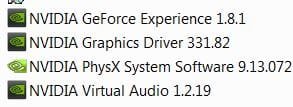
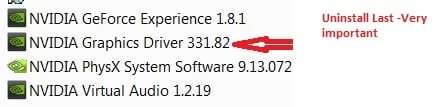
uninstall drivers CP.JPG

uninstall drivers CP 1.jpg
8. When you uninstall the Graphics driver, Windows will request a reboot, do so. Upon reboot Windows will install a graphics adapter, that is good.

9. Open the new driver you downloaded, agree to terms and select custom install. Under custom install uncheck everything except the Graphics driver, PhysX and GeForce experience, if you want that. Be sure the 'CLEAN INSTALL' box is checked
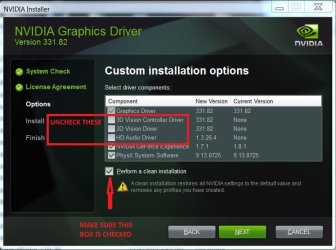
clean install drivers SET UP.jpg
10. Your set up should look like this.
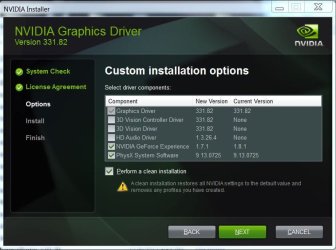
clean install drivers.JPG
11. Click next and begin the installation, after which you will reboot. This should give you a clean install of your drivers. You can now re set Windows Update to your preferred setting, as you are through.


Last edited:
Hmm regarding NVidia drivers I have just had a an interesting experience with my new laptop in that Asus support advised me to download drivers for the GTX 860M and after five different drivers all said there was no such device on board.

Now I happened to be able to get onto the Asus support site in Sydney and within an hour my GPU is functional and all because the drivers for the GPU from NVidia and the global Asus support site were not what was needed and the driver had to come through an Asus support site did not know about and not the one that one can Google!!

It turns out that this machine was made in the US and probably a refurbished one and the fellow I spoke to was so knowledgeable it reaffirmed my faith in Asus. Mind you it took three months of trying before the fix could be applied!!

So it seems that NVidia drivers are not the same for any old machine(I mean at least Asus ones)


Laptop drivers are usually modified drivers the OEM's alter to their specs, sometimes the Nvidia or AMD drivers will work but with laptops it is always best to get them from the OEM when available.

That's a good thing to remember in the BSOD threads John.
 

My Computer

Computer type
PC/Desktop
Computer Manufacturer/Model Number
Self Built
OS
Win 10 Pro x64
CPU
Intel I5-2500K @3.3GHz
Motherboard
Asrock P67 Extreme4
Memory
16GB G.Skill Ripjaws X (4x4GB)
Graphics Card(s)
EVGA GeForce 750 Ti SC 2GB
Sound Card
ASUS Xonar DG 5.1 Channels 24-bit 96KHz PCI Interface Sound
Monitor(s) Displays
auria eq2367
Screen Resolution
1920 x 1080
Hard Drives
250GB Samsung 850 EVO SSD
1TB WD Blue
1TB Hitachi
PSU
SeaSonic X 650W 80 Plus Gold
Case
Corsair Obsidian 750D
Cooling
Corsair H60, Three 140mm case fans
Keyboard
Logitech Wireless Keyboard K520
Mouse
Logitech Wireless Mouse M310
Internet Speed
Wave Broadband ~ 100 dn 5 up
Antivirus
Windows Defender, Malwarebytes Premium
Browser
Edge, IE11, Chrome
Other Info
Laptop specs: HP g7-1365dx /
CPU: AMD A6-3420M APU with Radeon(tm) HD Graphics /
RAM: Crucial 8Gb (2x4Gb) /
SSD: Crucial M4-CT128M4SSD2 ATA Device/ FW 000F /
GFX: AMD Radeon HD 6520G /
OS: Windows 10 Pro x64
Yes I agree Derek what annoyed ne though is the Asus support site bot local (Philippines call centre) and the global one (I am presuming Taiwan) gave me three different drivers yet the Sydney based one had the problem fixed in an hour because I was being directed to the wrong NVidia download site.

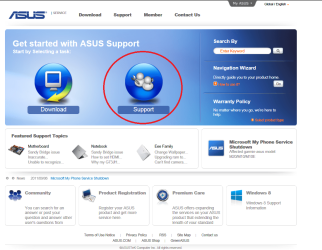
So if anyone who has an Asus machine particularly a laptop - is reading this then I would suggest you contact the very nearest one to you and it is I am assuming - support.asus.com just type that into the address bar no need for www. etc and you should come up with what is in my pic and sue the circled feature.
 

Attachments

  • Asus support.PNG
    Asus support.PNG
    129.3 KB · Views: 779

My Computer

Computer type
PC/Desktop
Computer Manufacturer/Model Number
Own build (new) Desk1 / Asus ROG Win 7 / Desk2 1st build
OS
Desk1 7 Home Prem / Desk2 10 Pro / Main lap Asus ROG 10 Pro 2 laptop Toshiba 7 Pro Asus P2520 7 & 10
CPU
Desk1 i5 3750K / Laptop i7 GTX 860M / Desk2 i5 2500
Motherboard
Desk1 Asus P877-V / Desk2 Gigabyte H67 UD3H / Laptop ?
Memory
Desk1 8GB (1866) / Desk2 16GB (1333) / Laptop 8Gb DDR3
Graphics Card(s)
Desk 1& 2NVidia GTX 650 & Laptops on board Intel
Sound Card
Desk 1 & 2 -XONAR DG Realtek High Def audio Laptop
Monitor(s) Displays
Desk 1 Benq HD 2450 / Desk2 Philips 24" / Laptop 17.5"
Screen Resolution
1920x1080 D1 & D2 & Laptop 1
Hard Drives
Desk1 Samsung 120GB 830 SSD
Asus ROG 256GB 850 Pro SSD
Desk2 Samsung 840 256 SSD
Toshiba 120GB EVO
PSU
Desk 1 Corsair HX 1050/ Laptop ? / Desk 2 Corsair HX 650
Case
Desk 1 Cooler HAF XM ? Toshiba laptop / Desk2 Coolermaster
Cooling
Fans on all Desk1 -2 Desk2 - all Coolermasters 5 Laptop ?
Keyboard
Desk 1 MS Sidewinder X6 Desk 2 MS Sidewinder X 4
Mouse
Desk 1&2 - Gigabyte MS 900 gamer - laptop - Logitec wireless
Internet Speed
ADSL2+
Other Info
One other Desktop (tester) and spare Toshba laptop both with SSD's
Running Kaspersky 2016 ISS on all machines config'd identically
Logitec audio stereo systems on each machine (x3)
Canon MG5250MFC
Router/modem TP-Link running WPA2SK
After step 8....after it installs the graphics adaptor it requests a reboot. Only problem is when computer reboots IT INSTALLS the Nvidia driver I just uninstalled.

Should I skip this reboot and try step 9 immediately ?

If Nvidia installer package worked correctly in 1st place........lot of people having problem using it with all panels black right after using it and right after windows splash screen appears...only way out seems to be letting windows due a repair (which is a roll back in time). Only reason I am trying methodology in this thread which isnt working out for me either. All I want is the updated driver so when pop for the Dell 4K panel......
Same problem here. I'm trying to confirm or eliminate driver issues as a cause for BSODs (it's either that or the graphics card itself, happens when I play games) but Step 8, rebooting the computer, effectively undoes Step 7, uninstallation of the drivers, hence the driver installer (Step 9) is just going to refuse to do anything on the grounds a newer version is already installed.
 

My Computer

Computer type
PC/Desktop
Computer Manufacturer/Model Number
Zoostorm
OS
Windows 7 Home Premium 64bit
CPU
Pentium Dual-Core E5700 @ 3.00GHz
Memory
8 GB
Graphics Card(s)
Nvidia Geforce GT 430
Browser
Google Chrome
A Graphics Adapter is necessary and not the Nvidia Driver. But, it does not require a reboot. If you set Windows Update to 'let me decide what to install' It should not install a driver.
 

My Computers

System One System Two

  • Computer type
    PC/Desktop
    Computer Manufacturer/Model Number
    ALWAYS UNDER CONSTRUCTION
    OS
    Windows 11 Pro
    CPU
    Ryzen 9 5900X
    Motherboard
    Asus X570 Crosshair Viii Hero
    Memory
    32GB G Skill DDR4-3600
    Graphics Card(s)
    EVGA RTX 3080 FTW 3 Ultra
    Sound Card
    On Board/Sennheiser PC37X Headset
    Monitor(s) Displays
    3 X Asus 27"
    Screen Resolution
    2560x1440
    Hard Drives
    2 X 1 TB NVME drives
    PSU
    EVGA 850
    Case
    Phanteks Eclipse P400A
    Cooling
    EVGA 280 AIO
    Keyboard
    Logitech G510s/ Logitech G13
    Mouse
    Logitech G502
    Internet Speed
    24/1
    Antivirus
    ESET/MBAM Pro/SAS Pro
    Browser
    Chrome/ Firefox/ Edge
  • Computer type
    Laptop
    System Manufacturer/Model Number
    Dell 16 Plus
    OS
    Windows 11 Pro
    CPU
    Intel Ultra 9 288V
    Memory
    32 GB LPDDR5X 8533
    Monitor(s) Displays
    16" Mini-LED HDR600 Touch 90 Hz
    Screen Resolution
    2560X1600
    Hard Drives
    1 TB NVME
Also, some times Windows Update will have an Nvidia Driver, I believe it will uninstall the C:/Nvidia folder and the current driver will probably be in Windows Updates or wherever Windows installs drivers. I have my Windows update set like the tutorial suggests all the time and will usually not install hardware updates but go find one that is more current. Don't tell Greg.


I don't think it is a good practice to ever advise consumers to turn off Windows Update as they likely will never return to see what all they're missing and 7 is so heavily patched now that you can almost be sure there are patches there that some hardware, software or the OS depend upon. Often these are strangely queued under Optional.

My point of view here is mostly from Clean Reinstall Factory OEM where I would still always go with WIndows Update drivers since I can't remember a single one of it's 1.3+ million users who reported bogus WUD drivers, and that's acknowledging their screw-up rate of one in a million.

With self-builds there's better reason to immediately plug in the chipset and GPU drivers, possibly after seeing what WUD offers since you know in most cases that's the OS speaking.

In either case I always turn off all GPU software in msconfig>Statup and >Services (after Hiding all MS Services) and in Services.msc since it's bloatware can present problems and is not needed.

Just another point of view. You guys work in BSOD which has my greatest respect, and will know how much GPU software is too much. Last I recall on the subject was something Archie said about never using it.
 
Greg, in the beginning I stated that the tutorial is mainly for people who are already having driver problems. I said turn WU off just for the driver install. The last sentence in the tutorial states to turn WU back to where you like it.
 

My Computers

System One System Two

  • Computer type
    PC/Desktop
    Computer Manufacturer/Model Number
    ALWAYS UNDER CONSTRUCTION
    OS
    Windows 11 Pro
    CPU
    Ryzen 9 5900X
    Motherboard
    Asus X570 Crosshair Viii Hero
    Memory
    32GB G Skill DDR4-3600
    Graphics Card(s)
    EVGA RTX 3080 FTW 3 Ultra
    Sound Card
    On Board/Sennheiser PC37X Headset
    Monitor(s) Displays
    3 X Asus 27"
    Screen Resolution
    2560x1440
    Hard Drives
    2 X 1 TB NVME drives
    PSU
    EVGA 850
    Case
    Phanteks Eclipse P400A
    Cooling
    EVGA 280 AIO
    Keyboard
    Logitech G510s/ Logitech G13
    Mouse
    Logitech G502
    Internet Speed
    24/1
    Antivirus
    ESET/MBAM Pro/SAS Pro
    Browser
    Chrome/ Firefox/ Edge
  • Computer type
    Laptop
    System Manufacturer/Model Number
    Dell 16 Plus
    OS
    Windows 11 Pro
    CPU
    Intel Ultra 9 288V
    Memory
    32 GB LPDDR5X 8533
    Monitor(s) Displays
    16" Mini-LED HDR600 Touch 90 Hz
    Screen Resolution
    2560X1600
    Hard Drives
    1 TB NVME
Hi,
Interestingly enough I have 2 NVidia display driver folders :/
331.82
347.88
 

My Computer

Computer type
PC/Desktop
Computer Manufacturer/Model Number
Custom assembled by me :}
OS
Win-7-Pro64bit 7-H-Prem-64bit
CPU
i7-5930K 2nd i9-9940x both water blocked VRM's too
Motherboard
ASUS SABERTOOTH X99 2nd ASUS x299 Apex
Memory
Trident-z 3200C14 2nd Trident-z 3600C16
Graphics Card(s)
EVGA 1080ti ftw3 2nd Titan Xp both water blocked
Sound Card
Built-in Realtek
Monitor(s) Displays
1-AOC G2460PG 24"G-Sync 144Hz/ 2nd 1-ASUS VG248QE 24" 144Hz
Screen Resolution
1920 x 1080 144Hz
Hard Drives
2-Samsung M.2 Evo & Evo Plus
2-Samsung 850 EVO 500GB SSD's/ 3-2.5 W.D. Black 1tb-&3-1tb/3-3.5 WD Black 1tb hdd's
PSU
EVGA SuperNOVA 1000-P2 2nd 1200-P2
Case
2-Corsair Obsidian Series 450D Black ATX Mid Tower
Cooling
Custom water loops
Keyboard
Logitech G710+/ 2nd Logitech G910
Mouse
2-RedDragon M901 Perdition 16400 dpi Gaming mouse = wired
Internet Speed
Comcast Ping 19ms 89.31mbps download speed 6.12mbps upload
Antivirus
Malwarebytes Pro/ Superantispyware Pro
Browser
FireFox & Pale moon
Other Info
2nd ASUS X299 Apex/Intel i9-9940x with Custom water loop/7H-Prem-x64/Corsair 450D case/Ram Trident-z 3600C16 4x8gb / Samsung970Evo plus 500gb SSD/Dual ssd EZ swap evo/PSU EVGA SuperNova 1200w-P2 80+Platinum/GPU Titan Xp /8-ML-140 on push-pull on 2-280GTX rads
Which one is installed in Device Manager? How's performance?

Recent Nvidia updates are bypassing MS config and will need disabling in services.MSC.
 
Hi,
I can't tell there isn't a listing for it would it be in display adapters .....gtx 980 properties ?
But GeForce experience shows 353.30 6/22/15
 

My Computer

Computer type
PC/Desktop
Computer Manufacturer/Model Number
Custom assembled by me :}
OS
Win-7-Pro64bit 7-H-Prem-64bit
CPU
i7-5930K 2nd i9-9940x both water blocked VRM's too
Motherboard
ASUS SABERTOOTH X99 2nd ASUS x299 Apex
Memory
Trident-z 3200C14 2nd Trident-z 3600C16
Graphics Card(s)
EVGA 1080ti ftw3 2nd Titan Xp both water blocked
Sound Card
Built-in Realtek
Monitor(s) Displays
1-AOC G2460PG 24"G-Sync 144Hz/ 2nd 1-ASUS VG248QE 24" 144Hz
Screen Resolution
1920 x 1080 144Hz
Hard Drives
2-Samsung M.2 Evo & Evo Plus
2-Samsung 850 EVO 500GB SSD's/ 3-2.5 W.D. Black 1tb-&3-1tb/3-3.5 WD Black 1tb hdd's
PSU
EVGA SuperNOVA 1000-P2 2nd 1200-P2
Case
2-Corsair Obsidian Series 450D Black ATX Mid Tower
Cooling
Custom water loops
Keyboard
Logitech G710+/ 2nd Logitech G910
Mouse
2-RedDragon M901 Perdition 16400 dpi Gaming mouse = wired
Internet Speed
Comcast Ping 19ms 89.31mbps download speed 6.12mbps upload
Antivirus
Malwarebytes Pro/ Superantispyware Pro
Browser
FireFox & Pale moon
Other Info
2nd ASUS X299 Apex/Intel i9-9940x with Custom water loop/7H-Prem-x64/Corsair 450D case/Ram Trident-z 3600C16 4x8gb / Samsung970Evo plus 500gb SSD/Dual ssd EZ swap evo/PSU EVGA SuperNova 1200w-P2 80+Platinum/GPU Titan Xp /8-ML-140 on push-pull on 2-280GTX rads
It's usually coded in the Display driver version.

It looks like you've gotten a newer one than either of those, Probably from Windows Update.

In any case you can delete those two files from C as they are merely staging files for the driver install.
 
Thanks both ?
I guess that makes since this is the second 980 I've installed the first was the 980 hybrid which I guess is the 347.88
And the second probably came from the install disk of the asus 980 gold card which was an older driver obviously 331.82
 

My Computer

Computer type
PC/Desktop
Computer Manufacturer/Model Number
Custom assembled by me :}
OS
Win-7-Pro64bit 7-H-Prem-64bit
CPU
i7-5930K 2nd i9-9940x both water blocked VRM's too
Motherboard
ASUS SABERTOOTH X99 2nd ASUS x299 Apex
Memory
Trident-z 3200C14 2nd Trident-z 3600C16
Graphics Card(s)
EVGA 1080ti ftw3 2nd Titan Xp both water blocked
Sound Card
Built-in Realtek
Monitor(s) Displays
1-AOC G2460PG 24"G-Sync 144Hz/ 2nd 1-ASUS VG248QE 24" 144Hz
Screen Resolution
1920 x 1080 144Hz
Hard Drives
2-Samsung M.2 Evo & Evo Plus
2-Samsung 850 EVO 500GB SSD's/ 3-2.5 W.D. Black 1tb-&3-1tb/3-3.5 WD Black 1tb hdd's
PSU
EVGA SuperNOVA 1000-P2 2nd 1200-P2
Case
2-Corsair Obsidian Series 450D Black ATX Mid Tower
Cooling
Custom water loops
Keyboard
Logitech G710+/ 2nd Logitech G910
Mouse
2-RedDragon M901 Perdition 16400 dpi Gaming mouse = wired
Internet Speed
Comcast Ping 19ms 89.31mbps download speed 6.12mbps upload
Antivirus
Malwarebytes Pro/ Superantispyware Pro
Browser
FireFox & Pale moon
Other Info
2nd ASUS X299 Apex/Intel i9-9940x with Custom water loop/7H-Prem-x64/Corsair 450D case/Ram Trident-z 3600C16 4x8gb / Samsung970Evo plus 500gb SSD/Dual ssd EZ swap evo/PSU EVGA SuperNova 1200w-P2 80+Platinum/GPU Titan Xp /8-ML-140 on push-pull on 2-280GTX rads
Mike, even when you uninstall drivers, the drivers are left in that folder. That's why you have 2 folders in Display drivers. When you reinstall, delete all of those folders before you install the new drivers. That's really the point of this whole tutorial. Get rid of all the older drivers and only install the ones you need. I never install anything but the Display driver and PhysX. GeForce Experience is causing a lot of people all kinds of problems.
 

My Computers

System One System Two

  • Computer type
    PC/Desktop
    Computer Manufacturer/Model Number
    ALWAYS UNDER CONSTRUCTION
    OS
    Windows 11 Pro
    CPU
    Ryzen 9 5900X
    Motherboard
    Asus X570 Crosshair Viii Hero
    Memory
    32GB G Skill DDR4-3600
    Graphics Card(s)
    EVGA RTX 3080 FTW 3 Ultra
    Sound Card
    On Board/Sennheiser PC37X Headset
    Monitor(s) Displays
    3 X Asus 27"
    Screen Resolution
    2560x1440
    Hard Drives
    2 X 1 TB NVME drives
    PSU
    EVGA 850
    Case
    Phanteks Eclipse P400A
    Cooling
    EVGA 280 AIO
    Keyboard
    Logitech G510s/ Logitech G13
    Mouse
    Logitech G502
    Internet Speed
    24/1
    Antivirus
    ESET/MBAM Pro/SAS Pro
    Browser
    Chrome/ Firefox/ Edge
  • Computer type
    Laptop
    System Manufacturer/Model Number
    Dell 16 Plus
    OS
    Windows 11 Pro
    CPU
    Intel Ultra 9 288V
    Memory
    32 GB LPDDR5X 8533
    Monitor(s) Displays
    16" Mini-LED HDR600 Touch 90 Hz
    Screen Resolution
    2560X1600
    Hard Drives
    1 TB NVME
Hey, im noticing something similar that happened to someone else in this thread where at step 8, my PC installs drivers on its own even when i have WU disabled and no internet connection. I read a few posts but i couldn't find a solution to it. How do i go about disabling that? Also windows does not seem to install any adapter for the card, but when i look in WU i am able to download one manually, should i do that?
 

My Computer

Computer type
PC/Desktop
Computer Manufacturer/Model Number
Custom build
OS
Windows 7 Professional N 64bit
CPU
AMD Phenom(tm) II X4 965 Processor 3.42GHz
Motherboard
Gigabyte GA-890GPA-UD3H
Memory
4GB RAM
Graphics Card(s)
Nvidia GTX 750
Hard Drives
SSD samsung EVO BASIC
Antivirus
NOD32
Browser
Google Chrome
It installs a graphics adaptor, which isn't a display driver. That is OK and needed. After installing the Drivers turn Windows Updates back to Automatic.
 

My Computers

System One System Two

  • Computer type
    PC/Desktop
    Computer Manufacturer/Model Number
    ALWAYS UNDER CONSTRUCTION
    OS
    Windows 11 Pro
    CPU
    Ryzen 9 5900X
    Motherboard
    Asus X570 Crosshair Viii Hero
    Memory
    32GB G Skill DDR4-3600
    Graphics Card(s)
    EVGA RTX 3080 FTW 3 Ultra
    Sound Card
    On Board/Sennheiser PC37X Headset
    Monitor(s) Displays
    3 X Asus 27"
    Screen Resolution
    2560x1440
    Hard Drives
    2 X 1 TB NVME drives
    PSU
    EVGA 850
    Case
    Phanteks Eclipse P400A
    Cooling
    EVGA 280 AIO
    Keyboard
    Logitech G510s/ Logitech G13
    Mouse
    Logitech G502
    Internet Speed
    24/1
    Antivirus
    ESET/MBAM Pro/SAS Pro
    Browser
    Chrome/ Firefox/ Edge
  • Computer type
    Laptop
    System Manufacturer/Model Number
    Dell 16 Plus
    OS
    Windows 11 Pro
    CPU
    Intel Ultra 9 288V
    Memory
    32 GB LPDDR5X 8533
    Monitor(s) Displays
    16" Mini-LED HDR600 Touch 90 Hz
    Screen Resolution
    2560X1600
    Hard Drives
    1 TB NVME
Sorry i'm still a bit confused so i'll explain, (i don't want to bring my BSOD issue into this thread since it already has its own thread) when i get to step 8, it installs something (driver or adapter) and instantly tells me to restart my PC without being able to (clean)install the driver (331.65) i was actually about to install. on restart, i get BSOD and my PC won't boot unless i use safemode. In order to be able to boot into normal mode i have to remove what was just installed.

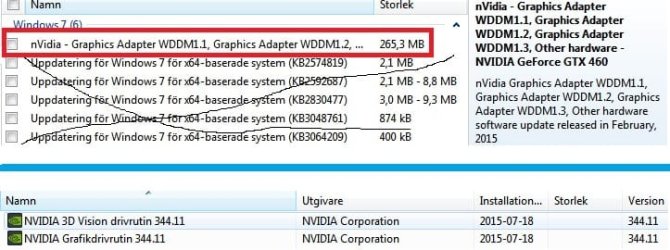
I uploaded a picture of what i have when i finish step 7 and 8.

Above the blue line is the Windows update thing that doesn't get installed right away, should i install it?

Under the blue line is what gets installed right away (adapter?) at step 8, are these the correct files?
 

Attachments

  • adapter.jpg
    adapter.jpg
    46.4 KB · Views: 134

My Computer

Computer type
PC/Desktop
Computer Manufacturer/Model Number
Custom build
OS
Windows 7 Professional N 64bit
CPU
AMD Phenom(tm) II X4 965 Processor 3.42GHz
Motherboard
Gigabyte GA-890GPA-UD3H
Memory
4GB RAM
Graphics Card(s)
Nvidia GTX 750
Hard Drives
SSD samsung EVO BASIC
Antivirus
NOD32
Browser
Google Chrome
If you have changed windows Updates to check for updates but let me decide whether to install them, then go ahead and do the custom install and install only the graphics driver and PhysX. Make sure the 'clean install' box is checked. then reboot, and set Windows Updates back to Automatic.
 

My Computers

System One System Two

  • Computer type
    PC/Desktop
    Computer Manufacturer/Model Number
    ALWAYS UNDER CONSTRUCTION
    OS
    Windows 11 Pro
    CPU
    Ryzen 9 5900X
    Motherboard
    Asus X570 Crosshair Viii Hero
    Memory
    32GB G Skill DDR4-3600
    Graphics Card(s)
    EVGA RTX 3080 FTW 3 Ultra
    Sound Card
    On Board/Sennheiser PC37X Headset
    Monitor(s) Displays
    3 X Asus 27"
    Screen Resolution
    2560x1440
    Hard Drives
    2 X 1 TB NVME drives
    PSU
    EVGA 850
    Case
    Phanteks Eclipse P400A
    Cooling
    EVGA 280 AIO
    Keyboard
    Logitech G510s/ Logitech G13
    Mouse
    Logitech G502
    Internet Speed
    24/1
    Antivirus
    ESET/MBAM Pro/SAS Pro
    Browser
    Chrome/ Firefox/ Edge
  • Computer type
    Laptop
    System Manufacturer/Model Number
    Dell 16 Plus
    OS
    Windows 11 Pro
    CPU
    Intel Ultra 9 288V
    Memory
    32 GB LPDDR5X 8533
    Monitor(s) Displays
    16" Mini-LED HDR600 Touch 90 Hz
    Screen Resolution
    2560X1600
    Hard Drives
    1 TB NVME
When i delete/uninstall all my drivers, and reboot, it immidiately installs those 2 files (Nvidia Graphic driver 344.11 and the 3D one) and asks me to reboot my PC. i clicked on reboot later, and did a clean install with the 331.65 with only driver and physx (although im not sure if physx installed, it already said i had a newer version) and clicked on reboot now. Ofcourse that just leaves me on a black screen after the windows logo and i have to boot into safemode again and uninstall everything.

I'm still confused as to why it installs those files from 344.11, i don't know how to stop it or if they even matter if you do a clean install for the next driver.

I guess i'll wait for Boozad for further info on how to continue.
 

My Computer

Computer type
PC/Desktop
Computer Manufacturer/Model Number
Custom build
OS
Windows 7 Professional N 64bit
CPU
AMD Phenom(tm) II X4 965 Processor 3.42GHz
Motherboard
Gigabyte GA-890GPA-UD3H
Memory
4GB RAM
Graphics Card(s)
Nvidia GTX 750
Hard Drives
SSD samsung EVO BASIC
Antivirus
NOD32
Browser
Google Chrome
Will it boot and run OK with the 344.11 Drivers? If so, just leave them there and use them. Did you set Windows Update to check but let me decide what to install? If you go to Windows Update and see the Nvidia drivers there, right click them and select Hide.
 

My Computers

System One System Two

  • Computer type
    PC/Desktop
    Computer Manufacturer/Model Number
    ALWAYS UNDER CONSTRUCTION
    OS
    Windows 11 Pro
    CPU
    Ryzen 9 5900X
    Motherboard
    Asus X570 Crosshair Viii Hero
    Memory
    32GB G Skill DDR4-3600
    Graphics Card(s)
    EVGA RTX 3080 FTW 3 Ultra
    Sound Card
    On Board/Sennheiser PC37X Headset
    Monitor(s) Displays
    3 X Asus 27"
    Screen Resolution
    2560x1440
    Hard Drives
    2 X 1 TB NVME drives
    PSU
    EVGA 850
    Case
    Phanteks Eclipse P400A
    Cooling
    EVGA 280 AIO
    Keyboard
    Logitech G510s/ Logitech G13
    Mouse
    Logitech G502
    Internet Speed
    24/1
    Antivirus
    ESET/MBAM Pro/SAS Pro
    Browser
    Chrome/ Firefox/ Edge
  • Computer type
    Laptop
    System Manufacturer/Model Number
    Dell 16 Plus
    OS
    Windows 11 Pro
    CPU
    Intel Ultra 9 288V
    Memory
    32 GB LPDDR5X 8533
    Monitor(s) Displays
    16" Mini-LED HDR600 Touch 90 Hz
    Screen Resolution
    2560X1600
    Hard Drives
    1 TB NVME
The windows update is set to check but let me decide what to download and install, however i don't see any NVIDIA drivers there, the only thing that was there was the adapter update, which is no longer there after i installed it.

It will unfortuanetley not run with the 344.11 drivers. It seems like i get the same issue no matter what driver i install, so im going to try to get a hold of a new GPU and test it.
 

My Computer

Computer type
PC/Desktop
Computer Manufacturer/Model Number
Custom build
OS
Windows 7 Professional N 64bit
CPU
AMD Phenom(tm) II X4 965 Processor 3.42GHz
Motherboard
Gigabyte GA-890GPA-UD3H
Memory
4GB RAM
Graphics Card(s)
Nvidia GTX 750
Hard Drives
SSD samsung EVO BASIC
Antivirus
NOD32
Browser
Google Chrome
Did you try disabling the Nvidia software in services.msc?

The software packages for these drivers are unneeded and can cause issues.
 
Back
Top