Nvidia drivers not working on windows 7

killjo12

New member
Local time
3:45 PM
Messages
42
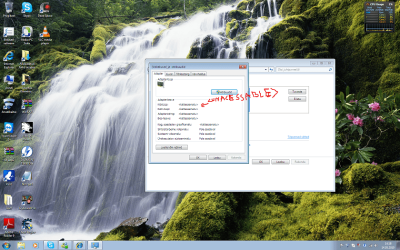
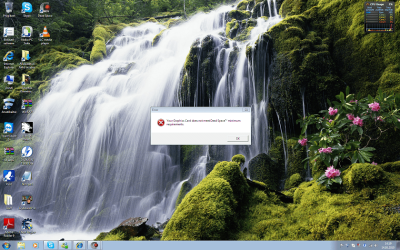
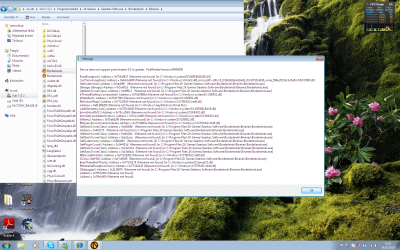
Okay so I have a large problem that nobody cant seem to help me with. One day I played splinter cell conviction on my PC. Suddenly my game crashed and wierd lights started showing on my screen. So I restarted my computer. Everything was fine. So the same thing happend about two more times until my videocard drivers stopped working at the third time. So I reinstalled and uninstalled the drivers didn't seem to work. I mean everything looked fine exept I couldn't play any games. All gave me the error that something is wrong with my videocard. Later I found out that somehow my BIOS had chanced. The part where you are suppose to chose the video card. So I chanced it back and everything seemed to work for a day until the same problem came back. I looked at the BIOS and everything was as it has to be. But the videocard error still existed. Still cant play any games. I mean this is just wierd.How did my BIOS chance? Why doesn't my videocard work? When video cards break the really break but not like this. And my videocard is only 1 year old, it can't break this fast. NVIDIA GeForce 9800 GT. So please someone help me fix this problem or at least confirm my suspicions that my videocard is broken.
 

Attachments

  • Problem.png
    Problem.png
    344.9 KB · Views: 52
  • Problem 2.png
    Problem 2.png
    258.2 KB · Views: 167
  • Problem 3.png
    Problem 3.png
    332 KB · Views: 112
  • problem 4.png
    problem 4.png
    538.2 KB · Views: 58

My Computer

OS
Microsoft windows 7
Graphics Card(s)
Onboard- Dont ask
Monitor(s) Displays
SyncMaster T220
Internet Speed
2-4 mb

My Computer

Computer type
PC/Desktop
Computer Manufacturer/Model Number
Custom Build
OS
Windows 10 Pro x64, Arch Linux
CPU
Intel Core 2 Quad Q8200 OC'd 3.08GHz
Motherboard
Asus Rampage formula LGA775
Memory
8GB DDR2 900Mhz
Graphics Card(s)
MSI GT730 2GB GDDR5 (Kepler)
Sound Card
Supreme FX2
Monitor(s) Displays
Samsung LS22F350 LED
Screen Resolution
1080P
Hard Drives
Kingston SSDNow UV400 120GB, 500GB Hitachi, 2TB Samsung, 500GB Seagate FreeAgent, 640GB Samsung, 160GB Toshiba (Arch)
PSU
AeroCool 500W Bronze
Cooling
Cooler Master V6 + 3X fans
Keyboard
Prolink keyboard
Mouse
Logitech M705
Internet Speed
1MiB/s
Browser
Chrome Beta
Welcome to Seven Forums. Lets first address the changing of your bios. This can or should only happen if you have reset your CMOS or have taken the battery out or the battery is going bad. This will reset your bios to default.
Now the video card. Their is no rhyme or reason to why a card goes bad. Some are shipped after testing only to be found DOA, installing the card and not handling it correctly can cause a card to have a small static charge run across the card an cause problems. You should always ground yourself by touching the case before installing any component inside your case. When and why they fail is anyones guess. The fact that the problem only happens when the card is placed under a load IE playing a game would suggest to me something is failing on the card.
If you have installed the driver for your card, then reinstalled it only to have the same outcome, I would remove the card and switch to the onbaoard and see if the problem of the driver stopping working occurs, or if you can play games. if the problem doesn't reoccur. I would start considering RMAing the card. Hopefully you registered it and have at least a 2 year warranty on it.
Also always get your driver from the manufacturers site whenever possible.Or as stated above an overheating problem which you can try blowing out the heatsink and fan with canned air and use evga precision to increase the fan speed http://downloads.guru3d.com/EVGA-Precision-1.7.1-download-2251.html Just some thoughts. Fabe
 

My Computer

Computer Manufacturer/Model Number
Self Built
OS
Windows 7 ultimate 64 bit / XP Home sp3
CPU
intel Core 2 Duo E8400 3.0ghz
Motherboard
Asus P5ND bios 1401
Memory
8 gigs 1066 OCZ Fata1ty
Graphics Card(s)
EVGA GTX 580 Call of Duty Black Ops Edition
Sound Card
Creative Soundblaster Audigy 2zs
Monitor(s) Displays
Asus 24in LCD's 2MS X2
Screen Resolution
1920x1080p @60Hz
Hard Drives
WD Caviar 500 Black/ WD Caviar 200 Blue
PSU
OCZ 700W GameXtreme
Case
NZXT Apollo
Cooling
Corsair H50 CPU/120mm x3 /60mm x2 /Corsair Dominator Ram
Keyboard
Logitech Bluetooth Wireless MX5000
Mouse
Logitech Bluetooth Wireless MX1000
Internet Speed
Download 19.83 Upload 0.97
Other Info
Logitech Z2300 Speakers/ Bose Noise Cancelling Headphones/Avermedia PCI-e Hybrid TV Bravo/Epson NX415 all in one/ 4 Port Powered USB Hub/ LG 10x Bluray Burner /TSST Corp DVDRW External
Bigger porblem, I switched to onboard on BIOS and my computer screen is completely black. I mean its black when my turn my computer on and nothing. The vent is working like crazy and thats it. How to fix this even bigger problem.:confused:
 

My Computer

OS
Microsoft windows 7
Graphics Card(s)
Onboard- Dont ask
Monitor(s) Displays
SyncMaster T220
Internet Speed
2-4 mb
I switched to onboard on BIOS and my computer screen is completely black.

Connect the monitor to the onboard video port so you can see, and go into the bios and change it back.
 

My Computer

Computer type
PC/Desktop
Computer Manufacturer/Model Number
Me
OS
Win 7 Ultimate x64
CPU
FX-8350 @ 4.6 GHz so far
Motherboard
Asus M5A97 EVO
Memory
ADATA XPG V1 Series Black 8GB DDR3 1600
Graphics Card(s)
Sapphire R9 270x Dual-X
Sound Card
Xonar DGX w/ Corsair Vengence 1300
Monitor(s) Displays
Acer S232HL Abid
Screen Resolution
1920x1080
Hard Drives
120 GB OCZ Vertex 3
500 GB Seagate 7200.12
PSU
Antec Earthwatts 650W Green
Case
Antec Three Hundred
Cooling
Cooler Master 212 EVO
Keyboard
Logitech G510
Mouse
Logitech G500s
Internet Speed
35000/3000
Kinda noob question, but where is it located. I can only find two ports where to sitck it but none of them work
 

My Computer

OS
Microsoft windows 7
Graphics Card(s)
Onboard- Dont ask
Monitor(s) Displays
SyncMaster T220
Internet Speed
2-4 mb

My Computer

Computer type
PC/Desktop
Computer Manufacturer/Model Number
Me
OS
Win 7 Ultimate x64
CPU
FX-8350 @ 4.6 GHz so far
Motherboard
Asus M5A97 EVO
Memory
ADATA XPG V1 Series Black 8GB DDR3 1600
Graphics Card(s)
Sapphire R9 270x Dual-X
Sound Card
Xonar DGX w/ Corsair Vengence 1300
Monitor(s) Displays
Acer S232HL Abid
Screen Resolution
1920x1080
Hard Drives
120 GB OCZ Vertex 3
500 GB Seagate 7200.12
PSU
Antec Earthwatts 650W Green
Case
Antec Three Hundred
Cooling
Cooler Master 212 EVO
Keyboard
Logitech G510
Mouse
Logitech G500s
Internet Speed
35000/3000
onboard is probably VGA and he may only have a DVI cable.
 

My Computer

Computer Manufacturer/Model Number
HAL-9000
OS
Windows 7 Ultimate 64bit
CPU
Intel i7 3770K
Motherboard
Asus Sabertooth Z77
Memory
16GB DDR3 1333 Corsair XMS3
Graphics Card(s)
XFX HD6950 2GB EyeFinity
Sound Card
Logitech G35 & Sennheiser PC135 & VIA HD
Monitor(s) Displays
23" HP 2310e, 23" Samsung B2230, 21.5" Viewsonic
Screen Resolution
5760x1080
Hard Drives
16TB of Storage
128GB & 256GB Crucial M4 SSD's, 2X 1TB WD Black, 3x 2TB WD, 3x 2TB Samsung F4, 1.5TB Seagate, WD 500GB,
PSU
Antec True Power New 650watt
Case
Cooler Master HAF-932
Cooling
Corsair H60 Hydro Cooler, 3x 230mm Fans, 2x120mm Fan
Keyboard
Logitech G15 and G13
Mouse
Logitech G700 Gaming Mouse
Internet Speed
50/10 Mbit
Other Info
Speakers : Alesis M1 Active Mk2 Studio Monitors , APC RS 1200 UPS, HP 4500DN Color Laser, HP P1006 mono Laser, Kodak 8500 Dye-Sub, Epson 1280 inkjet, Epson Worforce 610 MFC
Finally got the onboard thing fixed. I plugged the DVI cable in but I also had to mess with the monitor.
Anyway I still need help with that Nvidia problem.
I used the link thefabe gave me. But the program didn't want to start after install. It says "Some EVGA Precision components are missing ore corrupted!"
 
Last edited:

My Computer

OS
Microsoft windows 7
Graphics Card(s)
Onboard- Dont ask
Monitor(s) Displays
SyncMaster T220
Internet Speed
2-4 mb
Did you try doing a system restore from a restore point before the game was installed?

Bill
 

My Computer

Computer type
PC/Desktop
Computer Manufacturer/Model Number
Custom Built
OS
Windows 7 Enterprise x64
CPU
i7-5820K
Motherboard
Asus X99 A
Memory
16GB DDR4
Graphics Card(s)
ASUS 2GB Nvidia 960GTX OC'd
Monitor(s) Displays
24"
Screen Resolution
1920x1080
Hard Drives
Samsung 1TB 840 SSD
Western Digital 1TB Black Drive
Seagate 2TB NAS Drive
PSU
Antec Earthwatts 650w
Case
Antec DF-85
Last edited:

My Computer

OS
Microsoft windows 7
Graphics Card(s)
Onboard- Dont ask
Monitor(s) Displays
SyncMaster T220
Internet Speed
2-4 mb
Back
Top