Solved Nvme Driver

My Computers

System One System Two

  • Computer type
    PC/Desktop
    OS
    7 X64
    CPU
    i5 8400
    Motherboard
    gigabyte b365m ds3h
    Memory
    2x8gb 3200mhz
    Hard Drives
    various
    PSU
    pure power 11 400w cm
    Case
    Coolermaster
    Cooling
    cryorig m9i
  • Computer type
    PC/Desktop
    OS
    7x64
    CPU
    g5400
    Motherboard
    ga b365m ds3h
    Memory
    8gb ddr4 2400
    PSU
    xfx pro 450w
:-)
 

My Computers

System One System Two

  • Computer type
    PC/Desktop
    OS
    7 X64
    CPU
    i5 8400
    Motherboard
    gigabyte b365m ds3h
    Memory
    2x8gb 3200mhz
    Hard Drives
    various
    PSU
    pure power 11 400w cm
    Case
    Coolermaster
    Cooling
    cryorig m9i
  • Computer type
    PC/Desktop
    OS
    7x64
    CPU
    g5400
    Motherboard
    ga b365m ds3h
    Memory
    8gb ddr4 2400
    PSU
    xfx pro 450w
Yes. I suspect they are trying to make things awkward for win 7 users - with the intention of pushing them onto win10.

Isn't that something. Just like how certain CPUs can only be used in Win 10. I call BS on that. Sure, there might be OS only capabilities for that CPU and Windows 10, but by in large, many people are using the latest Ryzen CPUs and Intel CPUs in Windows 7 without ill recourse.
 

My Computer

Computer type
PC/Desktop
OS
Windows 7 Ultimate x64

I have flashed the mentioned Bios 9903, but windows 7 bootloader doesn't seem to be having NVMe drivers. I've just cloned my classical disk using gparted to NVMe and setup NVMe (PATA:ss) device as first boot option. However
Code:
Reboot and Select proper Boot device
or Insert Boot Media in selected Boot device and press a key
was the result. I had to put back the classical drive and get back to booting from it for now.

I am not sure whether to install clover bootmanager or to search for some tutorial how to "repair" the bootloader using enhanced installation CD (Win 7 instllation iso with NVMe drivers) so it can deal with new type of drive.
 

My Computer

Computer type
PC/Desktop
Computer Manufacturer/Model Number
Asus
OS
Windows 7 Home Premium 64bit
CPU
Core i7
Motherboard
Asus P8Z68-V gen3
Memory
16 GB
Graphics Card(s)
GeForce 1060
Antivirus
Windows Defender
Browser
Firefox
after searching the internet for a solution about a ssd M.2 in windows 7 i found this website ,

i downloaded the files , but for some reason that i do not get the installation say's that this is not this pc .
what am i doing wrong here ?
The ssd is a Samsung 980 1 Tb on an Asus prime B350 board with a Ryzen 7 1700 . windows 7 SP1

at this moment de SSD is not visible in windows and is not yet the boot drive , after a ghost clone , this ends with a bsod .
 

My Computers

System One System Two

  • Computer type
    PC/Desktop
    Computer Manufacturer/Model Number
    custom build
    OS
    windows 7 x64
    CPU
    ryzen 7 1700
    Motherboard
    asus b350 plus
    Memory
    4 * 16 GB
    Graphics Card(s)
    7970
    Hard Drives
    1 * 640 Gb WD black
    1 * 3 TB toshiba
    Browser
    chrome
  • Computer type
    PC/Desktop
Hello everyone. Does anyone have the Intel 670p series driver for win7?
Thank you in advance
 

My Computers

System One System Two

  • Computer type
    Laptop
    Computer Manufacturer/Model Number
    HP
    OS
    Win 11 64bit
    Antivirus
    none
    Browser
    Librewolf
  • Computer type
    PC/Desktop
What mother board you putting this on?
 

My Computer

Computer type
PC/Desktop
OS
Windows 10, 7, x64

My Computers

System One System Two

  • Computer type
    PC/Desktop
    OS
    7 X64
    CPU
    i5 8400
    Motherboard
    gigabyte b365m ds3h
    Memory
    2x8gb 3200mhz
    Hard Drives
    various
    PSU
    pure power 11 400w cm
    Case
    Coolermaster
    Cooling
    cryorig m9i
  • Computer type
    PC/Desktop
    OS
    7x64
    CPU
    g5400
    Motherboard
    ga b365m ds3h
    Memory
    8gb ddr4 2400
    PSU
    xfx pro 450w
I have an HP Envy laptop 15t-es100 and for some reason i cannot find the appropriate driver for the installation. When i un-hide the compatible drivers during the installation i can see at the description "series 4,5,7,8" and the "660p" but no drivers for the 670p intel nvme.
 

My Computers

System One System Two

  • Computer type
    Laptop
    Computer Manufacturer/Model Number
    HP
    OS
    Win 11 64bit
    Antivirus
    none
    Browser
    Librewolf
  • Computer type
    PC/Desktop
Why do you need specific drivers ?
 

My Computers

System One System Two

  • Computer type
    PC/Desktop
    OS
    7 X64
    CPU
    i5 8400
    Motherboard
    gigabyte b365m ds3h
    Memory
    2x8gb 3200mhz
    Hard Drives
    various
    PSU
    pure power 11 400w cm
    Case
    Coolermaster
    Cooling
    cryorig m9i
  • Computer type
    PC/Desktop
    OS
    7x64
    CPU
    g5400
    Motherboard
    ga b365m ds3h
    Memory
    8gb ddr4 2400
    PSU
    xfx pro 450w
Installation procedure is not able to detect my intel nvme drive. I've downloaded every possible driver i could find online. I can install win10 and win11 but not win7.
 

My Computers

System One System Two

  • Computer type
    Laptop
    Computer Manufacturer/Model Number
    HP
    OS
    Win 11 64bit
    Antivirus
    none
    Browser
    Librewolf
  • Computer type
    PC/Desktop
did you try the drivers I uploaded in my previous post?

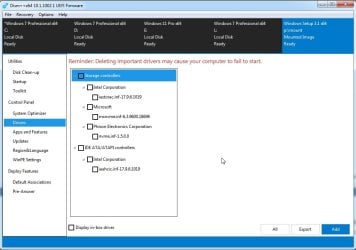
they include the last intel irst as well as msnvme and phison ( which work for all known nvme disks )

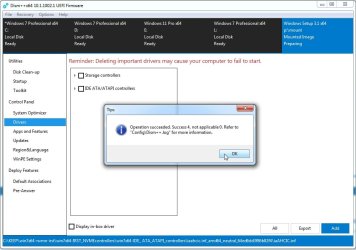
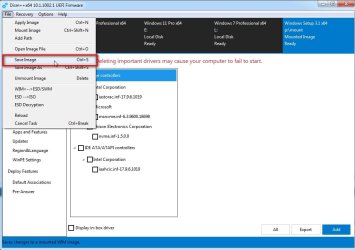
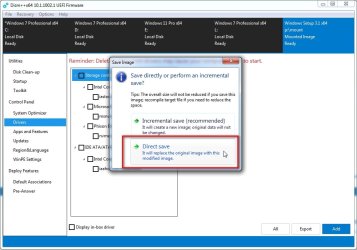
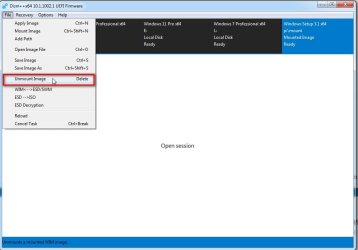
integrate them into boot.wim, winre.wim and install.wim

it is easier if you use this which will include those automatically for you

Update your Win 7 installation media

if it is amd you could try canonkong's ryzen mainboard drivers
 

My Computers

System One System Two

  • Computer type
    PC/Desktop
    OS
    7 X64
    CPU
    i5 8400
    Motherboard
    gigabyte b365m ds3h
    Memory
    2x8gb 3200mhz
    Hard Drives
    various
    PSU
    pure power 11 400w cm
    Case
    Coolermaster
    Cooling
    cryorig m9i
  • Computer type
    PC/Desktop
    OS
    7x64
    CPU
    g5400
    Motherboard
    ga b365m ds3h
    Memory
    8gb ddr4 2400
    PSU
    xfx pro 450w
I haven't even bought my SSD yet but I knew I would need drivers. Like everybody else, I landed here:

Update to add native driver support in NVM Express in Windows 7 and Windows Server 2008 R2 - Microsoft Support

Where they no longer provide the hotfix. My interpretation of what it says on that page is that they will give you the hotfix if you call them & pay them for it. Negatory.

In any case, I got the Nvme-Win7x64.zip since I'm running W7 64-bit. I installed the Windows6.1-KB2990941-v3-x64.msu no problem. Rebooted. Went to install Windows6.1-KB3087873-v2-x64.msu & it said it didn't apply to my computer. Reading between the lines of something you said above, I'm guessing that if you have SP1 installed, you needn't worry about this failure to install. Yes? No?

I see you have something for USB 3. I have USB 3 ports on this machine & I have used devices plugged into those ports. Now I'm wondering if I'm really getting USB 3 performance out of them. How would I tell? Maybe I'll just get that thing & try to install whatever it is. I've already booted today. My habit is to go at least a few weeks if not months between reboots. I hope you're not going to make me reboot AGAIN. Such a hardship . . .

- - - Updated - - -

Well, I did get your USB 3 package & looked inside it. That gave me the ID kb2864202. Searching the MS web site landed me here:

MS13-081: Description of the security update for USB drivers: October 8, 2013 - Microsoft Support

According to the information on that page & a couple of dir /s commands on my boot partition, I already have this particular fix on my system. I'm sure I installed it years ago when I was still letting Windows Update run all the time. I of course shut that off when MS decided to yank the rug out from under our feet & take W7 out of support. OK. That package wasn't what I thought it was. It is not something that adds USB 3 support to W7 the way your NVME package adds NVME support to the system. It's just a security update & it seems I already have it.

In a word, never mind.

- - - Updated - - -

Oh. And I'll be sure to come back here & give an update once I actually own an SSD & have tried to make it my new boot drive.

 

My Computer

Computer type
PC/Desktop
Computer Manufacturer/Model Number
ASUS (assembled myself)
OS
Windows 7 Professional 64-bit
CPU
Intel Core i7-4790K Quad CPU @ 4.00 GHz
Motherboard
ASUS Z97-AR, Intel Z97 Express chipset, ATX form factor
Memory
2x4G DDR3 1600MHz DIMMs
Graphics Card(s)
Intel HD Graphics 4600 on mobo; NVidia GeForce GT 710 PCI-E
Sound Card
Realtek High Definition Audio, integrated on mobo
Monitor(s) Displays
Dell SE2417HGX, 20.5"x11.5" viewable area; 32" Toshiba HDTV
Screen Resolution
1920 x 1080 @ 60 Hz, 32-bit color depth
Hard Drives
Western Digital 500G SATA
Seagate 150G SATA
2 x Seagate 6T SATA
2 x Seagate 18T SATA
PSU
EVGA 500B (500 Watts)
Case
NZXT H230 mid-tower
Cooling
CPU fan, PSU fan, 2 case fans, NVidia fan
Keyboard
Perixx 513H
Mouse
Touch pad integrated into keyboard
Internet Speed
Intel Ethernet Conn(2)I218-V, on mobo, ISP=cableTV 400Mbps
Antivirus
Comodo
Browser
Firefox
Other Info
Ext'l DVD rec: LG HL-DT-ST DVDRAM GP10NB20 USB
Monitor conn to VideoPort via HDMI-to-VideoPort adap
Realtek ALC892 8-channel High Definition Audio CODEC featuring Crystal Sound 2
Audio conn to surr recv via 25' optical S/PDIF TOSLINK audio cable
SYSINFO: 11 NIC ports but only 1 actively conn via DHCP to ISP
ISP bundled w/ cable TV+cell, claims 400Mbps,
but really 50 million bytes/sec
Installation procedure is not able to detect my intel nvme drive. I've downloaded every possible driver i could find online. I can install win10 and win11 but not win7.

Because like newer Motherboards and Laptops. You can't install Windows 7! "Sorry"

Yes you can, but I had a Dell Laptop I could install windows 7 on. But there were No Drivers.

Plus If you can get Windows 7 on it you have to activated it. They activation server is shut down and don't know even if you can still call it in.
 

My Computer

Computer type
PC/Desktop
OS
Windows 10, 7, x64
SIW2, I downloaded the IRST package you included in your earlier post. I see 4 directories. I'm not entirely sure what each directory is applicable to. I do not see any kind of installation executable. There are only 2 .exe files in the whole package that I can see & I'm not going to try executing them on spec without knowing what they might do. And I do not know how to, to use your words, "integrate them into" a WIM. Please offer a little more detail.
 

My Computer

Computer type
PC/Desktop
Computer Manufacturer/Model Number
ASUS (assembled myself)
OS
Windows 7 Professional 64-bit
CPU
Intel Core i7-4790K Quad CPU @ 4.00 GHz
Motherboard
ASUS Z97-AR, Intel Z97 Express chipset, ATX form factor
Memory
2x4G DDR3 1600MHz DIMMs
Graphics Card(s)
Intel HD Graphics 4600 on mobo; NVidia GeForce GT 710 PCI-E
Sound Card
Realtek High Definition Audio, integrated on mobo
Monitor(s) Displays
Dell SE2417HGX, 20.5"x11.5" viewable area; 32" Toshiba HDTV
Screen Resolution
1920 x 1080 @ 60 Hz, 32-bit color depth
Hard Drives
Western Digital 500G SATA
Seagate 150G SATA
2 x Seagate 6T SATA
2 x Seagate 18T SATA
PSU
EVGA 500B (500 Watts)
Case
NZXT H230 mid-tower
Cooling
CPU fan, PSU fan, 2 case fans, NVidia fan
Keyboard
Perixx 513H
Mouse
Touch pad integrated into keyboard
Internet Speed
Intel Ethernet Conn(2)I218-V, on mobo, ISP=cableTV 400Mbps
Antivirus
Comodo
Browser
Firefox
Other Info
Ext'l DVD rec: LG HL-DT-ST DVDRAM GP10NB20 USB
Monitor conn to VideoPort via HDMI-to-VideoPort adap
Realtek ALC892 8-channel High Definition Audio CODEC featuring Crystal Sound 2
Audio conn to surr recv via 25' optical S/PDIF TOSLINK audio cable
SYSINFO: 11 NIC ports but only 1 actively conn via DHCP to ISP
ISP bundled w/ cable TV+cell, claims 400Mbps,
but really 50 million bytes/sec

My Computers

System One System Two

  • Computer type
    PC/Desktop
    OS
    7 X64
    CPU
    i5 8400
    Motherboard
    gigabyte b365m ds3h
    Memory
    2x8gb 3200mhz
    Hard Drives
    various
    PSU
    pure power 11 400w cm
    Case
    Coolermaster
    Cooling
    cryorig m9i
  • Computer type
    PC/Desktop
    OS
    7x64
    CPU
    g5400
    Motherboard
    ga b365m ds3h
    Memory
    8gb ddr4 2400
    PSU
    xfx pro 450w
I believe I already have the USB 3 update installed on my system. As for DISM, I already have these on my system:

Directory of C:\Windows\System32

01/08/2021 20:51 <DIR> Dism
01/08/2021 20:48 274,944 Dism.exe

Directory of C:\Windows\SysWOW64

01/08/2021 20:51 <DIR> Dism
01/08/2021 20:48 205,312 Dism.exe

Is either of these acceptable? Or should I really use the one you are providing?

Other than that, you are most helpful. I will let you know how it goes with modifying my WIM files.
 

My Computer

Computer type
PC/Desktop
Computer Manufacturer/Model Number
ASUS (assembled myself)
OS
Windows 7 Professional 64-bit
CPU
Intel Core i7-4790K Quad CPU @ 4.00 GHz
Motherboard
ASUS Z97-AR, Intel Z97 Express chipset, ATX form factor
Memory
2x4G DDR3 1600MHz DIMMs
Graphics Card(s)
Intel HD Graphics 4600 on mobo; NVidia GeForce GT 710 PCI-E
Sound Card
Realtek High Definition Audio, integrated on mobo
Monitor(s) Displays
Dell SE2417HGX, 20.5"x11.5" viewable area; 32" Toshiba HDTV
Screen Resolution
1920 x 1080 @ 60 Hz, 32-bit color depth
Hard Drives
Western Digital 500G SATA
Seagate 150G SATA
2 x Seagate 6T SATA
2 x Seagate 18T SATA
PSU
EVGA 500B (500 Watts)
Case
NZXT H230 mid-tower
Cooling
CPU fan, PSU fan, 2 case fans, NVidia fan
Keyboard
Perixx 513H
Mouse
Touch pad integrated into keyboard
Internet Speed
Intel Ethernet Conn(2)I218-V, on mobo, ISP=cableTV 400Mbps
Antivirus
Comodo
Browser
Firefox
Other Info
Ext'l DVD rec: LG HL-DT-ST DVDRAM GP10NB20 USB
Monitor conn to VideoPort via HDMI-to-VideoPort adap
Realtek ALC892 8-channel High Definition Audio CODEC featuring Crystal Sound 2
Audio conn to surr recv via 25' optical S/PDIF TOSLINK audio cable
SYSINFO: 11 NIC ports but only 1 actively conn via DHCP to ISP
ISP bundled w/ cable TV+cell, claims 400Mbps,
but really 50 million bytes/sec
Last edited:

My Computers

System One System Two

  • Computer type
    PC/Desktop
    OS
    7 X64
    CPU
    i5 8400
    Motherboard
    gigabyte b365m ds3h
    Memory
    2x8gb 3200mhz
    Hard Drives
    various
    PSU
    pure power 11 400w cm
    Case
    Coolermaster
    Cooling
    cryorig m9i
  • Computer type
    PC/Desktop
    OS
    7x64
    CPU
    g5400
    Motherboard
    ga b365m ds3h
    Memory
    8gb ddr4 2400
    PSU
    xfx pro 450w
Yes I realize this is a year old... I have a Win 7 machine that went down and will not boot to BIOS or anything, but will turn on. So I got a new laptop with 11 on it with the intent to roll back to 10. However, I want to clone my Win 7 disk and upgrade that install to 10 for the laptop. Im writing on a ThinkPad Yoga 12 that I managed to get 7 SP1 on. If I apply the hotfix after the cloning to this Thinkpad, and then to the new one, will that work? I know its a lot of work, but I don't want to mess up the older 7 install at all, so im not putting that disk into anything.
 

My Computer

Computer type
PC/Desktop
OS
Win 7 64bit
CPU
AMD FX-6100 Black Edition @ 3.8
Motherboard
Gigabyte 990FXA-UD5
Memory
Corsair Vengeance 16GB
Graphics Card(s)
Sapphire 4890 x 2
Monitor(s) Displays
Samsung SyncMaster S22B300 x 3
Screen Resolution
5760*1080
Hard Drives
Intel X-25M 160GB
Intel X-25M 40GB
WD VelociRaptor 150GB x 4
PSU
Antec Tru-Power Quattro 850W
Case
Corsair Carbide 500R
Cooling
Water
Keyboard
Hiper SE
Mouse
Logitech Trackman Wheel
Back
Top