NVRAM Error

ik8ozv

New member
Member
Local time
10:34 AM
Messages
62
Hello,
i have the old Pc that has as Mainboard a P5B Deluxe.
I have noticed that everytimes i reset the PC I get the folllowing error:

NO Keyboard Detected!
Press F1 to Resume
Checking NVRAM..
This appears just for a second and then i see the O.S. Loading.
The Keyboard is attached to the PC and it works because After have
loaded the O.S. I can use it with no problems.
I have tried a Cmos clear but still get the error.
What could it be?
What to check?
Any help will be really appreciated.
Thanks.
Enzo
 
Last edited:

My Computer

Computer Manufacturer/Model Number
Desktop
OS
Windows 7 Ultimate x64
CPU
Intel(R) Core(TM)2 CPU 6600 @ 2.40GHz
Motherboard
ASUSTeK Computer INC. P5B-Deluxe
Memory
6,00 GB
Graphics Card(s)
ATI Radeon HD 3600 Series
Sound Card
SoundMAX Integrated
Screen Resolution
1280x1024 60Hz
Hard Drives
ST3120022A ATA Device
NVRAM is non volitaile memory. It is the memory that usually retains your settings. There are several things that can cause this error but the most likely one is a bad CMOS battery or even ram errors. The CMOS battery is the easiest to replace and is very cheap. It is also called a coin battery because it looks like a coin on your motherboard. If you change the battery you will lose all settings in BIOS, so remember what they are. A good sign is if the system is losing the date and time.
 

My Computers

System One System Two

  • Computer type
    PC/Desktop
    Computer Manufacturer/Model Number
    ALWAYS UNDER CONSTRUCTION
    OS
    Windows 11 Pro
    CPU
    Ryzen 9 5900X
    Motherboard
    Asus X570 Crosshair Viii Hero
    Memory
    32GB G Skill DDR4-3600
    Graphics Card(s)
    EVGA RTX 3080 FTW 3 Ultra
    Sound Card
    On Board/Sennheiser PC37X Headset
    Monitor(s) Displays
    3 X Asus 27"
    Screen Resolution
    2560x1440
    Hard Drives
    2 X 1 TB NVME drives
    PSU
    EVGA 850
    Case
    Phanteks Eclipse P400A
    Cooling
    EVGA 280 AIO
    Keyboard
    Logitech G510s/ Logitech G13
    Mouse
    Logitech G502
    Internet Speed
    24/1
    Antivirus
    ESET/MBAM Pro/SAS Pro
    Browser
    Chrome/ Firefox/ Edge
  • Computer type
    Laptop
    System Manufacturer/Model Number
    Dell 16 Plus
    OS
    Windows 11 Pro
    CPU
    Intel Ultra 9 288V
    Memory
    32 GB LPDDR5X 8533
    Monitor(s) Displays
    16" Mini-LED HDR600 Touch 90 Hz
    Screen Resolution
    2560X1600
    Hard Drives
    1 TB NVME
Have changed the CMOS Battery, but get alway the erro whe resetting the PC.
 

My Computer

Computer Manufacturer/Model Number
Desktop
OS
Windows 7 Ultimate x64
CPU
Intel(R) Core(TM)2 CPU 6600 @ 2.40GHz
Motherboard
ASUSTeK Computer INC. P5B-Deluxe
Memory
6,00 GB
Graphics Card(s)
ATI Radeon HD 3600 Series
Sound Card
SoundMAX Integrated
Screen Resolution
1280x1024 60Hz
Hard Drives
ST3120022A ATA Device
Are you getting blue screens or just error messages? What else is not going right with the computer? NVram is usually, to the best of my knowledge, ram that holds the bios settings. After replacing the battery did you go to bios and set optimized defaults? But, if it is not the CMOS battery, I would run memtest86 and see if it could be the system ram. If that does not show errors, maybe we can get someone with a little more experience than me with these issues.
 

My Computers

System One System Two

  • Computer type
    PC/Desktop
    Computer Manufacturer/Model Number
    ALWAYS UNDER CONSTRUCTION
    OS
    Windows 11 Pro
    CPU
    Ryzen 9 5900X
    Motherboard
    Asus X570 Crosshair Viii Hero
    Memory
    32GB G Skill DDR4-3600
    Graphics Card(s)
    EVGA RTX 3080 FTW 3 Ultra
    Sound Card
    On Board/Sennheiser PC37X Headset
    Monitor(s) Displays
    3 X Asus 27"
    Screen Resolution
    2560x1440
    Hard Drives
    2 X 1 TB NVME drives
    PSU
    EVGA 850
    Case
    Phanteks Eclipse P400A
    Cooling
    EVGA 280 AIO
    Keyboard
    Logitech G510s/ Logitech G13
    Mouse
    Logitech G502
    Internet Speed
    24/1
    Antivirus
    ESET/MBAM Pro/SAS Pro
    Browser
    Chrome/ Firefox/ Edge
  • Computer type
    Laptop
    System Manufacturer/Model Number
    Dell 16 Plus
    OS
    Windows 11 Pro
    CPU
    Intel Ultra 9 288V
    Memory
    32 GB LPDDR5X 8533
    Monitor(s) Displays
    16" Mini-LED HDR600 Touch 90 Hz
    Screen Resolution
    2560X1600
    Hard Drives
    1 TB NVME
How long have you noticed this error occurring?

Does it also happen if you completely turn off the system and then turn it on, or is it only when you restart or reset the system?

Can you be more specific as to what you mean when you say "reset the PC"? There are a number of different methods for resetting a PC, and even some different meanings behind the phrase.
 

My Computer

Computer Manufacturer/Model Number
HP Pavilion e9110t
OS
Windows 7 Home Premium 64 Bit
CPU
Intel(R) Core(TM)2 Quad CPU Q9550 @ 2.83GHz
Motherboard
Pegatron IPIEL-LA3
Memory
6.00 GB Hundai HMT125U6BFR8C-H9
Graphics Card(s)
ATI Radeon HD 4850
Sound Card
Realtek High Definition Audio/ATI High Definition Audio
Monitor(s) Displays
Acer AL2216W
Screen Resolution
1680x1050
Hard Drives
Hitachi HDP725050GLA360 ATA Device 500 GB
PSU
Unknown/installed by HP
Case
HP generic case
Cooling
Intel Stock Cooling
Keyboard
HP Keyboard
Mouse
HP Mouse
Internet Speed
Download: 19.15 Mbps Upload: 1.67 Mbps
Other Info
Network Adapter Realtek RTL8168D/8111D Family PCI-E Gigabit Ethernet NIC (NDIS 6.20)
Network Adapter 802.11n Wireless PCI Express Card LAN Adapter
ik8ozv,

The sources of such problems are legion.

You need to help us to slowly, but surely, eliminate possibilities.

would you please:
1. provide the requested info which will be a big help,
2. any and all snapshots reflecting upon the problem would be helpful,
3. running of Memtest86+ is rather much a necessity,
4. your updated system specs sure do help us to sniff out the problem.

Update your SevenForums System Specs
User CP (located on the top menu bar) |
Your Profile | Edit System Spec
(left-hand column)

To gather info, use Speccy (my favorite) or SIW or System Info

In the System Manufacturer Block, enter:
Manufacturer and Model and
ADD the word laptop, desktop, netbook or tablet.
For example:
Toshiba Satellite L305D notebook.

Provide full windows version info, for example:
MS Windows 7 Ultimate SP1 64-bit

Use the “Other Info” block for Optical Reader,
Mouse, touchpad, wifi adapter, speakers, monitor, etc

Scroll down and click on SAVE CHANGES.

You will find that in Speccy, you can select info from the display
using your mouse/touchpad and then paste that info into your specs.

SIW is a marvelous program, but the free version does not offer
this capability.

=================================================

Here is how to make and how to post a snippet.
Post a File or Screenshot in Seven Forums

How to use the Snipping tool:
Make a snapshot:
WIN |
type SNIPPING | ENTER | New
Drag the cursor around the area you want to snip.
File | Save as | select save location and name | Save


My Computer

Computer Manufacturer/Model Number
Toshiba Satellite S875D-S7239 laptop
OS
MS Windows 7 Ultimate SP1 64-bit
CPU
AMD A10-4600M
Motherboard
AMD Pumori (Socket FT1)
Memory
6.00 GB Dual-Channel DDR3 @ 798MHz (11-11-12-28)
Graphics Card(s)
AMD Radeon HD 7660G
Sound Card
High Definition Audio Device
Monitor(s) Displays
Generic PnP Monitor (1600x900@60Hz)
Screen Resolution
1600x900@60Hz
Hard Drives
SSD 119GB Corsair CSSD-V128GB2 ATA Device
Keyboard
Standard PS/2 Keyboard
Mouse
HP Wireless Optical Mobile Mouse Model FHA-3410
Internet Speed
What the local pub, local coffee shop offers.
Other Info
Optical Drive:MATSHITA BD-CMB UJ160B ATA Device


Also have an Asus ha1002xp netbook with Win 7 Ultimate installed.

My Computer

Computer type
PC/Desktop
Computer Manufacturer/Model Number
Home Built Desktop By DataTech
OS
Windows 7 Ultimate X64 SP1
CPU
Intel i5-2550K, Differing ~4.4-4.8GHz No built in GPU
Motherboard
ASUS P8Z68-V PRO/GEN3
Memory
16GB G.Skill Sniper 1866MHz @ 2133MHz 2x8GB
Graphics Card(s)
ASUS GTX650TIB-DC2OC-2GD5, (650TI Boost)
Sound Card
Onboard Realtek 5-1
Monitor(s) Displays
Samsung P2570HD
Screen Resolution
1920x1080
Hard Drives
Samsung 840 Pro 256GB SSD for OS, 500GB Seagate Constellation (Enterprise drive) for Data
PSU
Corsair HX650W
Case
Inwin Dragon Rider
Cooling
Hyper 212 EVO w/two Noctua fans, push-pull, @1300 RPM
Keyboard
E-Z Eyes, bright yellow keys with large characters
Mouse
steelseries SENSEI Laser Pro Gaming
Internet Speed
48-51Mbs Mbs down, 11 Mbs up Xfinity Cable
Antivirus
Norton Internet Security 2013
Browser
IE 10, Opera, Pale Moon if needed
Other Info
4 case fans, LG BluRay-RE, ASUS DVD-RW, Mr. Fusion power supply, 1.21 gigawatts.
Hi ik8ozv, Welcome to Seven Forums.
To help all of us would you please add your systems specs? Here's how: http://www.sevenforums.com/tutorials/180324-system-info-see-your-system-specs.html#post1530002
another way.

If you are using the Reset button on the case, don't do that, it can corrupt files. Click the :orb:(Start button) then Restart instead.

Guys,
actually i am using and old PC because the one i used before ( new ) had a problem
with a Downgrade Bios and now i have bring it bak to the dealer for change it
hoping under warranty.

Now i would like to know if i have to update my info specs with the PC that i am waiting the Motherboard coming back or with this old one that i am using in the meantime i get the new one back?
Thanks for help.
Enzo.
 

My Computer

Computer Manufacturer/Model Number
Desktop
OS
Windows 7 Ultimate x64
CPU
Intel(R) Core(TM)2 CPU 6600 @ 2.40GHz
Motherboard
ASUSTeK Computer INC. P5B-Deluxe
Memory
6,00 GB
Graphics Card(s)
ATI Radeon HD 3600 Series
Sound Card
SoundMAX Integrated
Screen Resolution
1280x1024 60Hz
Hard Drives
ST3120022A ATA Device
It would help to have the specs on the one you are asking about in this thread, so we know what hardware we are talking about. When this gets resolved and you get your new computer back, just change the specs to that computer. It's easy to do, I change mine every couple of months. You can look at my specs to see what we are looking for. Just My click system specs in the bottom left of my post. In the same place in your post, there will be an option to update your system specs.
 

My Computers

System One System Two

  • Computer type
    PC/Desktop
    Computer Manufacturer/Model Number
    ALWAYS UNDER CONSTRUCTION
    OS
    Windows 11 Pro
    CPU
    Ryzen 9 5900X
    Motherboard
    Asus X570 Crosshair Viii Hero
    Memory
    32GB G Skill DDR4-3600
    Graphics Card(s)
    EVGA RTX 3080 FTW 3 Ultra
    Sound Card
    On Board/Sennheiser PC37X Headset
    Monitor(s) Displays
    3 X Asus 27"
    Screen Resolution
    2560x1440
    Hard Drives
    2 X 1 TB NVME drives
    PSU
    EVGA 850
    Case
    Phanteks Eclipse P400A
    Cooling
    EVGA 280 AIO
    Keyboard
    Logitech G510s/ Logitech G13
    Mouse
    Logitech G502
    Internet Speed
    24/1
    Antivirus
    ESET/MBAM Pro/SAS Pro
    Browser
    Chrome/ Firefox/ Edge
  • Computer type
    Laptop
    System Manufacturer/Model Number
    Dell 16 Plus
    OS
    Windows 11 Pro
    CPU
    Intel Ultra 9 288V
    Memory
    32 GB LPDDR5X 8533
    Monitor(s) Displays
    16" Mini-LED HDR600 Touch 90 Hz
    Screen Resolution
    2560X1600
    Hard Drives
    1 TB NVME
ik8ozvUpdate your SevenForums System Specs
User CP (located on the top menu bar) |
Your Profile | Edit System Spec
(left-hand column)

To gather info, use Speccy (my favorite) or SIW or System Info

In the System Manufacturer Block, enter:
Manufacturer and Model and
ADD the word laptop, desktop, netbook or tablet.
For example:
Toshiba Satellite L305D notebook.

Provide full windows version info, for example:
MS Windows 7 Ultimate SP1 64-bit

Use the “Other Info” block for Optical Reader,
Mouse, touchpad, wifi adapter, speakers, monitor, etc

Scroll down and click on SAVE CHANGES.

You will find that in Speccy, you can select info from the display
using your mouse/touchpad and then paste that info into your specs.

SIW is a marvelous program, but the free version does not offer
this capability.
 

My Computer

Computer Manufacturer/Model Number
Toshiba Satellite S875D-S7239 laptop
OS
MS Windows 7 Ultimate SP1 64-bit
CPU
AMD A10-4600M
Motherboard
AMD Pumori (Socket FT1)
Memory
6.00 GB Dual-Channel DDR3 @ 798MHz (11-11-12-28)
Graphics Card(s)
AMD Radeon HD 7660G
Sound Card
High Definition Audio Device
Monitor(s) Displays
Generic PnP Monitor (1600x900@60Hz)
Screen Resolution
1600x900@60Hz
Hard Drives
SSD 119GB Corsair CSSD-V128GB2 ATA Device
Keyboard
Standard PS/2 Keyboard
Mouse
HP Wireless Optical Mobile Mouse Model FHA-3410
Internet Speed
What the local pub, local coffee shop offers.
Other Info
Optical Drive:MATSHITA BD-CMB UJ160B ATA Device


Also have an Asus ha1002xp netbook with Win 7 Ultimate installed.
Are you getting blue screens or just error messages? What else is not going right with the computer? NVram is usually, to the best of my knowledge, ram that holds the bios settings. After replacing the battery did you go to bios and set optimized defaults? But, if it is not the CMOS battery, I would run memtest86 and see if it could be the system ram. If that does not show errors, maybe we can get someone with a little more experience than me with these issues.

No i am not getting any blue screen but just the error.
Actually i am running the test program you suggested me.
It is running from about 3 hours and still running, and did not get any error.
How long it takes the test?
Should i stop it or it has to run till the end?
Thanks
Enzo
 

My Computer

Computer Manufacturer/Model Number
Desktop
OS
Windows 7 Ultimate x64
CPU
Intel(R) Core(TM)2 CPU 6600 @ 2.40GHz
Motherboard
ASUSTeK Computer INC. P5B-Deluxe
Memory
6,00 GB
Graphics Card(s)
ATI Radeon HD 3600 Series
Sound Card
SoundMAX Integrated
Screen Resolution
1280x1024 60Hz
Hard Drives
ST3120022A ATA Device
Enzo,
Please see post #10.
 

My Computer

Computer Manufacturer/Model Number
Toshiba Satellite S875D-S7239 laptop
OS
MS Windows 7 Ultimate SP1 64-bit
CPU
AMD A10-4600M
Motherboard
AMD Pumori (Socket FT1)
Memory
6.00 GB Dual-Channel DDR3 @ 798MHz (11-11-12-28)
Graphics Card(s)
AMD Radeon HD 7660G
Sound Card
High Definition Audio Device
Monitor(s) Displays
Generic PnP Monitor (1600x900@60Hz)
Screen Resolution
1600x900@60Hz
Hard Drives
SSD 119GB Corsair CSSD-V128GB2 ATA Device
Keyboard
Standard PS/2 Keyboard
Mouse
HP Wireless Optical Mobile Mouse Model FHA-3410
Internet Speed
What the local pub, local coffee shop offers.
Other Info
Optical Drive:MATSHITA BD-CMB UJ160B ATA Device


Also have an Asus ha1002xp netbook with Win 7 Ultimate installed.
Enzo,
Please see post #10.

I cannot now because how i said before i am still running
The test. I will as soon i finish it, or if i can interrupt it.
To send the message i am using the iPhone.
Thanks
Enzo
 

My Computer

Computer Manufacturer/Model Number
Desktop
OS
Windows 7 Ultimate x64
CPU
Intel(R) Core(TM)2 CPU 6600 @ 2.40GHz
Motherboard
ASUSTeK Computer INC. P5B-Deluxe
Memory
6,00 GB
Graphics Card(s)
ATI Radeon HD 3600 Series
Sound Card
SoundMAX Integrated
Screen Resolution
1280x1024 60Hz
Hard Drives
ST3120022A ATA Device
It needs to run at least 6 passes, or until you get an error. Depending on the speed of the machine and amount of ram it will take 6-8 hours. As soon as we can get your specs, some of these experts can give you some needed help.
 

My Computers

System One System Two

  • Computer type
    PC/Desktop
    Computer Manufacturer/Model Number
    ALWAYS UNDER CONSTRUCTION
    OS
    Windows 11 Pro
    CPU
    Ryzen 9 5900X
    Motherboard
    Asus X570 Crosshair Viii Hero
    Memory
    32GB G Skill DDR4-3600
    Graphics Card(s)
    EVGA RTX 3080 FTW 3 Ultra
    Sound Card
    On Board/Sennheiser PC37X Headset
    Monitor(s) Displays
    3 X Asus 27"
    Screen Resolution
    2560x1440
    Hard Drives
    2 X 1 TB NVME drives
    PSU
    EVGA 850
    Case
    Phanteks Eclipse P400A
    Cooling
    EVGA 280 AIO
    Keyboard
    Logitech G510s/ Logitech G13
    Mouse
    Logitech G502
    Internet Speed
    24/1
    Antivirus
    ESET/MBAM Pro/SAS Pro
    Browser
    Chrome/ Firefox/ Edge
  • Computer type
    Laptop
    System Manufacturer/Model Number
    Dell 16 Plus
    OS
    Windows 11 Pro
    CPU
    Intel Ultra 9 288V
    Memory
    32 GB LPDDR5X 8533
    Monitor(s) Displays
    16" Mini-LED HDR600 Touch 90 Hz
    Screen Resolution
    2560X1600
    Hard Drives
    1 TB NVME
Pity that you didn't take care of this 15 hours ago when the info was requested.

You started the test < 4 hours ago according to your own words.
 

My Computer

Computer Manufacturer/Model Number
Toshiba Satellite S875D-S7239 laptop
OS
MS Windows 7 Ultimate SP1 64-bit
CPU
AMD A10-4600M
Motherboard
AMD Pumori (Socket FT1)
Memory
6.00 GB Dual-Channel DDR3 @ 798MHz (11-11-12-28)
Graphics Card(s)
AMD Radeon HD 7660G
Sound Card
High Definition Audio Device
Monitor(s) Displays
Generic PnP Monitor (1600x900@60Hz)
Screen Resolution
1600x900@60Hz
Hard Drives
SSD 119GB Corsair CSSD-V128GB2 ATA Device
Keyboard
Standard PS/2 Keyboard
Mouse
HP Wireless Optical Mobile Mouse Model FHA-3410
Internet Speed
What the local pub, local coffee shop offers.
Other Info
Optical Drive:MATSHITA BD-CMB UJ160B ATA Device


Also have an Asus ha1002xp netbook with Win 7 Ultimate installed.
It needs to run at least 6 passes, or until you get an error. Depending on the speed of the machine and amount of ram it will take 6-8 hours. As soon as we can get your specs, some of these experts can give you some needed help.

Where to read the passes?
If you mean Where it is Test # so now i am
At Test #6 [Moving inversions, 32 bit pattern]
Right now it ha passed to:
Test #7 [Random number sequence]
 

My Computer

Computer Manufacturer/Model Number
Desktop
OS
Windows 7 Ultimate x64
CPU
Intel(R) Core(TM)2 CPU 6600 @ 2.40GHz
Motherboard
ASUSTeK Computer INC. P5B-Deluxe
Memory
6,00 GB
Graphics Card(s)
ATI Radeon HD 3600 Series
Sound Card
SoundMAX Integrated
Screen Resolution
1280x1024 60Hz
Hard Drives
ST3120022A ATA Device

My Computer

Computer Manufacturer/Model Number
HP Pavilion e9110t
OS
Windows 7 Home Premium 64 Bit
CPU
Intel(R) Core(TM)2 Quad CPU Q9550 @ 2.83GHz
Motherboard
Pegatron IPIEL-LA3
Memory
6.00 GB Hundai HMT125U6BFR8C-H9
Graphics Card(s)
ATI Radeon HD 4850
Sound Card
Realtek High Definition Audio/ATI High Definition Audio
Monitor(s) Displays
Acer AL2216W
Screen Resolution
1680x1050
Hard Drives
Hitachi HDP725050GLA360 ATA Device 500 GB
PSU
Unknown/installed by HP
Case
HP generic case
Cooling
Intel Stock Cooling
Keyboard
HP Keyboard
Mouse
HP Mouse
Internet Speed
Download: 19.15 Mbps Upload: 1.67 Mbps
Other Info
Network Adapter Realtek RTL8168D/8111D Family PCI-E Gigabit Ethernet NIC (NDIS 6.20)
Network Adapter 802.11n Wireless PCI Express Card LAN Adapter
Ok so i need time.
I am still on Pass 2
Thanks.
 

My Computer

Computer Manufacturer/Model Number
Desktop
OS
Windows 7 Ultimate x64
CPU
Intel(R) Core(TM)2 CPU 6600 @ 2.40GHz
Motherboard
ASUSTeK Computer INC. P5B-Deluxe
Memory
6,00 GB
Graphics Card(s)
ATI Radeon HD 3600 Series
Sound Card
SoundMAX Integrated
Screen Resolution
1280x1024 60Hz
Hard Drives
ST3120022A ATA Device
There are 8 tests in each pass, they test part of your RAM then go the the next section of it until a test had run all of it.
More RAM=more time, my 16GB took 2+ hours per pass.
BTW< if you get any error, even one, stop and post back. Errors will be in bright red in the lower section.
And put in system specs.:sarc:
 

My Computer

Computer type
PC/Desktop
Computer Manufacturer/Model Number
Home Built Desktop By DataTech
OS
Windows 7 Ultimate X64 SP1
CPU
Intel i5-2550K, Differing ~4.4-4.8GHz No built in GPU
Motherboard
ASUS P8Z68-V PRO/GEN3
Memory
16GB G.Skill Sniper 1866MHz @ 2133MHz 2x8GB
Graphics Card(s)
ASUS GTX650TIB-DC2OC-2GD5, (650TI Boost)
Sound Card
Onboard Realtek 5-1
Monitor(s) Displays
Samsung P2570HD
Screen Resolution
1920x1080
Hard Drives
Samsung 840 Pro 256GB SSD for OS, 500GB Seagate Constellation (Enterprise drive) for Data
PSU
Corsair HX650W
Case
Inwin Dragon Rider
Cooling
Hyper 212 EVO w/two Noctua fans, push-pull, @1300 RPM
Keyboard
E-Z Eyes, bright yellow keys with large characters
Mouse
steelseries SENSEI Laser Pro Gaming
Internet Speed
48-51Mbs Mbs down, 11 Mbs up Xfinity Cable
Antivirus
Norton Internet Security 2013
Browser
IE 10, Opera, Pale Moon if needed
Other Info
4 case fans, LG BluRay-RE, ASUS DVD-RW, Mr. Fusion power supply, 1.21 gigawatts.
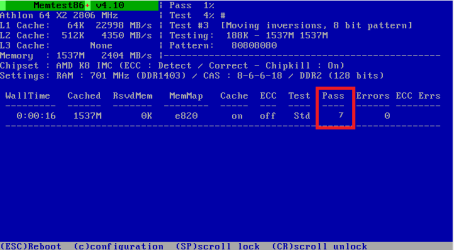
Waited for 12 Pass.
These are the results:
006xw.jpg


Also updated my System Specs.
Thanks
Enzo
 

My Computer

Computer Manufacturer/Model Number
Desktop
OS
Windows 7 Ultimate x64
CPU
Intel(R) Core(TM)2 CPU 6600 @ 2.40GHz
Motherboard
ASUSTeK Computer INC. P5B-Deluxe
Memory
6,00 GB
Graphics Card(s)
ATI Radeon HD 3600 Series
Sound Card
SoundMAX Integrated
Screen Resolution
1280x1024 60Hz
Hard Drives
ST3120022A ATA Device
Back
Top