OBS/Windows update

tjessop

New member
Local time
9:19 AM
Messages
39
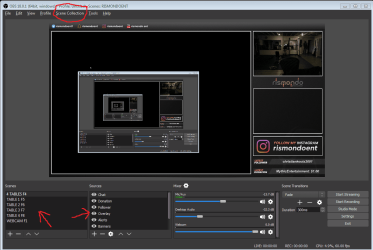
Sorry if this is in the wrong area or if i should be contacting OBS (open broadcast studio) directly. I'm looking to possibly update to windows 10, as you can still do it for free if im correct. I had someone develop me an overlay plus customs settings for in OBS and wondering if those could be affected while converting/updating to windows 10, along with other programs? Or does of my PC stay the same other than the new overlay and features of windows 10. Thanks a lot for any responses, much appreciated! Happy new year!
 

Attachments

  • 2.1.PNG
    2.1.PNG
    74.4 KB · Views: 2

My Computer

Computer type
PC/Desktop
Computer Manufacturer/Model Number
custom build
OS
window 7 64 bit
CPU
i7
Motherboard
asus
Memory
16 gb
Graphics Card(s)
nivia
Hard Drives
128 ssd, 1T hard drive
Antivirus
none
Browser
chrome
If the upgrade from Windows 7 to Windows 10 does not fail, there will be many visual changes to your computer.
Concerning your OBS app, it is unknown if it will remain the same as it is now.
I tend to doubt it will remain the same.
 

My Computer

Computer type
PC/Desktop
Computer Manufacturer/Model Number
Dell OptiPlex 9020
OS
Windows 7 Professional SP1 64-bit
CPU
Intel Core i7-4790 3.60 GHz
Memory
32 GB DDR3-1600 MHz
Graphics Card(s)
Integrated Intel HD Graphics 4600
Monitor(s) Displays
Viewsonic 32" LCD
Hard Drives
Kingston SATA 3 240 GB SSD
Internet Speed
Spectrum Internet 1000 Mbps
If the upgrade from Windows 7 to Windows 10 does not fail, there will be many visual changes to your computer.
Concerning your OBS app, it is unknown if it will remain the same as it is now.
I tend to doubt it will remain the same.

Darn! Okay, i might have to do some investigating. Or just hold off on the update for now, thanks for the reply.
 

My Computer

Computer type
PC/Desktop
Computer Manufacturer/Model Number
custom build
OS
window 7 64 bit
CPU
i7
Motherboard
asus
Memory
16 gb
Graphics Card(s)
nivia
Hard Drives
128 ssd, 1T hard drive
Antivirus
none
Browser
chrome
Reading your post a few times, it appears you are concerned by some internal functionality of OBS its self. Is that correct?

You have arrows pointing to the options for internal functionality. This leads me to believe you're concerned on whether OBS will act different in how it records or streams video in Windows 10.

If this is the question, then I wouldn't think that internal functionality would change in 10. OBS with its own ini file settings and what not should do what it does in 7 in 10. Though, 10 does seem to have its own set of issues for different things. And the lack of quality control with updates can give you a headache.

Now if you're referring to the GUI (Graphics User Input) of the OBS program its self and how it looks in Windows 10, that WILL probably change. Windows 10 like 8 renders as an App look with flat icon crap which makes rat vomit look like a Thanksgiving feast. Why Microsoft wanted to make a PC OS look like a tablet or smartphone is beyond me. Do people even us a Windows phone?! They should have made a tablet version of 10 and a PC version of 10. Microsoft likes to release different versions anyway to help fulfill their bottom line.

To get a more in depth answer, I think OBS has their own support forum.
 

My Computer

Computer type
PC/Desktop
OS
Windows 7 Ultimate x64
Reading your post a few times, it appears you are concerned by some internal functionality of OBS its self. Is that correct?

You have arrows pointing to the options for internal functionality. This leads me to believe you're concerned on whether OBS will act different in how it records or streams video in Windows 10.

If this is the question, then I wouldn't think that internal functionality would change in 10. OBS with its own ini file settings and what not should do what it does in 7 in 10. Though, 10 does seem to have its own set of issues for different things. And the lack of quality control with updates can give you a headache.

Now if you're referring to the GUI (Graphics User Input) of the OBS program its self and how it looks in Windows 10, that WILL probably change. Windows 10 like 8 renders as an App look with flat icon crap which makes rat vomit look like a Thanksgiving feast. Why Microsoft wanted to make a PC OS look like a tablet or smartphone is beyond me. Do people even us a Windows phone?! They should have made a tablet version of 10 and a PC version of 10. Microsoft likes to release different versions anyway to help fulfill their bottom line.

To get a more in depth answer, I think OBS has their own support forum.

Sorry for the late reply, I was in camp for a week working. Thanks so much for that info! It was a lot of help!

You pretty much nailed it. I'm more concerned with the internal functions (scenes, hotkeys, overlay, alerts etc). I paid someone to do my overlay and set up, and I was hoping it wouldn't get affected (just update to windows 10 and plug and play kind of thing). The reason I ask is because I cant contact the person that did the overlay, if I run into issues (overlay and designs are saved in a file on C drive).

Anyways thanks again, I'm also going to reach out to OBS directly and see what they say as you requested. Worst comes to worst ill just keep windows 7... or is that a little too risky in 2021?
 

My Computer

Computer type
PC/Desktop
Computer Manufacturer/Model Number
custom build
OS
window 7 64 bit
CPU
i7
Motherboard
asus
Memory
16 gb
Graphics Card(s)
nivia
Hard Drives
128 ssd, 1T hard drive
Antivirus
none
Browser
chrome
or is that a little too risky in 2021?

I wouldn't worry about it too much, man. I could type at least ten paragraphs as to why it's pretty much a fallacy to have the latest and "greatest" right now. I've only used about 5 updates for hardware and software since I ran Windows 98se. I never committed myself to patch Tuesday. No hoodie wearing hacker ever got in, no malware, any of that. As I said, I could write at least ten paragraphs on this. The bottom line are these three points:

1) Get in the habit of scanning ALL downloads at Virus Total. And I really do mean ALL.

2) Check out the now free and open source program called Sandboxie. Run that for your browser. Might want to do the same for your email client. But proper email client configuration is beyond the scope of this thread.

3) Make periodic full 1:1 disk clones to an external hard drive. If things go south, clone back. It'll be like hardly anything ever changed.

Last but not least, it's really all on how you use the Internet. If you have a tendency of browsing shady sites, using the Piratebay, etc, expect bad things to happen. If you know what you're doing then it's not an issue.

Should you have updates? Yes and no. You should have the criticals and nothing more unless it solves a hardware or software issue. As I said, I have maybe five installed and I've never had any issues.

I feel this whole idea of having to have updates is a way to get you onto a new OS. And Microsoft didn't make 10 free because they wanted to be nice. I could write at least ten paragraphs on that as well.

Right now, 7 should work just fine, but as more and more hardware and the software that uses the Internet changes, it'll require 10 unless you hack the crap out of 7. I know a guy that's a little bit of a conspiracy theorist who's still running 98se. LOL! You can't even take advantage of modern day website capability today in a browser built for 98se. He did indicate he was using some kind of proxy for SNI for websites, but beyond that I don't know what else he's doing. Very strange person. I'd be more apt to use XP if that's what he's thinking.

 
Last edited:

My Computer

Computer type
PC/Desktop
OS
Windows 7 Ultimate x64
Back
Top