Solved Odd certificate issue for particular website

maurisrx

New member
Local time
5:24 AM
Messages
14
Hello,

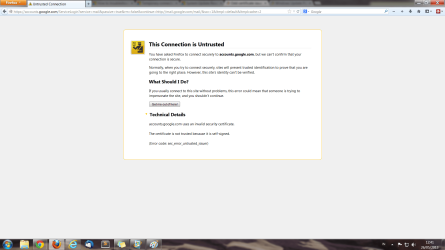
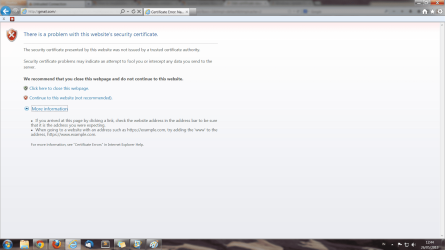
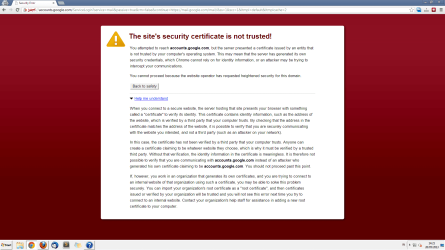
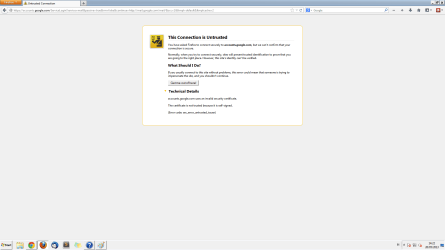
I am having very odd issue with my PC. When I tried to access accounts.google.com, the browsers (chrome, firefox, IE) showed that certificate is not trusted and the option to proceed was not available. Here is the odd part, I can open the URL right after my PC boot up but I can't access it a few minutes later. I can access other websites normally as usual, I even still can log in to gmail because my browsers saved the cookies.

I tried some troubleshooting steps such as clearing browser cache and cookies and restoring my windows system. This problem occurs only on my PC and started a few days ago. Another issue is my windows update is not working, and I think this issue started at the same time as my first issue. I don't know if there's connection between them.

I've been googling for two days and followed a suggestion to download and install root certificate from microsoft but it didn't work. How do I solve this problem?

Thank you in advance :)
 

My Computer

Computer type
PC/Desktop
Computer Manufacturer/Model Number
Custom Build
OS
Windows 7 Home Premium x64 SP1
CPU
Intel i3-3220
Motherboard
Asrock B75M-DGS R2.0
Memory
Corsair Vengeance Black Dual Channel 8 GB
Graphics Card(s)
Club 3D HD 7850 Royal Queen Series
Sound Card
Stock
Monitor(s) Displays
Philips 224CL2
Screen Resolution
1920 x 1080p
Hard Drives
WDC Blue 500GB
Seagate Barracuda 1 TB
PSU
Corsair CX500
Case
Thermaltake Commander MS-I
Cooling
Stock
Keyboard
Logitech K100
Mouse
XTECGO Team Eagle
Internet Speed
312 kbps
Antivirus
Microsoft Security Essentials
Browser
Chrome, Firefox, IE

My Computer

Computer type
PC/Desktop
OS
Windows 10 Home x64
CPU
INTEL Core i5-750 Quad-Core 3.37GHz
Motherboard
ASUS P7P55D
Memory
HyperX Fury Black Series 8GB (2 x 4GB) 1866Mhz
Graphics Card(s)
EVGA GeForce GTX 750 Superclocked 1GB 128-Bit GDDR5
Monitor(s) Displays
LG 32MA68HY 32" IPS
Screen Resolution
1920 x 1080
Hard Drives
Samsung 840 Evo 120GB, SEAGATE 500GB Barracuda® 7200.12, SATA 3 Gb/s, 7200 RPM, 16MB cache
PSU
ANTEC TruePower New TP-550, 80 PLUS, 550W
Case
ANTEC Three Hundred Illusion
Cooling
COOLER MASTER Hyper 212 Plus, 4 x 120mm 1 x 140mm Noctua's
Internet Speed
85 + Mbps
Antivirus
Avast
Browser
Vivaldi
Hello A Guy,

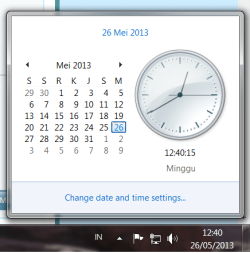
My time and date setting are correct. I set the language to Indonesian. Here is the screenshot of the settings:

date and time setting.png

And here are the screenshots of the errors:

accounts.google.com can't be accessed - chrome.png accounts.google.com can't be accessed - firefox.png accounts.google.com can't be accessed - IE.png

It's odd that this error occurs after my PC is on for a few minutes.
 

My Computer

Computer type
PC/Desktop
Computer Manufacturer/Model Number
Custom Build
OS
Windows 7 Home Premium x64 SP1
CPU
Intel i3-3220
Motherboard
Asrock B75M-DGS R2.0
Memory
Corsair Vengeance Black Dual Channel 8 GB
Graphics Card(s)
Club 3D HD 7850 Royal Queen Series
Sound Card
Stock
Monitor(s) Displays
Philips 224CL2
Screen Resolution
1920 x 1080p
Hard Drives
WDC Blue 500GB
Seagate Barracuda 1 TB
PSU
Corsair CX500
Case
Thermaltake Commander MS-I
Cooling
Stock
Keyboard
Logitech K100
Mouse
XTECGO Team Eagle
Internet Speed
312 kbps
Antivirus
Microsoft Security Essentials
Browser
Chrome, Firefox, IE

My Computer

Computer type
PC/Desktop
OS
Windows 10 Home x64
CPU
INTEL Core i5-750 Quad-Core 3.37GHz
Motherboard
ASUS P7P55D
Memory
HyperX Fury Black Series 8GB (2 x 4GB) 1866Mhz
Graphics Card(s)
EVGA GeForce GTX 750 Superclocked 1GB 128-Bit GDDR5
Monitor(s) Displays
LG 32MA68HY 32" IPS
Screen Resolution
1920 x 1080
Hard Drives
Samsung 840 Evo 120GB, SEAGATE 500GB Barracuda® 7200.12, SATA 3 Gb/s, 7200 RPM, 16MB cache
PSU
ANTEC TruePower New TP-550, 80 PLUS, 550W
Case
ANTEC Three Hundred Illusion
Cooling
COOLER MASTER Hyper 212 Plus, 4 x 120mm 1 x 140mm Noctua's
Internet Speed
85 + Mbps
Antivirus
Avast
Browser
Vivaldi
It also doesn't wok in safe mode with networking. Here are the screenshots:
accounts.google.com can't be accessed - chrome - safe mode.png

accounts.google.com can't be accessed - firefox - safe mode.png

I have run malware scans using MSE and Microsoft malicious software removal tool before posting this issue and there's no infection in my PC. I also can't run windows update and it shows 80072f78 error. Is there a connection between them?
 

My Computer

Computer type
PC/Desktop
Computer Manufacturer/Model Number
Custom Build
OS
Windows 7 Home Premium x64 SP1
CPU
Intel i3-3220
Motherboard
Asrock B75M-DGS R2.0
Memory
Corsair Vengeance Black Dual Channel 8 GB
Graphics Card(s)
Club 3D HD 7850 Royal Queen Series
Sound Card
Stock
Monitor(s) Displays
Philips 224CL2
Screen Resolution
1920 x 1080p
Hard Drives
WDC Blue 500GB
Seagate Barracuda 1 TB
PSU
Corsair CX500
Case
Thermaltake Commander MS-I
Cooling
Stock
Keyboard
Logitech K100
Mouse
XTECGO Team Eagle
Internet Speed
312 kbps
Antivirus
Microsoft Security Essentials
Browser
Chrome, Firefox, IE

My Computer

Computer type
PC/Desktop
OS
Windows 10 Home x64
CPU
INTEL Core i5-750 Quad-Core 3.37GHz
Motherboard
ASUS P7P55D
Memory
HyperX Fury Black Series 8GB (2 x 4GB) 1866Mhz
Graphics Card(s)
EVGA GeForce GTX 750 Superclocked 1GB 128-Bit GDDR5
Monitor(s) Displays
LG 32MA68HY 32" IPS
Screen Resolution
1920 x 1080
Hard Drives
Samsung 840 Evo 120GB, SEAGATE 500GB Barracuda® 7200.12, SATA 3 Gb/s, 7200 RPM, 16MB cache
PSU
ANTEC TruePower New TP-550, 80 PLUS, 550W
Case
ANTEC Three Hundred Illusion
Cooling
COOLER MASTER Hyper 212 Plus, 4 x 120mm 1 x 140mm Noctua's
Internet Speed
85 + Mbps
Antivirus
Avast
Browser
Vivaldi
The windows update error is gone but the certificate issue still occurs. I think the windows update error was caused by my unstable ISP connection. Windows update is working well now. The certificate issue still exists and I still can't figure it out. Actually besides date & time setting, what does usually cause certificate issue? I'm still looking for the cause of the problem.
 

My Computer

Computer type
PC/Desktop
Computer Manufacturer/Model Number
Custom Build
OS
Windows 7 Home Premium x64 SP1
CPU
Intel i3-3220
Motherboard
Asrock B75M-DGS R2.0
Memory
Corsair Vengeance Black Dual Channel 8 GB
Graphics Card(s)
Club 3D HD 7850 Royal Queen Series
Sound Card
Stock
Monitor(s) Displays
Philips 224CL2
Screen Resolution
1920 x 1080p
Hard Drives
WDC Blue 500GB
Seagate Barracuda 1 TB
PSU
Corsair CX500
Case
Thermaltake Commander MS-I
Cooling
Stock
Keyboard
Logitech K100
Mouse
XTECGO Team Eagle
Internet Speed
312 kbps
Antivirus
Microsoft Security Essentials
Browser
Chrome, Firefox, IE
Usually the system time/date. If the certificate is not from a known/trusted provider. If the certificate is out of date.

I'd try the clean start mentioned above anyway. Usually if it doesn't work in safe mode, then a clean start will not reveal anything.

Are you connected straight to the modem, or through a router?

A Guy
 

My Computer

Computer type
PC/Desktop
OS
Windows 10 Home x64
CPU
INTEL Core i5-750 Quad-Core 3.37GHz
Motherboard
ASUS P7P55D
Memory
HyperX Fury Black Series 8GB (2 x 4GB) 1866Mhz
Graphics Card(s)
EVGA GeForce GTX 750 Superclocked 1GB 128-Bit GDDR5
Monitor(s) Displays
LG 32MA68HY 32" IPS
Screen Resolution
1920 x 1080
Hard Drives
Samsung 840 Evo 120GB, SEAGATE 500GB Barracuda® 7200.12, SATA 3 Gb/s, 7200 RPM, 16MB cache
PSU
ANTEC TruePower New TP-550, 80 PLUS, 550W
Case
ANTEC Three Hundred Illusion
Cooling
COOLER MASTER Hyper 212 Plus, 4 x 120mm 1 x 140mm Noctua's
Internet Speed
85 + Mbps
Antivirus
Avast
Browser
Vivaldi
I am connected through wireless modem router, but actually I am connected through LAN cable because my modem router has LAN cable port. Other PCs that'are connected to this modem router through wireless doesn't have this issue. Is this possibly the source of the issue?

Thanks,
maurisrx
 

My Computer

Computer type
PC/Desktop
Computer Manufacturer/Model Number
Custom Build
OS
Windows 7 Home Premium x64 SP1
CPU
Intel i3-3220
Motherboard
Asrock B75M-DGS R2.0
Memory
Corsair Vengeance Black Dual Channel 8 GB
Graphics Card(s)
Club 3D HD 7850 Royal Queen Series
Sound Card
Stock
Monitor(s) Displays
Philips 224CL2
Screen Resolution
1920 x 1080p
Hard Drives
WDC Blue 500GB
Seagate Barracuda 1 TB
PSU
Corsair CX500
Case
Thermaltake Commander MS-I
Cooling
Stock
Keyboard
Logitech K100
Mouse
XTECGO Team Eagle
Internet Speed
312 kbps
Antivirus
Microsoft Security Essentials
Browser
Chrome, Firefox, IE
My father's blackberry also has the same issue. So the problem maybe is in router?

Thanks,
maurisrx
 

My Computer

Computer type
PC/Desktop
Computer Manufacturer/Model Number
Custom Build
OS
Windows 7 Home Premium x64 SP1
CPU
Intel i3-3220
Motherboard
Asrock B75M-DGS R2.0
Memory
Corsair Vengeance Black Dual Channel 8 GB
Graphics Card(s)
Club 3D HD 7850 Royal Queen Series
Sound Card
Stock
Monitor(s) Displays
Philips 224CL2
Screen Resolution
1920 x 1080p
Hard Drives
WDC Blue 500GB
Seagate Barracuda 1 TB
PSU
Corsair CX500
Case
Thermaltake Commander MS-I
Cooling
Stock
Keyboard
Logitech K100
Mouse
XTECGO Team Eagle
Internet Speed
312 kbps
Antivirus
Microsoft Security Essentials
Browser
Chrome, Firefox, IE
It's possible. The only commons are the router and the ISP. A Guy
 

My Computer

Computer type
PC/Desktop
OS
Windows 10 Home x64
CPU
INTEL Core i5-750 Quad-Core 3.37GHz
Motherboard
ASUS P7P55D
Memory
HyperX Fury Black Series 8GB (2 x 4GB) 1866Mhz
Graphics Card(s)
EVGA GeForce GTX 750 Superclocked 1GB 128-Bit GDDR5
Monitor(s) Displays
LG 32MA68HY 32" IPS
Screen Resolution
1920 x 1080
Hard Drives
Samsung 840 Evo 120GB, SEAGATE 500GB Barracuda® 7200.12, SATA 3 Gb/s, 7200 RPM, 16MB cache
PSU
ANTEC TruePower New TP-550, 80 PLUS, 550W
Case
ANTEC Three Hundred Illusion
Cooling
COOLER MASTER Hyper 212 Plus, 4 x 120mm 1 x 140mm Noctua's
Internet Speed
85 + Mbps
Antivirus
Avast
Browser
Vivaldi
It's possible. The only commons are the router and the ISP. A Guy

Thanks, I'll try to reset the router.

8.jpg
 

My Computer

Computer type
PC/Desktop
Computer Manufacturer/Model Number
Custom Build
OS
Windows 7 Home Premium x64 SP1
CPU
Intel i3-3220
Motherboard
Asrock B75M-DGS R2.0
Memory
Corsair Vengeance Black Dual Channel 8 GB
Graphics Card(s)
Club 3D HD 7850 Royal Queen Series
Sound Card
Stock
Monitor(s) Displays
Philips 224CL2
Screen Resolution
1920 x 1080p
Hard Drives
WDC Blue 500GB
Seagate Barracuda 1 TB
PSU
Corsair CX500
Case
Thermaltake Commander MS-I
Cooling
Stock
Keyboard
Logitech K100
Mouse
XTECGO Team Eagle
Internet Speed
312 kbps
Antivirus
Microsoft Security Essentials
Browser
Chrome, Firefox, IE
It's solved finally. Resetting the router solved the problem. Thanks for the answers.
 

My Computer

Computer type
PC/Desktop
Computer Manufacturer/Model Number
Custom Build
OS
Windows 7 Home Premium x64 SP1
CPU
Intel i3-3220
Motherboard
Asrock B75M-DGS R2.0
Memory
Corsair Vengeance Black Dual Channel 8 GB
Graphics Card(s)
Club 3D HD 7850 Royal Queen Series
Sound Card
Stock
Monitor(s) Displays
Philips 224CL2
Screen Resolution
1920 x 1080p
Hard Drives
WDC Blue 500GB
Seagate Barracuda 1 TB
PSU
Corsair CX500
Case
Thermaltake Commander MS-I
Cooling
Stock
Keyboard
Logitech K100
Mouse
XTECGO Team Eagle
Internet Speed
312 kbps
Antivirus
Microsoft Security Essentials
Browser
Chrome, Firefox, IE
Great, glad you got it sorted ;)

A Guy
 

My Computer

Computer type
PC/Desktop
OS
Windows 10 Home x64
CPU
INTEL Core i5-750 Quad-Core 3.37GHz
Motherboard
ASUS P7P55D
Memory
HyperX Fury Black Series 8GB (2 x 4GB) 1866Mhz
Graphics Card(s)
EVGA GeForce GTX 750 Superclocked 1GB 128-Bit GDDR5
Monitor(s) Displays
LG 32MA68HY 32" IPS
Screen Resolution
1920 x 1080
Hard Drives
Samsung 840 Evo 120GB, SEAGATE 500GB Barracuda® 7200.12, SATA 3 Gb/s, 7200 RPM, 16MB cache
PSU
ANTEC TruePower New TP-550, 80 PLUS, 550W
Case
ANTEC Three Hundred Illusion
Cooling
COOLER MASTER Hyper 212 Plus, 4 x 120mm 1 x 140mm Noctua's
Internet Speed
85 + Mbps
Antivirus
Avast
Browser
Vivaldi
Back
Top