Hello,
New to the forums.. glad to be here! Have a weird one for ya; Simple to explain, can't even begin to think of how to fix it.
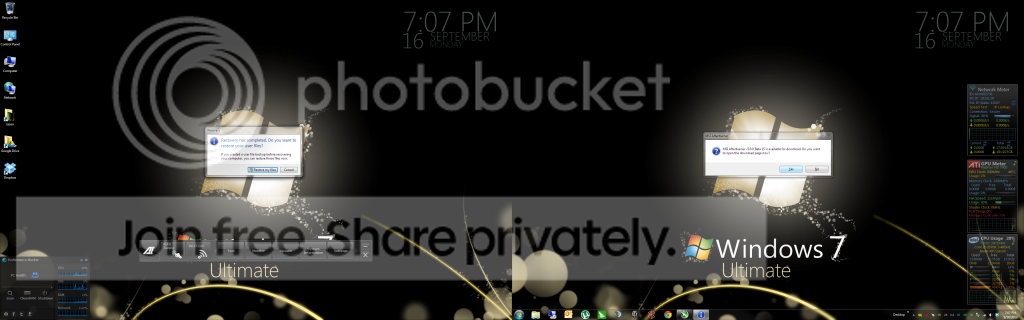
Every time I boot, upon login I am prompted to restore files which have apparently been recovered.
Two problems: A) I don't use the built-in Windows Back and Restore utility so I have no backups to begin with as far as the utility is concerned (I use EaseUS Todo Backup). and, B) I haven't initiated a backup or system restore, why is this prompt being displayed??
any help, much appreciated!
(screen shot to follow, need to log off and on to screenshot)
thanks again,
JChap1590
New to the forums.. glad to be here! Have a weird one for ya; Simple to explain, can't even begin to think of how to fix it.
Every time I boot, upon login I am prompted to restore files which have apparently been recovered.
Two problems: A) I don't use the built-in Windows Back and Restore utility so I have no backups to begin with as far as the utility is concerned (I use EaseUS Todo Backup). and, B) I haven't initiated a backup or system restore, why is this prompt being displayed??
any help, much appreciated!
(screen shot to follow, need to log off and on to screenshot)
thanks again,
JChap1590
My Computer
- Computer type
- PC/Desktop
- Computer Manufacturer/Model Number
- Custom Build
- OS
- Windows 7 Professional, 64-bit
- CPU
- Intel Pentuim G3258
- Motherboard
- EVGA Z97 Stinger Core 3D LGA1150 mITX
- Memory
- Crucial Ballistix Elite DDR3 2x4GB 1866MHz C9
- Graphics Card(s)
- MSI Radeon R9 270X Gaming 2G ITX
- Hard Drives
- Samsung 840 EVO, 250GB
- PSU
- EVGA SuperNOVA 650 G1
- Case
- Bitfenix Prodigy ITX, Orange
- Cooling
- EVGA ACX mITX CPU Cooler