Odd Request

rsteele

New member
Local time
6:54 PM
Messages
21
Location
Panhandle of Texas
Hello community of my peers :) I have a question that hopefully somebody can answer. Yesterday after visiting my dad's house and installing a printer made in 1993 on his computer, he showed me several interesting and unusual electronic items and told me I could have something from the pile. Out of all the stuff there, the most useful thing I found was a video intercom thing, so that is what I took. It appears to have been made also in the early 90's.

My goal is to put it in my office area in the basement of my house, so that when I am down here, the other people living here can call me from upstairs instead of having to climb up and down them just to tell me something, or scream at the top of their lungs just to even alert me they need/want something.

The problem I'm encountering is that I can not find any documentation for the video phone anywhere on the internet, not even the company who made it or a picture or video or anything at all. I need schematics and detailed requirements to figure out how to wire it correctly so the call button works when it is pressed. I have the RJ-11 phone wire hooked up correctly between the call button and microphone/camera and the base phone with the monitor. The device shows video and transmits sound, but only when I initiate the call from the base station/monitor. If the call button is pressed, nothing happens at all and no call is started. The product was made in Malaysia and it appears that it was to be sold and used there as well. The box is only in Malaysian language, as well as the small 20 page manual that came with it, and even after using multiple online translators, I still have not gained any headway.

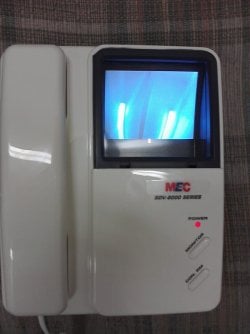
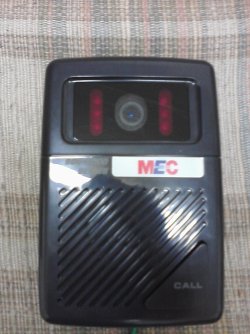
My question I guess I am asking is....how can I find information and specs on such an uncommon device? I figured computer people would know best, which is why I asked here. If it helps at all or if anybody wants to try to help me find technical information, it is made by a company called MEC (I'm assuming it means Malaysia(n) Electronic(s) Company) and the model is SDV-8000 series. The title of the device is a "Door Video Phone". I currently don't have a way to upload any pictures of the device, but the Base Station/Monitor looks identical to an office desk phone, but with only 2 buttons instead of numbers and it has a 3.5 inch CRT screen in the top right corner. It is an off-white color. The camera/call button part is black and has a small solid state black and white camera with IR sensors to see at night. It is about 5 inches wide and about 6 inches tall and maybe 3 inches deep.

I hope somebody can help me with my issue, as getting it to work fully functionally would be a really nice addition to my office to assist me in being even lazier lol. Please let me know if anybody is interested in helping. Thanks for reading this entirely too long post.

Steele

PS I hope that this isn't upsetting to anybody because it doesn't concern Windows, or even computers really....I just trust this site when I can't find answers on the internet myself. People are smart and knowledgeable and friendly here. Thanks
 

My Computer

Computer Manufacturer/Model Number
Compaq Presario CQ62
OS
Windows 7 Home Premium x64
CPU
Intel Celeron 900 @ 2.20GHz (mobile)
Motherboard
Generic S.O. board
Memory
2GB DDR2 (upgrades to 4GB)
Graphics Card(s)
On-board graphics by Intel
Sound Card
On-board sound by RealTek
Monitor(s) Displays
16.9" Generic PnP LCD Panel
Screen Resolution
1366x768
Hard Drives
Samsung HM250HI 250GB
PSU
9 Cell Lithium Ion Battery
Case
Notebook (S.O.)
Cooling
A tiny, insufficient fan.
Keyboard
Very basic standard keyboard, no 10-key
Mouse
Synaptics Touchpad or Targus 2.4g Wireless Mouse
Internet Speed
100Mbps (not MBps!!!) 4G WiMaxx
Other Info
The very most basic and low-end laptop available on the market. Not great for anything data-intensive, but it gets the job done for school and web browsing. I'd give it 3 stars out of 5.
hmmm... I am guessing there is no software for it?

if you have it set up and it doesnt work with that one function I would open it up and see if there is a fuse in the casing that needs to be replaced.

Also you said " I need schematics and detailed requirements to figure out how to wire it correctly"

Does it have exposed wires?

I might just be fueling a fire, but pictures maybe?
 

My Computer

Computer type
Laptop
Computer Manufacturer/Model Number
ASUS G60-RBBX05
OS
Win7 Home Premium 64x
CPU
Intel Core 2 Duo P7450 / 2.13 GHz (2.29 with Extreme Turbo)
Memory
4 GB PC-6400 Hyundai (2X2) at 800Mhz
Graphics Card(s)
NVIDIA GeForce GTX 260M 1GB DDR3 VRAM
Monitor(s) Displays
16" LED Backlit
Screen Resolution
1366 x 768 on laptop 1600x1050 max res on 22" external mon
Hard Drives
OCZ Agility 3 60GB SSD / 320 GB - Serial ATA-150 - 7200 rpm
PSU
6-cell Lithium ion { lasts 1.5 hours }
Case
ASUS G60 Laptop
Keyboard
Chicklet type back-lit (white light) keyboard
Mouse
Logitech G9 Laser Mouse 3200dpi and 1000 reports per minute
Internet Speed
Comcast 8.60mb/s up - 3.11mb/s down
Antivirus
MSE
Browser
Firefox
Other Info
General mid-budget gaming Comp. Low batterylife - High FrameRates - currently overheating problems :(

2nd Rig: Case: Rosewill BLACKHAWK Gaming ATX Mid Tower Computer Case

Mobo: GIGABYTE GA-990FXA-UD3
CPU: AMD FX-6200 Zambezi 3.8GHz (4.1GHz Turbo)
Heatsink: COOLER MASTER V8 CPU Cooler
RAM: Patriot Viper 3 8GB (2 x 4GB) 240-Pin DDR3 SDRAM 1866 (PC3 15000)
GPU: SAPPHIRE Radeon HD 6850 1GB 2
I do not have a camera handy at the moment, but I will do my best to explain....

There are no fuses. I think the problem has something to do with a ground wire on the talk/camera part. There is a screw that is in the bottom of it for something, and I think it needs a ground wire attached to it and a ground, and I don't know where to ground something out inside a house.

As far as the interface and wires, it uses simple phone line (RJ-11) and connectors very similar to the ones on the backs of really old analog CRT TV's to hook up the antenna. Its a screw that you back out a few turns, put a wire underneath the head of the screw, then tighten the screw on top of it. There are 4 wires and terminals on the back of the base station/monitor part, and upstairs on the camera/talk part, there are also 4 terminals to connect your RJ-11 to, in the same order as on the back of the base station. I have those connected and verified correct. I need to find out for sure if the little screw that I haven't figured out what it's for yet, is actually for a ground, and where to ground something out in a house.
 

My Computer

Computer Manufacturer/Model Number
Compaq Presario CQ62
OS
Windows 7 Home Premium x64
CPU
Intel Celeron 900 @ 2.20GHz (mobile)
Motherboard
Generic S.O. board
Memory
2GB DDR2 (upgrades to 4GB)
Graphics Card(s)
On-board graphics by Intel
Sound Card
On-board sound by RealTek
Monitor(s) Displays
16.9" Generic PnP LCD Panel
Screen Resolution
1366x768
Hard Drives
Samsung HM250HI 250GB
PSU
9 Cell Lithium Ion Battery
Case
Notebook (S.O.)
Cooling
A tiny, insufficient fan.
Keyboard
Very basic standard keyboard, no 10-key
Mouse
Synaptics Touchpad or Targus 2.4g Wireless Mouse
Internet Speed
100Mbps (not MBps!!!) 4G WiMaxx
Other Info
The very most basic and low-end laptop available on the market. Not great for anything data-intensive, but it gets the job done for school and web browsing. I'd give it 3 stars out of 5.
For grounding purposes you can use any 3-prong standard 120V plug. Pick one up at a home warehouse, Lowes, Home depot, Menards, etc. Connect a wire to ONLY the screw for the round ground prong, cover or insulate the other two screws if exposed. Plug in to any 120V receptacle and you have a ground.

Another way is to use and old 3-wire power cable with a round cable. The cable should have 3 separate wires inside, white, balck, and green, The green one is the ground conductor. Use an insulating cap for the two other wires, one for each one, and you can use that for a ground too. Take care that the white and black wires do not touch and are fully insulated from each other. A spare PC power cable works great.

I just did a Google search for MEC SDV-8000 series and came up with a steam cleaner and some kind of pump...along with this thread.
 

My Computer

Computer type
PC/Desktop
Computer Manufacturer/Model Number
Home Built Desktop By DataTech
OS
Windows 7 Ultimate X64 SP1
CPU
Intel i5-2550K, Differing ~4.4-4.8GHz No built in GPU
Motherboard
ASUS P8Z68-V PRO/GEN3
Memory
16GB G.Skill Sniper 1866MHz @ 2133MHz 2x8GB
Graphics Card(s)
ASUS GTX650TIB-DC2OC-2GD5, (650TI Boost)
Sound Card
Onboard Realtek 5-1
Monitor(s) Displays
Samsung P2570HD
Screen Resolution
1920x1080
Hard Drives
Samsung 840 Pro 256GB SSD for OS, 500GB Seagate Constellation (Enterprise drive) for Data
PSU
Corsair HX650W
Case
Inwin Dragon Rider
Cooling
Hyper 212 EVO w/two Noctua fans, push-pull, @1300 RPM
Keyboard
E-Z Eyes, bright yellow keys with large characters
Mouse
steelseries SENSEI Laser Pro Gaming
Internet Speed
48-51Mbs Mbs down, 11 Mbs up Xfinity Cable
Antivirus
Norton Internet Security 2013
Browser
IE 10, Opera, Pale Moon if needed
Other Info
4 case fans, LG BluRay-RE, ASUS DVD-RW, Mr. Fusion power supply, 1.21 gigawatts.
Well, the problem I'm running into is this....the house I live in was built in 1919 and it has never been rewired....so this house doesn't have 3 wire plugs, or wires with 3 wires in them....just a black (gound) and white (hot) wires through out the whole house. I'll figure something out though eventually I guess. If it doesn't work, then oh well, no big deal I suppose.
 

My Computer

Computer Manufacturer/Model Number
Compaq Presario CQ62
OS
Windows 7 Home Premium x64
CPU
Intel Celeron 900 @ 2.20GHz (mobile)
Motherboard
Generic S.O. board
Memory
2GB DDR2 (upgrades to 4GB)
Graphics Card(s)
On-board graphics by Intel
Sound Card
On-board sound by RealTek
Monitor(s) Displays
16.9" Generic PnP LCD Panel
Screen Resolution
1366x768
Hard Drives
Samsung HM250HI 250GB
PSU
9 Cell Lithium Ion Battery
Case
Notebook (S.O.)
Cooling
A tiny, insufficient fan.
Keyboard
Very basic standard keyboard, no 10-key
Mouse
Synaptics Touchpad or Targus 2.4g Wireless Mouse
Internet Speed
100Mbps (not MBps!!!) 4G WiMaxx
Other Info
The very most basic and low-end laptop available on the market. Not great for anything data-intensive, but it gets the job done for school and web browsing. I'd give it 3 stars out of 5.
White should be the neutral (ground), but in an old house not guaranteed. Black or any color other than green will be the "hot" lead.
You can do the same procedure with a two prong plug by cutting off the one which goes in the "hot" side of the receptacle.
You should use a voltage detector to figure out which is which and may vary from each receptacle. something like:
Greenlee GT-11 Non-Contact Voltage Detector UPC #9022#
 

My Computer

Computer type
PC/Desktop
Computer Manufacturer/Model Number
Home Built Desktop By DataTech
OS
Windows 7 Ultimate X64 SP1
CPU
Intel i5-2550K, Differing ~4.4-4.8GHz No built in GPU
Motherboard
ASUS P8Z68-V PRO/GEN3
Memory
16GB G.Skill Sniper 1866MHz @ 2133MHz 2x8GB
Graphics Card(s)
ASUS GTX650TIB-DC2OC-2GD5, (650TI Boost)
Sound Card
Onboard Realtek 5-1
Monitor(s) Displays
Samsung P2570HD
Screen Resolution
1920x1080
Hard Drives
Samsung 840 Pro 256GB SSD for OS, 500GB Seagate Constellation (Enterprise drive) for Data
PSU
Corsair HX650W
Case
Inwin Dragon Rider
Cooling
Hyper 212 EVO w/two Noctua fans, push-pull, @1300 RPM
Keyboard
E-Z Eyes, bright yellow keys with large characters
Mouse
steelseries SENSEI Laser Pro Gaming
Internet Speed
48-51Mbs Mbs down, 11 Mbs up Xfinity Cable
Antivirus
Norton Internet Security 2013
Browser
IE 10, Opera, Pale Moon if needed
Other Info
4 case fans, LG BluRay-RE, ASUS DVD-RW, Mr. Fusion power supply, 1.21 gigawatts.
I took the speaker/camera device apart to see if there was a ground inside of it, as it turns out, the screw is an adjustment for the angle of the camera lens. There are only 4 wire connections to be made on the back of that part. They are all hooked up correctly. It has to do something with the other 4 wires that come out of the base station itself, and also the DIP switch on the back of the base station. It's got 5 tiny on/off switches, and I dont know where they are supposed to be set, and I dont know what the other 4 wires do. I need to get a diagram, which brings us back to the original problem, there's no place to find it. I guess I'll toss it in the dumpster, its nothing more than a paper weight without proper functions.
 

My Computer

Computer Manufacturer/Model Number
Compaq Presario CQ62
OS
Windows 7 Home Premium x64
CPU
Intel Celeron 900 @ 2.20GHz (mobile)
Motherboard
Generic S.O. board
Memory
2GB DDR2 (upgrades to 4GB)
Graphics Card(s)
On-board graphics by Intel
Sound Card
On-board sound by RealTek
Monitor(s) Displays
16.9" Generic PnP LCD Panel
Screen Resolution
1366x768
Hard Drives
Samsung HM250HI 250GB
PSU
9 Cell Lithium Ion Battery
Case
Notebook (S.O.)
Cooling
A tiny, insufficient fan.
Keyboard
Very basic standard keyboard, no 10-key
Mouse
Synaptics Touchpad or Targus 2.4g Wireless Mouse
Internet Speed
100Mbps (not MBps!!!) 4G WiMaxx
Other Info
The very most basic and low-end laptop available on the market. Not great for anything data-intensive, but it gets the job done for school and web browsing. I'd give it 3 stars out of 5.
I will try to borrow my buddy's camera here in a little bit and take pictures of everything I can. Hopefully pics can help somehow, but for some reason, I doubt it....anyways, will post them.
 

My Computer

Computer Manufacturer/Model Number
Compaq Presario CQ62
OS
Windows 7 Home Premium x64
CPU
Intel Celeron 900 @ 2.20GHz (mobile)
Motherboard
Generic S.O. board
Memory
2GB DDR2 (upgrades to 4GB)
Graphics Card(s)
On-board graphics by Intel
Sound Card
On-board sound by RealTek
Monitor(s) Displays
16.9" Generic PnP LCD Panel
Screen Resolution
1366x768
Hard Drives
Samsung HM250HI 250GB
PSU
9 Cell Lithium Ion Battery
Case
Notebook (S.O.)
Cooling
A tiny, insufficient fan.
Keyboard
Very basic standard keyboard, no 10-key
Mouse
Synaptics Touchpad or Targus 2.4g Wireless Mouse
Internet Speed
100Mbps (not MBps!!!) 4G WiMaxx
Other Info
The very most basic and low-end laptop available on the market. Not great for anything data-intensive, but it gets the job done for school and web browsing. I'd give it 3 stars out of 5.
Sounds like a plan, get plenty of light on it and focus. We'll have a look-see.:)
 

My Computer

Computer type
PC/Desktop
Computer Manufacturer/Model Number
Home Built Desktop By DataTech
OS
Windows 7 Ultimate X64 SP1
CPU
Intel i5-2550K, Differing ~4.4-4.8GHz No built in GPU
Motherboard
ASUS P8Z68-V PRO/GEN3
Memory
16GB G.Skill Sniper 1866MHz @ 2133MHz 2x8GB
Graphics Card(s)
ASUS GTX650TIB-DC2OC-2GD5, (650TI Boost)
Sound Card
Onboard Realtek 5-1
Monitor(s) Displays
Samsung P2570HD
Screen Resolution
1920x1080
Hard Drives
Samsung 840 Pro 256GB SSD for OS, 500GB Seagate Constellation (Enterprise drive) for Data
PSU
Corsair HX650W
Case
Inwin Dragon Rider
Cooling
Hyper 212 EVO w/two Noctua fans, push-pull, @1300 RPM
Keyboard
E-Z Eyes, bright yellow keys with large characters
Mouse
steelseries SENSEI Laser Pro Gaming
Internet Speed
48-51Mbs Mbs down, 11 Mbs up Xfinity Cable
Antivirus
Norton Internet Security 2013
Browser
IE 10, Opera, Pale Moon if needed
Other Info
4 case fans, LG BluRay-RE, ASUS DVD-RW, Mr. Fusion power supply, 1.21 gigawatts.
Well, I will probably wind up editing this post before it's all said and done, but here are the best pics I could come up with. Apparently my friend meant I could use is cell phone camera and I could have done that myself, so I just used it. The quality isn't very clear or crisp, but hopefully it conveys the point(s). I don't know which pics are which, so I'm going to submit this reply, then come back to it and add details about the pictures.

Pic 1: This is the camera and microphone part....

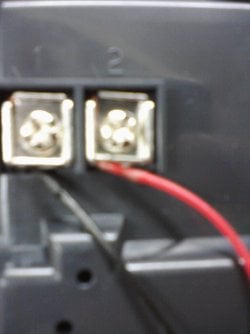
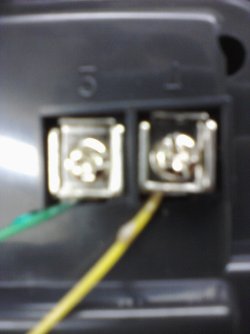
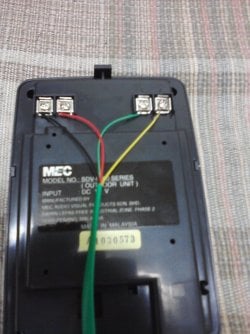
Pic 2: This is the back of the camera/mic part, where the 4 connections are made from the base part. They are numbered 1-4 from left to right. Close ups are Pics 7 and 8

Pic 3: Overview of the back of the base station/monitor part

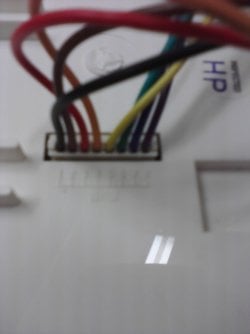
Pic 4: Where the 8 wires exit the back of the base/monitor, they are numbered 1-8 from left to right, just can't see the numbers etched in the plastic because the pic is fuzzy.

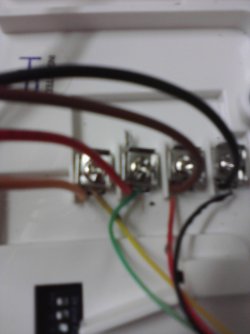
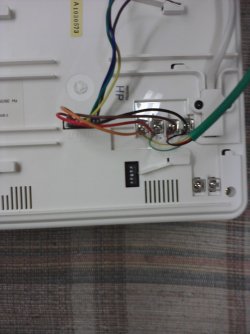
Pic 5: Close up of the 4 connections that go to the cam/mic part. They also are numbered 1-4, except in this pic from left to right it goes 4, 3, 2, 1. The green RJ-11 phone line is attached correctly to these connectors as well as on the back of the cam/mic piece. The wire order is as follows: 1-black, 2-red, 3-green, 4-yellow. All the numbers align with each other properly, in all three places.

Pic 6: Shows the connections on the back of the monitor, and also the DIP switch and two other terminals that I don't know what are for. I think the device has the capability to open a locked door/gate to allow people to enter at the press of a button instead of having to manually unlock the door/gate. The indentations on the plastic by the two unused terminals say "S" and "L".

Pic 7: Shows connections 1 and 2 on the back of the cam/mic

Pic 8: Shows connections 3 and 4 on the back of the cam/mic

Pic 9: Shows the top side of the monitor, where the cam was on. The cam works when you turn it on from the monitor, and so does the mic and sound. I'm trying to figure out how to get it to also work when the call button is pressed on the cam/mic part. That is the whole problem.

Pic 10: didn't load for some reason, but it was a close up of the DIP switch on the back. The settings are left as it came out of the box. Switches 1 and 2 are off, switch 3 is on, and 4 and 5 are also off.

I hope this helps somebody understand a little more what's going on....maybe the call button on the cam/mic is just broken, which sucks :(
 

Attachments

  • Image07132011155838.jpg
    Image07132011155838.jpg
    220.2 KB · Views: 97
  • Image07132011155922.jpg
    Image07132011155922.jpg
    241.6 KB · Views: 102
  • Image07132011155957.jpg
    Image07132011155957.jpg
    177.4 KB · Views: 100
  • Image07132011160018.jpg
    Image07132011160018.jpg
    90.9 KB · Views: 101
  • Image07132011160035.jpg
    Image07132011160035.jpg
    110.1 KB · Views: 91
  • Image07132011160051.jpg
    Image07132011160051.jpg
    145.9 KB · Views: 100
  • Image07132011160141.jpg
    Image07132011160141.jpg
    161.9 KB · Views: 93
  • Image07132011160148.jpg
    Image07132011160148.jpg
    148.6 KB · Views: 82
  • Image07132011160208.jpg
    Image07132011160208.jpg
    136.4 KB · Views: 102
Last edited:

My Computer

Computer Manufacturer/Model Number
Compaq Presario CQ62
OS
Windows 7 Home Premium x64
CPU
Intel Celeron 900 @ 2.20GHz (mobile)
Motherboard
Generic S.O. board
Memory
2GB DDR2 (upgrades to 4GB)
Graphics Card(s)
On-board graphics by Intel
Sound Card
On-board sound by RealTek
Monitor(s) Displays
16.9" Generic PnP LCD Panel
Screen Resolution
1366x768
Hard Drives
Samsung HM250HI 250GB
PSU
9 Cell Lithium Ion Battery
Case
Notebook (S.O.)
Cooling
A tiny, insufficient fan.
Keyboard
Very basic standard keyboard, no 10-key
Mouse
Synaptics Touchpad or Targus 2.4g Wireless Mouse
Internet Speed
100Mbps (not MBps!!!) 4G WiMaxx
Other Info
The very most basic and low-end laptop available on the market. Not great for anything data-intensive, but it gets the job done for school and web browsing. I'd give it 3 stars out of 5.
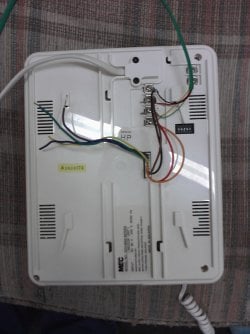
Pics are fine. On the black part the screws have numbers, does the phone part have corresponding ones? That connector with wires to the screws on the white part may be for a 2nd camera or inside unit, hence the loose wires?:confused:
 

My Computer

Computer type
PC/Desktop
Computer Manufacturer/Model Number
Home Built Desktop By DataTech
OS
Windows 7 Ultimate X64 SP1
CPU
Intel i5-2550K, Differing ~4.4-4.8GHz No built in GPU
Motherboard
ASUS P8Z68-V PRO/GEN3
Memory
16GB G.Skill Sniper 1866MHz @ 2133MHz 2x8GB
Graphics Card(s)
ASUS GTX650TIB-DC2OC-2GD5, (650TI Boost)
Sound Card
Onboard Realtek 5-1
Monitor(s) Displays
Samsung P2570HD
Screen Resolution
1920x1080
Hard Drives
Samsung 840 Pro 256GB SSD for OS, 500GB Seagate Constellation (Enterprise drive) for Data
PSU
Corsair HX650W
Case
Inwin Dragon Rider
Cooling
Hyper 212 EVO w/two Noctua fans, push-pull, @1300 RPM
Keyboard
E-Z Eyes, bright yellow keys with large characters
Mouse
steelseries SENSEI Laser Pro Gaming
Internet Speed
48-51Mbs Mbs down, 11 Mbs up Xfinity Cable
Antivirus
Norton Internet Security 2013
Browser
IE 10, Opera, Pale Moon if needed
Other Info
4 case fans, LG BluRay-RE, ASUS DVD-RW, Mr. Fusion power supply, 1.21 gigawatts.
Pics are fine. On the black part the screws have numbers, does the phone part have corresponding ones? That connector with wires to the screws on the white part may be for a 2nd camera or inside unit, hence the loose wires?:confused:

I think the other 4 wires that aren't used are to control a gate/door lock, or to be used to connect to the "control room" as the other button on the monitor says....I do not know, that's why I wish somebody could find documentation on the damn thing so I could figure out what to do to make it work fully.
 

My Computer

Computer Manufacturer/Model Number
Compaq Presario CQ62
OS
Windows 7 Home Premium x64
CPU
Intel Celeron 900 @ 2.20GHz (mobile)
Motherboard
Generic S.O. board
Memory
2GB DDR2 (upgrades to 4GB)
Graphics Card(s)
On-board graphics by Intel
Sound Card
On-board sound by RealTek
Monitor(s) Displays
16.9" Generic PnP LCD Panel
Screen Resolution
1366x768
Hard Drives
Samsung HM250HI 250GB
PSU
9 Cell Lithium Ion Battery
Case
Notebook (S.O.)
Cooling
A tiny, insufficient fan.
Keyboard
Very basic standard keyboard, no 10-key
Mouse
Synaptics Touchpad or Targus 2.4g Wireless Mouse
Internet Speed
100Mbps (not MBps!!!) 4G WiMaxx
Other Info
The very most basic and low-end laptop available on the market. Not great for anything data-intensive, but it gets the job done for school and web browsing. I'd give it 3 stars out of 5.
Well if your getting sound & video you are hooked up right with the phone line.
Is the "call" feature wireless? Like old garage door openers or wireless doorbells, if so maybe in/on the black piece should be dip switches or a diagram to show what position to put the other dips in?
 

My Computer

Computer type
PC/Desktop
Computer Manufacturer/Model Number
Jeepmann/Custom Built
OS
Windows 7 Ultimate 64bit
CPU
Intel Core i7-2600K Sandy Bridge 3.4GHz (@[email protected])
Motherboard
Asus Maximus IV Extreme LGA 1155 Intel P67
Memory
G.SKILL Ripjaws X Series 16GB 1600Mhz (4 x 4GB) (Stock)
Graphics Card(s)
x2 EVGA GeForce GTX 760's w/ACXCoolers in SLI Surround
Sound Card
On-Board
Monitor(s) Displays
3x Acer 24" HDMI Widescreen LCD Monitor
Screen Resolution
3@ 1920x1080 (5760x1080 In Surround)
Hard Drives
Samsung 830 128gb ssd
Western Digital Caviar Black 640GB 7200 RPM
Western Digital Caviar Black 500GB 7200 RPM
Seagate 2tb 7200 RPM
PSU
COOLER MASTER Silent Pro 1000W
Case
COOLER MASTER HAF X Black
Cooling
CORSAIR Hydro H70
Keyboard
Logitech G510
Mouse
Zalman M300
Internet Speed
100mbps-ish Down & 5mbps-ish Up
Other Info
I installed the stock 140mm case fan outside of case then installed the H70+ 1 of its 120mm fans inside case. Used the 2nd 120mm from the H70 to go in the Gpu tunnel.
230mm Front,200mm side,200mm top,120mm Gpu tunnel,120mm&140mm on H70.
Well if your getting sound & video you are hooked up right with the phone line.
Is the "call" feature wireless? Like old garage door openers or wireless doorbells, if so maybe in/on the black piece should be dip switches or a diagram to show what position to put the other dips in?

I have taken the black piece completely apart, there are no DIP switches or radio transmitters inside the device, nor any diagrams or pictures that aren't in Malaysian. Maybe it's just broken, but I still doubt that. It was still in the box brand new in the plastic wrap still. It shouldn't be broken. My guess is that the setting is for the DIP switch on the back of the white piece, or the other 4 wires that aren't attached to anything, or the 2 terminals that say "S" and "L" on them. I'm pretty sure though, that its not wireless at all, it is too old to have that technology inside it. Maybe the call button is simply broken, but surely that DIP switch on the back of the white part does something?
 

My Computer

Computer Manufacturer/Model Number
Compaq Presario CQ62
OS
Windows 7 Home Premium x64
CPU
Intel Celeron 900 @ 2.20GHz (mobile)
Motherboard
Generic S.O. board
Memory
2GB DDR2 (upgrades to 4GB)
Graphics Card(s)
On-board graphics by Intel
Sound Card
On-board sound by RealTek
Monitor(s) Displays
16.9" Generic PnP LCD Panel
Screen Resolution
1366x768
Hard Drives
Samsung HM250HI 250GB
PSU
9 Cell Lithium Ion Battery
Case
Notebook (S.O.)
Cooling
A tiny, insufficient fan.
Keyboard
Very basic standard keyboard, no 10-key
Mouse
Synaptics Touchpad or Targus 2.4g Wireless Mouse
Internet Speed
100Mbps (not MBps!!!) 4G WiMaxx
Other Info
The very most basic and low-end laptop available on the market. Not great for anything data-intensive, but it gets the job done for school and web browsing. I'd give it 3 stars out of 5.
Any hope for me guys, or is it a lost cause? I have still been searching, and haven't come up with anything. I thought EVERYTHING was on the Internet somewhere. I win because I found the one thing that wasn't! LOL anyways, just curious if I should continue messing with this video phone or just toss it in a box somewhere and forget it. Or revert to my other plan and go buy a cheap doorbell and install that, so the caller can ring that and then I could start the intercom.

I guess my whole goal was to figure out why it wasn't working to see if I could fix it, but all avenues of effort have been exhausted completely. I am at a loss at what to look for or try next. Thanks for all your time and effort :)
 

My Computer

Computer Manufacturer/Model Number
Compaq Presario CQ62
OS
Windows 7 Home Premium x64
CPU
Intel Celeron 900 @ 2.20GHz (mobile)
Motherboard
Generic S.O. board
Memory
2GB DDR2 (upgrades to 4GB)
Graphics Card(s)
On-board graphics by Intel
Sound Card
On-board sound by RealTek
Monitor(s) Displays
16.9" Generic PnP LCD Panel
Screen Resolution
1366x768
Hard Drives
Samsung HM250HI 250GB
PSU
9 Cell Lithium Ion Battery
Case
Notebook (S.O.)
Cooling
A tiny, insufficient fan.
Keyboard
Very basic standard keyboard, no 10-key
Mouse
Synaptics Touchpad or Targus 2.4g Wireless Mouse
Internet Speed
100Mbps (not MBps!!!) 4G WiMaxx
Other Info
The very most basic and low-end laptop available on the market. Not great for anything data-intensive, but it gets the job done for school and web browsing. I'd give it 3 stars out of 5.
if you have a computer upstairs then you could install trillian and message each other that way.
Trillian
 

My Computer

Computer Manufacturer/Model Number
Hewlett packard/p6512uk
OS
Microsoft Windows 7 Home Premium 64-bit 7600
CPU
IIx4 amd athelon 635 processor
Motherboard
FOXCONN 2AA9
Memory
2x2gb
Graphics Card(s)
ati radeon HD 5450
Sound Card
(1) Realtek High Definition Audio (2) AMD High Definition
Monitor(s) Displays
samsung lcd tv 32"
Screen Resolution
1360x 768
Hard Drives
(1) WDC WD10 01FAES-60Z2A0 SATA Disk Device (2) Maxtor OneTouch USB Device (3) ST310003 33AS USB Device (4) WD My Book 1111 USB Device
PSU
?
Cooling
air!
Keyboard
wireless hp
Mouse
wireless Hp,optical
Internet Speed
1.10mb/s
Antivirus
MSE
Browser
Firefox
Sorry bud, I have no other ideas about it. Shame, looks pretty handy.:(
 

My Computer

Computer type
PC/Desktop
Computer Manufacturer/Model Number
Home Built Desktop By DataTech
OS
Windows 7 Ultimate X64 SP1
CPU
Intel i5-2550K, Differing ~4.4-4.8GHz No built in GPU
Motherboard
ASUS P8Z68-V PRO/GEN3
Memory
16GB G.Skill Sniper 1866MHz @ 2133MHz 2x8GB
Graphics Card(s)
ASUS GTX650TIB-DC2OC-2GD5, (650TI Boost)
Sound Card
Onboard Realtek 5-1
Monitor(s) Displays
Samsung P2570HD
Screen Resolution
1920x1080
Hard Drives
Samsung 840 Pro 256GB SSD for OS, 500GB Seagate Constellation (Enterprise drive) for Data
PSU
Corsair HX650W
Case
Inwin Dragon Rider
Cooling
Hyper 212 EVO w/two Noctua fans, push-pull, @1300 RPM
Keyboard
E-Z Eyes, bright yellow keys with large characters
Mouse
steelseries SENSEI Laser Pro Gaming
Internet Speed
48-51Mbs Mbs down, 11 Mbs up Xfinity Cable
Antivirus
Norton Internet Security 2013
Browser
IE 10, Opera, Pale Moon if needed
Other Info
4 case fans, LG BluRay-RE, ASUS DVD-RW, Mr. Fusion power supply, 1.21 gigawatts.
Back
Top